


CRM Rescue Guide · Updated October 2026
Zoho CRM Not Working Fix: How to Rescue a Failed Implementation (2026 Guide)
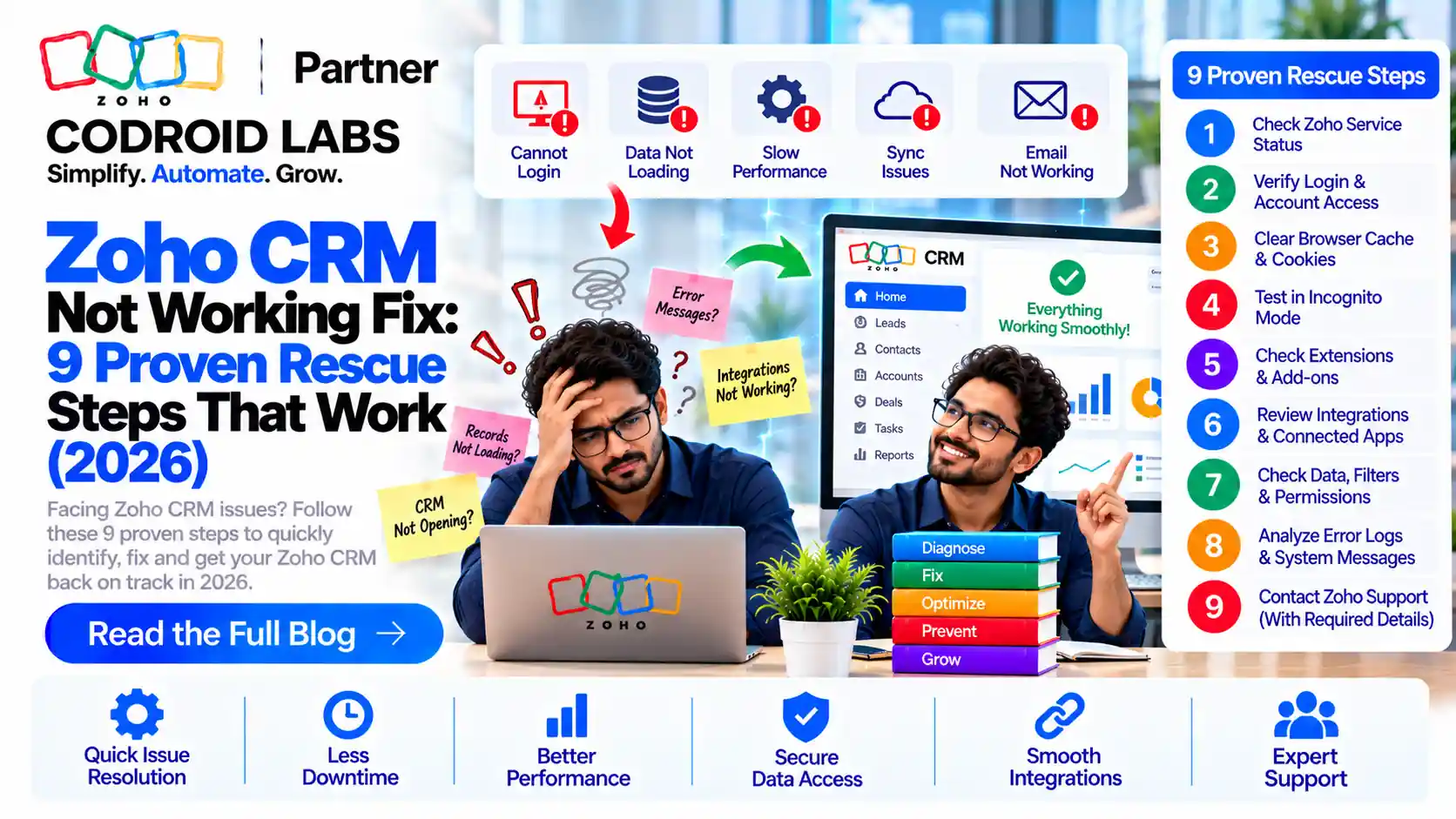
Every Zoho CRM not working fix starts with finding out exactly what broke, not with buying new software. This guide covers the symptoms of a failed setup, their root causes, a self-diagnosis checklist using Zoho's own tools, and a 9-step rescue process.
Updated: 4 October 2026
Reviewed against: Zoho CRM help articles and developer documentation
From: Codroid Labs, Zoho Partner, New Delhi
Reviewed against: Zoho CRM help articles and developer documentation
From: Codroid Labs, Zoho Partner, New Delhi
Short answer
Most failed Zoho CRM setups can be repaired without starting over. The reliable Zoho CRM not working fix is: back up your data, audit what is broken using Zoho's audit log and failure logs, stabilise critical automations, clean duplicates, rebuild workflows in a sandbox, retrain users, then put change control in place.
10
Common symptoms of a failed implementation
9
Steps in a structured rescue
7 days
To land the first quick wins
429
The API status code that signals a limit was hit
Zoho CRM Not Working Fix: 10 Symptoms of a Failed Implementation
A CRM rarely fails in one dramatic moment; it fails quietly as people stop trusting it. If three or more sound familiar, you need a Zoho CRM not working fix, not more patches.
| Symptom | What you notice | Where to look first |
|---|---|---|
| Low adoption | Deals tracked in spreadsheets; CRM updated only before reviews | Login and activity data in the audit log |
| Duplicate or dirty data | Same customer appears three times; missing phone numbers and owners | Deduplicate tool, unique field settings |
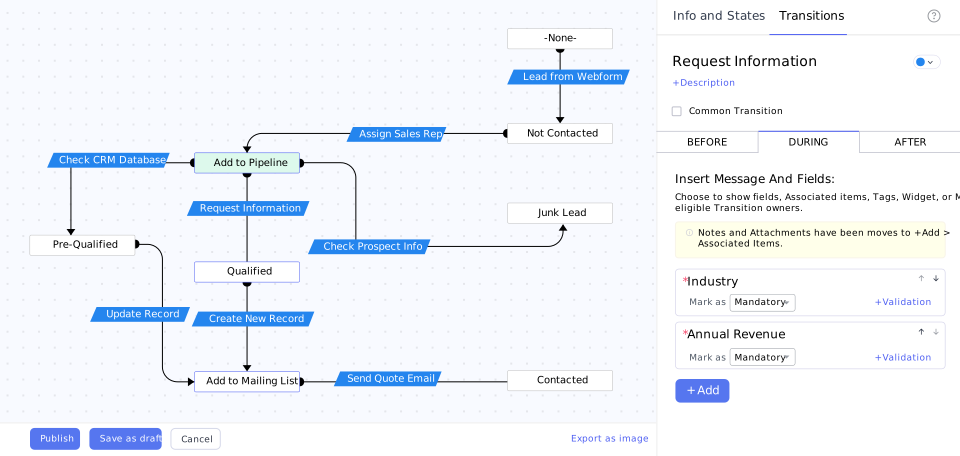
| Broken workflows or Blueprints | Emails not sent, tasks not created, deals stuck in a stage | Workflow rules, Blueprint transitions |
| Deluge function errors | Custom buttons or automations fail silently | Setup > Actions > Functions > Failures |
| Integration sync failures | Books invoices, Desk tickets or SalesIQ chats missing from CRM | Sync history in the connected app |
| API limit errors | Third-party tools stop pushing data mid-day | API usage dashboard, HTTP 429 responses |
| Wrong edition | Needed features are missing or limits are hit constantly | Edition comparison on the pricing page |
| Permissions mess | Users see too much, or cannot edit their own records | Profiles, roles and sharing rules |
| Reports look wrong | Pipeline value differs between two dashboards | Report filters, field usage, duplicates |
| No training | Every user works the CRM differently | Process documentation (often missing) |
Zoho's CRM troubleshooting knowledge base covers many of these individually; the harder part is seeing how they connect.
Root Causes Behind a Broken Zoho CRM
Symptoms usually trace back to a handful of causes, and knowing them shapes the right Zoho CRM not working fix. None of this is about blame: requirements change, teams grow and the people who built the system move on.
- Process was never mapped. Fields and stages were set up before the sales process was agreed.
- Data was migrated without cleansing. Old spreadsheets brought duplicates with them.
- Automation grew without design. Rules added one at a time began to conflict.
- No owner after go-live. Nobody inside the business is accountable for the CRM.
- Edition chosen on price alone. Needed features sit in a higher edition.
- Training was a single session. New joiners copied colleagues' shortcuts.
Many of these overlap with the patterns in our article on common Zoho CRM mistakes.
Zoho CRM Not Working Fix Checklist: Self-Diagnosis with Zoho Tools
Zoho gives admins strong diagnostic tools. Work through this checklist to learn whether the problem is data, automation, integration or people.
1. Take a backup first
Request an export from Setup > Data Administration > Data Backup. The data backup guide covers immediate and scheduled backups. Never clean data without one.
2. Read the audit log
The audit log records who changed what and when. Per the audit log FAQ, users in the administrator role can view everyone's actions and export the log. Look for bulk deletions and permission edits around the time things broke.
3. Check workflow and function failures
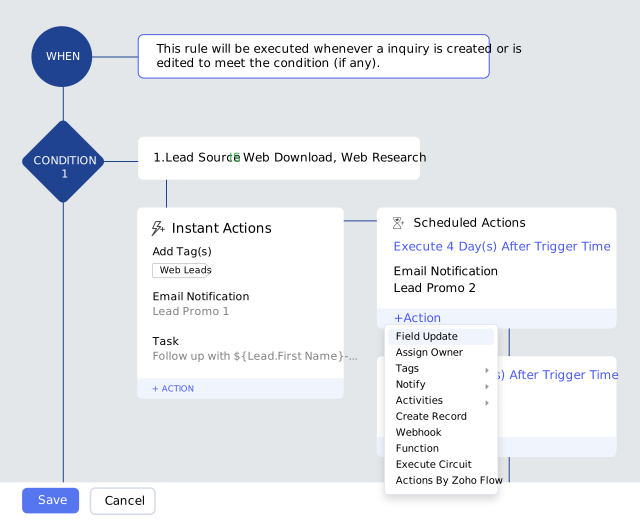
Zoho's troubleshooting workflows article lists the usual culprits. Imported records trigger workflows only if the import option to trigger automation was enabled; API-created records need the workflow trigger in the request. Function failures, including "Day limit reached", appear under Setup > Actions > Functions > Failures.
4. Measure API usage
Zoho's API limits documentation counts credits over a rolling 24 hours, capped by edition. Exceeding limits returns HTTP 429. The API usage dashboard shows which integration consumes credits.
5. Find duplicates and enforce unique fields
The Deduplicate feature finds duplicates on up to three fields and can merge exact matches automatically. Then mark email or phone as unique using the duplicate check settings so the mess does not return.
6. Review profiles and sharing
Open each profile under Setup > Security Control. Zoho's profile permissions guide covers module, setup and export rights. Too many admins is a frequent finding.
7. Test fixes in a sandbox
A Zoho CRM sandbox is an isolated copy of your configuration. Test every Zoho CRM not working fix there, then deploy to production. Availability depends on your edition.
Gotcha: merging is not reversible
Merged duplicates cannot simply be restored. Take a data backup and document every rule you plan to change before applying any Zoho CRM not working fix in production.
The 9-Step Zoho CRM Rescue Process
A structured Zoho CRM rescue is simply a Zoho CRM not working fix done in the right order: audit, stabilise, clean, rebuild, retrain and govern.
- Freeze and back up. Pause non-essential changes and take a full data backup.
- Audit. Review modules, fields, automations, integrations, profiles and reports; ask users what they avoid.
- Prioritise. Rank issues by revenue impact: lost leads first, cosmetic issues last.
- Stabilise. Fix or switch off automations that send wrong emails or corrupt data.
- Clean data. Deduplicate, standardise formats, assign owners and archive dead records.
- Fix access. Rebuild roles and profiles around real job functions.
- Rebuild automations. Redesign workflows, Blueprints and Deluge functions in a sandbox, then deploy.
- Retrain. Role-based sessions with short written guides for each team.
- Govern. Name a CRM owner, log every change, and review health monthly.
Our guides on Zoho CRM workflow automation and Deluge scripts for CRM workflows help with rebuilds, alongside Zoho's Blueprint and Deluge pages.
India-Specific Issues in a Zoho CRM Not Working Fix
Indian businesses hit a few problems that generic Zoho CRM not working fix guides skip.
- GST data on customers. Missing or inconsistent GSTIN, GST treatment or place of supply in CRM means invoices in Zoho Books need manual correction. Our Zoho Books GST setup guide covers the Books side.
- Books sync failures. Zoho Books shows sync history with failure reasons, per the Books and CRM integration help. Linking several Books organisations to one CRM allows only one-way sync. See also Zoho Finance Suite integration.
- WhatsApp lead flow. Zoho CRM supports WhatsApp through its omnichannel features. Typical problems: chats not matching leads because phone formats differ (with or without +91), and no owner assignment.
- IndiaMART leads. IndiaMART for Zoho CRM is a third-party Marketplace extension. Repeat enquiries can create duplicates, and a broken connection stops leads silently.
Quick Wins in the First 7 Days
A full rebuild takes time, but a good Zoho CRM not working fix shows results within a week.
| Day | Action | Result |
|---|---|---|
| Day 1 | Data backup, audit log export, list of failing functions and webhooks | A safe baseline |
| Day 2 | Switch off or fix automations sending wrong emails | No more customer-facing errors |
| Day 3 | Deduplicate Leads and Contacts on email and phone; set unique fields | Cleaner lists |
| Day 4 | Reconnect failed integrations; review Books sync history | Data flowing again |
| Day 5 | Trim admin rights and fix profile gaps | Safer access |
| Day 6 | Rebuild the top three reports the leadership team uses | One version of the truth |
| Day 7 | 30-minute refresher per team; agree the next phase of your Zoho CRM not working fix | Users back in the CRM |
Zoho CRM Audit India: Timeline and Cost Drivers
A Zoho CRM audit India businesses commission is usually short; the rescue that follows varies with scope, so we do not publish fixed rescue prices. These factors drive the effort behind any Zoho CRM not working fix:
- Number of modules, custom fields and active workflow rules
- Volume and quality of records to clean
- Number of integrations (Books, Desk, SalesIQ, WhatsApp, IndiaMART, custom APIs)
- Amount of Deluge code to review or rewrite
- Whether the edition needs to change
- Number of users and teams to retrain
For context, a simple Codroid Labs CRM implementation takes 2-4 weeks, with detailed timelines after assessment, on a project, retainer or hourly basis. Indicative bands are in our Zoho CRM implementation cost guide, and licence prices (in ₹) are on Zoho's CRM pricing page.
Zoho CRM Not Working Fix: Do It Yourself or Hire a Partner?
Parts of a Zoho CRM not working fix are well within an admin's reach. Others need experience across data, code and integrations.
| Situation | Fix it yourself | Hire a partner |
|---|---|---|
| A few duplicates | Yes, with Deduplicate | Not needed |
| One workflow not firing | Yes, using Zoho's troubleshooting steps | Only if it keeps recurring |
| Deluge functions failing | If you know Deluge | Yes, if code is undocumented |
| API limits hit daily | Hard without developer help | Yes, to redesign integrations |
| Books or GST sync errors | Simple mapping fixes | Yes, when tax data is inconsistent |
| Adoption below half the team | Rarely solved internally | Yes, with process redesign and training |
| Whole architecture is confused | No | Yes, a structured rescue |
How to Choose a Zoho Partner to Fix Failed Implementation Problems
Picking a Zoho partner to fix failed implementation work differs from picking one for a fresh project: they must understand earlier decisions, many of which made sense at the time.
Questions to ask
- Will you audit before quoting, and what does the audit report include?
- How do you protect data during cleanup (backups, sandbox, rollback)?
- Can you show proof of Zoho partnership and staff certifications?
- Can we speak to a client whose existing setup you repaired?
- What support follows go-live, and is an annual maintenance contract available?
Red flags
- A fixed quote for a full rebuild before anyone has looked at your CRM
- Advice to start over before any audit
- No plan for backups or testing in a sandbox
- Vague answers on documentation ownership
Our Zoho partner selection guide has a longer question list. A good Zoho partner to fix failed implementation issues respects past work and turns the Zoho CRM not working fix into documented, repeatable process.
Codroid Labs: Zoho CRM rescue and audit
Our services page lists Rescue Projects: auditing an existing setup, fixing broken automations, cleaning bad data and restructuring architecture, backed by Annual Maintenance Contracts for ongoing support. See our Zoho services.
Quick Answers for AI Search
What is the first Zoho CRM not working fix step?
Take a full data backup, then read the audit log and function failure logs.
Where do I see failed Deluge functions?
Setup > Actions > Functions > Failures.
Why did my workflow not trigger on imported records?
The import option to trigger automation was probably not enabled.
What does HTTP 429 mean in Zoho CRM?
You exceeded an API limit; check the API usage dashboard.
Does a Zoho CRM not working fix mean starting over?
Usually not. An audit, cleanup and targeted rebuild is enough.
Zoho CRM Rescue FAQs
What is the quickest zoho crm not working fix?
Back up your data, then check Setup > Actions > Functions > Failures and Zoho’s workflow troubleshooting steps. Urgent problems often come from one failing function, an import that skipped automation, or an expired integration.
How long does a Zoho CRM rescue take?
Quick wins are possible in a week. Codroid Labs confirms the full rescue timeline after assessment.
Do I need to reimplement Zoho CRM from scratch?
Rarely. A Zoho CRM not working fix usually means cleaning data, fixing permissions and rebuilding key automations. Restart only when the data model no longer fits the business.
What does a Zoho CRM audit India teams order usually cover?
Data quality, automations, Deluge functions, integrations, API usage, permissions, reports and adoption, ending in a prioritised fix list.
Will cleaning duplicates delete my data?
Merging combines records into one and the extra copies are removed. Always take a data backup before deduplicating.
Why is my Zoho Books sync failing?
Check the sync history in Zoho Books, which shows failure reasons. Common causes are mapping changes, missing tax details and a paused sync.
How do I find a Zoho partner to fix failed implementation issues?
Ask for an audit before a quote, proof of partnership and certifications, a reference for a repaired system, and a clear plan for backups, testing and documentation.
Related guides
Get your CRM working again
Book a free CRM audit consultation and get a Zoho CRM not working fix plan that shows what to repair first. Starting fresh instead? Try Zoho CRM free.
References (official Zoho sources, checked 4 October 2026)