


ZohoBooks WhatsApp integration India — Indian customers read WhatsApp messages. They don’t read emails. The open rate on a well-timed WhatsApp invoice notification is 85-95%; the open rate on the equivalent email is 15-20%. For any Indian business that has outstanding invoices sitting unread in customers’ email inboxes, the WhatsApp integration in ZohoBooks is the single highest-ROI change available — faster payment collection, less manual follow-up, and better customer experience, all automated from inside Zoho Books.
WhatsApp integration with Zoho Books India uses the Meta WhatsApp Business API — the same infrastructure that banks, airlines, and major Indian retailers use for transactional messaging — to send GST invoices, payment reminders, payment receipts, and customer statements directly from Zoho Books to your customers’ WhatsApp numbers. This guide covers the complete setup, Meta template approval, IM credits, workflow automation, industry-specific configurations, and ZohoBooks WhatsApp integration implementation services from Codroid Labs as your certified Zoho partner.
ZohoBooks WhatsApp Integration — Key Facts 2026
API Type: Meta WhatsApp Business API (not personal WhatsApp)
Message Types: Utility (invoices/reminders) + Marketing (campaigns)
Template Required: Yes — Meta approval before sending
IM Credits: 1 credit per message — purchasable in Zoho Books
Two-Way Chat: Yes — reply management within Zoho Books
Bulk Messaging: Yes — multiple invoices/reminders at once
7-Step ZohoBooks WhatsApp Integration Setup India
ZohoBooks WhatsApp integration setup, ZohoBooks WhatsApp integration setup India, and ZohoBooks WhatsApp reminder setup India — the complete setup sequence:
1
Open WhatsApp Integration — Zoho Books → Settings → Integrations & Marketplace → WhatsApp → Enable. This opens the WhatsApp setup wizard.
2
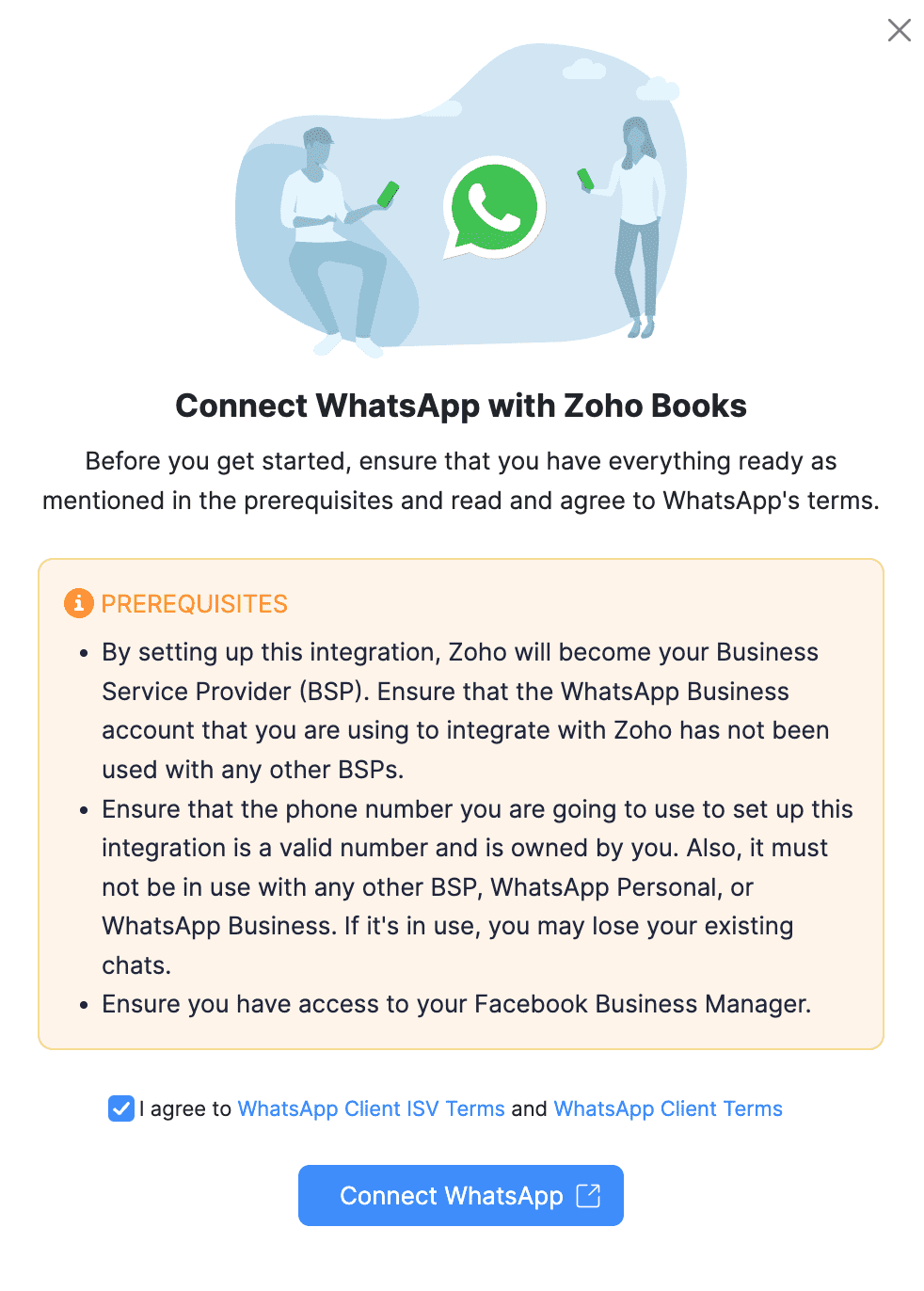
Connect WhatsApp Business Account — Connect existing WhatsApp Business Account or create a new one. The phone number must not already be registered with another WhatsApp Business Service Provider. Indian mobile numbers (+91) work seamlessly.
3
Facebook Business Manager Verification — Log in with your Meta (Facebook) Business Manager credentials. Complete business verification by uploading: GST certificate, business PAN, or MSME registration. Indian business verification typically takes 1-3 business days.
4
Configure WhatsApp Channels — Set separate numbers for utility messages (invoices, receipts, reminders) vs marketing messages (offers, campaigns). Separation reduces spam risk and maintains template quality score.
5
Create Message Templates — Create and submit templates for: Invoice Notification, Payment Reminder, Payment Receipt, Customer Statement, Vendor Statement. Utility templates approved in 24-48 hours; marketing templates in 3-5 days.
6
Purchase IM Credits — Settings → IM Credits → Buy Credits. Purchase in bulk for better per-message cost. Monitor usage via the IM Credit Usage Report to avoid running out mid-campaign.
7
Enable and Configure Workflow Automation — Enable WhatsApp for each customer/vendor contact. Configure workflow rules for automated sending: “When invoice is created → Send via WhatsApp” or “When invoice is 3 days overdue → Send payment reminder via WhatsApp.”
Automation 1 — GST Invoice via WhatsApp
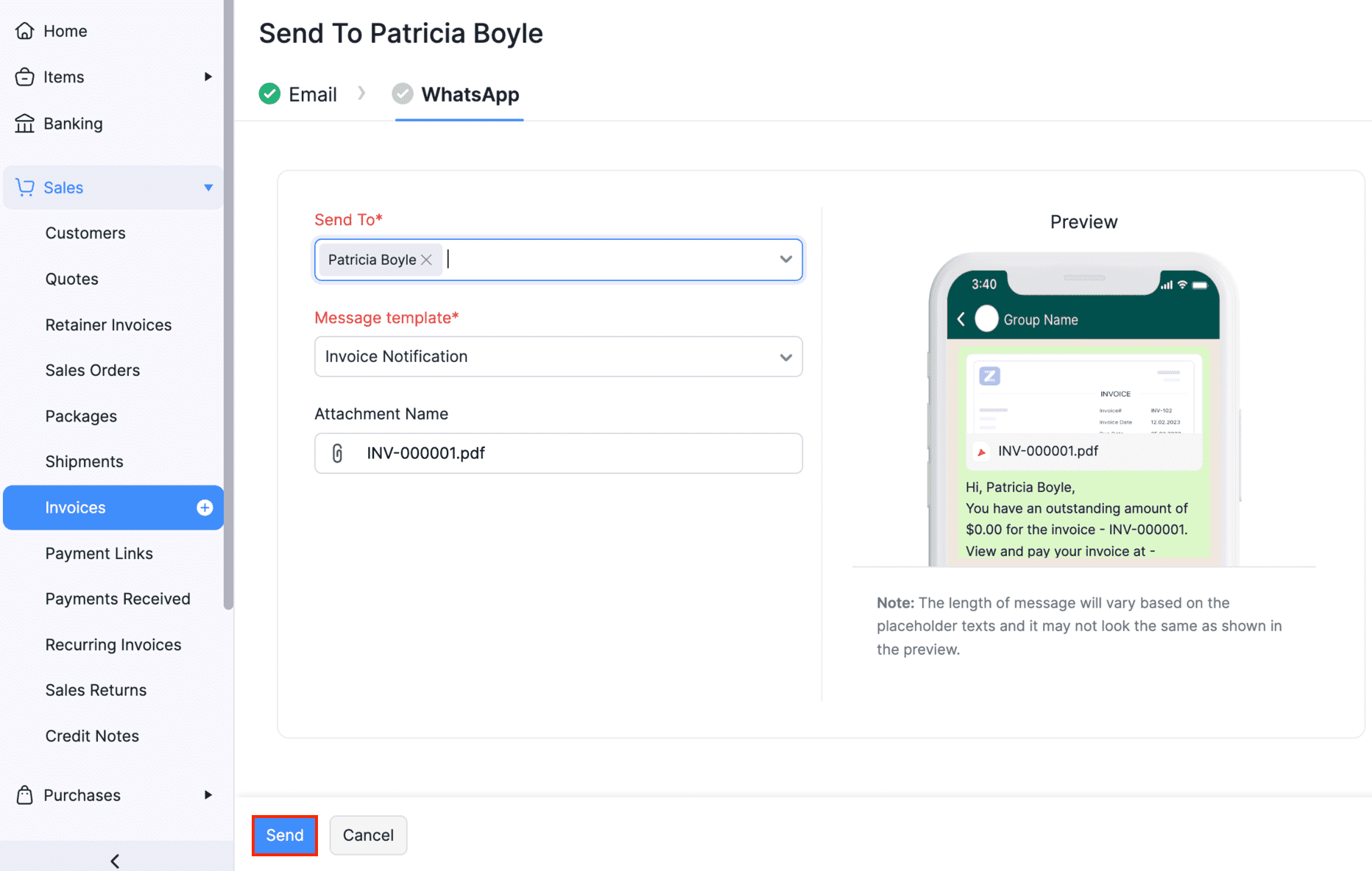
Send invoices from ZohoBooks to WhatsApp, ZohoBooks invoice notification via WhatsApp, and ZohoBooks WhatsApp invoice automation — the most impactful automation. When a GST invoice is created in Zoho Books, the workflow rule fires automatically:
Workflow Rule: Auto Invoice via WhatsApp
Trigger: Invoice Status changes to “Sent” or “Created”
Condition: Customer WhatsApp number is available AND IM credits > 0
Action: Send WhatsApp message using Invoice Notification template
Template content: “Dear [Customer Name], Invoice [Invoice Number] for Rs.[Amount] has been generated. Due date: [Date]. PDF attached. Pay via: [Payment Link]”
Trigger: Invoice Status changes to “Sent” or “Created”
Condition: Customer WhatsApp number is available AND IM credits > 0
Action: Send WhatsApp message using Invoice Notification template
Template content: “Dear [Customer Name], Invoice [Invoice Number] for Rs.[Amount] has been generated. Due date: [Date]. PDF attached. Pay via: [Payment Link]”
Result: Customer receives the invoice on WhatsApp with PDF attachment within 30 seconds of invoice creation — zero manual sending.
WhatsApp integration in Zoho Books accounting for GST compliance — the invoice shared via WhatsApp includes the complete GST-compliant format: GSTIN of both parties, HSN/SAC codes, CGST/SGST/IGST breakdown, and IRN number for e-invoicing-registered businesses. The WhatsApp delivery does not replace the official invoice record in Zoho Books — it is a delivery channel for a document that is also stored digitally in the system.
Automation 2 — Payment Reminders via WhatsApp
ZohoBooks payment reminders via WhatsApp and ZohoBooks WhatsApp billing and reminders — the highest-ROI automation for any Indian business with outstanding invoices. Configure three-tier reminder automation:
ZohoBooks WhatsApp customer notifications — businesses using automated WhatsApp payment reminders report a 30-45% reduction in average debtor days (days from invoice to payment). The WhatsApp delivery ensures the reminder is seen, unlike email which goes unread in a cluttered inbox. Each reminder includes the payment link from Razorpay or PayU, making it a one-tap payment experience for the customer.
Automation 3 — Payment Receipt and Customer Statement
WhatsApp integration with ZohoBooks for post-payment communication — when a customer makes a payment, Zoho Books triggers a WhatsApp payment receipt automatically: “Thank you [Name]! We have received your payment of Rs.[Amount] against Invoice [No.]. Remaining outstanding: Rs.[Balance]. Payment receipt attached.” This closes the transaction loop professionally and reduces follow-up queries from customers asking “did you receive my payment?”
ZohoBooks WhatsApp billing and reminders for customer statements — at month-end, instead of emailing customer account statements (which most customers never open), configure a workflow to send the statement via WhatsApp with a single message: “Your account statement for [Month]: Total invoiced Rs.[X], Total paid Rs.[Y], Outstanding: Rs.[Z]. Statement attached.” High open rate + immediate response to queries = faster reconciliation.
Automation 4 — Bulk Messaging for Overdue Collection
WhatsApp integration for ZohoBooks bulk messaging — for businesses with many outstanding invoices, the bulk reminder feature sends payment reminders to multiple customers simultaneously. Filter criteria: invoices overdue by more than 30 days → select all → Send WhatsApp Reminder. Each customer receives a personalised message (their name, invoice number, amount, and payment link) generated from the template and sent in bulk without per-customer manual action.
ZohoBooks WhatsApp automation for accountants and ZohoBooks WhatsApp integration for chartered accountants — CA firms managing multiple client Zoho Books accounts can configure bulk reminder campaigns for each client’s receivables. The monthly overdue collection campaign that previously took 2-3 hours of WhatsApp messages sent manually now takes 5 minutes: filter overdue, select all, send bulk reminder. ZohoBooks WhatsApp integration for Indian businesses — particularly high value for businesses with 50+ active debtors.
Automation 5 — Vendor Communication Automation
WhatsApp integration in ZohoBooks for vendor management — the integration works for supplier communication too, not just customer invoicing. Configure vendor statement sharing: monthly outstanding payable statements sent via WhatsApp to vendors, helping both parties maintain accurate records. Purchase order confirmations can be sent via WhatsApp when a PO is approved. Vendor payment advice — when you make a bank transfer, send a WhatsApp notification to the vendor with payment reference and amount covered.
Automation 6 — Two-Way Customer Chat Management
WhatsApp integration with Zoho Books India two-way chat — when a customer replies to an invoice notification (“Can I get a 7-day extension?” or “I made the payment — please check”), the reply appears inside the Zoho Books customer chat interface. Accounts staff can respond directly from Zoho Books without switching to a phone or separate WhatsApp Business application. Conversation history is maintained against the customer record — all billing communication in one place.
Automation 7 — Marketing Campaign Messaging
ZohoBooks WhatsApp integration automation services for marketing — separate from utility messages (invoices, reminders), Zoho Books supports marketing-category WhatsApp templates for promotional communication: new service announcements, seasonal offers, loyalty programme updates, and product launch notifications. Use a separate phone number for marketing messages to maintain the utility channel’s quality score. ZohoBooks WhatsApp integration for service businesses: announce new service packages to existing clients. ZohoBooks WhatsApp integration for retail: seasonal sale announcements to top customers.
Industry-Specific Configurations — India 2026

IM Credits and ZohoBooks WhatsApp Integration Pricing India
ZohoBooks WhatsApp integration pricing India — two cost components for ZohoBooks WhatsApp integration:
Zoho Books Software Cost
Zoho Books Standard: Rs.749/org/month. Zoho Books Professional: Rs.1,499/org/month. WhatsApp integration feature is available on all paid Zoho Books plans — no additional plan upgrade required.
Zoho Books Standard: Rs.749/org/month. Zoho Books Professional: Rs.1,499/org/month. WhatsApp integration feature is available on all paid Zoho Books plans — no additional plan upgrade required.
IM Credits (Per Message Cost)
Credits purchased inside Zoho Books. 1 credit per message. Bulk credit purchases reduce per-message cost. Monitor credit usage and top up to avoid messaging interruptions. Usage report available in Zoho Books reports.
Credits purchased inside Zoho Books. 1 credit per message. Bulk credit purchases reduce per-message cost. Monitor credit usage and top up to avoid messaging interruptions. Usage report available in Zoho Books reports.
ZohoBooks WhatsApp integration support India and ZohoBooks WhatsApp integration for Codroid Labs Zoho Partner — Codroid Labs provides complete As your ZohoBooks WhatsApp integration partner, Codroid Labs provides complete ZohoBooks WhatsApp integration services including: Facebook Business Manager setup and verification assistance, WhatsApp Business account creation, Meta-approved template writing and submission, workflow automation configuration, IM credits guidance, team training, and ongoing ZohoBooks WhatsApp integration support India for businesses in Delhi, Noida, Mumbai, Bangalore, Chennai, and PAN India. ZohoBooks WhatsApp integration consultant Delhi: +91 78384 02682 | team@codroiditlabs.com. GSTIN invoice (07AAWFC0815B1ZP) for ITC recovery on all services.
More Guides from Codroid Labs
Frequently Asked Questions — ZohoBooks WhatsApp Integration India
Can I use my personal Indian mobile number for ZohoBooks WhatsApp integration?
WhatsApp integration with Zoho Books India requires a WhatsApp Business API phone number — not a personal WhatsApp number. The number must: (1) Be a valid Indian mobile or landline number. (2) Not already be registered with another WhatsApp Business Service Provider (BSP). (3) Be capable of receiving an OTP for verification. If your current business number is already using the regular WhatsApp Business App (free app), it must be migrated to the API version — this process deletes the existing WhatsApp Business App account on that number. Codroid Labs as your ZohoBooks WhatsApp integration consultant manages this migration to avoid communication interruption.
What is the difference between Utility and Marketing WhatsApp templates in Zoho Books?
ZohoBooks WhatsApp integration setup templates: Utility templates are transactional messages that customers have implicitly agreed to receive by entering a business relationship — invoices, payment receipts, reminders, order confirmations. These are lower cost, faster to approve, and have a higher delivery rate. Marketing templates are promotional messages — offers, campaigns, product announcements. These require explicit customer opt-in, are higher cost per message, and have a separate approval process. Best practice: use separate phone numbers for utility and marketing templates. Mixing promotional messages with transactional numbers risks the utility channel being flagged as spam, which disrupts invoice delivery.
Does ZohoBooks WhatsApp integration work for exporters with foreign buyers?
ZohoBooks WhatsApp integration for exporters — yes. WhatsApp is widely used globally, making it a highly effective invoice delivery channel for Indian exporters dealing with buyers in UAE, UK, USA, Southeast Asia, and Africa. Zoho Books multi-currency invoices can be sent via WhatsApp in the buyer’s currency (USD, AED, GBP) with the GST/IGST line showing as zero-rated for export transactions. The WhatsApp integration in Zoho Books accounting sends the PDF invoice attachment along with the message, ensuring the foreign buyer receives a proper tax document. Payment links (Razorpay international, PayPal, or Stripe via Zoho Books) can be included in the message template for streamlined cross-border payment collection.
Set Up ZohoBooks WhatsApp Integration — Codroid Labs Implements It
Complete WhatsApp Business API setup, Meta verification, template creation and approval, workflow automation, IM credits configuration, and team training. Certified Zoho partner. GSTIN invoice. PAN India.
Start Zoho Books via Codroid Labs
Book Free WhatsApp Integration Consultation