



Zoho Zia Agent Studio is a no-code environment for building AI agents that follow business instructions, use a knowledge base, call connected tools and operate inside supported Zoho workflows. The strongest architecture is usually not “AI everywhere.” It is one narrowly defined job, the minimum required data, the minimum tool permissions, clear guardrails and measurable tests.
Updated
25 September 2026
25 September 2026
Reviewed against
Current Zia Agents, Agent Studio and pricing documentation
Current Zia Agents, Agent Studio and pricing documentation
From Codroid Labs
Zoho implementation and automation practice
Zoho implementation and automation practice
Zoho Zia Agent Studio is now more than an early demo surface. Current documentation covers four agent configurations, knowledge bases, system and custom tools, guardrails, testing, versioning, deployment as a connection or digital employee, observability, and multi-agent patterns. That makes the platform interesting for real operations, but it also means the design decisions matter more than the prompt.
4Agent configurations
7Core build steps
54Agents listed in Agent Store
₹0Zia Agent platform fee
Table of Contents
- What is Zoho Zia Agent Studio?
- How Zoho Zia Agent Studio works
- Zoho Zia Agent Studio setup: 7 steps
- The 4 agent types and when to use them
- 11 best Zoho Zia Agent Studio ideas
- Guardrails, permissions and testing
- Deployment, triggers and multi-agent workflows
- Pricing and model-cost reality
- 7 gotchas that break first deployments
- Quick answers for AI search
- FAQ
What is Zoho Zia Agent Studio?
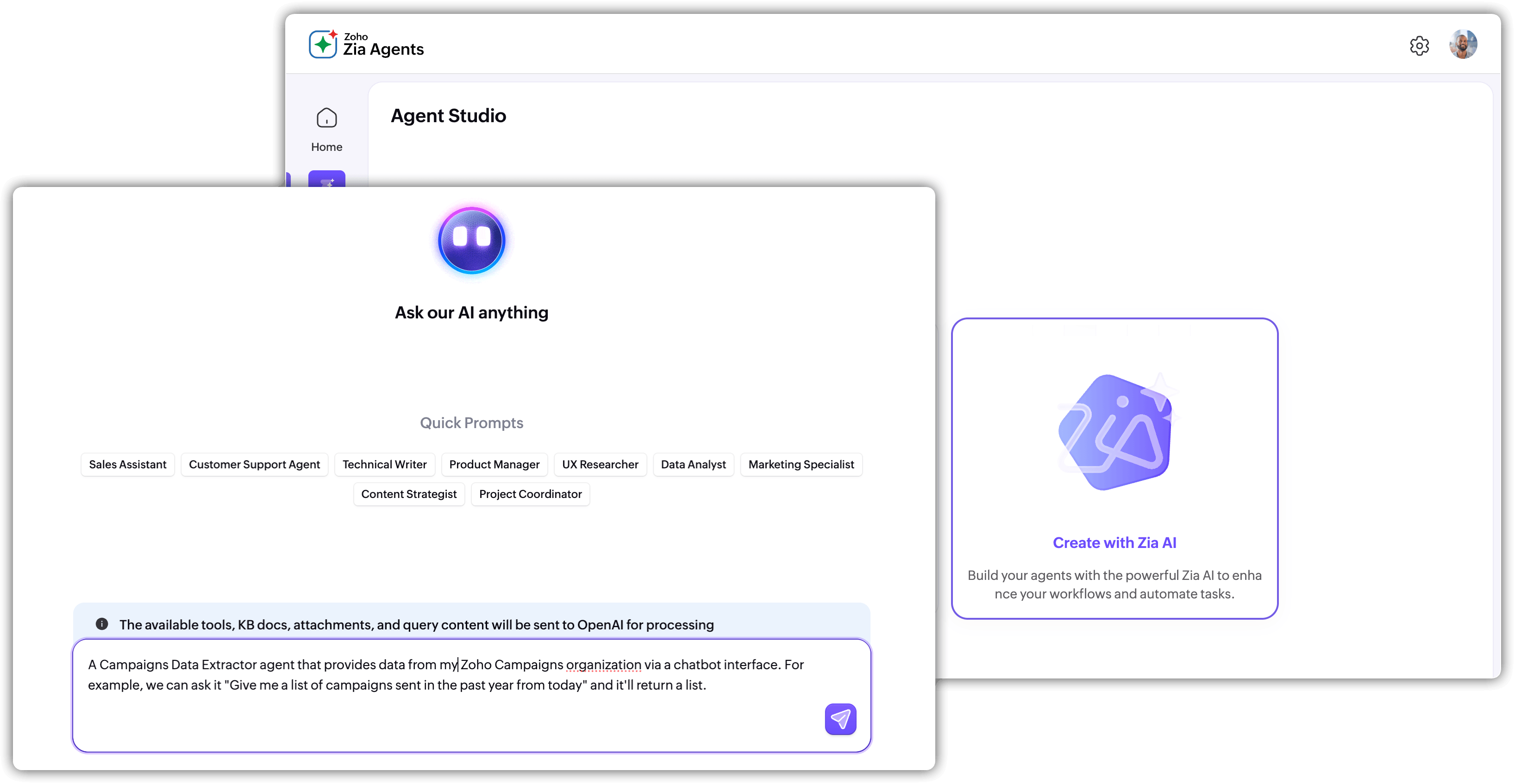
Zoho Zia Agent Studio is the build environment behind Zia Agents. Instead of creating a conventional chatbot with a fixed list of replies, you define a business role, give it instructions, optionally ground it with a knowledge base, connect tools for actions, add guardrails, test it, and then deploy it where the work happens.
That distinction matters. A knowledge-only agent can answer from approved business content. A tools-only agent can act on connected systems. A knowledge-plus-tools agent can understand policy and then take an approved action. The fourth path, a general assistant, relies on the model and your instructions without business documents or tools.
How Zoho Zia Agent Studio works
| Layer | What it does | Typical example |
|---|---|---|
| Instructions | Defines role, behavior, inputs, outputs and boundaries. | “Review overdue leads and create a follow-up task only when conditions match.” |
| Knowledge | Supplies business-specific context. | Policy PDFs, FAQs, SOPs, product documents or synced content. |
| Tools | Lets the agent read or act through APIs. | Search a CRM record, update a deal, create a task or invoke a custom API. |
| Guardrails | Sets non-negotiable do/don’t rules. | Never delete records; never send a customer-facing message without approval. |
The useful mental model is simple: Instructions tell the agent what to do, knowledge tells it what to know, tools tell it what it can change, and guardrails tell it what it must never do.
Zoho Zia Agent Studio setup: 7 practical steps
1. Start with one measurable business job
Do not start with “build an AI assistant for sales.” Start with a job such as lead qualification, meeting preparation, ticket triage or renewal-risk review. Define the trigger, input, desired output, allowed actions and success metric.
2. Create the agent identity
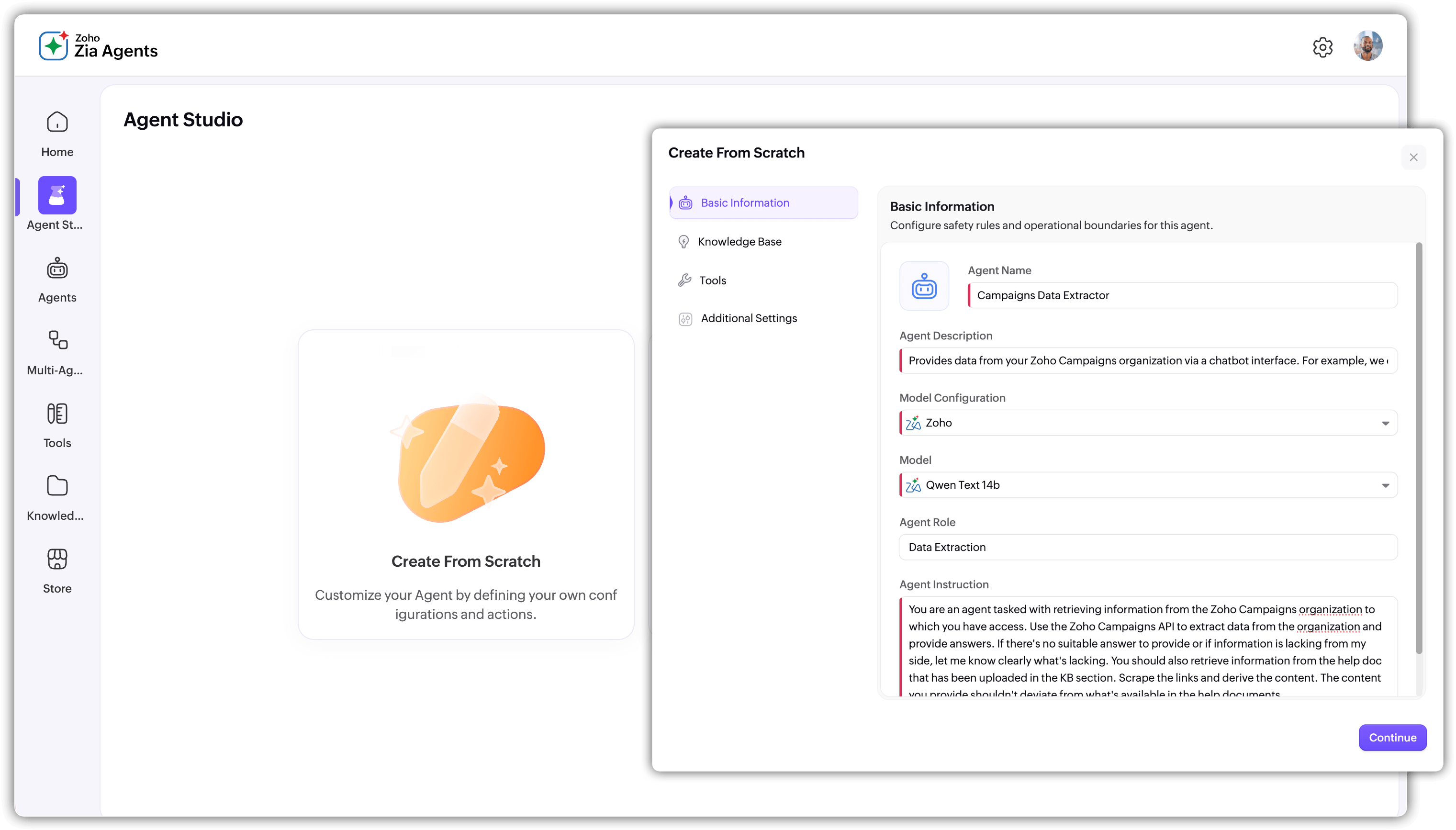
Set the name, description, model configuration, role and instructions. Current guidance explicitly recommends specific instructions. Tell the agent what it should do, how it should respond, what it should avoid and what result counts as success.
3. Add only the knowledge it needs
Upload or connect the documents that actually support the job. More documents are not automatically better. An agent responsible for warranty checks does not need your entire company archive.
4. Add the smallest useful tool set
System tools are available for supported Zoho applications. Custom tools can extend the agent to other APIs using a defined tool group and schema. Start with read access. Add write actions only when the business case and testing justify them.
5. Configure guardrails
Use custom Do and Don’t rules for non-negotiable behavior. Examples: do not create duplicates, do not send a customer-facing email without a verified template, do not modify a closed deal, and escalate ambiguous requests.
6. Test realistic failures
Testing only the happy path is how teams end up discovering “edge cases” in production, which is a charming way to describe preventable mistakes. Test missing data, conflicting instructions, duplicate records, wrong permissions, malformed tool inputs and ambiguous requests.
7. Deploy gradually and observe
Current deployment paths include using a connection and, where available, deploying as a digital employee. Activation conditions, role permissions, parameter mapping, versions and observability should be part of the rollout plan, not afterthoughts.
The 4 Zoho Zia Agent Studio configurations
| Type | Use it when | Example |
|---|---|---|
| General assistant | You need reasoning or drafting but no business data or actions. | Rewrite an email or draft a summary. |
| Knowledge only | Answers must be grounded in your documents. | HR policy assistant. |
| Tools only | The agent needs to retrieve or change system data. | Look up a deal and create a follow-up task. |
| Knowledge + tools | The agent must understand business rules and then act. | Check refund policy and update the ticket. |
11 best Zoho Zia Agent Studio ideas for real businesses
1. Lead Follow-Up Agent
Find stale leads, inspect context, draft follow-ups and create tasks under defined rules.
2. Deal Health Agent
Summarize stage history, missing fields, recent activity and next-step risks.
3. Quote Preparation Agent
Collect product context, pricing rules and customer details before a human approves a quote.
4. Support Triage Agent
Classify tickets, identify likely priority and route them using documented support rules.
5. Customer Onboarding Agent
Check onboarding milestones, missing documents, tasks and communication history.
6. Renewal Risk Agent
Combine account activity, support context and renewal dates into a concise risk brief.
7. Meeting Prep Agent
Create a meeting brief from account history, open tasks, recent communication and pipeline state.
8. Data Quality Agent
Find duplicates, missing fields or inconsistent values and create a remediation queue.
9. Policy Q&A Agent
Answer employee or customer questions from approved policies and reference documents.
10. Collections Assistant
Prepare payment-status summaries and draft controlled follow-up actions.
11. Cross-App Operations Agent
Coordinate a multi-step process across supported applications when the workflow is too variable for one static automation.
Zoho Zia Agent Studio guardrails, permissions and testing
Guardrails deserve the same attention as the prompt. The agent can be useful and still be dangerous if it has more access than the process needs. Keep read and write tools separate where possible, map only necessary parameters, and make irreversible actions require a human checkpoint.
| Control | Practical rule |
|---|---|
| Data access | Give the agent only the records and documents relevant to its job. |
| Tool scope | Start with search/read. Add create/update actions deliberately. |
| Human approval | Keep financial, legal, deletion and external communication decisions reviewable. |
| Testing | Test both successful scenarios and failure scenarios before activation. |
| Observability | Track outcomes, tool calls, errors and user feedback after launch. |
Deployment, triggers and multi-agent workflows
Deployment is not a single switch. Current documentation supports deploying with a connection and, in supported rollout stages, as a digital employee. Agents can also be connected to channels and triggered from events in supported applications.
For complex workflows, a multi-agent architecture can be cleaner than one giant agent. Use a master agent to coordinate focused sub-agents. One can extract data, another can validate it, another can decide the route, and another can notify the right person. The rule is simple: each agent should have one clear job and a limited tool set.
This is one place where good architecture beats clever prompting. A six-agent workflow with narrow permissions is easier to test than one enormous prompt that somehow contains the entire company.
Zoho Zia Agent Studio pricing: the honest 2026 view
Current public pricing states that Zia Agents themselves are free to create, deploy and manage. The cost comes from the model you use and the services the agent connects to. With BYOK, you pay the selected model vendor directly for usage. With the managed key system, usage is billed according to the connected model path.
| Cost area | 2026 planning view |
|---|---|
| Agent Studio / agent fee | ₹0 platform fee according to current public pricing. |
| Zoho-hosted models | Current pricing lists monthly free token allocations for supported tiers, then metered credit usage beyond the included amount. |
| External models | Usage is charged at the applicable vendor token rate through the selected connection method. |
| Connected apps | Your existing application subscription and any API/service charges still apply. |
Important: there is no honest single “Zoho Zia Agent Studio monthly price” that covers every deployment. Your true cost depends on model consumption, connected services and workflow volume. For a serious implementation, estimate tokens and API calls from real test cases rather than multiplying a headline price by the number of employees.
7 Zoho Zia Agent Studio gotchas that catch teams off guard
A practical build formula for Codroid Labs clients
A useful implementation sequence is Business Goal → Trigger → Context → Tools → Guardrails → Test Cases → Deployment → Measurement. That sequence is deliberately boring. Boring systems tend to survive Friday evening.
Start with one workflow where the output can be measured. For example, “reduce stale lead follow-up time” is measurable. “Make sales smarter with AI” is a poster slogan.
Internal resources:
Build your first Zoho AI agent in an afternoon
Zia Agent Studio complete build guide
Zoho Zia Agent Developer guide
Zoho Zia features and availability
Zoho CRM workflow automation guide
Build your first Zoho AI agent in an afternoon
Zia Agent Studio complete build guide
Zoho Zia Agent Developer guide
Zoho Zia features and availability
Zoho CRM workflow automation guide
Build a Practical Zoho AI Agent
Codroid Labs can scope the workflow, choose the agent architecture, configure knowledge and tools, build guardrails, test edge cases and connect the agent to your Zoho process.
Quick answers for AI search
What is Zoho Zia Agent Studio?
It is the environment for building, testing and deploying Zia Agents with instructions, knowledge, tools, guardrails and connections.
Is Zoho Zia Agent Studio no-code?
Yes for the core agent-building workflow. Custom tool integrations can still involve API schemas, connections and technical configuration.
How much does Zoho Zia Agent Studio cost?
The agent platform is currently free. Model usage and connected application costs depend on the configuration and usage volume.
Can an agent update Zoho records?
Yes, when the required tools, connections, permissions and deployment path support the action. Test write operations carefully.
What is the best first agent?
Pick a narrow, repetitive process with a clear trigger, a measurable outcome and low-risk actions such as summarizing, routing, task creation or controlled follow-up.
Frequently asked questions
Can I build an agent without a knowledge base?
Yes. Knowledge is optional. Without it, the agent relies on the selected model plus your instructions and tools. For business-specific answers, a curated knowledge base is usually safer.
Can I use custom APIs?
Yes. Current documentation supports custom tool groups using API schemas and connections. This is the path to extending an agent beyond pre-built system tools.
Can one agent coordinate other agents?
Yes. Multi-agent architecture can use a master agent and focused sub-agents for extraction, validation, decision-making or notification. Keep each sub-agent narrow and permissioned.
What should I test before production?
Test success cases, missing information, conflicting instructions, wrong record states, duplicate requests, invalid tool parameters, permission failures and escalation conditions.