


Zia Agent Studio — quick answer: define a single clear purpose then create via Text-to-Agent or manual build then write specific instructions (role plus objective plus boundaries plus restrictions) then add relevant knowledge documents then connect only the tools the agent scope requires then configure Do and Don’t guardrails then test failure scenarios not just success then refine in cycles then deploy to one low-risk workflow first.
Zia Agent Studio — the building your first AI agent in Zoho with Zia Agent Studio guide exists because most businesses approach AI agents the same way they approached their first CRM: turn it on and try to use it for everything at once. The result is an agent impressive in demo and unreliable in production. This complete Zia Agent Studio AI agent setup guide 2026 covers the entire build process from writing the purpose statement to configuring guardrails along with the 7 mistakes that prevent first-time AI agents from reaching production and a complete worked example showing every concept in practice.
9 Steps
Purpose to Production
7 Mistakes
Avoid These First
4 Components
Instructions Knowledge Tools Guardrails
1 Example
Lead Follow-Up Agent
What is Zia Agent Studio?
Zia Agent Studio is Zoho’s platform for building proactive AI agents for business operations. The Zoho AI agent and Zoho AI agents built inside Zia Agent Studio differ from conventional chatbots: they understand a business objective, access organizational knowledge, use connected tools, retrieve or update records, and take actions across workflows — not just answer questions. The Zia AI agent builder is designed for both technical and non-technical users, supporting the Zoho no code AI agent approach through Text-to-Agent where you describe what you want and Zia generates the starting agent, alongside a full manual build path for teams needing precise control. The Zoho digital employee vision: an agent that participates in business operations as a workflow actor rather than a passive information source.
AI agent vs chatbot — the critical difference
The Zoho AI assistant vs Zoho AI agent distinction that determines which you should build:
The practical example: a chatbot answers “What is our refund policy?” A Zia Agent Studio AI agent finds the customer transaction then checks the applicable policy then determines the refund status then updates the record then creates a follow-up task. Same starting question, fundamentally different operational impact.
Step 1 — Define the agent purpose precisely
The build AI agent Zoho and create a Zoho AI agent from scratch step by step starting point: before opening Zia Agent Studio, write one sentence answering who the agent serves, what it does, what information it needs, and what action it can take. The Zoho AI workflow objective format:
Weak purpose — avoid:
“Build a sales AI.”
Strong purpose — use this:
“Create an AI sales assistant that qualifies incoming leads, checks CRM information, and creates follow-up tasks for qualified prospects — without modifying lead status without approval.”
Step 2 — Create the agent
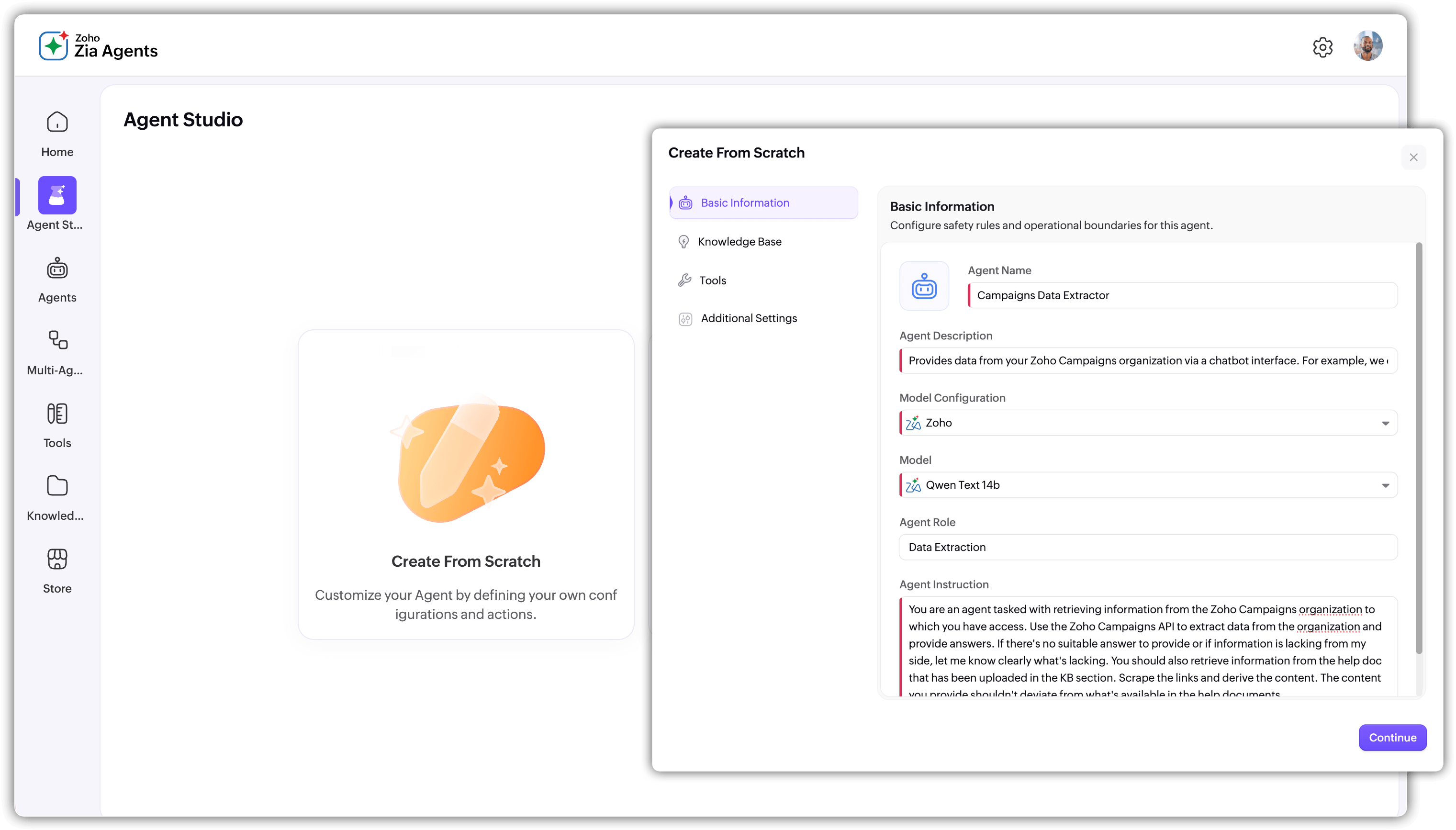
The how to create an AI agent in Zia Agent Studio and Zia Agent Studio tutorial for beginners 2026 — two build paths: Text-to-Agent (describe what you want in natural language and Zia generates the structure — the how to build a no code AI agent in Zoho route) or manual build (full control over every component — name, instructions, knowledge, tools, behavior, guardrails). The how to choose an LLM for Zia Agent Studio guidance: select the underlying model based on agent complexity. Use Text-to-Agent to generate a starting structure then refine manually — most agents need significant instruction work regardless of creation method.
Step 3 — Write effective agent instructions
The Zoho agent instructions and how to define instructions for a Zoho AI agent and how to create an AI agent with Zia AI prompts — the most consequential configuration step. The Zia Agent Studio agent instructions and guardrails guide instruction contrast:
Weak instruction — avoid:
“Help customers.”
Strong instruction — use this structure:
“You are a customer support assistant. Review the customer request. Retrieve relevant information from the approved knowledge sources. Provide a concise professional response. Create a support task when human intervention is required. Do not share pricing information without confirming the customer account tier. Escalate any legal compliance or refund requests over Rs.10,000 to a senior agent.”
Instruction quality is the primary driver of consistent production behavior — not model choice or tool configuration. Define role, objective, communication style, decision boundaries, required actions, and restrictions.
Step 4 — Build the knowledge base
The Zoho agent knowledge base and how to add knowledge sources to a Zoho AI agent and how to connect Zoho WorkDrive documents to an AI agent — knowledge allows the agent to know your business rather than answering from its general training. The Zoho AI automation knowledge quality rule: give the agent relevant current authoritative documents for its specific scope — company policies, product documentation, service FAQs, process manuals, communication guidelines. Do not upload every available document. A small well-curated knowledge base produces reliable responses; a large low-quality one produces inconsistent ones.
Step 5 — Connect tools and actions
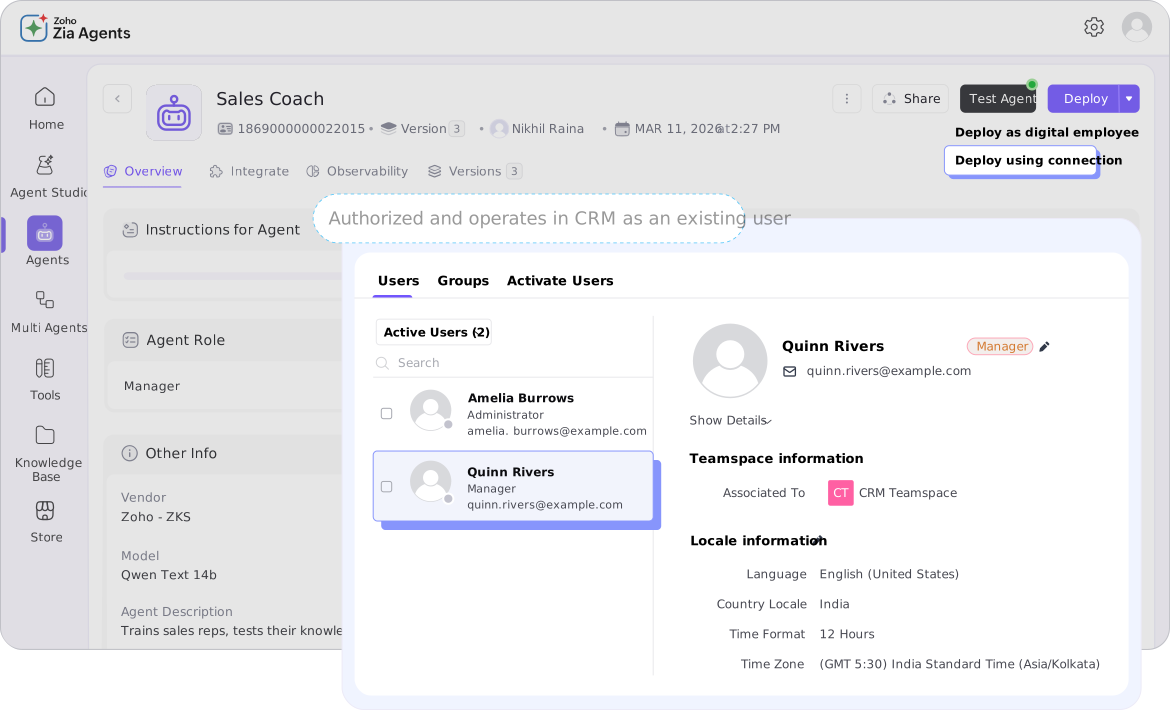
The Zoho agent tools and how to add tools and actions to a Zia AI agent and how Zoho AI agents use APIs and tools — tools allow the agent to do rather than just know. The Zoho agent permissions and how to set permissions for a Zoho AI agent critical rule: only connect the tool groups the agent defined scope requires. The Zoho CRM AI agent needs CRM record access. The Zoho Desk AI agent needs ticket access. The Zoho Creator AI agent needs Creator record access. Cross-contaminating tool access creates security risk and unexpected behavior. The how to connect Zia Agent Studio with Zoho CRM and Zoho agent integrations setup uses native Zoho tool groups and API-based connections for third-party systems. Without tools the agent says “the customer needs a follow-up.” With tools the agent identifies the customer then retrieves the CRM record then creates the follow-up task then notifies the assigned salesperson.
Step 6 — Configure guardrails
The Zoho agent guardrails and how to configure guardrails for Zoho AI agents — the step most first-time builders skip: define what the agent must not do as explicitly as what it can do. The platform provides Do and Don’t guardrail configuration. Do: use approved company information only, maintain a professional tone, ask for clarification when required information is missing, escalate sensitive requests to a human, confirm before irreversible actions. Don’t: invent customer information not in the system, approve discounts above defined threshold, share confidential information outside the session, make decisions outside assigned scope, modify critical records without confirmation. Guardrails make the Zoho custom AI agent behavior predictable — an agent with tool access that can do things can also do the wrong things without guardrails.
Step 7 — Test failure scenarios first
The Zoho agent model testing phase and how to test a custom AI agent in Zoho — the most important testing insight: test how the agent behaves when things go wrong, not just when they go right. For a Zoho agent automation sales agent the test matrix covers: complete lead information (expected: qualify and create task), missing email (expected: ask for the field), duplicate lead (expected: avoid creating duplicate), high-value discount request (expected: follow approval rule and escalate), out-of-scope question (expected: decline without inventing answer), sensitive complaint (expected: escalate to human). Each failure scenario tests a different component — instructions, knowledge, tools, or guardrails. The goal is not to confirm the agent works but to discover where it breaks before production deployment.
Steps 8 and 9 — Refine and deploy
The Zoho AI guide 2026 refinement cycle: use testing results to identify incorrect responses, unclear instructions, missing knowledge, unnecessary tool access, and poor communication style. Refine Instructions then Knowledge then Tools then Guardrails then retest. Repeat until behavior is reliable across both normal and failure scenarios. The Zoho agent deployment and how to deploy an AI agent in Zoho applications production principle: start with one low-risk repetitive process. The expansion path from the Zoho digital employee framework: Lead Follow-Up Agent then Customer Support Agent then Meeting Assistant then Finance Assistant then Multi-Agent Workflow. Each step validates genuine value before expanding scope. The platform includes multi-agent orchestration capabilities for coordinated AI workflows — build these after not before a successful single-agent production deployment.
Worked example — Lead Follow-Up Agent
The build an AI sales assistant with Zia Agent Studio and create a Zoho CRM AI agent for lead qualification complete worked example — the Zoho AI agent knowledge base and tool configuration in practice:
Instructions
“Review new leads assigned to the sales team. Identify leads requiring follow-up based on defined criteria. Retrieve relevant customer information, prepare a professional follow-up message, and create a follow-up task for the assigned salesperson. Do not modify lead qualification status without approval.”
Knowledge base
Product information, sales FAQs, company communication guidelines, lead qualification criteria, follow-up timing standards.
Tools
Retrieve CRM lead records, create follow-up tasks, access customer contact information. No finance or billing tool access.
Guardrails — Do
- Use verified CRM information only
- Maintain a professional tone
- Escalate uncertain cases to the sales manager
Guardrails — Don’t
- Invent customer information
- Modify critical CRM fields without permission
- Make unauthorized pricing commitments
Test against: normal qualified lead, lead with missing information, duplicate lead in CRM, inactive lead, lead requesting unsupported discount. Five scenarios testing instructions, knowledge boundaries, tool behavior, and guardrail effectiveness before the agent reaches production.
7 mistakes to avoid when building Zoho AI agents
The common mistakes when building Zoho AI agents — the Zia Agent Studio tutorial for beginners 2026 failure-prevention framework:
Mistake 1: Overly broad purpose
“Manage sales” as the agent purpose. Start with one defined workflow — lead follow-up for inbound inquiries, not all of sales.
Mistake 2: Vague instructions
“Help customers” produces generic unpredictable behavior. Instructions need specific role, objective, boundaries, and restrictions.
Mistake 3: Unnecessary tool access
Giving every available tool group to every agent. Scope access to the specific task — a support agent does not need finance record access.
Mistake 4: Low-quality knowledge base
Uploading every available document. Quality and relevance matter more than volume. Give the agent current authoritative information for its specific scope only.
Mistake 5: Skipping guardrails
An agent with tool access can take wrong actions as easily as right ones. Guardrails are not optional — they define the boundaries of acceptable behavior.
Mistake 6: Only testing success scenarios
Testing only with perfect input misses how the agent behaves with missing data, out-of-scope requests, and edge cases that occur daily in production.
Mistake 7: Automating high-risk decisions immediately
Starting with complex high-stakes workflows. Start with low-risk repetitive processes. Introduce human oversight where the cost of an incorrect action is significant. The Zoho agent automation build sequence: one validated agent first then expand.
AI agent vs traditional Zoho automation — when to use which
The create a Zoho Creator AI agent for workflow automation and create a Zoho Desk AI agent for customer support deployment decision:
Use traditional automation when
- Process is completely predictable
- Input is consistent and structured
- Decision is binary (if X do Y)
- Workflow steps are fixed and linear
Use an AI agent (Agent Studio) when
- Input is variable and requires interpretation
- Process involves knowledge retrieval
- Decision requires selecting between actions
- Context determines the appropriate response
Codroid Labs — Certified Zoho Partner — Zia Agent Studio Implementation
Zia Agent Studio, Zoho AI agent, Zoho AI agents, build AI agent Zoho, Zoho Agent Studio tutorial, Zia AI agent builder, Zoho no code AI agent, Zoho agent automation, Zoho custom AI agent, Zoho AI workflow, Zoho AI assistant, Zoho agent instructions, Zoho agent knowledge base, Zoho agent tools, Zoho agent guardrails, Zoho agent deployment, Zoho agent model, Zoho agent permissions, Zoho agent integrations, Zoho AI automation, Zoho CRM AI agent, Zoho Creator AI agent, Zoho Desk AI agent, Zoho digital employee, Zoho AI guide 2026 — Codroid Labs (GSTIN 07AAWFC0815B1ZP) is a certified Zoho Authorized Partner implementing Zia Agent Studio for Indian businesses. Contact: +91 78384 02682, team@codroiditlabs.com.
Related Guides from Codroid Labs
Frequently asked questions
How do I create an AI agent in Zia Agent Studio step by step?
9 steps: define purpose then create via Text-to-Agent or manual then write instructions then add knowledge then connect tools then configure guardrails then test failure scenarios then refine then deploy. Full step detail in FAQ Schema above.
What is the difference between a Zoho AI agent and traditional Zoho workflow automation?
Traditional automation follows fixed rules for predictable inputs. Zia Agent Studio AI agents handle variable inputs requiring interpretation, knowledge retrieval, and contextual action selection. Use automation for deterministic processes and use agents for judgment-requiring ones. Full detail in FAQ Schema above.
Build Your First Zoho AI Agent — Expert Zia Agent Studio Implementation
Purpose definition, instructions, knowledge base, tool configuration, guardrails, testing and deployment — certified Zoho partner with GSTIN invoice for 18% ITC.
Book Free AI Agent Consultation
Start Zoho One via Codroid Labs – +91 78384 02682