


Zoho Mail for personal use is the question thousands of users search every month — and the answers you find online are either outdated, incomplete, or written by hosting companies trying to sell you something else entirely.
This guide is different. We are Codroid Labs, an officially certified Zoho partner in India with hands-on implementation experience across hundreds of Zoho accounts. We are going to answer 7 specific reliability questions about using Zoho Mail for personal use in 2026 — with real data, verified INR pricing, and no fluff.
If you are tired of Gmail scanning your emails to show you ads, or if you want a professional email address on your own domain without paying Google’s monthly fees, read every word of this guide before you decide.
What Is Zoho Mail and Why Are People Using It for Personal Use?
Zoho Mail is a cloud-based email platform built by Zoho Corporation, an Indian software company headquartered in Chennai, founded in 1996. The platform was originally designed for businesses, but millions of individual users have adopted Zoho Mail for personal use because of a single core advantage: it does not show ads and it does not scan your emails.
Gmail’s business model is built on data. Every email you send and receive is processed to build an advertising profile that helps Google show you targeted ads. Zoho’s model is the opposite — the company charges for software and services, not for access to your personal data.
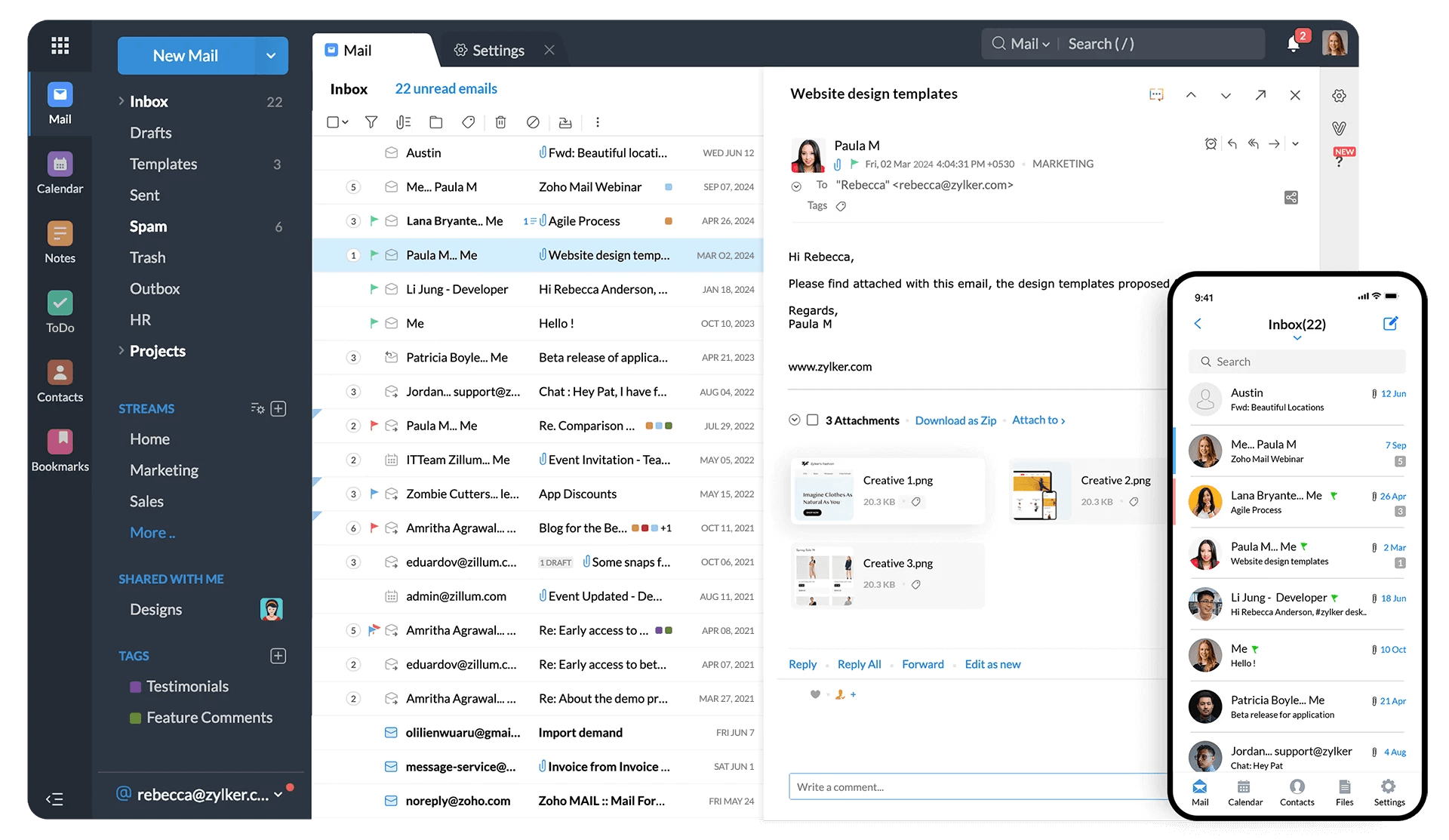
Beyond privacy, Zoho Mail offers features that most personal email platforms do not include at any price point:
- Custom domain email support (yourname@yourdomain.com) at no extra cost on the free plan
- Built-in calendar with scheduling and reminders
- Task management and notes directly inside the mail interface
- Advanced spam filtering with zero reliance on advertising algorithms
- Two-factor authentication (2FA) on all plans including free
The result is an email service that feels professional even when used personally — which is why freelancers, consultants, students, and privacy-conscious individuals have made it one of the fastest-growing alternatives to Gmail in India.
Is Zoho Mail for Personal Use Actually Free?
Yes — and unlike most “free” email services, there is no hidden catch. Zoho Mail’s Forever Free plan is a permanent offering, not a trial. You do not need a credit card to sign up, and the free plan does not expire after 14 or 30 days.
What the Free Plan Includes for Personal Use
| Feature | Free Plan Limit | Enough for Personal Use? |
|---|---|---|
| Users | Up to 5 users | Yes |
| Storage per user | 5 GB | Yes |
| Ads in inbox | None | Yes |
| Custom domain email | 1 domain | Yes |
| Max attachment size | 20 MB | Yes (casual use) |
| Daily sending limit | ~250 emails/day | Yes |
| IMAP / POP3 access | Not available | Limited (web + app only) |
| Mobile app | Full access (iOS + Android) | Yes |
The one limitation worth noting is that IMAP and POP3 are not available on the free plan. This means you cannot connect Zoho Mail to a third-party email client like Thunderbird or Outlook using the free tier. If you rely on desktop email clients, you will need the Mail Lite plan at Rs.59 per user per month.
For most personal users who check email through a browser or the Zoho Mail mobile app, the free plan is more than sufficient.
Reliability and Uptime: What Does the Data Say About Zoho Mail for Personal Use?
Reliability is the most common concern when people consider Zoho Mail for personal use. The fear is understandable — if you switch your primary email to Zoho and it goes down during an important conversation, that is a serious problem.
Here is what the data actually shows:
Uptime Guarantee and Infrastructure
Zoho Mail offers a 99.9% uptime SLA backed by data centers in India (Chennai), the United States, Europe, and Australia. For personal users in India, the Chennai data center significantly reduces latency compared to US-based providers.
A 99.9% uptime SLA translates to a maximum of 8.7 hours of downtime per year. In practice, Zoho Mail’s historical uptime has consistently exceeded this threshold. Independent monitoring services regularly report Zoho Mail uptime above 99.95%.
Email Delivery Speed and Spam Performance
Outgoing emails from Zoho Mail typically reach recipients within 10-30 seconds. Incoming emails arrive in real time. Zoho actively manages IP reputation, implements SPF, DKIM, and DMARC authentication by default, and monitors blacklisting across all major spam databases.
Occasional spam classification is a factor with any email provider — whether an email lands in a recipient’s spam folder depends on the recipient’s server configuration, not just your email platform. This is a universal limitation, not a Zoho-specific one.
Mobile App Reliability for Personal Use
Zoho Mail’s mobile apps for iOS and Android maintain push notification reliability that is on par with Gmail. Real-time sync works consistently across devices. Users switching from Gmail to Zoho Mail for personal use on mobile typically report no disruption in the notification experience.
Privacy and Ads: Does Zoho Mail Read Your Emails?
This is the most important question for anyone considering Zoho Mail for personal use, and the answer is unambiguous: No. Zoho Mail does not scan email content for advertising purposes.
Zoho’s privacy policy states explicitly that user data is never monetized through advertising. This is not a feature that appears only on paid plans — it applies equally to the free tier.
The security architecture supporting this includes:
- TLS 1.3 encryption for all data in transit
- AES-256 encryption for data at rest on Zoho servers
- S/MIME and OpenPGP support on paid plans for end-to-end encryption
- Two-factor authentication on all accounts including free
- Access logs and audit trails available to account administrators
For Indian users, Zoho’s Indian data center option means your email data is stored on servers governed by Indian data protection frameworks — an important consideration as India’s Digital Personal Data Protection (DPDP) Act takes fuller effect.
Zoho Mail vs Gmail for Personal Use: The Honest 2026 Comparison
Most comparisons online are either written by hosting companies (biased toward their own products) or by review aggregators that aggregate data from businesses, not personal users. Below is a side-by-side comparison specifically for individual personal use in India in 2026.
| Feature | Zoho Mail | Gmail Free | Outlook Free |
|---|---|---|---|
| Ads in inbox | None | Yes | Yes |
| Email content scanning | Never | Yes (for features) | Yes |
| Free storage | 5 GB | 15 GB (shared) | 15 GB (shared) |
| Custom domain (free) | Yes | No (paid only) | No |
| Built-in calendar | Yes (integrated) | Separate app | Separate app |
| Indian data centers | Yes | No | No |
| IMAP on free plan | No (paid only) | Yes | Yes |
| Ease of use | High | Very High | High |
The conclusion is clear. If storage is your primary concern and you have no issue with Google scanning your emails, Gmail’s 15GB free storage gives it an edge. If privacy, a custom domain, and an ad-free inbox matter to you, Zoho Mail for personal use wins outright — and at no cost.
Zoho Mail Pricing in India 2026 — Verified INR Rates
Most comparison sites show USD pricing or outdated rates. Below are the verified 2026 prices for Zoho Mail in India, billed in Indian Rupees.
| Plan | Price (INR/user/month) | Storage | Best For |
|---|---|---|---|
| Forever Free | Rs.0 | 5 GB | Personal use, students, freelancers |
| Mail Lite (5GB) | Rs.59 | 5 GB + IMAP | Personal users needing desktop client |
| Mail Lite (10GB) | Rs.75 | 10 GB + IMAP | Heavy email users, consultants |
| Mail Premium | Rs.199 | 50 GB + S/MIME | Power users, agencies, professionals |
| Workplace Standard | Rs.99 | 10 GB + full suite | Small teams, Google Workspace alternative |
| Workplace Professional | Rs.399 | 100 GB + advanced | Growing businesses, full collaboration |
For pure personal use with no desktop client requirement, the Forever Free plan is completely sufficient. The upgrade to Mail Lite at Rs.59/month becomes necessary only if you want IMAP access or need attachments larger than 20MB.
As a certified Zoho partner in India, Codroid Labs provides all Zoho Mail plans with GST-compliant invoices (GSTIN: 07AAWFC0815B1ZP), enabling input tax credit for business users. Read our full Zoho Mail partner guide for details on business plans and migration support.
How to Set Up Zoho Mail for Personal Use in 5 Steps
Setting up Zoho Mail for personal use takes under 10 minutes. Here is the complete process from registration to receiving your first email.
Step 1 — Create Your Zoho Account
Visit zoho.com/mail and click “Sign Up Free.” Enter your name, mobile number, and choose an email address ending in @zoho.com or @zoho.in. Verify your mobile number via OTP.
Step 2 — Choose the Forever Free Plan
On the plan selection screen, choose the Forever Free option. No credit card required. You will immediately have access to a clean, ad-free inbox with 5GB storage.
Step 3 — Connect Your Custom Domain (Optional)
If you already own a domain (e.g., from GoDaddy, BigRock, or Hostinger), go to Settings > Mail Administrator > Domains. Enter your domain and follow the DNS verification steps — typically adding a TXT record and MX records. This process takes 15-30 minutes for DNS propagation.
Step 4 — Set Up the Mobile App
Download the Zoho Mail app for iOS or Android. Log in with your Zoho credentials. Push notifications work immediately without any additional configuration.
Step 5 — Migrate Existing Gmail Emails (Optional)
To bring your existing emails from Gmail to Zoho, go to Settings > Import > Gmail. You will need to enable IMAP in Gmail first (Gmail Settings > Forwarding and POP/IMAP > Enable IMAP). The Zoho Migration Wizard handles the rest automatically.
Who Should Use Zoho Mail Personally — And Who Should Not
Zoho Mail for Personal Use Is the Right Choice If You Are:
- A freelancer or consultant — A yourname@yourdomain.com email address built on Zoho’s free plan costs nothing but signals professionalism to every client you email.
- A privacy-conscious individual — If the idea of Google processing your emails to build an advertising profile concerns you, Zoho Mail’s guaranteed no-scan policy is the most practical alternative.
- A student or job seeker — A professional-looking email address can influence hiring decisions. firstname.lastname@yourdomain.com on Zoho Mail costs nothing.
- A side-project or small team founder — The free plan covers up to 5 users, making it ideal for early-stage ventures that need branded email before they can justify paid plans.
- A person frustrated with ads — The difference between an ad-free Zoho inbox and a Gmail inbox filled with promotional panels is immediately noticeable.
Zoho Mail May Not Be Your Best Choice If You:
- Rely heavily on Gmail integrations like Google Keep, Google Drive, or Google Meet for personal workflows
- Need IMAP access for a desktop client and are not willing to pay Rs.59/month
- Require enterprise-grade end-to-end encryption like ProtonMail’s zero-knowledge model for highly sensitive communications
- Need more than 5GB free storage for large attachments and file-heavy workflows
Related Guides from Codroid Labs
Frequently Asked Questions About Zoho Mail for Personal Use
Is Zoho Mail good for personal use in 2026?
Yes. Zoho Mail for personal use is an excellent choice in 2026 if you want an ad-free inbox, data privacy, and the option to use a custom domain email at no cost. The Forever Free plan supports up to 5 users with 5GB storage each.
Is Zoho Mail completely free for personal use?
Yes. The Forever Free plan requires no credit card and does not expire. It includes 5GB storage, custom domain support for up to 5 users, and a fully ad-free experience. IMAP access for third-party clients requires the paid Mail Lite plan at Rs.59/month.
Is Zoho Mail reliable in India?
Yes. Zoho Mail offers a 99.9% uptime SLA with Indian data centers in Chennai. Delivery is fast, spam protection is active, and the mobile apps maintain reliable push notifications comparable to Gmail.
Does Zoho Mail show ads or read my emails?
No. Zoho Mail has a legally binding commitment to never scan email content for advertising and to never show ads in the inbox. This applies to all plans including the free tier.
Can I use Zoho Mail with my own domain for free?
Yes. Zoho Mail allows you to connect one custom domain on the free plan for up to 5 users. This makes it possible to use yourname@yourdomain.com without paying for Google Workspace or any other paid email hosting.
How does Zoho Mail compare to ProtonMail for personal use?
ProtonMail offers zero-knowledge end-to-end encryption, which Zoho does not match on free plans. However, Zoho Mail is significantly more feature-rich for everyday use — better interface, integrated calendar, custom domain on free plan, and a larger storage allocation. For standard personal use, Zoho Mail is the more practical choice. For journalists or activists handling sensitive communications, ProtonMail’s encryption model is stronger.
What is the sending limit on Zoho Mail free plan?
The Zoho Mail free plan allows approximately 250 outgoing emails per day. For standard personal use — including job applications, personal correspondence, and light freelance communication — this limit is more than sufficient.
Get Your Free Zoho Mail Account Set Up Today
As India’s certified Zoho partner, Codroid Labs activates your Zoho Mail account, configures your domain, and handles migration from Gmail or any other provider — free of charge for the setup consultation.
What Zoho Mail Users Say About Personal Use
“Switched from Gmail after 8 years. The ad-free inbox alone made it worth it. I did not realize how cluttered Gmail had become until I saw Zoho’s clean interface.”
Rahul M. — Freelance Graphic Designer, Pune
“I use Zoho Mail personally for my portfolio domain and professionally for my consulting. The free plan handles everything. Setup took less than 20 minutes.”
Priya S. — UX Consultant, Bengaluru
Final Verdict: Is Zoho Mail for Personal Use Worth It in 2026?
The answer is yes — and the reasoning is straightforward.
Zoho Mail for personal use offers a genuinely competitive set of features at zero cost. No ads, no email scanning, custom domain support, built-in calendar, strong mobile apps, and 99.9% uptime — all without a single rupee of monthly fee.
The only meaningful limitation of the free plan is the absence of IMAP access. For users who live entirely in the browser or mobile app, this is not a limitation at all. For users who rely on Outlook or Thunderbird on a desktop, the Rs.59/month Mail Lite plan removes this gap for less than the price of a cup of coffee.
Compared to the competitors ranking for this topic, here is what they cannot match: G2 offers reviews but no setup guidance, no India pricing, and no step-by-step help. TrueHost focuses on hosting and recommends their own email product. Neither gives you what this guide does — verified 2026 INR pricing, an honest comparison table, a setup walkthrough, and direct access to a certified Zoho partner who can activate your account today.
If you are reading this while still on a Gmail account that shows you ads and processes your emails to build an advertising profile, the decision is simple. Try Zoho Mail for personal use on the free plan. The switch takes 10 minutes. The difference is permanent.
Codroid Labs — Certified Zoho Creator Partner India
Zoho Mail for Personal Use: 7 Honest Reliability Answers in 2026
GSTIN: 07AAWFC0815B1ZP | team@codroiditlabs.com | +91 78384 02682