


Zoho Mail Admin Console — centralized administration portal covering: organization management, domain verification and DNS (MX/SPF/DKIM/DMARC), user management, role-based admin permissions, email groups and distribution lists, MFA enforcement, spam protection, email routing, data migration, storage monitoring, compliance (retention/eDiscovery/legal hold), reports and analytics, branding, and mobile administration. Access at mail.zoho.com or through the Zoho App Launcher with admin credentials. Codroid Labs (GSTIN 07AAWFC0815B1ZP) is a certified Zoho Mail partner.
Zoho Mail Admin Console — business email is more than sending and receiving messages. A 2021 product tutorial covers the old UI and misses role-based admin permissions, compliance features, and the most common beginner mistakes. This complete 2026 guide covers the Zoho Mail administration system from first login through advanced compliance configuration, designed for IT administrators and business owners setting up Zoho Mail for the first time and for those migrating from Gmail or Microsoft 365.
7 Role Types
Super Admin to Custom
4 DNS Records
MX, SPF, DKIM, DMARC
10 Mistakes
Most Beginners Make
5 Sources
Migration: Gmail, M365+
How to access Zoho Mail Admin Console
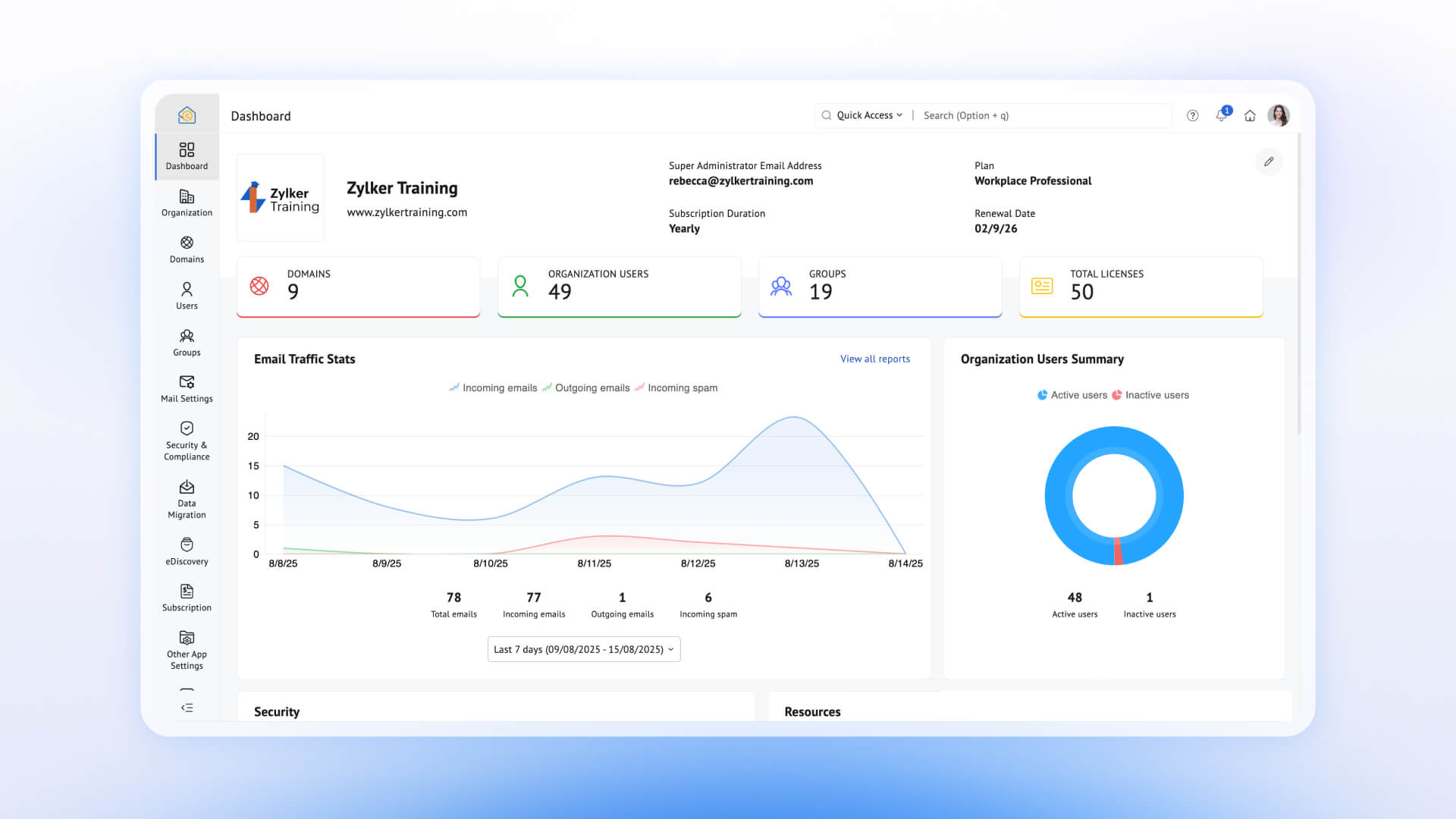
The Zoho Mail admin login and how to access Zoho Mail Admin Console for beginners: log in at mail.zoho.com with your Super Admin or Organization Admin credentials. The Zoho Mail admin dashboard opens showing organization overview, user count, storage usage, and recent security events. Access is also available through the Zoho App Launcher if you have administrator privileges assigned. The Zoho Mail Admin Console login and setup guide first step — only accounts with an assigned admin role can see the Admin Console option. Regular user accounts will not see it. The Zoho Mail setup guide sequence starts here before any users or domains are configured.
Admin roles and permissions
The Zoho Mail admin roles and Zoho Mail Admin Console user roles and privileges:
The Zoho Mail super admin best practice: use a dedicated admin account with MFA enabled, not a personal named mailbox. The how to change a user to admin in Zoho Mail process: navigate to Admin Console, Users section, select the user, and assign the appropriate role. The Zoho Mail administrator and Zoho Mail Admin Console password policy setup are both configured in the Security section.
Domain management — MX, SPF, DKIM, DMARC
The Zoho Mail domain management and how to add and verify a domain in Zoho Mail: domain verification is step one before adding any users. The Zoho Mail Admin Console domain section walks through adding the domain, verifying ownership via a TXT record at your DNS provider, and then configuring the four records that determine email delivery and security. The configuration sequence matters: MX records first (so email can arrive), then SPF (to define authorized senders), then DKIM (cryptographic email signing), then DMARC (policy enforcement and reporting). The how to manage domains and email accounts in Zoho Mail process also covers adding secondary domains, subdomain routing, and managing multiple domains from one Admin Console. DNS propagation takes up to 24 hours — email delivery issues immediately after domain setup are almost always propagation delays, not configuration errors.
User management — add, remove, alias, groups
The Zoho Mail user management and how to add users in Zoho Mail Admin Console: users can be added individually, imported via CSV, or provisioned through a directory sync. The how to import users into Zoho Mail Admin Console CSV import handles bulk onboarding for organizations migrating from another provider. The Zoho Mail user accounts section covers storage allocation per user, password reset, account suspension, and reactivation. The Zoho Mail aliases and how to create email aliases in Zoho Mail Admin allow multiple email addresses (e.g., info@, support@, hello@) to deliver to one primary mailbox. The Zoho Mail email groups and how to create email groups in Zoho Mail create department distribution lists — Sales, HR, Support, Management — allowing one email to reach the entire team without individual addressing. The how to manage users in Zoho Mail Admin Console involves both this user section and the Roles assignment covered above.
Security settings — MFA, spam, email policies
The Zoho Mail security settings and Zoho Mail Admin Console security settings guide: the most important single action for a new Zoho Mail Admin Console setup is enabling MFA for all administrator accounts. The Zoho Mail email policies and how to configure email policies in Zoho Mail cover sender policies, attachment restrictions, and domain-level send/receive rules. The Zoho Mail spam settings and how to manage spam settings in Zoho Mail Admin include spam level configuration, quarantine rules, block lists, and allow lists. The Zoho Mail business administration security posture is significantly improved by enabling MFA, configuring proper DNS authentication, and reviewing the security event log weekly.

Email routing and catch-all
The Zoho Mail organization settings email routing section and Zoho Mail Admin Console organization settings tutorial: catch-all accounts receive any email sent to your domain that doesn’t match a specific mailbox address — useful for capturing typos and old addresses during migration. Email forwarding rules, routing policies, and domain-level policies are all configured here. The Zoho Mail control panel routing configuration is especially important for organizations using multiple domains or running a transition period where the old email addresses still need to function. The Zoho Mail Admin Console for small business setup typically needs only basic routing — catch-all plus forwarding — while enterprise setups configure more complex routing rules per domain.
Data migration guide
The Zoho Mail data migration and Zoho Mail Admin Console data migration guide: the migration wizard in the Admin Console imports emails, contacts, calendars, and folder structure from Gmail, Microsoft 365, Exchange, IMAP, and POP servers. The Zoho Mail admin tools migration feature handles both per-user migration (for small teams) and bulk migration (for larger organizations). Keep the source account active with forwarding enabled during the transition period to ensure no emails are lost between the migration cutover and DNS propagation completing. The step by step Zoho Mail administration tutorial 2026 migration sequence: verify domain first, add all users, run migration wizard per user or in bulk, test delivery, then update MX records to switch the live email flow to Zoho.
Compliance, reports, and analytics
The Zoho Mail compliance and Zoho Mail Admin Console compliance settings: email retention policies define how long emails are kept and when they are automatically removed. Legal hold freezes specific mailboxes or date ranges to prevent deletion during litigation. eDiscovery allows compliance administrators to search and export emails across the organization for regulatory or legal purposes. The Zoho Mail reports and Zoho Mail Admin Console reports and analytics guide include active user counts, mail traffic volumes, storage usage per user, spam statistics, login activity, security events, and email delivery statistics. The how to monitor email usage in Zoho Mail process: Admin Console, Reports section, select the report type and date range. These reports are particularly useful for identifying storage issues before they affect delivery and for auditing suspicious login activity.
Common beginner mistakes
The Zoho Mail Admin Console troubleshooting for beginners — 10 mistakes most first-time administrators make:
Setup mistakes
- Skipping domain verification before adding users
- Incorrect MX record configuration (wrong priority)
- Not enabling MFA for administrator accounts
- Forgetting SPF or DKIM records after domain setup
- Giving Super Admin access when Organization Admin is sufficient
Ongoing mistakes
- Ignoring mailbox storage limits until delivery fails
- Not testing mail flow after DNS changes or migration
- Overlooking spam filter settings, causing over-blocking
- Failing to configure a backup email for password recovery
- Not reviewing security event logs and reports regularly
Codroid Labs — Certified Zoho Mail Partner — Admin Console Setup and Training
Zoho Mail Admin Console, Zoho Mail admin guide, Zoho Mail control panel, Zoho Mail administration, Zoho Mail admin login, Zoho Mail admin setup, Zoho Mail user management, Zoho Mail domain management, Zoho Mail security settings, Zoho Mail email policies, Zoho Mail admin dashboard, Zoho Mail administrator, Zoho Mail super admin, Zoho Mail admin roles, Zoho Mail user accounts, Zoho Mail email groups, Zoho Mail aliases, Zoho Mail data migration, Zoho Mail spam settings, Zoho Mail reports, Zoho Mail compliance, Zoho Mail organization settings, Zoho Mail admin tools, Zoho Mail business administration, Zoho Mail setup guide — Codroid Labs (GSTIN 07AAWFC0815B1ZP) is a certified Zoho Mail partner. We provide the complete Zoho Mail administrator guide for business email — configuring the Zoho Mail Admin Console complete guide for beginners scope — domain verification, user setup, SPF/DKIM/DMARC, migration, and compliance — for businesses across India. Contact: +91 78384 02682, team@codroiditlabs.com.
Related Guides from Codroid Labs
Frequently asked questions
How do I access the Zoho Mail Admin Console?
Full detail in the FAQ Schema above. Summary: log in at mail.zoho.com with admin credentials, then access the Admin Console from the top-right icon. Only accounts with an assigned admin role see this option.
What is the difference between Super Admin and Organization Admin in Zoho Mail?
Full detail in the FAQ Schema above. Summary: Super Admin includes billing and subscription control; Organization Admin has full day-to-day admin without billing access. Use the minimum necessary role for each administrator — avoid giving Super Admin access to anyone who doesn’t need billing control.
Get Your Zoho Mail Admin Console Set Up Correctly
Domain verification, SPF/DKIM/DMARC, user onboarding, migration, compliance configuration — certified Zoho Mail partner with GSTIN invoice for 18% ITC.
Start Zoho Mail via Codroid Labs
Book Free Admin Console Setup Call – +91 78384 02682