


Free custom domain email Zoho Mail — the Zoho Mail free plan supports up to 5 users, 5 GB/user, with your own domain (e.g. name@yourbrand.com). Setup in 5 steps: (1) create Zoho Mail account; (2) add and verify domain via TXT record; (3) configure MX records (mx.zoho.in priority 10, mx2.zoho.in priority 20); (4) add SPF and DKIM records; (5) create email accounts. DNS propagation: 15 min to 24 hours. No monthly fee — only domain registration cost.
Free custom domain email Zoho Mail — using a Gmail or Yahoo address for business makes your organization look unprofessional. A Zoho Mail custom email like info@yourcompany.com or yourname@yourbrand.com is achievable for free — and a basic free-domain-email blog misses Cloudflare-specific DNS steps, DKIM configuration depth, and the most common setup mistakes. This complete 2026 guide covers the entire process from account creation to fully authenticated email delivery.
5 Users
Free Plan Limit
5 GB
Storage Per User
4 Records
TXT, MX, SPF, DKIM
Rs.0
Monthly Fee (Free Plan)
What you need before you start
The free custom domain email Zoho Mail setup requires two things you bring yourself: a registered domain name (purchased from any registrar — GoDaddy, Namecheap, Google Domains, Hostinger, or others) and access to that domain’s DNS settings. You don’t need paid hosting — the Zoho Mail custom domain setup without paid hosting works because Zoho hosts the email, not your web hosting provider. Domain registration typically costs Rs.800–1,500/year for a .com or .in domain and is the only ongoing cost in a free Zoho Mail setup.
Step 1: Create your Zoho Mail account
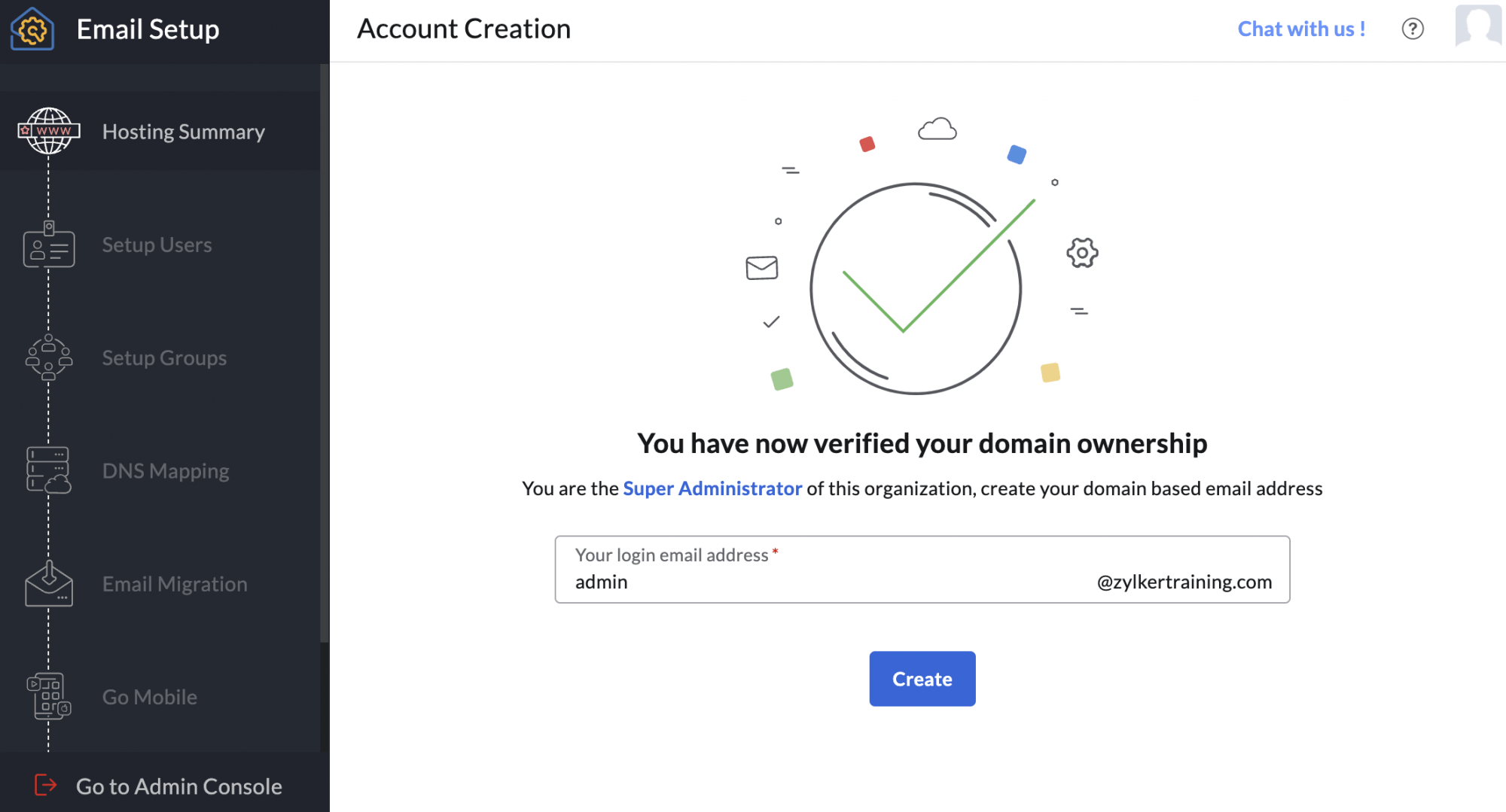
To create a free custom domain email with Zoho Mail, visit zoho.com/mail, select Business Email, and choose the Forever Free Plan. Zoho Mail allows you to host professional email addresses on your own domain for up to 5 users, with 5GB of storage per user, making it an excellent choice for startups and small businesses. Since Zoho does not provide free domain names, you’ll need to use a domain you already own or purchase one from a domain registrar. During sign-up, enter your organization name, add your domain, and create the administrator account that will serve as the Super Admin. For a professional setup, create the admin mailbox directly on your custom domain so you can proceed to domain verification and complete your free business email configuration.
Step 2: Add and verify your domain
The Zoho Mail domain verification and how to add and verify a domain in Zoho Mail: the Zoho Mail domain setup wizard generates a unique TXT record value (e.g., zoho-verification=zb12345678). The Zoho Mail domain verification using TXT record process: log into your domain registrar’s DNS panel, add a new TXT record with Host = @ (or blank) and Value = the verification string from Zoho. Return to Zoho Mail and click “Verify.” The verification is usually instant to a few minutes — if it fails, the TXT record hasn’t propagated yet; wait 5–10 minutes and try again. The Zoho Mail admin console shows verification status in real time.
Step 3: Configure MX records
The Zoho Mail MX records and how to configure MX records for Zoho Mail — the most important step for inbound email delivery:
The how to configure Zoho Mail MX records correctly critical step: delete any existing MX records pointing to your web host or previous email provider before adding these — conflicting MX records split inbound email between providers, causing unpredictable delivery failures. The Zoho Mail DNS settings wizard in the Admin Console shows the exact values to add. The Zoho Mail email hosting begins working once MX records propagate, typically within 15 minutes to a few hours.
Step 4: Add SPF and DKIM records
The Zoho Mail SPF record and Zoho Mail DKIM setup — the how to add SPF and DKIM records in Zoho Mail process and the Zoho Mail custom domain email setup with DNS records authentication layer:
SPF record: add a TXT record with Host = @ and Value = v=spf1 include:zoho.in ~all. This tells receiving mail servers that Zoho is authorized to send email for your domain, preventing spoofing.
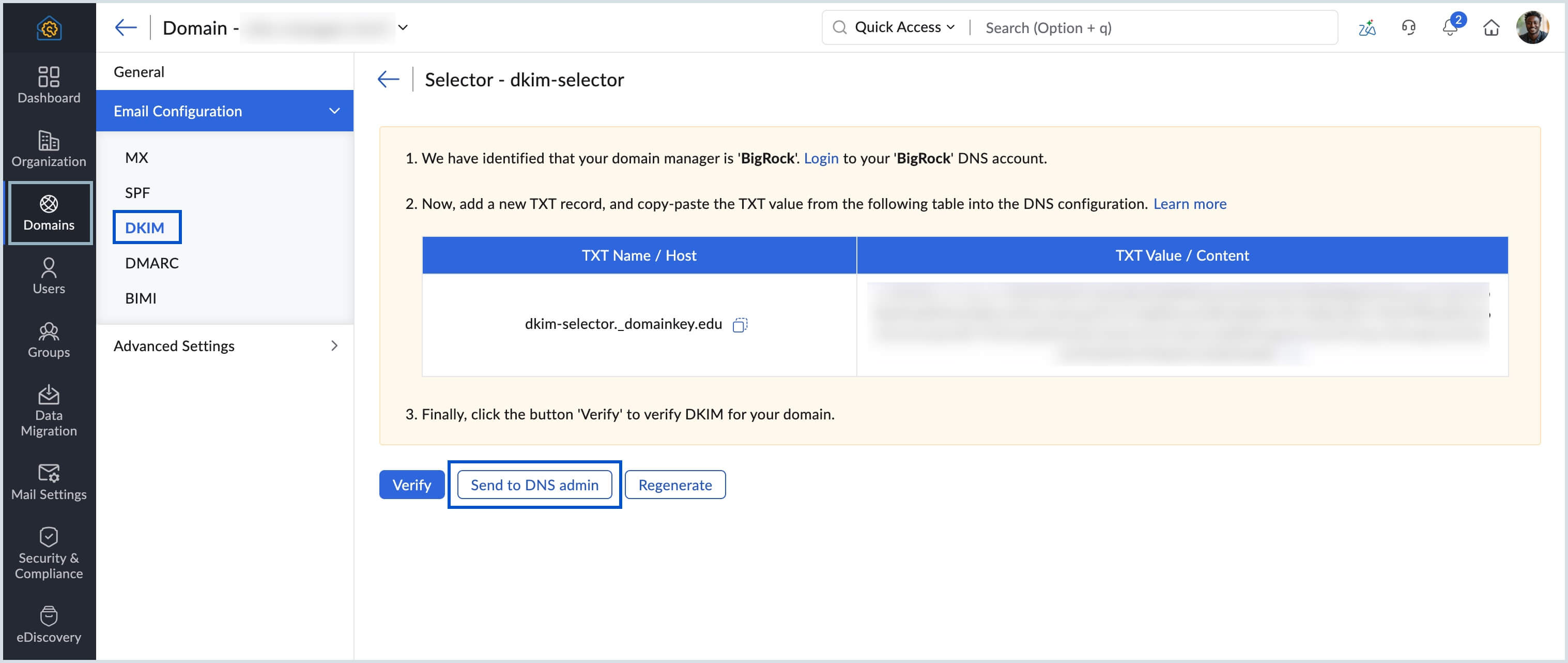
DKIM record: in the Zoho Mail Admin Console, navigate to Domains, select your domain, and click “DKIM.” Zoho generates a CNAME or TXT record to add at your DNS provider. Copy both the Host (selector._domainkey.yourdomain.com) and Value exactly. DKIM is the cryptographic signing layer that prevents tampering with your emails in transit — without it, some recipients’ spam filters will flag your email or reject it entirely. The Admin Console shows a green checkmark when DKIM is verified. The Zoho Mail free business email is not fully protected against spam rejection without both SPF and DKIM configured.

Step 5: Create your email accounts
The Zoho Mail email users and how to create multiple business emails in Zoho Mail: in the Admin Console, Users section, add each user with their display name and desired email address (e.g. yourname@yourdomain.com). The how to set up info and contact email in Zoho Mail process: create these as either additional user accounts (each with their own mailbox) or as aliases pointing to an existing mailbox. Aliases are ideal for info@, contact@, support@, and hello@ addresses that all need to land in one person’s inbox. The how to create custom domain email accounts in Zoho Mail free plan allows up to 5 separate user mailboxes — each with 5 GB storage and independent login credentials. The Zoho Mail custom address and Zoho Mail professional email are now fully active once the user accounts are created and DNS has propagated.
Cloudflare DNS setup walkthrough
The Zoho Mail custom domain setup using Cloudflare DNS — Cloudflare is the most widely used DNS provider and has a few specific steps to follow. The Zoho Mail custom email setup with DNS records via Cloudflare: log into your Cloudflare dashboard, select your domain, go to DNS, click Add Record. For MX records: select MX type, set Name to @ (or your domain), Mail Server to mx.zoho.in, Priority to 10, and Proxy status to DNS only (grey cloud, not orange). MX records should never be proxied through Cloudflare — using the orange proxy icon for MX records will route email through Cloudflare’s HTTP proxy and break mail delivery. Repeat for mx2.zoho.in with priority 20. For TXT (SPF): select TXT type, Name @, and paste the SPF value. For DKIM: select CNAME type if Zoho provides a CNAME, or TXT if it provides a TXT value — add exactly what the Admin Console shows. The Zoho Mail free email hosting for custom domain 2026 via Cloudflare is fully functional once all four records are saved.
Common mistakes and troubleshooting
The Zoho Mail custom domain email setup and troubleshooting — 6 mistakes that break setup:
DNS setup mistakes
- Not deleting old MX records before adding Zoho’s
- Proxying MX records through Cloudflare (orange cloud)
- Adding DKIM as TXT when Zoho specifies CNAME (or vice versa)
Verification mistakes
- Clicking Verify before DNS propagation completes (wait 5 min)
- Adding domain TXT record with wrong Host (use @ or blank, not www)
- Missing SPF record, causing emails to land in spam
Free plan vs paid plans
The Zoho Mail free plan limits and paid plan pricing for when you outgrow it:
Guide summary: this is the how to get free custom domain email with Zoho Mail 2026 complete reference — the Zoho Mail free custom domain email step by step guide covering how to create a business email with your own domain on Zoho, how to set up free custom email on Zoho Mail, and the Zoho Mail custom domain setup for beginners 2026 scope including Cloudflare DNS. Use this as the Zoho Mail free business email setup tutorial 2026 resource covering how to connect your domain to Zoho Mail for free, the Zoho Mail custom domain email setup without paid hosting approach (domain registration is the only cost), how to migrate email to Zoho Mail custom domain from Gmail or Microsoft 365, and how to access Zoho Mail Admin Console for domain setup — all the steps that the 5-section sequence above covers in full.
Codroid Labs — Certified Zoho Mail Partner — Custom Domain Email Setup
Free custom domain email Zoho Mail, Zoho Mail custom email, Zoho Mail business email, Zoho Mail free email, Zoho Mail domain email, Zoho Mail email hosting, Zoho Mail custom domain, free business email Zoho, Zoho Mail domain setup, Zoho Mail email setup, Zoho Mail MX records, Zoho Mail SPF record, Zoho Mail DKIM setup, Zoho Mail domain verification, Zoho Mail free plan, Zoho Mail professional email, Zoho Mail custom address, Zoho Mail business account, Zoho Mail DNS settings, Zoho Mail admin console, Zoho Mail email users, Zoho Mail domain hosting, Zoho Mail email service, Zoho Mail free business email, Zoho Mail setup guide 2026 — Codroid Labs (GSTIN 07AAWFC0815B1ZP) is a certified Zoho Mail partner. We help businesses set up free professional email with custom domain using Zoho Mail, configure DNS records, Zoho Mail free custom domain email for small business setups, and the complete Zoho Mail free custom domain email tutorial 2026 scope. Contact: +91 78384 02682, team@codroiditlabs.com.
Related Guides from Codroid Labs
Frequently asked questions
Is Zoho Mail custom domain email really free?
Yes — up to 5 users, 5 GB/user, with your custom domain, at Rs.0/month. The only cost is your domain registration. Full detail in the FAQ Schema above.
Which DNS records do I need to configure for Zoho Mail?
Four records: TXT for domain verification, MX records (mx.zoho.in priority 10, mx2.zoho.in priority 20), SPF TXT record, and DKIM CNAME or TXT record. Full detail in the FAQ Schema above. All values are available in the Zoho Mail Admin Console under domain settings.
Get Your Free Custom Domain Email Set Up Today
Domain verification, MX records, SPF/DKIM/DMARC, user creation — certified Zoho Mail partner with GSTIN invoice for 18% ITC on any paid plan.
Start Zoho Mail via Codroid Labs
Book Free Domain Email Setup Call – +91 78384 02682