



Zoho for Professional Services: 7 Hidden Gaps Behind Late Bills
Zoho for professional services works when the promise sold, the work delivered and the amount billed remain connected. A signed deal is not a complete handover, and a busy timesheet is not automatically an invoice.
Picture a familiar situation: the consultant has finished, the project manager is waiting for approvals and finance cannot tell which hours belong on the bill. This is a workflow illustration, not a client story. The seven gaps below explain what to check before that queue grows.
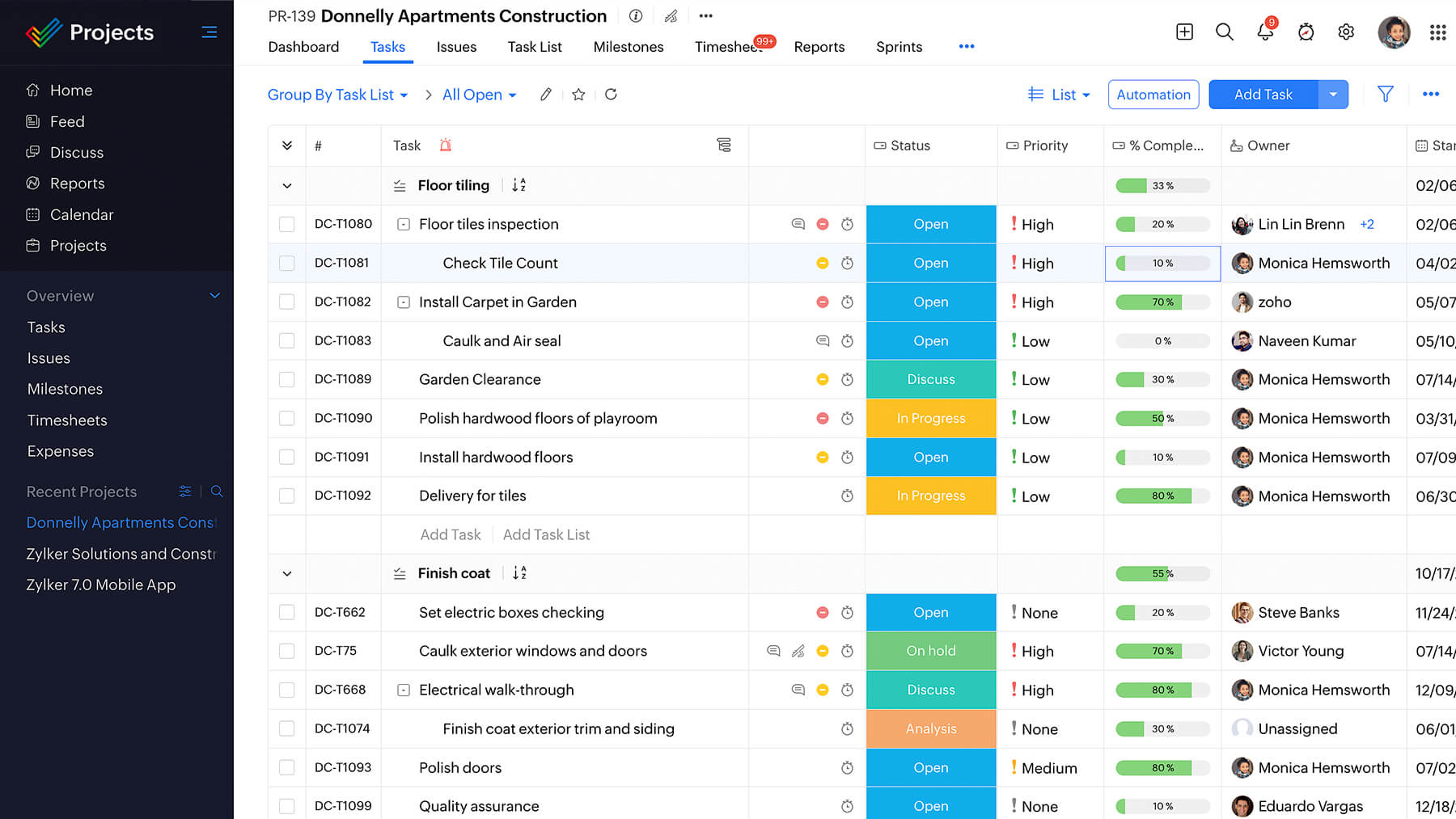
Zoho for Professional Services: Give Each App a Clear Job
For consulting, advisory and project-led firms, the commercial unit is often an engagement rather than a product shipment. Delivery depends on named people, agreed outputs and time that may or may not be billable. The software design should reflect those distinctions.
| Stage | System of record | Required handover |
|---|---|---|
| Opportunity and scope | CRM | Customer, scope version, commercial model, delivery owner |
| Project execution | Projects | Tasks, responsibilities, dates and acceptance conditions |
| Time review | Projects | Billable status, approval and explanatory notes |
| Billing and collection | Books | Invoice basis, issue date, payment status and follow-up owner |
A zoho for professional services design should therefore begin with ownership rules, not a collection of dashboards. Keep one agreed customer identity across the process, and decide which app owns each field before importing historical records.
For related planning, read CRM implementation services and Zoho One implementation planning. These explain setup work, not a promise that every app connects without configuration.
1. Scope Gets Sold but Never Reaches Delivery
A deal may contain a proposal while the delivery team receives only a short message. Without the agreed deliverables, exclusions and acceptance criteria, the project starts with several competing versions of what the customer bought.
The native CRM and Projects integration lets users create or associate projects from supported CRM records. It must be configured from CRM before data can be shared. Module availability depends on the CRM edition; the documented flow includes selecting New Project and reviewing project details and users.
Closing a deal does not, by that fact alone, create a correctly priced project or an invoice. If you need an automatic trigger, treat it as separately scoped automation with eligibility checks, field mapping and duplicate prevention. Do not present custom behaviour as the default connector.
Example only: a signed advisory engagement is handed over with a scope version, delivery owner and billing model. The owner verifies the project before work starts. See implementation mistakes to avoid for planning checkpoints.
2. The Project Has No Reliable Billing Customer
In zoho for professional services, a project can look healthy to delivery while finance cannot find its billable work. With Projects and Books integration, projects need an associated primary customer for the documented fetch into Books. Customer identity is a functional dependency, not just a display label.
The integration is connected in Books by selecting the Projects portal and modules to sync. Tasks, users and project information follow the configured relationship. The troubleshooting guidance also flags customer currency conflicts and dependent project records that could not be fetched.
Agree the customer name, currency and account mapping before importing projects. When changing from an older billing process, review the integration cutoff: earlier time can be marked invoiced or imported as unbilled according to the selected option. A wrong choice can expose already billed work again.
Zoho for professional services needs this reconciliation even when both apps already contain valid records. For the finance-side setup, see Books implementation planning.
3. Logged Hours Never Become Approved Billable Time
Time capture answers what someone worked on. Approval answers whether the entry is acceptable. Billable status answers whether the contract permits charging for it. Treat these as separate decisions rather than allowing every recorded hour to enter a customer invoice.
The Books integration documentation specifies billable, approved timesheets linked to projects with a primary customer. Non-billable entries or time awaiting approval will not be fetched through that billable-timesheet path. Investigate approval and customer mapping before assuming a sync failure.
Current Projects plans and feature comparison lists time logs, timesheets and approval features in paid-plan descriptions. Use the live comparison for the intended subscription, not an assumption that the Free plan has the same delivery and approval capabilities.
Example only: a consultant records twelve hours, of which two are internal preparation. The project owner reviews the ten billable hours and retains the internal time for delivery analysis. The invoice follows the agreement, not the total attendance figure.
4. The Contract Has No Matching Billing Rule
Fixed-fee, time-and-materials and retained services answer different commercial questions. Zoho for professional services should not model all three as an hourly invoice with a different description.
| Commercial arrangement | Configuration to consider | Control before invoicing |
|---|---|---|
| Fixed fee | Fixed-cost project billing | Confirm agreed amount and billing milestone |
| Time and materials | Project, task or staff hourly billing plus agreed expenses | Confirm rates, approved time and allowable costs |
| Ongoing service arrangement | Agreed scope, period and invoice schedule | Check allowance, rollover and extra-work rules |
| Advance payment | Retainer invoice applied to a later invoice | Match collected advance to the correct final bill |
Books documents fixed-cost, project-hour, task-hour and staff-hour methods in its Books project billing methods. A contract called time and materials still needs rules for expenses and materials; an hourly method does not define those contractual conditions for you.
A commercial retainer is not automatically the same as a Books retainer invoice. The Books project transactions and retainers documentation describes accepting an advance and applying a paid retainer to a later project invoice. Monthly capacity allowances or rollover calculations need a separate, agreed design.
5. Change Requests Bypass Commercial Approval
An extra workshop can enter the task list without entering the commercial agreement. By the time finance notices, staff may have delivered work the customer never approved as chargeable. More automation can make that mistake faster rather than preventing it.
Create a change record or agreed approval step containing the request, scope effect, effort estimate, pricing decision and approver. This is a recommended process design, not a claim that every Projects edition includes a ready-made change-request billing module.
Zoho for consulting firms benefits from distinguishing corrections to agreed work from genuinely additional scope. The delivery owner and commercial owner should settle that distinction before tasks are reclassified as billable.
For controlled stages and technical extensions, read Blueprint process design and scoped Deluge development. Any extension needs testing of rejected, duplicated and cancelled requests, not just the successful route.
6. Profitability Is Calculated From Incomplete Inputs
Revenue, invoiced value and cash collected are different measures. So are a billing rate and an internal cost rate. A project may appear profitable because internal time is absent, expenses are missing or an invoice is mistaken for a payment.
Zoho Projects documents staff-, project- and task-based billing, fixed cost and budget tracking in Projects budgets and financial management. The page also describes invoice and expense integrations and a profitability summary. These are configured capabilities, not a guarantee that a new account contains complete financial information.
Before trusting a report, agree which labour costs, expenses and adjustments belong in it. Restrict sensitive cost-rate access and verify that the rates used reflect the period being measured. Validate the calculation against one completed engagement before widening access.
Zoho for professional services can support a review conversation; it cannot promise a margin improvement. If existing rules are unclear, start with a CRM workflow review rather than rebuilding every dashboard.
7. An Invoice Is Created but Nobody Owns Collection
The Projects-to-Books connection makes transactions available for a project; it does not mean a customer has accepted the amount or paid it. The documented workflow includes creating an invoice from the synced project and reviewing the transaction.
Give finance responsibility for invoice review, issue status, due dates and receipt allocation. Give the commercial owner responsibility for disputes about scope or acceptance. A single overdue balance can need both conversations, but neither should disappear into the other team’s queue.
A useful zoho for professional services review distinguishes approved unbilled work, issued unpaid invoices and disputed amounts. Do not bundle them into one alarming number. Zoho for professional services is more useful when the queue explains what decision is needed next.
Zoho One Professional Services and the PSA Question
Professional services automation, or PSA, is a category covering commercial management, delivery, time, resources and financial control. The search phrase psa zoho does not establish a standalone bundled product with one universal feature set.
For a zoho one professional services setup, the current Zoho One application entitlements lists CRM, Projects and Books. That confirms their presence in the published application details, not unlimited access to every standalone feature. Check the selected One offering and each app’s entitlements before quoting a solution.
Books capabilities also vary by country and plan. The Books regional plan comparison is a US comparison, not an India price quote. Confirm project accounting, time approvals, user access and relevant limits in the customer’s regional edition. No licence prices are repeated here.
Pilot One Engagement Before Connecting Everything
To pilot zoho for professional services, choose one engagement with a clear customer, scope and billing basis. Configure its handover, approve representative time and draft an invoice without sending it. Then reconcile the result with the agreement and finance records. Resolve exceptions before migrating the wider backlog.
Test a rejected entry, non-billable time, a changed rate and previously invoiced hours. Confirm who can change each field and what happens if the customer mapping is missing. Record which behaviours are native, manually performed or custom-built.
Train commercial, delivery and finance owners together for the handovers, then separately for their daily tasks. Our role-based training guide and configuration documentation guide offer related preparation.
Quick Answers
Does a won deal automatically become an invoice? Not by default. Project creation, approved time and invoice preparation need setup and review.
Does every hour become billable? No. Contract terms, billable status and approval determine the billing basis.
Is a retainer always an advance? No. A service retainer is a contract model; a Books retainer invoice records an advance-payment transaction.
Is this a single PSA product? No. This guide describes a configured workflow across Zoho apps, not a standalone bundle promise.
Zoho for Professional Services: FAQs
Where should scope live?
Keep the agreed commercial scope and version with the opportunity, then hand a verified copy or reference to delivery. Decide which record controls later changes.
Can the firm keep fixed-fee work alongside hourly work?
Yes, the documented billing methods support different project bases. Configure each engagement to match its contract rather than changing labels on an hourly template.
Why is approved time absent from Books?
Check billable status, primary customer association and whether the related project synced. Use the integration troubleshooting guidance before reimporting records.
Can internal time still be useful?
Yes. Keep it for understanding delivery effort without assuming it belongs on an invoice. Test how it contributes to the reports chosen for your configuration.
Does Zoho One remove integration work?
No. Application entitlement does not configure portals, customer mapping, permissions, approval rules or cutover choices.
Can change requests be automated?
Potentially, after the approval policy is defined. Agree the native capabilities and any custom extension separately, then test exceptions before release.
Will this increase profit?
No result is guaranteed. Accurate time, costs, scope decisions and collection records are prerequisites for meaningful analysis.
What should we bring to a discovery call?
Bring a sample scope, project handover, timesheet approval and invoice. Remove private client details where possible and explain one real point where work gets stuck.
When Scope, Time and Billing Stop Agreeing
Codroid Labs is a Zoho Partner and Zoho AI Enabled Partner, recognised by Zoho after the AI Accelerator Series 2026. Based in New Delhi, Codroid sells Zoho licences and provides implementation, customisation, migration and AMC support remotely across India and for international clients.
If approved work is missing from invoices or finance keeps rebuilding the same handover, discuss that specific problem first. We can scope the mapping, permissions and exception checks around it. Service fees are quoted after a free call; no outcome or margin improvement is guaranteed.
Review one scope-to-invoice handover on a free call
+91 7838402682 | team@codroiditlabs.com
Related Workflow Guides
Broader Zoho options for service businesses covers a wider service-business audience. This article focuses on project-led professional work, approved effort and financial handovers.
Official Zoho References
Checked for this draft in November 2026. Regional help pages illustrate product behaviour; they do not establish the same entitlement in every country or subscription. Confirm the purchased plans and actual account settings before implementation.
Projects and Books integration
Books project transactions and retainers
Projects budgets and financial management
Projects plans and feature comparison