


Troubleshooting Guide · Banking · Zoho Books India
Zoho Books Bank Reconciliation with Indian Banks: Feeds, Fixes and a Month-End Checklist
Zoho Books bank reconciliation is the step where you confirm that the transactions in Zoho Books agree with your bank statement for a period, down to a zero difference.
This guide covers which Indian banks connect directly, how bank feeds work, 9 fixes when feeds break, and a month-end checklist you can copy.
Short answer
For Zoho Books bank reconciliation, bring bank lines in through a direct bank integration, Zoho's feed service providers or a statement import. Match or categorise each line, then use Reconcile Account until the difference is zero.
When feeds break, the usual causes per Zoho's help are bank MFA, changed credentials, an expired bank connection (30 days for Axis Bank and Kotak Mahindra Bank) or a removed user.
How Zoho Books Bank Reconciliation Works
In short: Feeds bring bank lines into Zoho Books; you match or categorise them, then reconcile a period against the bank closing balance.
Finance teams describe the same problems in public forums: feeds that stop without warning, a pile of uncategorised lines at month-end, and a closing balance that will not tie out.
Banking in Zoho Books follows three steps. First, bank transactions arrive as feeds or imported statements. Second, you match them to existing Zoho Books entries or categorise them. Third, you run Zoho Books bank reconciliation for a date range.
Zoho notes that only matched, categorised and manually added transactions appear in the reconciliation window, per its reconciliation help. So a clean Uncategorised tab comes before any reconciliation.
Which Indian Banks Support Connected Banking in Zoho Books?
In short: Zoho Books India help pages list direct connected banking with Axis Bank, ICICI Bank, HSBC, Kotak Mahindra Bank, SBI and Standard Chartered; Yes Bank takes no new requests.
Zoho Books India has dedicated help pages for direct, bank-to-Zoho integrations. Each one is for the India edition of Zoho Books created under the zoho.in domain. The list below reflects those pages as checked on 1 November 2026.
Direct feeds make Zoho Books bank reconciliation faster because the lines come from the bank itself.
| Bank | What Zoho's help page lists | Notes from the page |
|---|---|---|
| Axis Bank | Vendor payments, automatic bank feeds, reconciliation | Current account; integration expires every 30 days |
| ICICI Bank | Vendor and GST payments, direct feeds for reconciliation | Corporate current account; needs a paid Zoho Finance subscription |
| HSBC | Payments, automatic feeds, live balance | Corporate current account |
| Kotak Mahindra Bank | Real-time balance, direct feeds, reconciliation | Authentication expires every 30 days |
| SBI | Vendor payments, reconciliation, real-time balance | Corporate current account; admin sets up a token |
| Standard Chartered | Payments, direct feeds, reconciliation | Existing or new current account |
| Yes Bank | Payments and direct feeds | No new integration requests; existing users continue |
Sources: Zoho Books India help pages for Axis Bank, ICICI Bank, Kotak Mahindra Bank and SBI, plus the HSBC, Standard Chartered and Yes Bank integration pages in the same help centre.
Banks without a dedicated page here, such as HDFC Bank, can still be searched under Add Bank or Credit Card, or added manually with statement imports. We did not find an HDFC Bank direct integration page in Zoho Books India help.
Most direct integrations also need multi-factor authentication turned on for your Zoho account (excluding Security Key or Passkey, depending on the bank page).
Zoho Books Bank Feeds: Three Ways to Get Data In
In short: Connect a direct bank integration, use Zoho's feed service providers, or add the account manually and import statements.
1. Direct connected banking
Set up from Settings > Online Payments > Vendor Payments, then configure bank feeds for the account. Zoho says direct feeds come without third-party involvement.
2. Zoho Books automatic bank feeds through service providers
From Banking > Add Bank or Credit Card > Connect Now, choose one of Zoho's two account information service providers, agree to the terms, search your bank and log in. Zoho can fetch up to 90 days of history, per its add accounts help.
3. Manual account with statement import
Add the account manually, then use Import Statement. Zoho accepts CSV, TSV, OFX, QIF, CAMT.053 and PDF files, per its add transactions help. You can also auto-forward bank statement emails to Zoho Books.
Statement imports work for Zoho Books bank reconciliation too; they just need a regular upload.
Feed timing matters for Zoho Books bank reconciliation. Zoho says feeds are fetched every 24 hours for banks without MFA, and fetched data runs to the previous day, per its bank feeds help.
Zoho Books Bank Feeds Not Working? 9 Fixes
In short: Most broken feeds come from MFA, changed credentials, expired bank connections or a removed user; each has a documented fix.
Use this table when Zoho Books bank feeds are inactive or stale. Every cause and fix comes from Zoho Books India help pages. Fixing feeds first keeps Zoho Books bank reconciliation on schedule.
| # | Symptom | Likely cause | Fix |
|---|---|---|---|
| 1 | Feeds never update on their own | Your bank uses MFA, so automatic fetch is blocked | Refresh manually: Banking > account > Gear > Refresh Feeds (once a day) |
| 2 | Feeds stopped after a password change | Stored bank credentials are out of date | Gear > Update Credentials |
| 3 | Axis Bank shows Integration Expired | 30-day expiry, or a change of password, mobile, email or security questions | Reactivate the integration from Zoho Books |
| 4 | Kotak Mahindra Bank shows Expired | Authentication expires every 30 days | Use the go to the KMB Portal link and accept consent again |
| 5 | SBI feeds or payments stop | The integration token expired | Generate a new token in the bank portal and sync it |
| 6 | ICICI Bank feed stops after staff change | User-level integration; removing that user disables it | Set up the integration again with an active user |
| 7 | Cannot start a direct integration | MFA not enabled on the Zoho account, or org not on zoho.in | Enable Zoho MFA; check the India edition |
| 8 | Your bank is not in the list | No feed connection available | Add the account manually and import statements or auto-forward them |
| 9 | Duplicate lines after re-import | Same statement imported twice | Gear > Undo Last Import, or exclude duplicates |
Two more checks from Zoho: if you see an Upgrade Now banner under a bank, reconnect it to the provider's new platform. And today's transactions will not appear until the next day's fetch.
Zoho also notes that the manual refresh is limited to once a day, so Zoho Books refresh bank feeds clicks beyond that will not help. Plan month-end around it.
Zoho Books Bank Reconciliation, Step by Step
In short: Initiate Reconciliation, enter the period and closing balance, tick cleared lines until the difference is zero, then click Reconcile.
- Go to Banking and open the account.
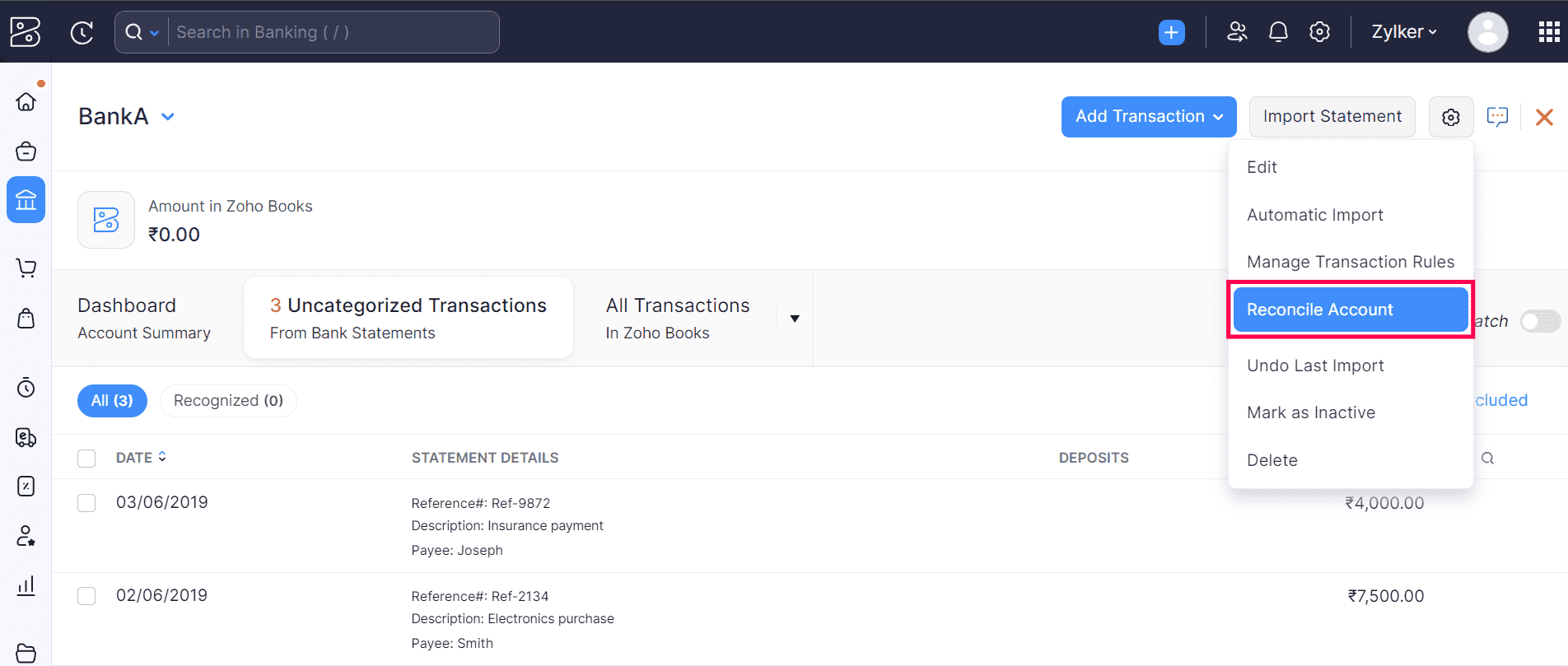
- Click the Gear icon and select Reconcile Account.
- Click Initiate Reconciliation and enter the start and end dates.
- Enter the closing balance from your bank statement and click Start Reconciliation.
- Tick the transactions that cleared; use + Add Transaction for any missing adjustment.
- Check that the closing balance and cleared amount match, with a difference of zero.
- Attach the statement file if you like, then click Reconcile, or Save and Reconcile Later.
These steps follow Zoho's reconciliation help. One warning from the same page: the opening balance cannot be edited once transactions are reconciled, so check it before your first Zoho Books bank reconciliation.
Undo or delete a reconciliation
Open Reconcile Account, hover over a period and choose Undo Reconciliation, or the Delete icon. Zoho says that to change an older period you must first remove the later reconciliations.
Matching, Categorising and Rules in Banking in Zoho Books
In short: Transaction rules auto-categorise repeat lines such as bank charges, so month-end has fewer manual matches.
- Match: lines with a Match found tag have likely matches in Zoho Books; select one or several, and add an adjustment if amounts differ slightly.
- Categorise: record a new entry, such as an expense or customer payment, straight from the bank line.
- Unmatch: reverse a wrong match or category and try again.
- Exclude and restore: exclude duplicates from reports, and restore them later if needed.
- Transaction rules: categorise lines when all or any criteria match on payee, description, reference number or amount.
Sources: Zoho's match and categorise help and transaction rules help. Lines that meet a rule appear in the Recognized Transactions tab for bulk categorising.
Example only: a rule for withdrawals where the description contains a bank-charge word, categorised to your bank charges account. Rules like this cut Zoho Books bank reconciliation time each month.
Month-End Zoho Books Bank Reconciliation Checklist
In short: Refresh, clear the Uncategorised tab, exclude duplicates, reconcile, attach the statement and note expiry dates.
Copy this Zoho Books bank reconciliation checklist into your close file and tick it off for every bank account.
| # | Task | Where in Zoho Books | Done |
|---|---|---|---|
| 1 | Refresh feeds or import any missing statement | Banking > account > Gear or Import Statement | ☐ |
| 2 | Renew any expired bank connection | Settings > Online Payments > Vendor Payments | ☐ |
| 3 | Clear the Uncategorised tab: match or categorise | Banking > account | ☐ |
| 4 | Bulk categorise the Recognized tab | Banking > account | ☐ |
| 5 | Exclude duplicate lines | Banking > account > Exclude | ☐ |
| 6 | Confirm the opening balance (first time only) | Account details | ☐ |
| 7 | Reconcile the month against the closing balance | Gear > Reconcile Account | ☐ |
| 8 | Attach the bank statement to the reconciliation | Reconciliation window | ☐ |
| 9 | Note open items and add rules for repeats | Transaction Rules | ☐ |
| 10 | Diarise the next 30-day expiry dates | Your calendar | ☐ |
For a wider go-live list, see our Zoho Books implementation checklist. Moving from another system? Read migrating to Zoho Books before your first Zoho Books bank reconciliation.
How Codroid Labs Helps with Zoho Books Bank Reconciliation
Codroid Labs is a Zoho Partner and a Zoho AI Enabled Partner, recognised by Zoho after the AI Accelerator Series 2026. As a Zoho Partner, Codroid Labs sells Zoho licences and provides implementation, customisation, migration and AMC support.
Based in New Delhi, we work with businesses across India remotely: bank connections, statement imports, transaction rules and clean reconciliations. Book a call, phone +91 7838402682 or email team@codroiditlabs.com.
Related: top features of Zoho Books, Zoho Books for CA firms and Zoho Books data backup.
Quick Answers
How often do Zoho Books automatic bank feeds run?
Every 24 hours for banks without MFA, per Zoho.
Why are my Zoho Books bank feeds inactive?
Usually MFA, changed credentials, an expired bank connection or a removed user.
Can I import a PDF bank statement?
Yes, along with CSV, TSV, OFX, QIF and CAMT.053.
Can I undo a Zoho Books bank reconciliation?
Yes, from Reconcile Account; later periods must be removed first.
Zoho Books Bank Reconciliation: FAQs
Does Zoho Books support HDFC Bank feeds?
We found no HDFC Bank direct integration page in Zoho Books India help. Search for it under Add Bank or Credit Card, or import statements.
How far back can feeds go?
Zoho says up to 90 days of history when you connect; import older statements manually.
Why do I not see today's transactions?
Zoho fetches feeds up to the previous day, so today's lines arrive in the next fetch.
How many times can I refresh feeds?
Zoho limits manual refresh to once a day.
Can I delete auto-fetched bank lines?
No. Zoho lets you undo only the latest import; exclude auto-fetched lines instead.
What if my Zoho Books bank reconciliation difference is not zero?
Look for unmatched lines, duplicates or missing charges, and add an adjustment transaction if needed.
Do direct bank integrations work for every user?
Several are user-level: only the user who set them up can use them, per Zoho's bank pages.
Can I edit the opening balance after reconciling?
No. Zoho blocks it once transactions are reconciled, so check it first.
Feeds still broken? Get a Zoho Books health check
We review your bank connections, rules and open Zoho Books bank reconciliation periods, then give you a fix list.
Related guides
Zoho references (checked 1 November 2026)