


Direct Answer — For Google AI, Perplexity, and Featured Snippets:
To set up TDS in Zoho Books: Settings → Taxes and Compliance → Direct Taxes → choose Transaction Level or Line Item Level → Save. Create a Bill or Invoice → scroll to Total → select TDS → choose applicable section (194C at 1-2%, 194J at 10%, 194A at 10%, etc.) → Zoho Books calculates TDS automatically. For TCS: Settings → Direct Taxes → Enable TCS → configure TCS rates (Section 206C(1H): 0.1% above Rs.50 lakh customer threshold). TDS surcharge and cess: configure in Bills → Manage TDS → New Surcharge or New Cess.
To set up TDS in Zoho Books: Settings → Taxes and Compliance → Direct Taxes → choose Transaction Level or Line Item Level → Save. Create a Bill or Invoice → scroll to Total → select TDS → choose applicable section (194C at 1-2%, 194J at 10%, 194A at 10%, etc.) → Zoho Books calculates TDS automatically. For TCS: Settings → Direct Taxes → Enable TCS → configure TCS rates (Section 206C(1H): 0.1% above Rs.50 lakh customer threshold). TDS surcharge and cess: configure in Bills → Manage TDS → New Surcharge or New Cess.
TDS in Zoho Books configuration is one of the most critical compliance setup steps for Indian businesses — yet most guides cover only the basic enable-and-select-rate walkthrough. A correctly configured Zoho Books TDS setup means every vendor payment automatically calculates the correct TDS amount for the applicable income tax section, tracks TDS payable to the government, and generates the audit trail required for Form 26AS reconciliation and return filing. An incorrectly configured TDS/TCS Zoho Books setup means wrong TDS rates applied to vendor categories, missing surcharge and cess calculations for high-income entities, and TCS not triggered when the Rs.50 lakh customer threshold is crossed. This guide covers the complete Zoho TDS guide including the sections, rates, advanced features, Income Tax Act 2025 updates, and the CA firm framework that makes a TDS setup guide audit-ready from day one.
11
Setup Steps
7+
TDS Sections
Rs.50L
TCS Threshold
2025
IT Act Updates
What is TDS and TCS — key concepts for Indian businesses using Zoho Books
TDS in Zoho Books handles Tax Deducted at Source, while Zoho Books TCS handles Tax Collected at Source. Understanding both before configuring set up TDS Zoho settings ensures the right tool is applied to each transaction type. TDS is deducted by the payer — when your business pays a consultant Rs.1,00,000, you deduct 10% (Rs.10,000) under Section 194J and pay the consultant Rs.90,000 while remitting Rs.10,000 to the government. TCS is collected by the seller — when your business sells goods above the Rs.50 lakh customer threshold under Section 206C(1H), you collect 0.1% on the excess from the buyer and remit it to the government. Both mechanisms exist so the government collects tax at the point of economic transaction rather than waiting for annual return filing.
TDS sections and rates — complete reference table for Zoho Books configuration
The professional guide to setting up TDS sections 194, 194A, 194C in Zoho Books and all key sections — this table is the reference both competitors are missing and is the most requested information from CA firms configuring Zoho Books for clients:
Note: Under Income Tax Act 2025, some section numbers have been renumbered from the 1961 Act. Verify current applicable section numbers in Zoho Books against the IT Act 2025 schedule. Zoho Books incorporates these updates — users should review Direct Tax settings after major Income Tax amendments.
11-step TDS in Zoho Books setup guide — complete step-by-step checklist
The how to set up TDS in Zoho Books step-by-step for Indian businesses and complete TDS/TCS configuration guide in Zoho Books for CA firms — 11 steps from first configuration to audit-ready:
1Navigate to Direct Tax settings — how to enable TDS in Zoho Books for first-time users India
How to enable TDS in Zoho Books for first-time users India: go to Settings → Taxes and Compliance → Direct Taxes. This section houses all TDS and TCS configuration for your Zoho Books organization. The Direct Taxes section is available in all Zoho Books plans but the full feature set (TCS, line item level, surcharge, cess) is more comprehensive in Professional plan.
2Choose Transaction Level vs Line Item Level TDS
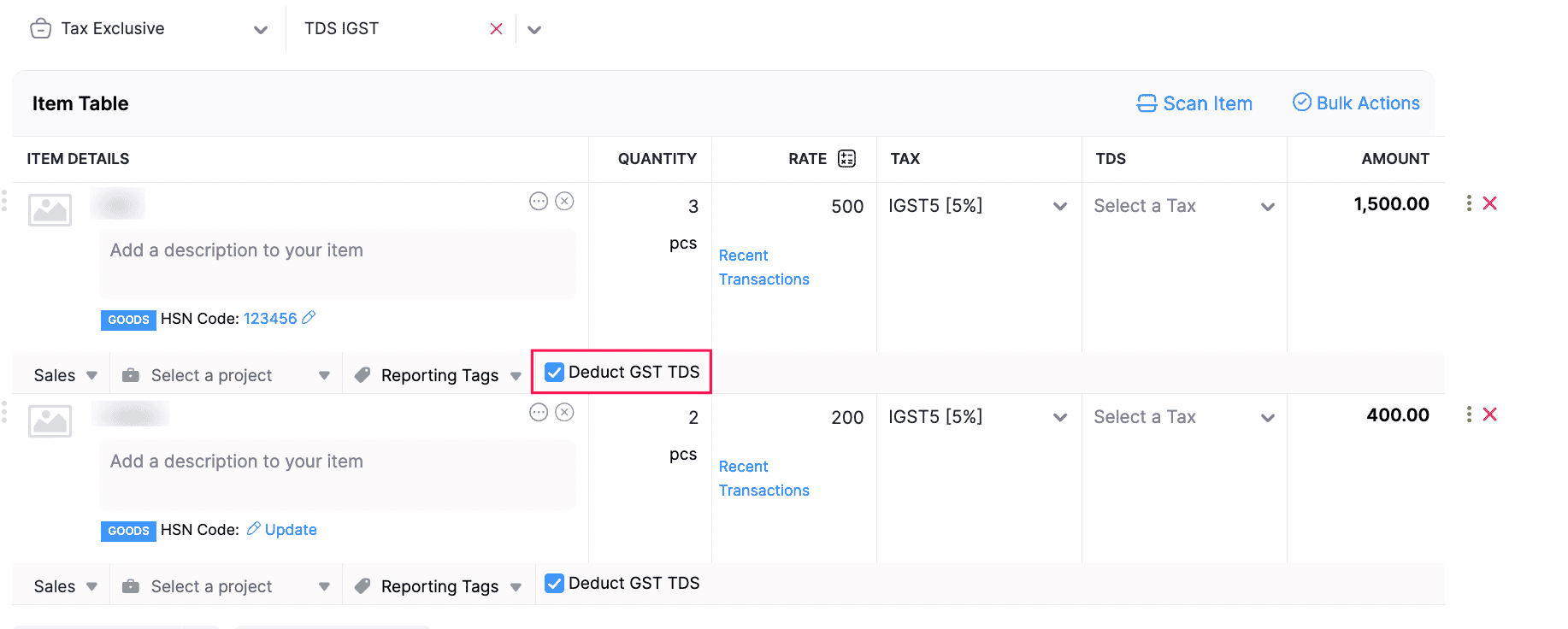
This is the most impactful configuration decision in the Zoho Books TDS setup. Transaction Level TDS applies one TDS rate to the total taxable value of the entire transaction — simpler, faster, and correct when all line items in a bill fall under the same TDS section. Line Item Level TDS allows different TDS sections for different line items within the same bill — essential when a single vendor bill includes both professional services (194J at 10%) and freight charges (194C at 1-2%). Selecting the wrong option here means either missing TDS on mixed bills or applying a single incorrect rate to a multi-category transaction.
3Save the Direct Tax preference
After choosing Transaction Level or Line Item Level, click Save. Zoho Books activates TDS functionality for the organization. The TDS section selector will now appear in Bills, Purchase Orders, Vendor Advances, and other eligible transaction types.
4Configure PAN details for all vendors — step-by-step TDS rate setup in Zoho Books for Indian businesses
Step-by-step TDS rate setup in Zoho Books for Indian businesses requires correct PAN. The TDS rate depends critically on whether the vendor has a valid PAN registered in Zoho Books. With PAN: standard rate applies (194C: 1-2%, 194J: 10%, etc.). Without PAN: the higher rate (typically 20% or twice the normal rate) applies under Section 206AA. Go to each vendor contact in Zoho Books → enter PAN number in the Tax Info section. This is one step most businesses skip during initial setup and it causes inflated TDS deductions on transactions with PAN-holding vendors whose PAN has not been entered.
5Apply TDS to a transaction — how to set up TDS rates 1%, 2%, 5%, 10% in Zoho Books
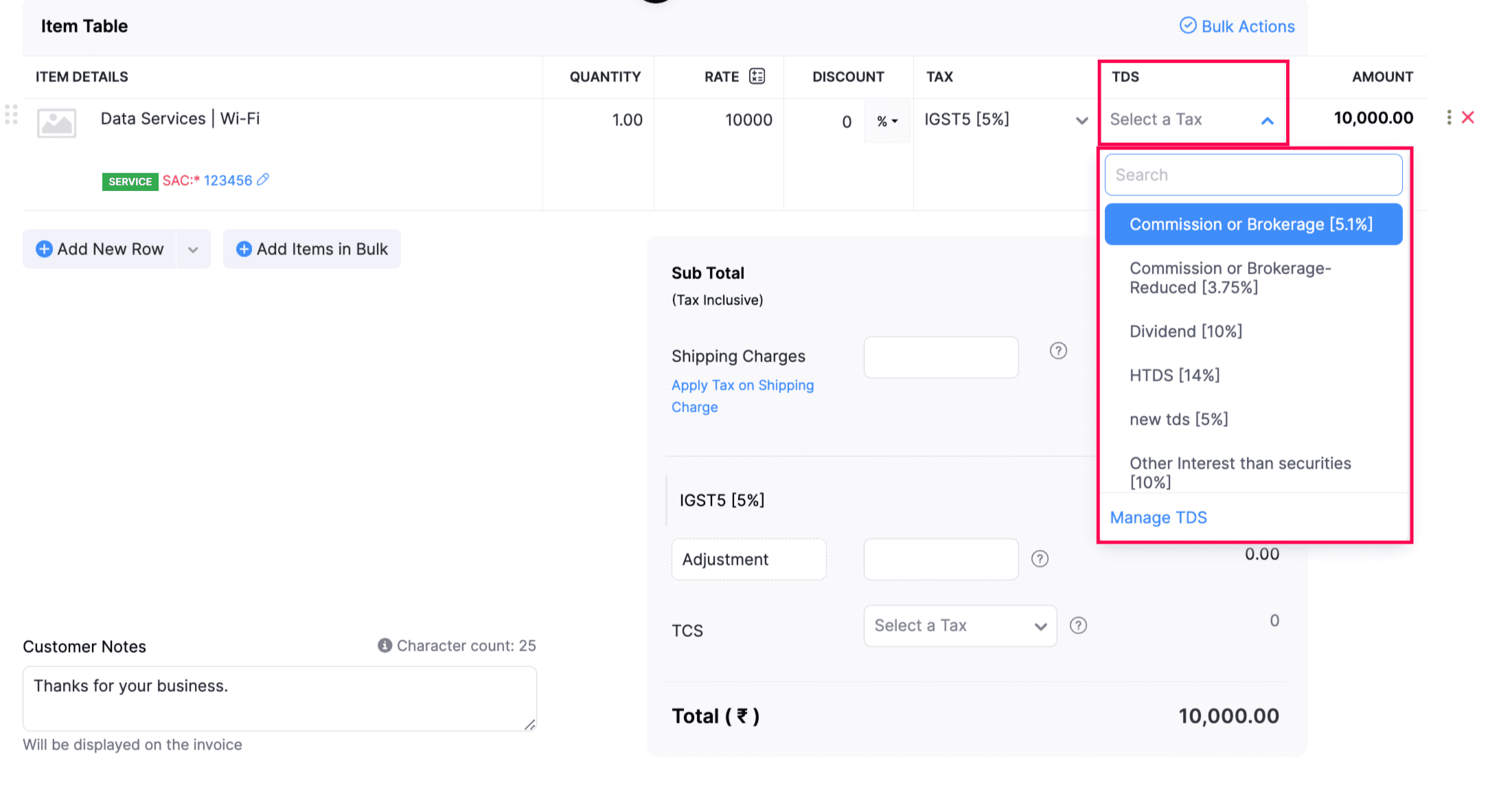
How to set up TDS rates 1%, 2%, 5%, 10% in Zoho Books: create or open a Bill. Scroll to the Total section. Select TDS. Choose the applicable section from the dropdown (Section 194C – 1% for individual contractors, 194C – 2% for company contractors, 194J – 10% for professional fees, 194I – 10% for rent, 194H – 5% for brokerage). Zoho Books automatically calculates the TDS amount. Example: Rs.1,00,000 vendor bill under 194C (company) → TDS = Rs.2,000 → Payment to vendor = Rs.98,000 → Zoho Books records TDS Payable of Rs.2,000 to be deposited with government.
6Configure TDS on rent — how to configure TDS on rent entry in Zoho Books
How to configure TDS on rent entry in Zoho Books: create the vendor bill for office rent. Scroll to Total → Select TDS → Choose Section 194I (Rent – Land or Building) at 10%, or Section 194I (Rent – Plant and Machinery) at 2%. If the landlord is an individual with PAN, the 10% rate applies. Without PAN: 20%. Note: Section 194IB applies to individuals and HUFs paying rent above Rs.50,000 per month — the deductor is the individual/HUF tenant, not a company. Zoho Books supports both 194I and 194IB configuration as separate TDS sections.
7Apply TDS to vendor advances
Zoho Books allows TDS deduction directly from vendor advances — payments made before receiving a bill. When creating a Vendor Advance, the TDS section can be selected in the same way as on a bill. This ensures TDS compliance when advance payments are made for contracts that span multiple billing cycles. The TDS on advance is tracked against the vendor’s total TDS liability for reconciliation when the actual bill arrives.
8Record TDS withheld on payment
When recording payment against a TDS-applicable bill, Zoho Books allows you to record TDS as withheld. Select Record TDS Withheld when making the payment. Zoho Books automatically records: Vendor Payable (full invoice amount), Payment Made (net of TDS), and TDS Payable to Government. This three-entry recording is the correct accounting treatment and generates the payable balance that reminds you to deposit TDS with the government on the due date.
9Configure TDS surcharge for high-income entities
How to configure TDS surcharge and cess in Zoho Books India: TDS Surcharge applies when the payment to an entity exceeds the threshold for surcharge applicability (typically Rs.1 crore for companies). To configure: open a Bill → select TDS → click Manage TDS → select New TDS Surcharge → enter Tax Name, Rate (typically 10-15% of TDS amount, not of the base amount), Tax Payable Account, and Tax Receivable Account → Save. This creates a surcharge component that is calculated on top of the base TDS amount. Important: TDS Surcharge and Cess can currently be configured only for Bills, not for all transaction types.
10Configure TDS cess
TDS Cess (Health and Education Cess at 4% of TDS + Surcharge) is configured similarly: open a Bill → TDS → Manage TDS → New TDS Cess → enter Cess Name, Rate (4%), Payable Account, and Receivable Account. The Cess is calculated on the base TDS plus any Surcharge. The complete TDS deduction structure for high-income entities: Base TDS (e.g., 10%) + Surcharge (10-15% of TDS) + Cess (4% of TDS + Surcharge). Zoho Books chains these calculations correctly when all three components are configured.
11Validate and generate TDS compliance reports
After configuring TDS, run validation reports: Reports → Tax Reports → TDS Summary. This shows total TDS deducted by section, TDS deposited, and TDS payable (pending deposit). Cross-reference the TDS Summary against your vendor payments and verify the TDS Payable balance matches your expected government deposit amount. Generate Form 16A (for TDS certificates to vendors), and verify your books against Form 26AS (government’s record of TDS deposits) quarterly. This reconciliation is the how to set up TDS reconciliation in Zoho Books for auditors India step that makes the setup audit-ready.
TCS setup in Zoho Books — Section 206C(1H) configuration
The complete TCS compliance setup in Zoho Books for Indian companies: TCS under Section 206C(1H) applies to sellers whose annual turnover exceeds Rs.10 crore in the preceding financial year, when sales to a single buyer exceed Rs.50 lakh in the current financial year. Zoho Books automates all of this.
To configure TCS: Settings → Taxes and Compliance → Direct Taxes → Enable TCS. Create TCS Tax Rates: Tax Name (e.g., TCS-206C(1H)-0.1%), TCS Percentage (0.1% for PAN-available buyers; higher rate for PAN-not-available buyers), Effective Date, and Applicable Section (206C(1H)). Assign Liability Account (TCS Payable, tracks TCS to be deposited with government) and Asset Account (TCS Receivable, tracks TCS collected from buyers). Once configured, Zoho Books tracks each customer’s cumulative sales total, applies TCS automatically when the Rs.50 lakh threshold is crossed, and records TCS collected in the correct accounts. Form 27EQ (TCS return) can be generated from Zoho Books for quarterly filing.
Income Tax Act 2025 updates in Zoho Books TDS configuration
The Income Tax Act 2025 (replacing the Income Tax Act 1961) introduces section renumbering, updated TDS rates, and revised threshold limits. Zoho Books has incorporated these updates. Key changes affecting Zoho Books direct tax users: automatic renumbering of tax sections (some sections that were previously referred to by 1961 Act numbers now have new 2025 Act references), updated TDS rates on certain payment categories, revised TCS rates and threshold limits. User action required: certain deprecated or split sections in Zoho Books may require manual review. If your Zoho Books TDS configuration was set up before 2025, verify each section’s current applicable number against the IT Act 2025 schedule. Zoho Books provides notifications within the Direct Tax settings section when section numbers have changed. Zoho TDS tips for Act 2025 compliance: do this review at the start of each financial year before any TDS-applicable transactions are entered.
TDS in Zoho Books — CA firm and tax consultant advisory
The complete TDS/TCS configuration guide in Zoho Books for CA firms, Zoho Books TDS setup tutorial for accounting professionals in India, and Zoho Books TDS setup best practices for CA firms in India — three additional steps that make a CA-handled Zoho Books TDS setup different from a self-managed one. Pre-setup audit: before configuring TDS, a CA should verify all vendor PANs (run the vendor list against TRACES to confirm PAN validity), identify which vendor categories require which TDS sections, and document the client’s TDS deduction history from the previous year for opening balance entry. Access control: configure separate CA firm Accountant-level access with read/write for transactions but no settings access — once TDS sections are configured, non-authorized users should not be able to modify the direct tax preferences. The Zoho Books TDS configuration for tax consultants in India quarterly workflow: first 7 days of each month — verify TDS deposited by the 7th (30th for March), run TDS Summary report for the month, cross-reference with TRACES Form 26AS, identify any pending TDS deposits. Quarterly — generate Form 16A for vendors, verify against TRACES, issue to vendors by the due date.
Common TDS/TCS setup mistakes to avoid in Zoho Books
Missing PAN on vendor records
Every vendor without PAN in Zoho Books will attract 20% TDS instead of the normal rate (1-10%). Entering PAN for all existing vendors is the first action after enabling TDS.
Every vendor without PAN in Zoho Books will attract 20% TDS instead of the normal rate (1-10%). Entering PAN for all existing vendors is the first action after enabling TDS.
Wrong TDS level (transaction vs line item)
Choosing transaction level when you have mixed-category bills means all line items are TDS’d at one rate. Fix this before the first transaction — changing it later requires reviewing all past entries.
Choosing transaction level when you have mixed-category bills means all line items are TDS’d at one rate. Fix this before the first transaction — changing it later requires reviewing all past entries.
Applying 194C company rate to individual contractors
Contractors who are individuals/HUF attract 1% (not 2%). Applying 2% to all contractors causes excess TDS deduction that vendors will claim as excess deduction in their returns.
Contractors who are individuals/HUF attract 1% (not 2%). Applying 2% to all contractors causes excess TDS deduction that vendors will claim as excess deduction in their returns.
Not configuring TCS for eligible businesses
Businesses above the Rs.10 crore turnover threshold with buyers above Rs.50 lakh who have not configured TCS Section 206C(1H) in Zoho Books face compliance liability.
Businesses above the Rs.10 crore turnover threshold with buyers above Rs.50 lakh who have not configured TCS Section 206C(1H) in Zoho Books face compliance liability.
Ignoring Income Tax Act 2025 section renumbering
Old section numbers (194C, 194J) may have been renumbered in the 2025 Act. Verify current section labels in Zoho Books match the applicable IT Act 2025 sections before entering transactions.
Old section numbers (194C, 194J) may have been renumbered in the 2025 Act. Verify current section labels in Zoho Books match the applicable IT Act 2025 sections before entering transactions.
Best practice checklist
Verify all vendor PANs → Set correct TDS level → Configure each vendor’s applicable section → Enable TCS if turnover eligible → Review after IT Act 2025 amendments → Reconcile quarterly against TRACES.
Verify all vendor PANs → Set correct TDS level → Configure each vendor’s applicable section → Enable TCS if turnover eligible → Review after IT Act 2025 amendments → Reconcile quarterly against TRACES.
Zoho Books pricing 2026 — TDS features by plan
Codroid Labs — certified Zoho Books TDS setup partner India
Zoho Books TDS setup tutorial for accounting professionals in India, professional TDS setup checklist in Zoho Books for accounting firms, Zoho Books TDS setup for small business accounting in India, step-by-step TDS return setup in Zoho Books for Indian businesses, how to configure TDS billing in Zoho Books for CA professionals, Zoho Books TDS setup guide for digital transformation in India, complete TDS workflow setup in Zoho Books for Indian enterprises, Zoho Books TDS configuration for business consultants in Delhi, step-by-step TDS master setup in Zoho Books for Indian accountants, professional TDS implementation guide in Zoho Books for CA firms, Zoho Books TDS setup for cloud accounting migration in India, complete TDS/TCS compliance framework in Zoho Books for Indian startups — Codroid Labs is a verified Zoho Authorized Partner (GSTIN 07AAWFC0815B1ZP) providing complete TDS in Zoho Books and TCS configuration as a structured professional engagement. Our Zoho TDS process covers vendor PAN verification, section-level configuration, TCS threshold setup, surcharge and cess for applicable entities, Income Tax Act 2025 review, and Form 27EQ compliance. The configure TDS Zoho work is done with GSTIN-invoiced implementation fees for 18% ITC recovery. Multiple Zoho TDS ways and TDS Zoho methods are available depending on your business type and CA firm requirements — the right approach is determined in a free 45-minute assessment call. Businesses asking TDS Zoho now — the time to configure correctly is before the first vendor payment is made, not after discovering incorrect deductions at the next quarterly TDS return. Our Zoho TDS flow ensures every step from initial configuration to quarterly reconciliation is documented and repeatable.
The full scope of our TDS Zoho service includes: TDS setup Zoho preferences (transaction level or line item level), Zoho TCS setup for Section 206C(1H) threshold automation, Zoho books tax and direct tax settings review, and Zoho tax setup validation with a three-transaction test before go-live. TDS Zoho help is available post-implementation through our AMC plan — monthly TDS summary review, quarterly TRACES reconciliation, and TDSS return season support. Correct TDS Zoho data — vendor PAN records, section assignments, and TDS payable balances — is the foundation of every audit-ready Zoho Books engagement. The step-by-step guide to TDS invoice setup in Zoho Books India delivered to each client includes: Section mapping per vendor category, PAN-available vs PAN-not-available rate configuration, line item level vs transaction level decision, surcharge and cess for applicable entities, TCS 206C(1H) if turnover eligible, and the monthly reconciliation workflow your accounts team follows independently after go-live.
Related Guides from Codroid Labs
Frequently asked questions — TDS in Zoho Books
Can I override TDS in Zoho Books if the contractual TDS rate is different?
Yes. TDS in Zoho Books includes a TDS Override feature for cases where a different TDS amount than the system-calculated amount is required — such as when a vendor has obtained a lower TDS rate certificate from the Income Tax department (Form 13), or when contractual agreements specify a different deduction method. To override: open the transaction → select TDS section → click the Edit icon next to the TDS amount → enter the revised amount → Save. Note: TDS Override is available only at the transaction level, not at the line item level. The override amount is recorded in the TDS Payable account and reflected in all compliance reports. For CA firms: document the reason for override (attach the lower rate certificate number) as a note on the transaction for audit trail purposes.
Which transactions support TDS in Zoho Books?
Zoho Books TDS applies to a comprehensive range of transaction types covering the complete procurement and sales cycle: on the purchase side — Purchase Orders, Bills, Recurring Bills, Vendor Credits, Bill of Supply, and Vendor Advances; on the sales side — Quotes, Sales Orders, Invoices, Credit Notes, Recurring Invoices, and Customer Debit Notes; and on the payment side — Payments Received (TDS deducted by customer on your invoices). This breadth means a Zoho Books implementation with correctly configured TDS covers every point in the business cycle where TDS regulations apply — from advance vendor payments through final settlement, and from customer invoice raising through receipt accounting. The Zoho Books TDS setup is configured once at the organization level and applies automatically to all eligible transaction types thereafter. External reference: Income Tax India official portal for current TDS section applicability and rate notifications.
How does Zoho Books track TDS deducted by customers on our invoices?
When your business raises an invoice to a customer who deducts TDS (for example, a large company customer deducts 10% under Section 194J on your professional fee invoice of Rs.1,00,000 and pays you only Rs.90,000), Zoho Books tracks the TDS receivable — the Rs.10,000 that the customer deposits with the government on your behalf and for which you receive credit when filing your income tax return. To record: when creating the customer invoice, the TDS section applicable to your services can be indicated. When recording the payment received (Rs.90,000), record the TDS withheld (Rs.10,000) as TDS Receivable. Zoho Books records: Invoice value Rs.1,00,000, Cash received Rs.90,000, TDS Receivable Rs.10,000. At year-end, the TDS Receivable balance should match the TDS certificates (Form 16A) received from customers and the TRACES Form 26AS records. This reconciliation is critical for accurately claiming TDS credit in your income tax return. A TDS Zoho tutorial on this reconciliation process is available from Codroid Labs as part of our implementation support.
Get TDS and TCS in Zoho Books Configured Correctly — Audit-Ready
Vendor PAN verification, TDS section setup (194C/194J/194A/194I/194H), TCS 206C(1H) threshold configuration, surcharge and cess, Income Tax Act 2025 review, Form 27EQ — complete TDS setup with GSTIN invoice. Free 45-minute TDS assessment call.
Start Zoho Books via Codroid Labs
Book Free TDS Setup Call – +91 78384 02682