


Zoho Books data backup — quick answer: Settings → Developer Space → Data Backup → Backup Your Data → Continue → Download. Processing time approximately 30 minutes. Format: CSV or XLS. Critical limit: one backup every 15 days. Critical gap: the export does NOT include attachments, comments, or custom configurations. Treat it as a financial data export — not a full system restore point.
Zoho Books data backup — your accounting data is one of the most critical assets in your business. Invoices, bills, customer records, expenses, payments, GST reports, and financial summaries all need to remain accessible even when system changes, migrations, or unexpected issues occur. While Zoho Books provides cloud-based storage with built-in reliability, every organization should also maintain its own verified offline copy of financial data — completely under its own control. This guide covers the complete verified backup process, its limitations, what it does and does not include, and the best practices that prevent permanent data loss.
6 Steps
Verified Backup Process
15 Days
Minimum Between Backups
~30 Min
Processing Time
CSV / XLS
Export Format
Why Zoho Books data backup matters
The Zoho Books backup and Zoho Books financial backup rationale: cloud storage is reliable — but reliability is not the same as organizational control. When your financial data lives only inside a cloud application, you depend entirely on that application remaining accessible, your subscription staying active, and your access credentials remaining secure. A Zoho Books accounting backup held outside the application gives your organization an independent, controllable copy of its financial history.
The Zoho Books data management case for regular backups is straightforward:
Compliance and audit
The Zoho Books backup for tax and audit records requirement: tax authorities and auditors may request historical financial records. An offline backup provides records independently of application access.
Pre-migration safety
The Zoho Books data export before software migration case: any significant system change — migrating to a new ERP, restructuring chart of accounts, bulk data imports — should be preceded by a verified backup.
Accidental deletion protection
The how to prevent permanent data loss in Zoho Books reason: accidental record deletion, incorrect bulk edits, or misconfigured automation can affect live data. A recent backup limits the scope of recovery work needed.
Historical archiving
The Zoho Books offline backup archiving case: for year-end closing, financial reviews, and long-term record retention, a named offline backup file provides a reliable historical reference point.
6-step Zoho Books data backup process (verified)
The Zoho Books backup data step by step process — the how to back up Zoho Books data and how to back up Zoho Books organizational data verified sequence:
Step 1Open Settings
Log in to your Zoho Books organisation. Click Settings from the top-right corner of the interface. This is the Zoho Books backup settings entry point for the built-in backup tool.
Step 2Open Data Backup under Developer Space
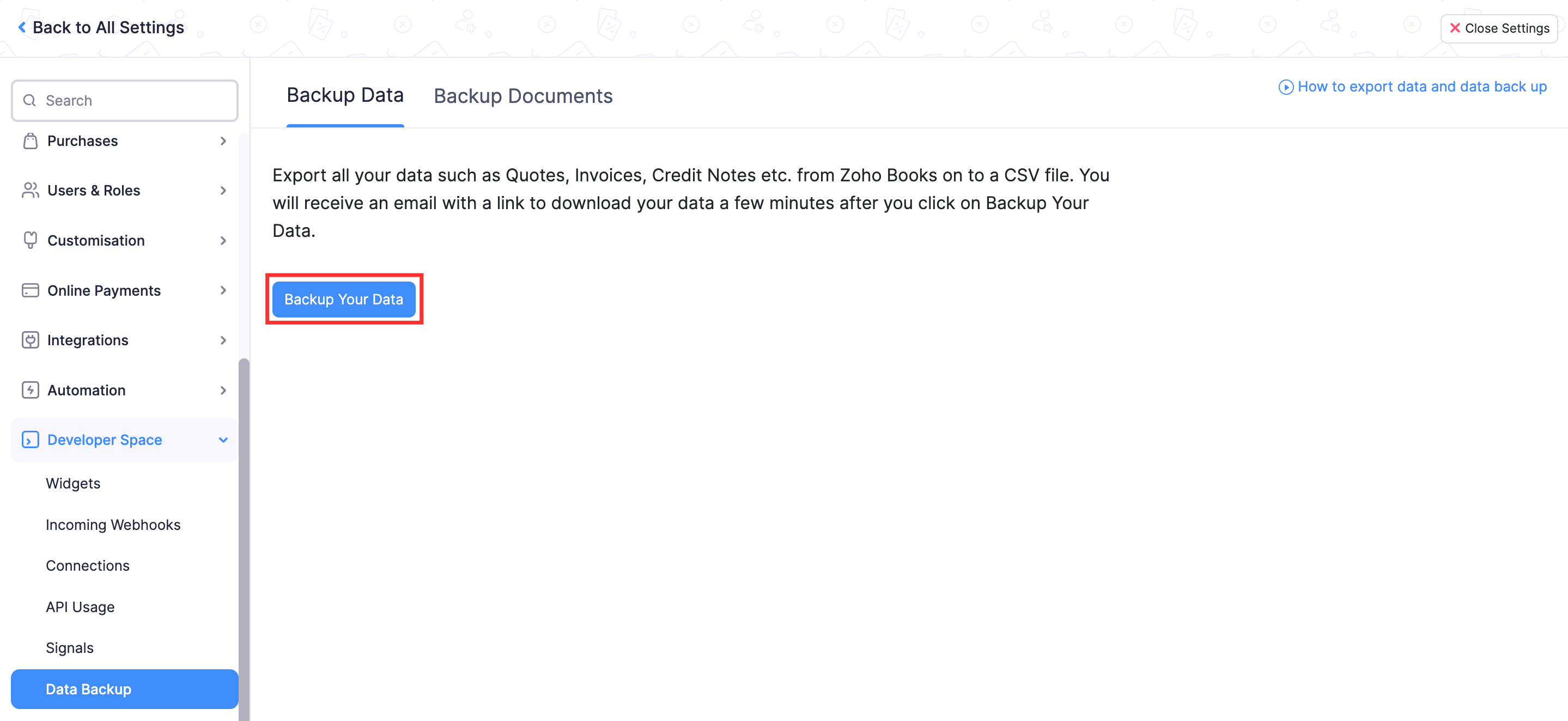
The where to find the Data Backup option in Zoho Books and how to access Zoho Books backup under Developer Space: within Settings, navigate to Developer Space (labeled “Developer & Data” in some plan versions). Select Data Backup from this section. This is the only built-in Zoho Books backup mechanism provided within the application.
Step 3Initiate the backup
The how to create a backup file in Zoho Books trigger: in the Data Backup section, click Backup Your Data. This initiates the export request for your organisation’s data.
Step 4Confirm the request
Click Continue to confirm and initiate the backup process. Zoho Books sends a confirmation email indicating the backup has been initiated.
Step 5Wait for processing — approximately 30 minutes
The Zoho Books backup guide timing note: the backup does not become available instantly. Processing takes approximately 30 minutes according to Zoho’s documentation. Zoho Books sends a notification when the backup file is ready.
Step 6Download the backup file
The how to download Zoho Books backup as a ZIP file step: download the generated Zoho Books backup file from either the email notification or directly from the Data Backup page in Settings. The Zoho Books CSV export and Zoho Books XLS export options provide your organizational data as a Zoho Books compressed backup file. The how to export Zoho Books data in CSV format and how to export Zoho Books data in XLS format process both follow this same six-step sequence — the export format options are presented during the backup configuration.

Critical limits: the 15-day rule and what it means for your backup strategy
The Zoho Books backup frequency constraint that most guides omit: after initiating a backup, you cannot initiate another for the next 15 days. This is the single most important limitation to understand before designing your Zoho Books data backup strategy.
What the 15-day limit means in practice:
- You cannot treat the built-in backup as a daily snapshot tool
- Maximum 2 backups per month — plan when they fall
- A backup before a major change consumes your “slot” for 15 days
- If you run a backup on the 1st and need another on the 10th — you cannot
- Build the 15-day window into your backup schedule calendar
The Zoho Books business backup scheduling recommendation: treat the 15-day window as a fixed constraint and plan your backup dates around your highest-risk activities — month-end processing, large imports, configuration changes, and year-end activities. The Zoho Books backup 2026 calendar approach: designate specific backup dates (e.g., 1st and 16th of each month) and assign responsibility for initiating and downloading each backup to a named administrator.
What the Zoho Books backup includes and what it misses
The Zoho Books export data and Zoho Books data export coverage — the how to export all data from Zoho Books complete picture:
Document and attachment backup — the gap most businesses miss
The Zoho Books backup documents and Zoho Books data backup and document backup difference — the how to back up documents in Zoho Books gap: if your Zoho Books organization contains uploaded files — invoice PDFs, bill attachments, receipt scans, contracts, customer correspondence — these are not captured in the standard data backup export.
The how to back up invoices and transactions in Zoho Books complete picture: the transaction data (amounts, dates, parties, line items) is backed up. The attached PDF files associated with those transactions are not.
Businesses that should address this gap specifically:
- Organizations that attach supporting PDFs to every invoice
- Businesses that store vendor bills and receipts as scanned uploads
- Companies with compliance requirements for document retention
- Any business where audit evidence depends on uploaded files
Solution: maintain a separate document storage process outside Zoho Books for files that must be retained independently of the application.
Backup is not the same as restore — the distinction that matters
The Zoho Books restore data and Zoho Books data recovery distinction: this is the most important conceptual point in the entire guide. A Zoho Books cloud backup export and a full system restore are not equivalent operations.
What the backup provides
- An offline CSV/XLS copy of organizational data
- A historical reference of financial records
- Source data for rebuilding records if needed
- Compliance documentation of point-in-time data
- Pre-change safety copy of data state
What the backup does NOT provide
- One-click restoration to a previous application state
- Recovery of deleted attachments or comments
- Restoration of custom workflow configurations
- Automatic re-import of all records
- A complete “time machine” rollback of the application
The how to restore Zoho Books data from a backup practical answer: the CSV export can be used to manually re-import data using Zoho Books’ import function — but this is a structured data recovery process, not an automated one-click restore. Organizations with critical recovery requirements should understand this distinction before assuming the built-in export covers their full recovery scenario.
Password protection and secure backup storage
The Zoho Books backup security and Zoho Books backup password requirements — the how to protect a Zoho Books backup with a password and how to store Zoho Books backup files securely approach: financial backup files contain sensitive business information — customer data, revenue figures, tax records, and potentially personally identifiable information (PII).
The how to include sensitive PII in Zoho Books backup security consideration: when the backup contains PII (customer names, addresses, PAN numbers, GSTIN, bank details), the downloaded file must be protected with the same security controls applied to other sensitive financial documents. Apply password protection to the downloaded archive before storing or sharing it.
The how to store Zoho Books backup files securely storage requirements: store backup files in access-controlled locations with restricted permissions. Named backup files (e.g., CompanyName_ZohoBooks_Backup_Aug-2026) make historical archives easier to manage and audit.
When to back up — the right triggers
The best practices for backing up Zoho Books data 2026 and Zoho Books backup for small business accounting data timing guide. Back up before:
Major configuration changes
Chart of accounts restructuring, custom field changes, workflow edits
Large data imports
Bulk invoice imports, contact uploads, item catalog updates
Software migrations
Zoho Books data export before software migration to any new system
User permission changes
Restructuring roles, removing users, admin access changes
Year-end and month-end
Pre-close backup preserves the period’s financial state
Automation changes
Before modifying recurring transactions, payment reminders, or workflows
6-point backup administration checklist
The complete Zoho Books data backup guide 2026 and how to backup Zoho Books without losing data administration checklist:
- Assign responsibility — name the administrator responsible for initiating and downloading each backup. Without named ownership, backups get skipped.
- Schedule backup dates — given the 15-day minimum between backups, designate fixed dates (e.g., 1st and 16th of each month) and add them to the accounting calendar.
- Use a secure storage location — the how to store Zoho Books backup files securely requirement: store backup files outside the Zoho environment in an access-controlled location your organization controls.
- Apply password protection — password-protect the downloaded backup archive before storage, particularly when the file contains customer PII or sensitive financial data.
- Use clear file naming — for example: CompanyName_ZohoBooks_Backup_Aug2026. Clear names make historical archives searchable and auditable.
- Retain multiple copies — the Zoho Books backup for tax and audit records retention rule: maintain previous backup files rather than overwriting them. For tax compliance, financial records often need to be retainable for 7+ years.
Codroid Labs — Certified Zoho Books Partner — Implementation and Data Management
Zoho Books data backup, Zoho Books backup, Zoho Books backup guide, Zoho Books backup data, Zoho Books backup documents, Zoho Books export data, Zoho Books data export, Zoho Books financial backup, Zoho Books accounting backup, Zoho Books cloud backup, Zoho Books offline backup, Zoho Books backup file, Zoho Books CSV export, Zoho Books XLS export, Zoho Books compressed backup, Zoho Books restore data, Zoho Books data recovery, Zoho Books backup security, Zoho Books backup settings, Zoho Books data management, Zoho Books backup password, Zoho Books transaction backup, Zoho Books invoice backup, Zoho Books business backup, Zoho Books backup 2026 — Codroid Labs (GSTIN 07AAWFC0815B1ZP) is a certified Zoho Books partner. We implement Zoho Books for businesses across India including data migration, configuration, backup procedures, and user training. Contact: +91 78384 02682, team@codroiditlabs.com.
Related Guides from Codroid Labs
Frequently asked questions
Where is the Data Backup option in Zoho Books?
Settings → Developer Space → Data Backup → Backup Your Data → Continue. Processing takes approximately 30 minutes. Full detail in the FAQ Schema above.
Is Zoho Books data backup the same as a full restore?
No — the built-in export provides a CSV/XLS copy of organizational data but does not include attachments, comments, or custom configurations. It is not a one-click restore. Full detail in the FAQ Schema above.
Set Up Zoho Books Right — With a Certified Partner
Implementation, data migration, backup procedures, GST configuration, and ongoing support — certified Zoho Books partner with GSTIN invoice for 18% ITC.
Start Zoho Books via Codroid Labs
Book Free Zoho Books Consultation – +91 78384 02682