


Switching Method · Checked 19 October 2026
Zoho Workplace Migration Plan: Switching From Google Workspace Step by Step
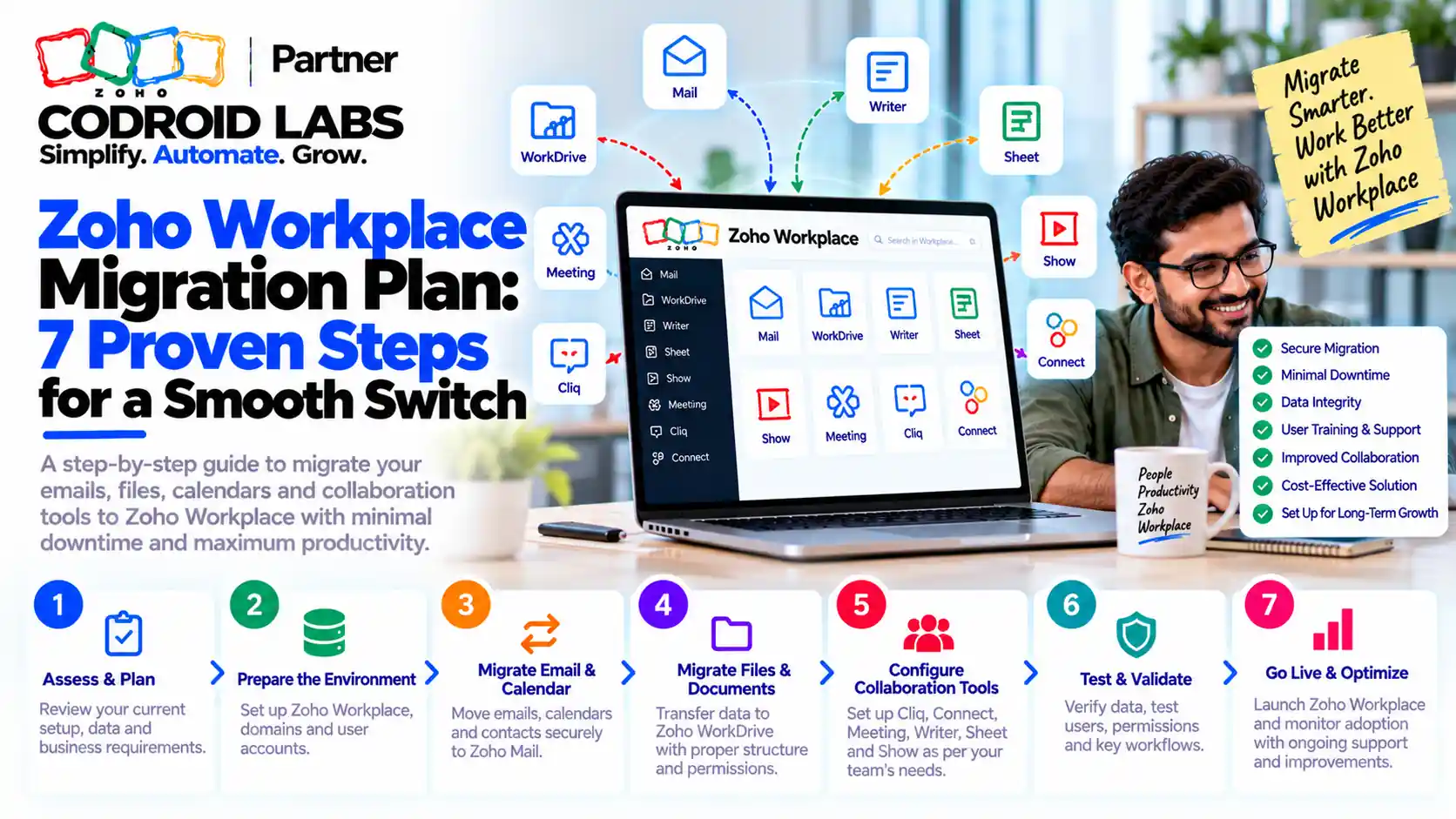
A Zoho Workplace migration plan turns a risky weekend switch into a calm, staged move: inventory first, then mail, DNS, files, chat and training in a fixed order. This guide is for admins moving a team from Google Workspace to Zoho Workplace. It follows Zoho's official migration tools, covers the MX, SPF and DKIM cutover, WorkDrive file migration, a Cliq implementation and a realistic timeline.
Checked: 19 October 2026
Source: Zoho Mail, WorkDrive and Cliq help; Zoho Workplace pricing
By: Codroid Labs, a Zoho Partner and Zoho AI Enabled Partner
Source: Zoho Mail, WorkDrive and Cliq help; Zoho Workplace pricing
By: Codroid Labs, a Zoho Partner and Zoho AI Enabled Partner
Short answer
Create users in Zoho Workplace and verify your domain. Grant Zoho Mail access to your Google Workspace data with a service account, then run Zoho's one-click migration for mail, contacts and calendars. Switch MX records so new mail lands in Zoho, then publish SPF, DKIM and DMARC. Move shared files to WorkDrive using Zoho's team migration tool (raised as a request), launch Cliq with a few channels, train users and keep the old accounts read-only for a short overlap.
What a Zoho Workplace Migration Plan Must Solve
In short: The hard parts are not the copy itself but labels, DNS timing, shared files, sign-in dependencies and getting people to change habits.
Admins who have made this move tend to report the same lessons. Mail with several labels arrived in several folders and used more storage than expected. New mail went missing because DNS was changed at the wrong moment. Shared files were forgotten until someone needed them. Other services that signed in with old work accounts stopped working. And people kept opening the old tools out of habit.
A written zoho workplace migration plan handles each of these before it happens. If you are still deciding whether to switch at all, read our overview of moving from Google Workspace to Zoho Workplace first. This page is the how-to method.
Inventory for Your Zoho Workplace Migration Plan
In short: Inventory users, mailboxes, aliases, groups, shared files, calendars and anything that signs in with old accounts, then set dates.
| Item | What to record | Why it matters |
|---|---|---|
| Users | Name, address, role, licence needed | Users must exist in Zoho before migration |
| Aliases and groups | Every alias and group address | Recreate them so no mail bounces |
| Mailbox sizes and labels | Size per user, number of overlapping labels | Labels become folders; overlaps duplicate mail |
| Mail rules and signatures | Filters, forwarding and signatures | Rebuild them in Zoho Mail after cutover |
| Shared drives and files | Owners, folder structure, size | Plan WorkDrive team folders and permissions |
| Calendars and resources | Shared calendars, rooms, recurring events | Check after migration that they appear correctly |
| Sign-in dependencies | Other services that use work accounts to sign in | Move or update these before closing old accounts |
| DNS access | Who can edit records at your domain host | Needed for verification, MX, SPF, DKIM and DMARC |
In your zoho workplace migration plan, reduce overlapping labels before migration if you can. Zoho's help explains that an email with several labels is migrated into each matching folder, which increases mailbox size.
Email Migration in a Zoho Workplace Migration Plan
In short: Zoho Mail's one-click Google Workspace migration moves mail, contacts and calendars once users exist in Zoho and access is granted with a service account.
Zoho Mail has a dedicated Google Workspace to Zoho Mail migration that moves mail, contacts and calendar data. Before you start, Zoho needs:
- The super admin email address of your Google Workspace organisation.
- A service account email address.
- The JSON or P12 key file for that service account.
Zoho's access setup help page walks through creating these. Then, in the Zoho Mail Admin Console:
| Step | Action in Zoho Mail Admin Console |
|---|---|
| 1 | Open Data Migration and choose Start Migration |
| 2 | Add server details for the source organisation and upload the key file |
| 3 | Add server settings, such as folders to exclude |
| 4 | Create the migration and add users (users must already exist in Zoho) |
| 5 | Start the migration and watch progress per user |
| 6 | Retry failed users; use Sync to bring later mail where the feature is enabled |
Zoho notes that the Sync option is being released in phases and can be enabled on request. Excluding a label such as Important, which duplicates the inbox, saves space. See Zoho's migration overview for other source types. This email migration step is the core of any zoho workplace migration plan.
DNS Cutover in a Zoho Workplace Migration Plan
In short: Verify the domain, switch MX records first so new mail lands in Zoho, then publish SPF, DKIM and DMARC.
| Order | Record | What it does | Zoho help |
|---|---|---|---|
| 1 | Verification (TXT or CNAME) | Proves you own the domain | Domain verification |
| 2 | MX | Routes new mail to Zoho | Configure email delivery |
| 3 | SPF (TXT) | Lists Zoho as an allowed sender for your domain | SPF configuration |
| 4 | DKIM (TXT) | Signs outgoing mail | DKIM configuration |
| 5 | DMARC (TXT) | Tells receivers how to treat failed checks | DMARC policy |
Many admins switch MX before importing old mail, so new messages land in Zoho straight away while history copies in the background. Users read new mail in Zoho and old mail in the previous system until the import finishes. Keep only one SPF record and remove old sending sources you no longer use. If mail starts landing in spam after the switch, our fix for Zoho emails going to spam covers the checks.
WorkDrive File Migration in Your Zoho Workplace Migration Plan
In short: Personal files move through the source system's data export and upload; team data moves through Zoho's own migration tool on request.
| Data | Zoho method | Notes |
|---|---|---|
| Personal files | Download with the source system's data export, then upload to WorkDrive | Suits individuals and small volumes |
| Organisation or team files | Raise a migration request; Zoho enables its own migration tool for your account | Suits shared drives and larger volumes |
Both routes are described in Zoho's migration help and in the WorkDrive migration guide. Before moving, design team folders in WorkDrive to match how people work today, set permissions per team and agree an owner for each folder. Our zoho workplace migration plan treats files as a separate stage after mail, because permissions take longer to check than mailboxes. The WorkDrive help covers team folders and sharing.
Cliq Implementation in a Zoho Workplace Migration Plan
In short: Launch Cliq with a small set of channels, naming rules and a clear rule for what goes in chat versus email.
| Decision | Recommendation |
|---|---|
| Channels | Start with a handful: company-wide, one per team, one per active project |
| Naming | A short prefix per type, such as team- or proj- |
| Chat vs email | Quick questions in Cliq; client and formal communication in email |
| Notifications | Agree quiet hours and mention rules |
| Integrations | Connect only the Zoho apps the team uses daily |
| Owners | One owner per channel who archives it when work ends |
A Cliq implementation fails when it becomes a second inbox. Launch it in your zoho workplace migration plan with simple rules and review after two weeks. Zoho's Cliq help covers channels, permissions and admin settings. Chat history from the old tool is usually not worth moving; export what you must keep for records.
Timeline and Training for Your Zoho Workplace Migration Plan
In short: A small team can follow a two to four week plan: prepare, pilot, cut over mail, move files, launch chat, then review.
| Week | Focus | Done when |
|---|---|---|
| 1 | Inventory, users, domain verification, service account access | All users exist; domain verified |
| 1 to 2 | Pilot with two or three users | Pilot mail, calendar and contacts look right |
| 2 | MX cutover, SPF, DKIM, DMARC; full mail migration | New mail arrives in Zoho; history importing |
| 2 to 3 | WorkDrive team folders and file migration | Owners confirm files and permissions |
| 3 | Cliq launch and training sessions | Every user has sent a message and found a file |
| 4 | Review, rebuild rules, update sign-in dependencies | Old accounts read-only, then closed on an agreed date |
This zoho workplace migration plan timeline is a guide for a small team, not a promise; larger organisations need longer pilots and staggered groups. Zoho states in its pricing table that dedicated migration assistance is available only for companies with more than 50 users. Zoho's Workplace migration guide (PDF) is a useful reference to share with users. Training should be short and role-based: where mail is, where files are, how to chat, how to book a meeting.
Zoho Workplace INR Prices
In short: Workplace Standard costs ₹99 and Professional ₹399 per user a month on annual billing, GST 18% extra.
From Zoho's Workplace pricing, checked 19 October 2026. Per user a month; GST at 18% is extra.
| Plan | Annual billing | Monthly billing | Mail storage | WorkDrive storage |
|---|---|---|---|---|
| Mail Lite | ₹59 (5 GB) or ₹75 (10 GB) | Annual only | 5 GB or 10 GB | Not included |
| Workplace Standard | ₹99 | ₹129 | 30 GB per user | 100 GB per team for 3 to 10 users, then 10 GB per extra user |
| Workplace Professional | ₹399 | ₹489 | 100 GB plus 100 GB retention per user | 1 TB per team for 3 to 10 users, then 100 GB per extra user |
Workplace plans include Mail, WorkDrive, Cliq, Meeting and the office apps. Mail Lite is email only, so it does not cover WorkDrive or Cliq. For a full collaboration suite migration, a zoho workplace migration plan usually assumes Standard or Professional. See our Zoho Mail migration guide if you only need email.
Help With Your Zoho Workplace Migration Plan
Codroid Labs is a Zoho Partner and a Zoho AI Enabled Partner, recognised by Zoho after completing the AI Accelerator Series 2026. We help teams plan and run the switch: inventory, service account setup, mail migration, DNS records, WorkDrive structure, Cliq rollout and training. Call +91 7838402682 or email team@codroiditlabs.com.
Book a free migration callStart a Zoho Workplace trial
Quick Answers
Does Zoho migrate mail, contacts and calendars?
Yes, through Zoho Mail's Google Workspace migration.
What do I need before migrating?
Super admin email, a service account and its key file.
Do users need to exist first?
Yes, create them in Zoho before adding the migration.
How do team files move?
Raise a request for Zoho's WorkDrive migration tool.
When should I change MX?
Usually before importing history, so new mail lands in Zoho.
How long does a zoho workplace migration plan take?
Often two to four weeks for a small team.
Zoho Workplace Migration Plan FAQs
What should a zoho workplace migration plan include?
An inventory of users, aliases, mailboxes, files, calendars and sign-in dependencies, plus the order for mail, DNS, files, chat and training, with dates and owners.
Will mailbox labels cause duplicate emails?
They can. Labels are migrated as folders, so an email with several labels lands in several folders. Reduce overlapping labels or exclude some before migrating.
Can I keep receiving mail during the switch?
Yes. Switch MX records so new mail arrives in Zoho, then import older mail in the background.
How do I move shared files to WorkDrive?
For team or organisation data, raise a migration request and Zoho enables its migration tool. Personal files can be exported and uploaded.
Should we move chat history to Cliq?
Usually not. Start fresh in Cliq with clear channels and keep an export of the old history if you need it for records.
Does Zoho help with migration?
Zoho provides self-service migration tools and help guides. Its pricing page states dedicated migration assistance is for companies with more than 50 users.
What does Zoho Workplace cost in India?
Workplace Standard is ₹99 and Professional ₹399 per user a month on annual billing, GST 18% extra.
Plan your switch in one call
Bring your user count, mailbox sizes and DNS access. Leave with a dated migration plan and a DNS checklist.
Related guides
Zoho references (checked 19 October 2026)
- Zoho Mail help: migration from Google Workspace
- Zoho Mail help: access setup for Google Workspace migration
- Zoho Mail help: migration overview
- Zoho Mail help: domain verification
- Zoho Mail help: configure email delivery (MX)
- Zoho Mail help: SPF
- Zoho Mail help: DKIM
- Zoho Mail help: DMARC
- Zoho WorkDrive help: migrate files to WorkDrive
- Zoho WorkDrive help
- Zoho Cliq help
- Zoho Workplace migration guide (PDF)
- Zoho Workplace pricing