


Travel Playbook · CRM + Books · Updated 28 October 2026
Zoho CRM and Books Implementation for a Boutique Travel Business: Stop Typing Every Booking Twice
A good Zoho CRM and Books implementation lets your sales team quote a trip in one place and your accounts team bill, collect and file from the same record. This guide shows how a small travel firm can connect enquiries, itineraries, deposits, balance payments, supplier bills, foreign currency and GST invoices, using only the sync options Zoho documents. Examples are labelled Example only.
Short answer
Connect Zoho Books to Zoho CRM from Books settings, then choose per module whether records are only fetched from CRM or synced both ways, per Zoho's integration guide. Check that both apps use the same base currency first. Create quotes, invoices and sales orders through the Zoho Finance module in CRM, not CRM's own native quote module, because Zoho says those native modules do not sync directly. Use retainer invoices for trip deposits, invoices for balances, bills for supplier costs, and migrate old customer data into one app only.
Where a Boutique Travel Business Loses Time Between CRM and Accounts
In short: Double entry, unclear deposits and mismatched currencies are the usual signs CRM and accounts are not connected.
Small travel firms that ask about this online describe a familiar day: an enquiry and itinerary live in CRM, the quote is rebuilt in the accounting app, the deposit is recorded somewhere else, supplier bills arrive by email, a foreign-currency booking needs a manual rate, and the GST invoice is typed again from scratch. Then years of old customer and booking data sit in spreadsheets nobody wants to move.
A Zoho CRM and Books implementation is meant to remove that second round of typing. Zoho says the integration lets sales and finance view customer and accounting information in one place, sync transactions between both apps, and automate steps such as creating an invoice when a deal is won (source). The work in a Zoho CRM and Books implementation is deciding which app owns which step, and setting the sync to match.
If you are still choosing a CRM for travel, start with Zoho CRM for travel agencies. This page assumes you want CRM accounting integration done properly, and walks through a Zoho CRM and Books implementation step by step.
Which App Owns What in a Travel Business
In short: CRM owns enquiries, deals and itineraries; Books owns quotes, invoices, payments, bills and tax.
| Job | Owner | Why |
|---|---|---|
| Enquiries and lead follow-up | Zoho CRM | Sales stages, owners and reminders live here |
| Itinerary details and trip dates | Zoho CRM (deal fields) | The sales team edits these most |
| Quotes sent to travellers | Zoho Books, created from CRM's Zoho Finance module | Keeps one quote number and tax treatment |
| Deposits | Zoho Books retainer invoices | An advance is a liability until the trip is delivered |
| Balance payments | Zoho Books invoices and payments | Ties receipts to the right booking |
| Supplier costs | Zoho Books bills | What you owe hotels, transport and guides |
| GST invoices and filing | Zoho Books | Tax settings sit in the accounting app |
Example only: a ten-night trip is a Deal in CRM with travel dates, travellers and destination fields. The quote, deposit and final invoice are created in Books but stay visible on that Deal through the Zoho Finance module. For how integrations across Zoho apps fit together, see Zoho One app integration.
The Sync Options Zoho Documents
In short: Choose Fetch from CRM or Sync both ways per module, and match base currencies before you start.
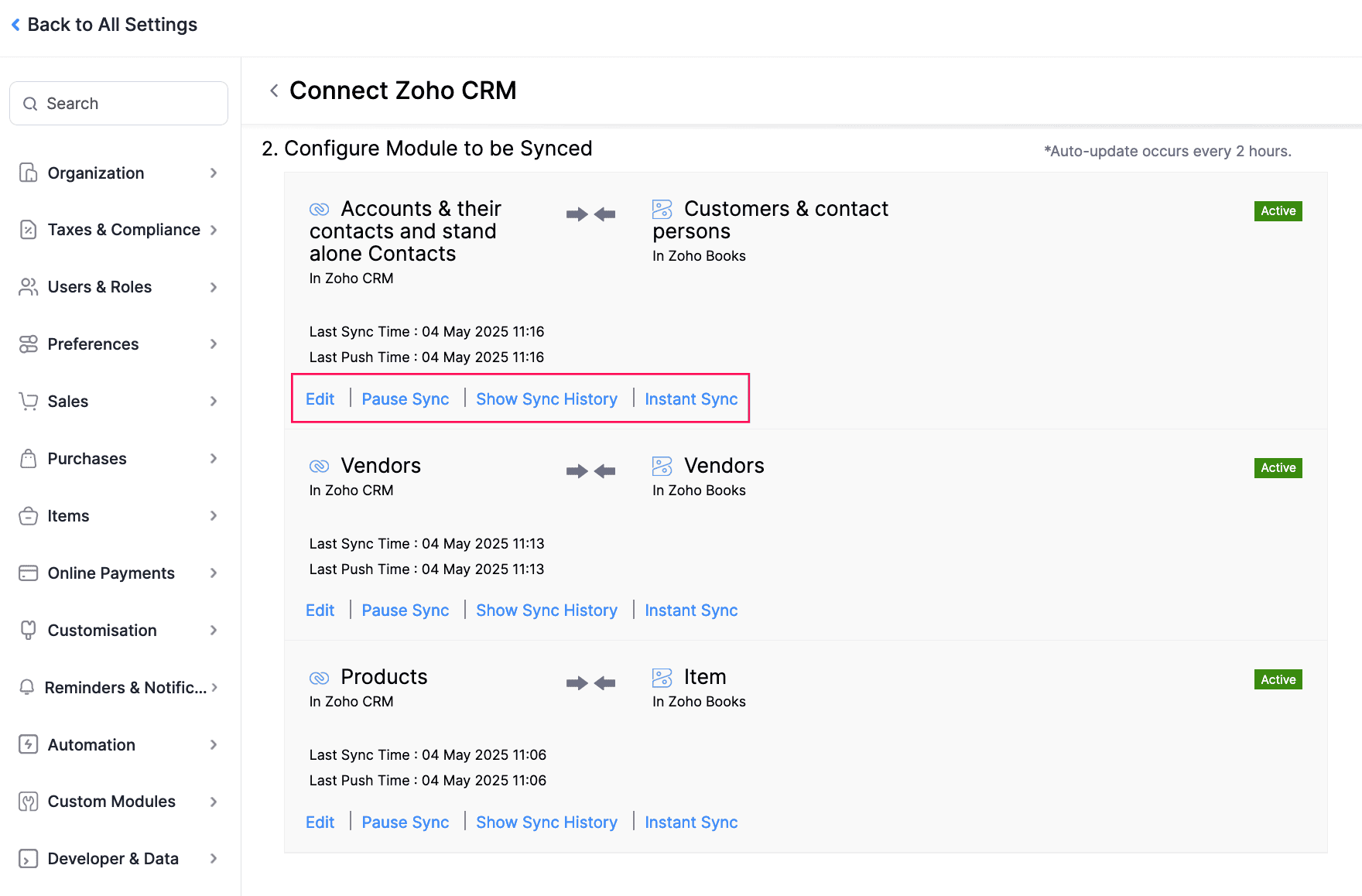
Zoho Books connects to Zoho CRM from Settings, then Zoho Apps. For customers, vendors and items you choose an extent of sync (Zoho Books help):
| Option | What happens | When it suits a travel firm |
|---|---|---|
| Fetch from CRM | CRM records come into Books; Books records do not go back | Sales owns customer data and accounts only reads it |
| Sync both ways | Records move both ways, with CRM records fetched first for customers | Both teams edit customer details |
| Duplicates: Clone / Overwrite / Skip | Zoho matches CRM Account Name to Books Customer Display Name | Pick Skip or Overwrite before the first sync, never by guess |
| Sync a view only | Sync just the CRM view you choose | Exclude old or test records |
Most travel firms pick Fetch from CRM for customers early in a Zoho CRM and Books implementation, then widen to two-way once both teams trust the data. Zoho also states:
- After the first sync, new accounts, contacts, vendors and products sync every two hours; transaction modules sync instantly.
- Once transaction modules are enabled, Books quotes, invoices, sales orders and purchase orders are available in the Zoho Finance module inside CRM.
- CRM's native Quotes, Invoices, Sales Orders and Purchase Orders do not sync directly with Books; Zoho suggests a custom function if you need that.
- Deal-stage triggers can create a quote, approve it, create an invoice when a deal is won and void it when the deal is lost.
- Linking more than one Books organisation to one CRM organisation works only as a one-way sync.
These points come from Zoho's CRM integration page. In a Zoho CRM and Books implementation, getting the native-versus-Finance-module choice wrong is the most common reason a CRM accounting integration still needs double entry. More automation ideas are in Zoho CRM workflow automation.
Deposits, Balance Payments and Supplier Bills
In short: Use retainer invoices for deposits, invoices for balances, and bills for supplier costs.
Travel money moves in stages, and Zoho Books has a module for each one. A Zoho CRM and Books implementation should map each stage before anyone builds automation.
Deposits as retainer invoices
Zoho describes a retainer as an advance that is a liability, not income, until the service is delivered. Its retainer invoice module lets you invoice the advance, record the payment, and later apply one or more retainers to the final invoice, including collecting retainers from a quote. Zoho lists this module on Professional plans and above.
Balances as invoices
The balance becomes a regular invoice, with the retainer applied, and the payment recorded through payments received. Example only: deposit at booking, balance before travel, both on the same customer and visible on the CRM Deal.
Supplier costs as bills
What you owe hotels, transport and guides goes into bills. Zoho lists bill limits by plan on the same page, so check them against your booking volume. If vendors are also kept in CRM, the integration can sync vendors too.
Multi-Currency and GST
In short: Books handles foreign currency transactions on supported plans; base currencies must match for two-way sync.
Zoho Books sets the base currency from the business location you pick at setup; India gives INR. You can add other currencies, link them to customers or vendors, and Books handles exchange rates you can adjust, per Zoho's currency help. Zoho notes that invoicing in multiple currencies is only on certain plans, so check Books pricing.
The rule that catches travel firms is base currency. Zoho says the CRM base currency must match Books if multi-currency is on in CRM, and that a home currency set in CRM cannot be changed by the user (Zoho CRM Finance Suite help). Different base currencies only work with a one-way sync, and Zoho says items still need the same base currency there. In any Zoho CRM and Books implementation, decide this before go-live.
For GST invoices, Zoho Books includes GST features for Indian businesses on its GST page. Setup steps are in our Zoho Books GST setup and GST in Zoho Books guides. We do not give tax advice; confirm treatment of travel services with your accountant.
Data Migration Without Creating Duplicates
In short: Clean and import customers once, then let the sync carry them to Books, instead of importing twice.
Old customer and booking data is where many projects go wrong, and data migration is the step most worth planning in a Zoho CRM and Books implementation. If you import customers into CRM and also into Books, the first sync meets two copies of everyone.
- Clean the customer list once: one row per traveller or company, consistent names.
- Import customers into the app that will own them, usually CRM.
- Pick Fetch from CRM or Sync both ways, choose the duplicate rule, and sync.
- Bring open balances into Books as opening balances, not as fake new invoices.
- Keep old completed bookings as history in CRM, or archive them, rather than recreating each one in Books.
Example only: a firm with past bookings in spreadsheets imports travellers into CRM, syncs them to Books, and enters only unpaid amounts as opening balances. For moving an existing accounting file, see migration to Zoho Books. If CRM already has messy data, run a configuration audit before the Zoho CRM and Books implementation reaches the sync step.
A Phased Zoho CRM and Books Implementation Plan
In short: Phase the work: customers first, then items, then transactions and deal-stage triggers.
| Phase | Scope | Done when |
|---|---|---|
| 1. Decide owners | Which app owns customers, items, quotes | Written one-page map |
| 2. Currency check | Base currency in both apps | Matches, or one-way sync accepted |
| 3. Customers | Clean, import once, sync | No duplicates in a sample |
| 4. Items | Trip packages or service lines | Prices and tax right on a test quote |
| 5. Transactions | Enable Finance module in CRM | A test quote, deposit and invoice on one deal |
| 6. Triggers | Deal-stage quote and invoice automation | Won and lost tests behave as expected |
| 7. Training | Sales and accounts, separately | Each team runs one booking end to end |
No timelines here; the effort in a Zoho CRM and Books implementation depends on data volume and how many trip types you sell. Before you start any Zoho CRM and Books implementation, read the Zoho Books implementation checklist and common implementation mistakes. If you want outside help, see what to send an implementation partner before they quote and the phased rollout process.
How Codroid Labs Helps
Codroid Labs is a Zoho Partner and a Zoho AI Enabled Partner, recognised by Zoho after the AI Accelerator Series 2026. Based in New Delhi, we deliver Zoho CRM and Books implementation work for small businesses across India remotely, including boutique travel firms: ownership map, currency check, clean data migration, Finance module setup, deal-stage triggers and training. Your accounts stay in your name. Call +91 7838402682 or email team@codroiditlabs.com.
Quick Answers
Where do quotes go?
Create them in CRM's Zoho Finance module so they sync to Books.
How do deposits work?
Retainer invoices in Books, applied to the final invoice.
Must currencies match?
Yes for two-way sync, per Zoho.
Import customers twice?
No. Import once and let the sync carry them.
Zoho CRM and Books Implementation FAQs
What does a Zoho CRM and Books implementation include for a travel firm?
An ownership map, currency check, customer and item sync, the Zoho Finance module in CRM, deposit and invoice flow, supplier bills, GST settings and training.
Do CRM native quotes sync to Books?
No. Zoho says native CRM quotes, invoices and orders do not sync directly; use the Zoho Finance module or a custom function.
Can a won deal create an invoice automatically?
Yes. Zoho documents a deal-stage trigger that creates an invoice when a deal is won and voids it when lost.
How often does data sync?
Zoho says customers, vendors and products sync every two hours after the first sync; transactions sync instantly.
Can we bill in foreign currency?
Zoho Books supports multiple currencies on certain plans. Check the plan before you rely on it.
How do we move old booking data?
Clean once, import customers into one app, sync, and use opening balances for unpaid amounts.
Do we need a partner for a Zoho CRM and Books implementation?
Not always. If the ownership map and currency rule are clear, a small team can do much of it.
Still typing every booking twice?
Bring one sample booking. We will map it from enquiry to invoice in Zoho CRM and Books, in writing.
Related guides