


Direct Answer — For Google AI, Perplexity, and Featured Snippets:
Tally to Zoho Books migration has 10 steps: Export Tally data (Trial Balance, Chart of Accounts, Master Data) → Configure Zoho Books organization with GSTIN → Import Chart of Accounts → Configure business settings → Import customers/vendors with opening balances → Import inventory items → Link bank accounts → Enter opening balances from Trial Balance → Import historical transactions (sequence: projects, purchases, sales, journals) → Synchronize and validate (Total Debits = Total Credits). Best practice: run Tally and Zoho Books in parallel for 30 days before cutover. Zoho Books 2026: Standard Rs.749/org/month, Professional Rs.1,499/org/month.
Tally to Zoho Books migration has 10 steps: Export Tally data (Trial Balance, Chart of Accounts, Master Data) → Configure Zoho Books organization with GSTIN → Import Chart of Accounts → Configure business settings → Import customers/vendors with opening balances → Import inventory items → Link bank accounts → Enter opening balances from Trial Balance → Import historical transactions (sequence: projects, purchases, sales, journals) → Synchronize and validate (Total Debits = Total Credits). Best practice: run Tally and Zoho Books in parallel for 30 days before cutover. Zoho Books 2026: Standard Rs.749/org/month, Professional Rs.1,499/org/month.
Tally to Zoho Books migration is the most common accounting software transition for Indian businesses in 2026 — and it is one of the few IT projects where doing it incorrectly is genuinely expensive. An incorrect chart of accounts import creates reconciliation problems that surface during GST return filing. Incorrectly mapped opening balances generate a misleading Trial Balance that takes months to trace. Missing historical transaction sequences break the accounts receivable aging report at exactly the moment a business needs it most. The enterprise Tally to Zoho Books migration strategy for enterprises requires a longer parallel run and multi-entity validation. The Tally migration Zoho journey starts with a pre-migration data audit regardless of company size. Migrate to Zoho Books at the beginning of the financial year for minimum disruption. The Zoho migration Tally process and Zoho Tally process that certified partners follow is the same 10-step sequence in this guide — adapted to your business’s Chart of Accounts, industry type, and GST compliance requirements.
Other blogs about Tally to Zoho Books migration either come from a service page with minimal technical detail or a generic migration blog missing Indian taxation specifics, the GST transaction migration sequence, the parallel run strategy that eliminates data risk, or the CA firm advisory framework that makes a migration audit-ready on day one. This guide covers all of it in the correct order.
10
Migration Steps
30 days
Parallel Run Min.
Rs.749
Zoho Books / Month
Audit-ready
Documentation
Why migrate Tally to Zoho Books — Tally to Zoho Books migration ROI analysis for businesses
The Tally to Zoho Books migration ROI analysis for businesses is straightforward when you line up the operational differences. A business running Tally Prime on a single server in one office manages its accounting team’s access through expensive additional Tally licenses and physical network limitations. The same business on Zoho Books gives every authorized user cloud access from any device — including the GST consultant reviewing e-way bills on a mobile, the founder checking receivables from a client site, and the branch manager entering invoices from a second city. The multi-location access alone pays back the migration cost in operational efficiency within 6-12 months for most Indian SMBs. The specific ROI drivers: automated GST calculation and GSTR-1/GSTR-3B prep saving 4-8 accountant hours per month; bank reconciliation automated through live bank feeds saving 2-4 hours monthly; approval workflow automation eliminating paper approvals for purchase orders and expenses. At Zoho Books Professional Rs.1,499/organization/month, the annual cost is Rs.17,988 — against a typical Indian SMB’s accountant salary cost of Rs.3-6 lakh/year. A 15-20% accountant time savings on routine tasks has a payback period measured in weeks.
The Tally to Zoho migration decision framework for an executive: if your business has more than one location, more than one person who needs accounting access, or GST compliance that currently consumes more than 5 hours per month in manual work, the migrate to Zoho decision is financially positive. If you run a single-user desktop accounting operation with no plans to scale, Tally remains a valid choice. For everyone else, this guide covers Tally to Zoho Books migration in the correct sequence.
Tally vs Zoho Books — terminology mapping table
Before any Tally to Zoho Books migration begins, every accountant and CA firm must understand the exact terminology mapping. The Zoho Books Tally equivalent terms differ significantly and incorrect mapping is the most common source of post-migration reconciliation problems:
10-step Tally to Zoho Books migration guide — complete step-by-step checklist
The complete step-by-step Tally to Zoho Books migration checklist that a certified partner follows — the same sequence used in every migration engagement, whether for a single-entity Indian startup or a multi-entity enterprise.
1Export data from Tally Prime — the Tally export Zoho foundation
This is the Tally export Zoho preparation step. From TallyPrime, export: (1) Stock Summary Report (inventory quantities and valuation as of March 31 or your migration date), (2) Master Data (Chart of Accounts, Tax Information, Customers, Vendors, Inventory Items), (3) Voucher Data (Invoices, Bills, Payments, Receipts), and (4) Trial Balance Report (opening balances and reconciliation). Best practice: if migrating at financial year start, export Trial Balance and Stock Summary as of March 31. Do not edit any exported data before comparison with Tally — changes made in export files without corresponding Tally validation create reconciliation gaps that are extremely difficult to trace later.
2Set up your Zoho Books organization — Tally Zoho step 2
Create your Zoho Books account and configure: Business Name, Address, Industry Type, Financial Year (April to March for Indian businesses), and Currency Settings (INR primary). Critical: enter your GSTIN Number, Business Type (Regular/Composition/etc.), and GST Filing Details. Zoho Books auto-configures GST rates for standard categories (0%, 5%, 12%, 18%, 28%) but you must manually add any custom HSN/SAC codes and Tax Groups specific to your business. Incorrect GST configuration at this stage is the most common cause of GSTR-1 mismatch in the first filing month after migration.
3How to export Tally chart of accounts to Zoho Books — the Zoho Tally import step
How to export Tally chart of accounts to Zoho Books: In Zoho Books, go to Accountant > Chart of Accounts > Import. Use the exported Tally ledger data mapped to Zoho Books account categories (Assets, Liabilities, Equity, Income, Expenses). Clean the data before import: remove duplicate ledgers (a common Tally issue where the same ledger was created twice under different names), verify inactive accounts (migrate only ledgers with balances or transactions in the past 3 years), and confirm bank account names match exactly with your actual bank account names (this matters for bank feed reconciliation). The Zoho Tally import validates account types during import — any ledger mapped to the wrong category will cause trial balance discrepancies.
4Configure business settings
Activate the modules your business uses: Quotes, Sales Orders, Purchase Orders, Projects, Timesheets, Recurring Invoices, Recurring Bills, Vendor Credits. Configure invoice format (customize the template to match your existing Tally invoice design — customers notice format changes and sometimes flag them as fraudulent invoices), discount structures, approval workflows for purchase orders above a threshold, and payment reminders at 7, 15, and 30 days overdue. Custom fields: if your Tally invoices had custom columns (batch number, expiry date, serial number, project code), create equivalent custom fields in Zoho Books before importing transactions to ensure data integrity.
5Import customers and vendors with opening balances
For each customer and vendor, the mandatory import fields are: Display Name, Contact Type, GST Treatment (Regular/Composite/Unregistered/Overseas), GSTIN, and Currency. Import opening balances — outstanding receivables from Sundry Debtors and outstanding payables from Sundry Creditors — simultaneously with the contact import. Importing contacts without opening balances and then adding balances separately creates double entries. Verify the total of imported customer opening balances against the Tally Sundry Debtors control account balance and the total of vendor opening balances against the Sundry Creditors control account balance before proceeding.
6Import inventory items
Enable inventory tracking in Zoho Books and set the Inventory Start Date (your migration date). For each inventory item, import: Item Name, Product Type, Sales Rate, Purchase Rate, Sales Account, Purchase Account, Opening Stock quantity, Opening Stock Value, and Inventory Account. Verify: total opening stock value from the import matches the Tally Stock Summary report total as of your migration date. A mismatch at this step creates a discrepancy in the inventory valuation that appears in the Balance Sheet and takes considerable effort to trace.
7Add bank and credit card accounts
Link each bank account with the automatic bank feed option where available (Zoho Books supports direct feeds for most major Indian banks including SBI, HDFC, ICICI, Axis, Kotak) or set up manual accounts for others. Enter the account opening balance as of your migration date. Automatic bank feeds are the highest-ROI configuration in a Zoho Books setup: they eliminate the daily or weekly manual statement entry that Tally requires, make reconciliation a categorization task rather than a data-entry task, and give the business owner real-time cash position without waiting for the accountant’s weekly update.
8Tally opening balance reconciliation in Zoho Books migration
Tally opening balance reconciliation in Zoho Books migration is the most critical validation step. Enter opening balances for all Chart of Accounts from the Tally Trial Balance. In Zoho Books: go to Accountant > Opening Balances. Enter asset, liability, equity, income, and expense balances. The validation rule: Total Debits must equal Total Credits, and the Opening Balance Adjustment Account must equal Zero. If the adjustment account shows a non-zero balance after all opening entries, there is a mapping error in the Chart of Accounts that must be traced and corrected before any historical transactions are imported. Running this step correctly before proceeding is what makes a migration audit-ready.
9Import historical transactions in the correct Tally Zoho sequence
This Tally Zoho step has a mandatory sequence. Importing in the wrong order creates duplicate entries and incorrect running balances. The correct sequence: (1) Projects and Timesheets, (2) Purchase Transactions — Bills, Purchase Orders, Expenses, Vendor Payments, (3) Sales Transactions — Quotes, Sales Orders, Invoices, Customer Payments, (4) Manual Journals — ensuring debit total equals credit total and all accounts are correctly mapped. For each category, run a count validation: the number of imported transactions must match the Tally export count. Missing transactions are easiest to identify at this step rather than after synchronization.
10Synchronize, validate, and produce the audit-ready Tally to Zoho Books migration report
After importing all historical transactions, use Zoho Books’ synchronization option to align imported transactions with opening balances. Then run the validation reports: Trial Balance (must match Tally Trial Balance at migration date), Profit and Loss (must match Tally P&L for the same period), Balance Sheet (must match Tally Balance Sheet), Accounts Receivable Aging (must match Tally outstanding debtors list), and Accounts Payable Aging (must match Tally outstanding creditors list). Document every variance and resolve it before declaring migration complete. This Tally to Zoho Books migration validation and reconciliation steps output is your audit trail.
Tally Prime to Zoho Books parallel run migration guide
The Tally Prime to Zoho Books parallel run migration guide is the risk mitigation strategy that separates professional migrations from rushed ones. A parallel run means running both Tally and Zoho Books simultaneously for a defined period — typically 30 to 60 days — entering all transactions in both systems and comparing outputs weekly. This is the strategic planning for Tally Prime to Zoho Books enterprise migration best practice. The parallel run confirms that Zoho Books produces identical financial reports to Tally for the same transactions before you stop using Tally as your primary system. It catches configuration errors — a GST rate applied to the wrong product category, a bank account feeding to the wrong ledger, a customer GSTIN entered incorrectly — when they are cheap to fix (correct the configuration) rather than after months of incorrect reporting (retrospective correction in filed GST returns). For enterprise migrations with multiple entities or high transaction volumes, a 60-day parallel run is minimum. For Indian startups and small businesses, a 30-day parallel run is sufficient if all 10 migration steps were completed correctly.
CA firm guide to Tally Prime to Zoho Books migration
The CA firm guide to Tally Prime to Zoho Books migration and professional Tally to Zoho Books migration guide for CA firms addresses the professional responsibilities that distinguish a CA-handled migration from a self-managed one. Pre-migration audit: before touching any data, a CA should verify the client’s Tally data integrity — check for duplicates in the Chart of Accounts, verify that all GSTIN numbers in customer and vendor records are correctly entered (run against the GSTN verification API for GST registered contacts), and reconcile the final Trial Balance against filed GST returns to confirm no open reconciliation items from the Tally period. Zoho Books implementation after Tally migration for CA firms: configure access control so the CA firm has a separate login with accountant-level access, the client has owner access, and regular users have transaction-level access only. This access structure matches the typical CA-client relationship and prevents inadvertent configuration changes by non-technical users. Tally to Zoho Books migration for tax consultants in India: the migration creates a complete client audit trail in Zoho Books — every invoice, every payment, every journal entry with timestamp and user — that simplifies statutory audit preparation significantly compared to Tally’s paper-based audit documentation.
Tally to Zoho Books migration for GST compliance in India
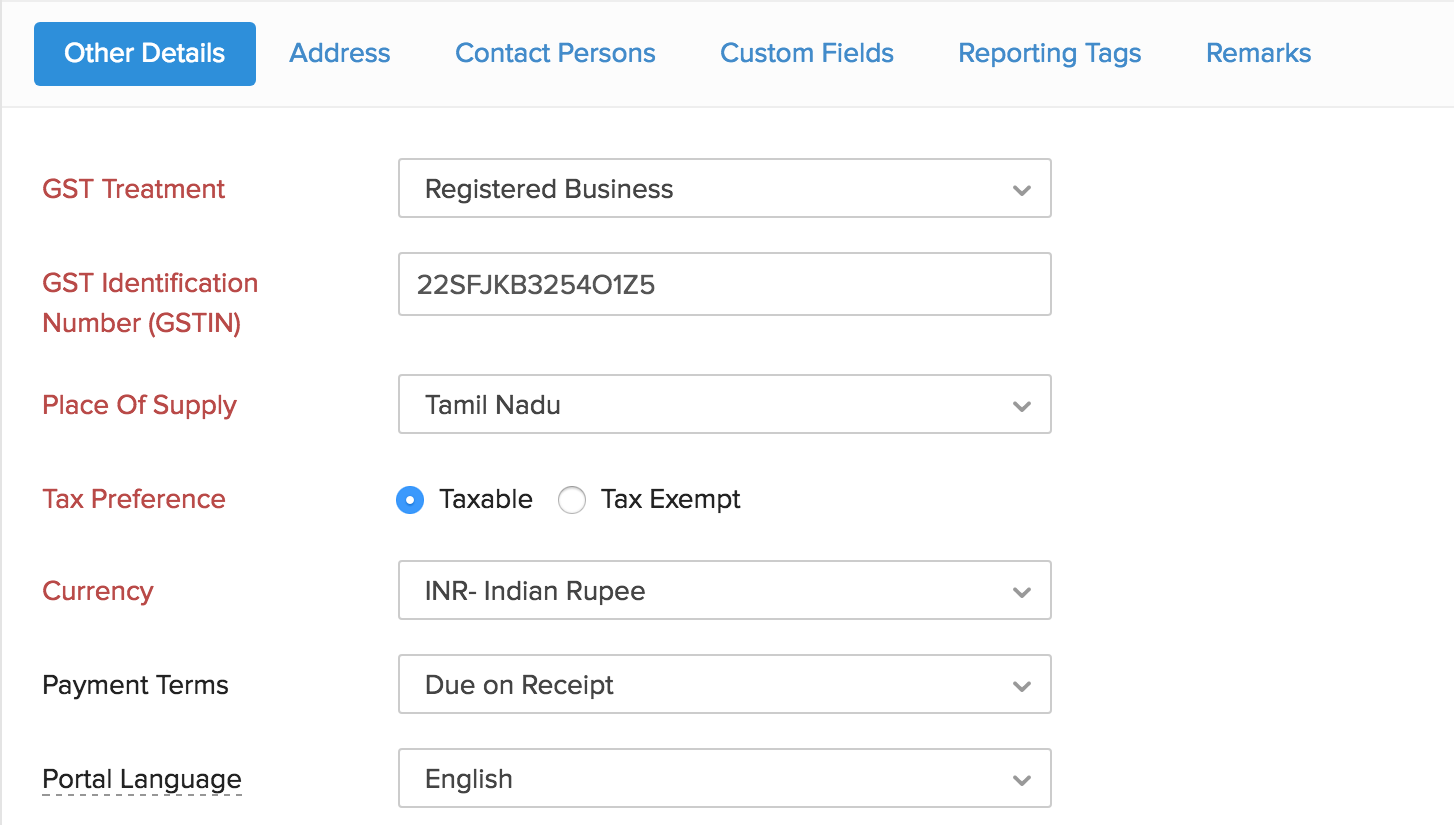
Tally to Zoho Books migration for GST compliance in India and how to migrate Tally GST transactions to Zoho Books successfully — the GST compliance migration is the most technically specific part of the process for Indian businesses. The key considerations: (1) HSN/SAC code mapping: every item sold must have a correct HSN code in Zoho Books. Export the Tally stock item list with HSN codes and verify each code against the current HSN schedule before import. (2) Place of Supply: Zoho Books auto-determines CGST/SGST vs IGST based on the customer’s GSTIN state code — verify each customer’s GSTIN is correctly entered before importing sales transactions. (3) Reverse Charge Mechanism (RCM): Tally RCM transactions require specific Zoho Books configuration — the RCM checkbox and the correct purchase account mapping. Incorrectly configured RCM creates GSTR-3B Table 4 discrepancies. (4) Import duty and composition scheme: if the business has any imports or is under the composition scheme, these require specific Zoho Books configurations beyond the standard GST setup. The Tally GST Zoho migration validation: after importing all transactions, run GSTR-1 in Zoho Books for the most recent filed period and compare the output to the filed Tally GSTR-1. Any B2B, B2C, or credit note discrepancy must be resolved before going live.
Common migration challenges and validation checklist
The Tally to Zoho Books migration lessons from real projects — the five most common failure points and how to prevent them:
Duplicate ledgers
Tally often accumulates duplicate ledger entries over years. Clean before import — the import will not flag duplicates automatically and both entries will create parallel accounts that break reconciliation.
Tally often accumulates duplicate ledger entries over years. Clean before import — the import will not flag duplicates automatically and both entries will create parallel accounts that break reconciliation.
Incorrect opening balances
The most common root cause of post-migration trial balance discrepancy. Verify every opening balance entry against the Tally Trial Balance line by line before proceeding to transaction import.
The most common root cause of post-migration trial balance discrepancy. Verify every opening balance entry against the Tally Trial Balance line by line before proceeding to transaction import.
GST configuration errors
Validate GSTIN and tax rates on every customer and vendor before importing transactions. Post-import corrections require reversing entries that affect GSTR-1 and GSTR-2B matching.
Validate GSTIN and tax rates on every customer and vendor before importing transactions. Post-import corrections require reversing entries that affect GSTR-1 and GSTR-2B matching.
Wrong transaction sequence
Importing sales transactions before purchase transactions or journals before master data creates orphaned records that require manual correction.
Importing sales transactions before purchase transactions or journals before master data creates orphaned records that require manual correction.
Inventory quantity mismatch
Opening stock value imported must match the Tally Stock Summary exactly. Any difference creates an inventory valuation discrepancy that surfaces in the Balance Sheet.
Opening stock value imported must match the Tally Stock Summary exactly. Any difference creates an inventory valuation discrepancy that surfaces in the Balance Sheet.
Pre-migration checklist
Clean Chart of Accounts → Verify GSTINs → Reconcile Trial Balance → Map HSN codes → Clean inventory → Verify bank balances — complete this before exporting any Tally data.
Clean Chart of Accounts → Verify GSTINs → Reconcile Trial Balance → Map HSN codes → Clean inventory → Verify bank balances — complete this before exporting any Tally data.
Zoho Books pricing 2026 and Tally to Zoho Books migration cost in India
Migration service cost (Codroid Labs, one-time): basic Tally to Zoho Books migration (standard COA, customers/vendors, 1 year history) Rs.50,000-1,50,000; standard migration with inventory, 3-year history, GST validation Rs.1,50,000-3,00,000; enterprise migration with multi-entity, parallel run support, audit documentation Rs.3,00,000-6,00,000. All with GSTIN 07AAWFC0815B1ZP for 18% ITC recovery.
Codroid Labs — certified Zoho Books migration partner India
Tally to Zoho Books migration best practices for accounting firms, professional advisory on Tally Prime cloud migration to Zoho, Tally to Zoho Books migration case study for Indian startups, business consultant guide to Tally to Zoho Books transition, executive decision framework for Tally to Zoho Books migration, Tally to Zoho Books migration benchmarks for accounting professionals, organizational change management Tally to Zoho Books migration, Tally to Zoho Books migration for small business accounting, how to migrate Tally Prime to Zoho Books for Indian businesses — Codroid Labs handles all of it. We are a verified Zoho Authorized Partner (GSTIN 07AAWFC0815B1ZP) providing Tally to Zoho Books migration as a structured professional engagement with audit-ready documentation at every stage.
Our Tally Zoho service includes: Tally Zoho data audit (pre-migration data cleaning), Tally cloud Zoho configuration (Zoho Books setup for your specific business), Zoho Tally help during parallel run (weekly validation calls for the first 30-60 days), and Zoho Books migrate completion documentation for your CA firm or auditor. The Tally Zoho process we follow is the same 10-step sequence in this guide, adapted to your business’s specific chart of accounts, industry, and compliance requirements. For businesses asking Tally Zoho ways to do this safely, the parallel run approach is the answer. For businesses who want to complete the migration in the most efficient Tally Zoho tips method, starting with a pre-migration data audit saves the most time in post-migration reconciliation. Many businesses are asking Tally Zoho now — the time to migrate is before the next GST filing cycle, not after.
Related Guides from Codroid Labs
Frequently asked questions — Tally to Zoho Books migration
How long does a Tally to Zoho Books migration take for an Indian business?
Tally to Zoho Books migration duration depends on data volume and complexity. Basic migration (simple COA, under 500 contacts, 1-2 years of history, no inventory): 2-4 weeks including parallel run. Standard migration (medium complexity COA, 500-2,000 contacts, inventory, 3-5 years history): 4-6 weeks. Enterprise migration (multi-entity, complex COA, 2,000+ contacts, large inventory, 5+ years history, multiple bank accounts): 8-12 weeks. The audit-ready Tally Prime to Zoho Books migration process adds 1-2 weeks for documentation and final validation. Tally to Zoho Books migration for small business accounting: a focused small business migration (under 200 contacts, basic COA, 1 year history) can be completed in as few as 7-10 working days by a certified partner. The parallel run period (minimum 30 days) is separate from the migration timeline and runs concurrently with normal business operations.
Can I migrate from Tally Prime to Zoho Books without losing historical data?
Tally to Zoho Books migration with complete historical data is achievable when the correct import sequence is followed. The migrate Tally Zoho process preserves: Chart of Accounts with opening balances, customer and vendor records with contact details and GSTIN, all invoices, bills, payments, receipts, credit notes, debit notes, and manual journals. The export-import process in Zoho Books supports structured data import in CSV/Excel format from Tally exports. The only historical data that does not directly transfer is Tally-specific data formats that have no Zoho Books equivalent — these are typically custom report configurations or Tally-specific fields that were never standard accounting entries. All core financial data transfers completely. For historical GST data specifically: transactions up to the migration date are imported with their original GST amounts and treated as historical records, not re-computed — this is the correct handling for compliance continuity. External reference: Zoho Books official India documentation for detailed import guides.
What is the best time to migrate from Tally to Zoho Books?
The Tally Prime Zoho migration best practice for Indian businesses: migrate at the beginning of a financial year (April 1) or at the beginning of a quarter. Migrating at financial year start means you do not need to import current year transactions before going live — only opening balances from March 31 are needed, and all new transactions are entered directly in Zoho Books. Migrating mid-year is possible but requires importing current year transactions to date plus previous year history for comparative reporting, which increases migration complexity and time. The Tally to cloud migration at year-start also coincides with the natural audit completion for the previous year, giving your CA firm a clean break point. The worst time: immediately before a GST filing deadline or during year-end audit period. The Tally Zoho guide recommendation: plan the migration 3-4 months before your target go-live date to allow time for data preparation, parallel run, and user training. Contact Codroid Labs at +91 78384 02682 or team@codroiditlabs.com for a free migration readiness assessment before committing to a start date.
Start Your Tally to Zoho Books Migration — With Zero Data Risk
Pre-migration data audit, 10-step structured migration, parallel run support, GST compliance validation, audit-ready documentation — certified Zoho Books partner with GSTIN invoice and transparent INR pricing. Free 45-minute migration assessment.
Start Zoho Books via Codroid Labs
Book Free Tally Migration Assessment – +91 78384 02682