



How to manage your first 100 clients with Zoho Bigin: centralize client data, build a visual sales pipeline, automate follow-ups and repetitive tasks, communicate directly from the CRM, use dashboards for insight, customize fields and workflows, capture leads efficiently, integrate with existing business tools, and stay accessible from mobile. Most businesses wait too long to adopt a CRM — starting at client one, not client one hundred, builds the strongest foundation.
How to manage your first 100 clients with Zoho Bigin — every growing business reaches a point where managing customer information through spreadsheets, sticky notes, or notebooks becomes inefficient. While handling a handful of clients manually may seem manageable, how to organize first 100 customers in Zoho Bigin requires a structured system to avoid missed opportunities, delayed follow-ups, and inconsistent communication. Built specifically for startups, freelancers, consultants, and small businesses, Zoho Bigin is a lightweight CRM that helps you organize customer data, manage sales pipelines, automate routine tasks, and build stronger client relationships — all without the complexity of traditional CRM systems. This is the practical foundation of any genuine client relationship management with Zoho Bigin approach, whether you’re running Zoho Bigin for startup sales operations or already a Zoho Bigin CRM for growing businesses with steady momentum.
10 Steps
Database to Mobile Access
Under 30 Min
Quick Setup Time
10 Best Practices
For Lasting Relationships
6 Signs
You Need to Upgrade Now
Why small businesses need a CRM early
Many businesses wait until they have hundreds or thousands of customers before adopting a CRM. By then, customer information is often scattered across spreadsheets, emails, and individual employee records. Using a CRM from the beginning helps you keep all customer information in one place, track every conversation and interaction, monitor your sales pipeline, improve customer follow-ups, increase team productivity, and make informed business decisions with real-time insights. Starting early creates a strong foundation for sustainable growth — exactly the principle behind this guide on how to manage your first 100 clients with Zoho Bigin.
Steps 1-5: Database, pipeline, follow-up, automation, communication
1Store Every Client in One Centralized Database
Instead of maintaining separate Excel files or handwritten notes, Zoho Bigin stores all customer information in one secure location — customer name, contact information, company details, products or services purchased, previous conversations, meeting notes, and documents and attachments. A centralized database ensures your team always has access to the latest customer information, the foundation of any genuine Zoho Bigin contact management tips.
2Organize Your Sales Pipeline
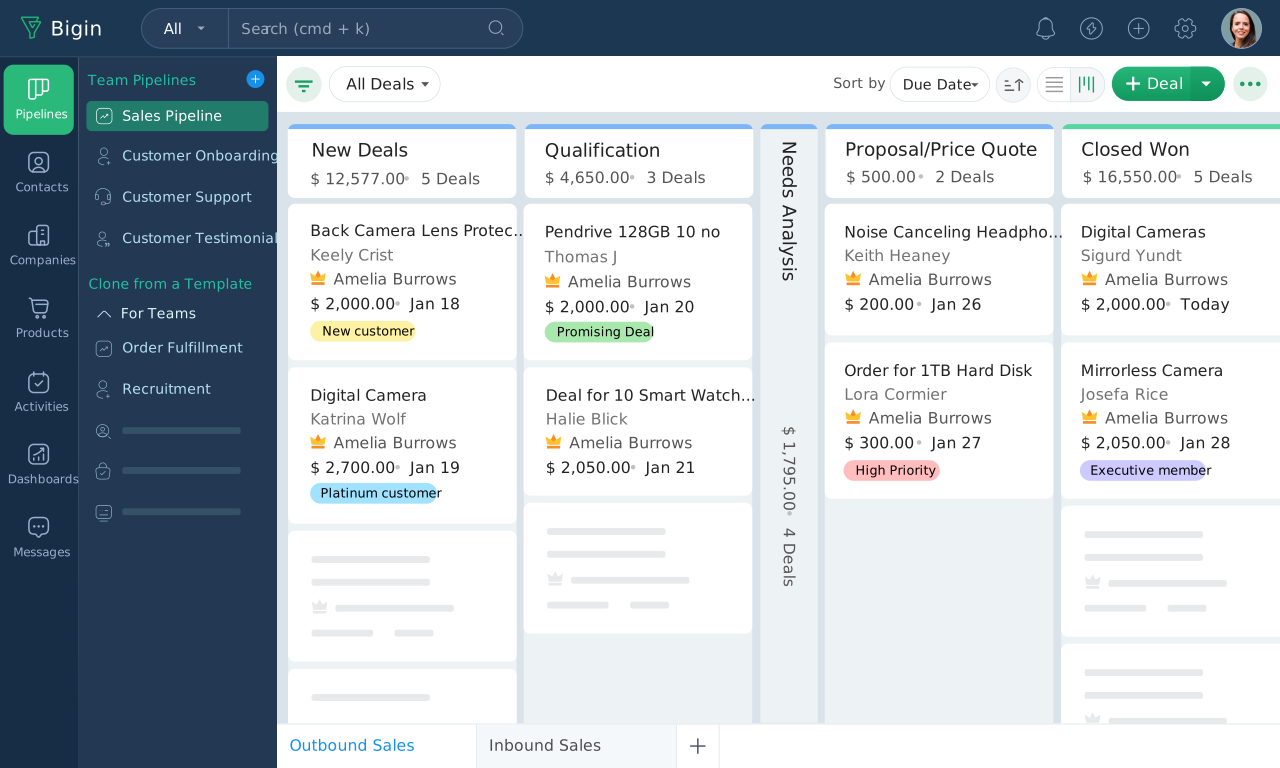
One of Bigin’s most valuable features is its visual sales pipeline. The right Zoho Bigin pipeline setup for new businesses — and the practical core of any Zoho Bigin workflow for client management — creates stages matching your sales process: New Lead, Contacted, Qualified, Proposal Sent, Negotiation, Won, Lost. This allows you to instantly see where every client stands and identify deals that require immediate attention.
3Never Miss a Follow-Up
Consistent follow-ups are often the difference between winning and losing a customer. With Zoho Bigin you can schedule reminders, assign follow-up tasks, set due dates, receive activity notifications, and track pending communications. This is the practical core of any Zoho Bigin follow up system for clients, and the most direct way to improve follow ups with Zoho Bigin — automated reminders ensure no valuable opportunity is overlooked.
4Automate Repetitive Work
As your client base grows, manual administrative work consumes valuable time. The right Zoho Bigin automation for customer tracking sends welcome emails, creates follow-up tasks automatically, updates deal stages, notifies team members, triggers internal alerts, and reduces repetitive data entry — letting your team spend more time building relationships and less time on routine tasks.
5Communicate Directly from Your CRM
Zoho Bigin includes built-in communication tools that keep customer interactions organized — make and receive calls, record communication history, send emails, and view previous interactions before every conversation. Having complete customer context improves service quality and strengthens relationships.
Steps 6-10: Dashboards, customization, leads, integrations, mobile
6Gain Insights Through Dashboards
Understanding business performance becomes easier with customizable dashboards tracking total clients, active opportunities, monthly sales, revenue forecasts, pending follow-ups, conversion rates, and sales representative performance. Real-time reporting enables better business decisions and is genuinely the best way to manage 100 clients in Zoho Bigin once your pipeline has enough deal volume to make trends visible — it’s also one of the most reliable Zoho Bigin tips for business growth precisely because it surfaces problems before they become urgent.
7Customize Bigin for Your Business
Every business has unique processes. Zoho Bigin allows you to customize data fields, pipelines, list views, filters, workflows, and dashboards — flexibility that ensures your CRM adapts to your operations instead of forcing you to change your workflow. This customization layer is also where Zoho Bigin deal management for startups gets tailored to match how a specific founding team actually closes business, rather than a generic default pipeline.
8Capture Leads Efficiently
Generating new clients is only valuable if leads are captured and managed effectively. Zoho Bigin supports lead collection through online forms, website inquiries, email integration, third-party applications, and manual entry, with leads automatically entering your sales pipeline for timely follow-up once captured — this is exactly how to use Zoho Bigin for lead tracking in practice.
9Integrate with Your Favorite Business Applications
As your business expands, your CRM should connect with the tools you already use. Zoho Bigin integrates with Zoho Books, Zoho Campaigns, Zoho Desk, Google Workspace, Microsoft 365, Zoom, Mailchimp, and Zapier — these integrations eliminate duplicate work and improve overall efficiency.
10Manage Your Business Anywhere
Modern businesses require flexibility. Zoho Bigin’s mobile applications let you access customer records, update deals, schedule appointments, make calls, view dashboards, and complete follow-ups whether you’re in the office or meeting clients — your CRM is always available.
Booking Pages for appointment scheduling
Zoho Bigin’s Booking Pages make it easier for customers to schedule appointments without exchanging multiple emails — share booking links, sync appointments with your calendar, reduce scheduling conflicts, improve customer convenience, and save valuable administrative time. This feature is especially useful for consultants, agencies, healthcare providers, and service-based businesses managing exactly the kind of simple client management system in Zoho Bigin this guide describes, and it doubles as a genuinely useful tool for Zoho Bigin for small business customer support teams handling appointment-based service requests. Combined with the centralized database from Step 1, this is also how teams manage customer data in Zoho Bigin consistently across both the sales and service side of the business.
Best practices for your first 100 clients
The complete Zoho Bigin checklist for managing clients — and the practical foundation of Zoho Bigin best practices for client retention:
Setup Discipline
- Add every client to your CRM immediately
- Keep customer records complete and up to date
- Schedule follow-ups after every interaction
Automation and Visibility
- Automate repetitive administrative tasks
- Regularly review your sales pipeline
- Use dashboards to monitor business performance
Customer Experience
- Respond quickly to customer inquiries
- Record every phone call, email, and meeting
- Personalize communication whenever possible
- Review customer feedback to improve your services
When should you upgrade from spreadsheets
If your business experiences any of the following, it’s time to switch: customer information is scattered across multiple files, follow-ups are frequently missed, sales opportunities are difficult to track, team collaboration is inefficient, reporting requires manual effort, and business growth is becoming difficult to manage. Zoho Bigin for first time client management helps solve these problems while preparing your organization for future expansion.
Codroid Labs — Certified Zoho Authorized Partner — Zoho Bigin Setup for Startups and Small Businesses
Zoho Bigin clients, Zoho Bigin customer management, Zoho Bigin CRM, Zoho Bigin small business, Zoho Bigin tips, Zoho Bigin guide, Zoho Bigin setup, Zoho Bigin pipeline, Zoho Bigin automation, Zoho Bigin workflow, Zoho Bigin contacts, Zoho Bigin deals, Zoho Bigin follow up, Zoho Bigin sales, Zoho Bigin tracking, client management, customer management, sales CRM, small business CRM, CRM for startups, lead management, sales pipeline, client follow up, business growth, CRM best practices — Codroid Labs (GSTIN 07AAWFC0815B1ZP) is a certified Zoho Authorized Partner offering Zoho Bigin setup for small businesses, Zoho Bigin sales process for small teams configuration, and Zoho Bigin CRM guide for beginners onboarding sessions across India. Contact: +91 78384 02682, team@codroiditlabs.com.
Related Guides from Codroid Labs
Frequently asked questions — how to manage your first 100 clients with Zoho Bigin
How do I manage my first 100 clients with Zoho Bigin if I’m currently using spreadsheets?
Start with a centralized client database, build a pipeline matching your real sales process, set up follow-up reminders, and import existing spreadsheet data directly rather than re-entering it by hand.
What makes Zoho Bigin different from other CRMs for managing a first 100 clients?
Under-30-minute setup, an intuitive interface with no dedicated admin training needed, pricing fit for 100 clients rather than 10,000, and built-in telephony plus Booking Pages — intentionally less customizable than enterprise CRM, which is the point at this stage.
Get Zoho Bigin Set Up Right From Client Number One
Centralized database, pipeline stages, follow-up automation, and Booking Pages — configured by a certified Zoho Authorized Partner with a GSTIN invoice for 18% ITC.
Start Zoho Bigin via Codroid Labs
Book Free Bigin Setup Session – +91 78384 02682