


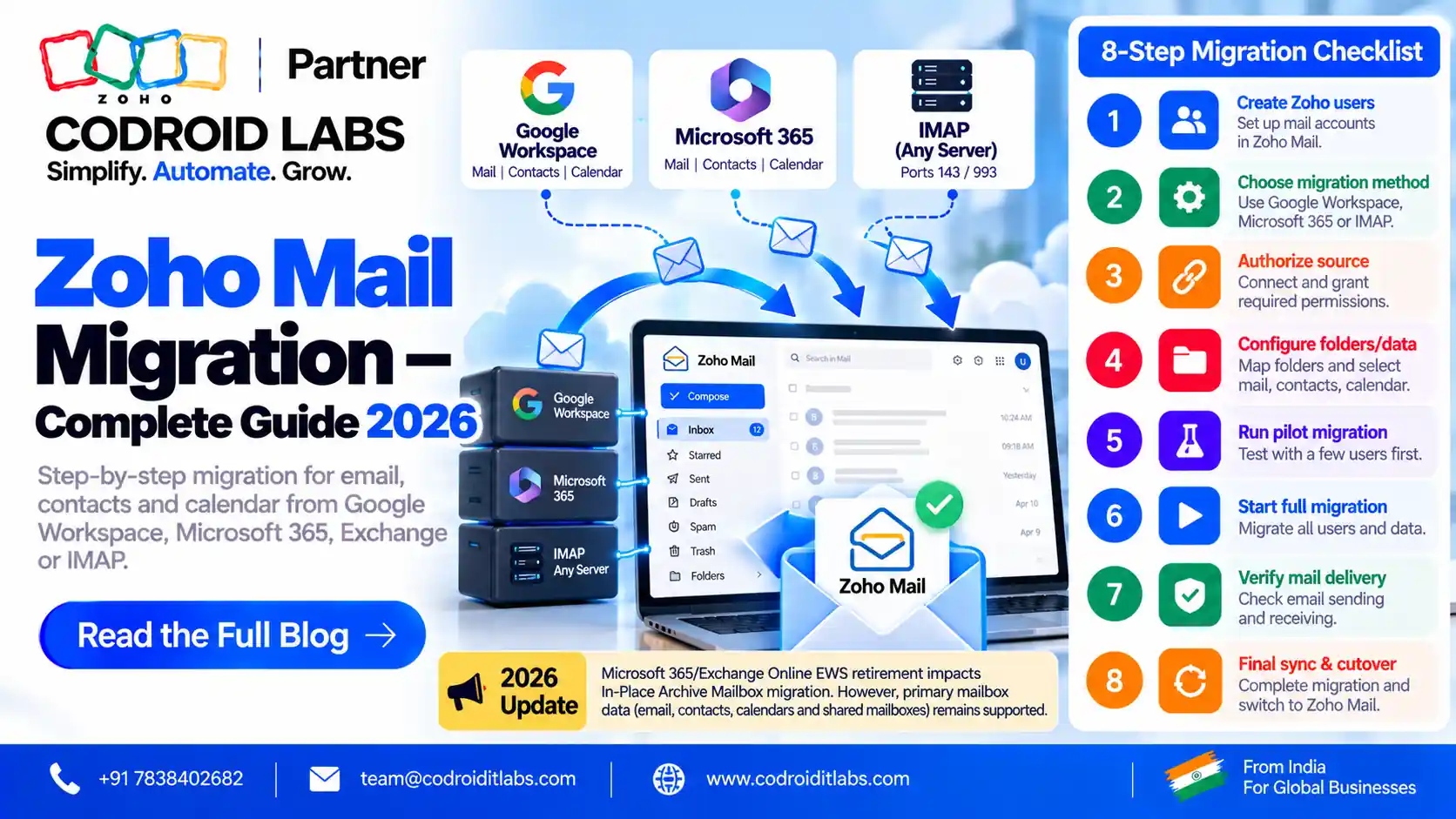
Admin Playbook · Updated October 2026
Zoho Mail Migration Guide: Choose the Path, Plan the Cutover, Fix the Errors
Zoho Mail migration guide for admins: this page helps you pick the right migration path for your source, plan the MX cutover so no email is lost, and fix the errors Zoho lists. Every path below is checked against official Zoho Mail help.
Updated: 7 October 2026
Reviewed against: Zoho Mail migration help and Zoho Mail pricing
From: Codroid Labs, Zoho Partner, New Delhi
Reviewed against: Zoho Mail migration help and Zoho Mail pricing
From: Codroid Labs, Zoho Partner, New Delhi
Short answer
Create users in Zoho Mail, pick the migration type for your source in Admin Console Data Migration, and run a first pass while the old system still receives email. Then switch MX records to Zoho, run a final pass for new emails, and check SPF, DKIM and client settings.
6
Verified migration paths
1 Oct 2026
Microsoft EWS blocking date for archive migration, per Zoho
₹59
Mail Lite 5 GB, per user/month, billed annually
7
Cutover steps
Zoho Mail Migration Guide: Pick Your Path
Zoho offers a different tool for each source. Choosing the right one is the most important decision in any zoho mail migration guide:
| Source | Zoho method | What moves | Runs from |
|---|---|---|---|
| Any IMAP server | IMAP migration | Emails and folders | Admin Console |
| Older POP-only host | POP migration | Inbox emails | Admin Console |
| Google Workspace | Google Workspace migration | Mail, contacts, calendar | Admin Console |
| Microsoft 365 | Microsoft 365 migration | Emails, contacts, calendars, shared mailboxes | Admin Console |
| Exchange Server or hosted Exchange | Migration Wizard (Windows) | Email, calendar, contacts, tasks, notes | Desktop wizard |
| PST or EML files | Migration Wizard, or EML import | Mailbox data from files | Desktop wizard or Settings |
Our earlier Zoho Mail migration overview explains why businesses switch. This page is the hands-on admin plan: a zoho mail migration guide for the person who has to run it.
Pre-Migration Steps Before You Migrate to Zoho Mail
- Verify your domain in Zoho Mail using one of the methods in Zoho's domain verification help.
- Create every user in Zoho Mail first. Zoho says all users must exist in Zoho Mail before calendar migration from Google Workspace or Microsoft 365, and the domain must match.
- Pick plans with enough storage. Large mailboxes need more than 5 GB.
- List aliases, groups and shared mailboxes so nothing is forgotten.
- Lower the TTL on your MX records a day ahead, so the switch takes effect faster.
- Tell users the date, what will change and how to set up their phone.
Anyone planning to migrate to zoho mail should finish this list before starting a single transfer. Every later step in this zoho mail migration guide assumes these are done.
IMAP Migration Zoho Admins Use Most
Zoho's IMAP migration help has four stages: add server details, add server settings, create the migration, and add users.
- Server details: In Admin Console, open Data Migration, choose IMAP, enter the source server, and pick SSL for port 993 or None for port 143. Zoho supports trusted certificates only, not self-signed ones.
- Settings: migrate all folders or specific ones, with include and exclude lists.
- Migration: set a maximum connection limit, which is how many users migrate at once, and choose to pause at 80% or 95% storage.
- Users: add them one by one or import a CSV of source and destination accounts.
Zoho's POP migration help follows the same steps with ports 995 (SSL) or 110. Use POP only when the old host offers no IMAP, because POP mainly fetches the inbox. Zoho's troubleshooting page notes that personal Gmail accounts need an app password for IMAP migration.
Tip from this zoho mail migration guide: test with two or three mailboxes first, check the reports, then add the rest by CSV.
Zoho Mail Migration From Google Workspace
For zoho mail migration from google workspace, Zoho's Google Workspace migration help uses a Google service account rather than user passwords:
- Choose Google Workspace in Data Migration, enter the super admin email and the service account email, and upload the JSON or P12 key file.
- Select what to move: mail, contacts and calendar.
- Labels become folders. An email with several labels is copied into several folders and uses space each time. Zoho suggests keeping overlapping labels low and excluding the Important label. This is the most common storage surprise in any zoho mail migration guide for Google sources.
Moving a personal Gmail account instead? See our Gmail to Zoho Mail guide.
Microsoft 365 and Exchange Migration
Zoho's Microsoft 365 migration help has you choose Microsoft 365 in Data Migration and sign in with source admin credentials. Emails, contacts, calendars and shared mailboxes are supported.
- EWS throttling. Zoho explains how to request a temporary EWS throttling increase in the Microsoft 365 admin centre to speed up large moves.
- Archive mailboxes. Zoho notes Microsoft begins blocking EWS on 1 October 2026 and retires it on 1 April 2027. To keep migrating In-Place Archive mailboxes, admins must add Zoho Mail's app ID to the EwsAllowedAppIDs list. After 1 April 2027, that route ends. If archives matter, schedule them first in your zoho mail migration guide plan.
For on-premises or hosted Exchange, Zoho's Exchange Migration Wizard runs on Windows and maps source accounts from a text file, the Global Address List or LDAP. Zoho recommends the web option when the server is reachable online, as it is faster.
PST and EML File Imports
Zoho's Migration Wizard handles Outlook PST files (email, calendar, contacts, tasks and notes) and EML files. It needs Windows with .NET Framework 4.6 and, for PST, Outlook installed with the same 32-bit or 64-bit version as the wizard. Zoho shares the download link free on request.
For a few EML files, users can import them from Settings > Import/Export, per Zoho's import and export help. A .zip of .eml files can keep its folder structure. Use this zoho mail migration guide route for small leftover archives, not whole mailboxes.
7-Step MX Cutover Plan in This Zoho Mail Migration Guide
The goal is zero lost email. Run the bulk copy while the old system still receives mail, then switch:
| Step | Action | Why |
|---|---|---|
| 1 | Run the first migration pass | Moves the bulk of old email with no downtime |
| 2 | Check reports per user | Catch errors before the switch |
| 3 | Pick a quiet time and update MX records | New email starts flowing to Zoho |
| 4 | Remove all old MX records | Zoho says lower-priority old records stop delivery |
| 5 | Turn off local delivery at the old host | Stops internal mail being kept there |
| 6 | Wait for DNS (Zoho notes 12-24 hours) | Some mail still reaches the old server meanwhile |
| 7 | Run a final pass for new emails | Zoho skips duplicates already migrated |
MX values and priorities are on Zoho's email delivery page; India-hosted accounts use the .in hosts shown in Admin Console. This cutover order is the core of the zoho mail migration guide.
Gotcha: do not cancel the old account on cutover day
Keep the old mailboxes running until the final pass is complete and DNS has fully switched. Cancelling early loses any email still landing on the old server.
Post-Migration Checklist
- SPF and DKIM updated for Zoho, per Zoho's SPF and DKIM help, with old provider entries removed.
- Test mail sent in and out from an outside address.
- Phones and desktop clients moved to Zoho's IMAP and SMTP settings.
- Aliases, groups and forwarding recreated.
- Migration reports reviewed for every user.
- Old account cancelled only after a few quiet days.
- A short note to users confirming the switch, linking to this zoho mail migration guide checklist.
If mail stops arriving, use our Zoho Mail not receiving emails fixes.
Zoho Mail Migration Guide: Troubleshooting Table
Zoho's migration troubleshooting page lists why emails may be skipped. Use this zoho mail migration guide table when a report shows errors:
| Problem | Cause per Zoho | What to do |
|---|---|---|
| Some emails skipped | Email size exceeds the user's email policy limit | Raise the limit or move them manually |
| Emails not copied twice | Mail already present (duplicate) | Expected; safe for final passes |
| Email rejected | Too many To addresses | Review and forward manually if needed |
| Invalid message | Not RFC-compliant headers or format | Export and import as EML |
| Gmail IMAP login fails | App password needed | Create one in the Google account |
| Migration paused | Storage reached the 80% or 95% threshold | Add storage or change plan, then resume |
| Microsoft 365 is slow | EWS throttling | Request a temporary throttling increase |
| Self-signed certificate error | Only trusted certificates are supported | Use the source's trusted hostname |
Pricing, Downtime and Cost Drivers
INR prices, excluding GST, come from Zoho's official pricing data for the Zoho Mail pricing page:
| Plan | Price | Storage per user |
|---|---|---|
| Forever Free | ₹0, up to 5 users | 5 GB; no IMAP, POP or ActiveSync |
| Mail Lite | ₹59/user/month, billed annually | 5 GB |
| Mail Lite | ₹75/user/month, billed annually | 10 GB |
| Workplace Standard | ₹99/user/month annually, ₹129 monthly | 30 GB |
Zoho's pricing page also says migration help from a dedicated technical agent is only for companies with more than 50 users.
Downtime. With the cutover plan above, there is usually no outage. The risk window is the DNS change, when some mail still reaches the old server; the final pass collects it.
Cost drivers: number of users, total mailbox size, labels in Google accounts, archive mailboxes, calendars and contacts, PST files on laptops, and how many phones need reconfiguring. Anyone who wants to migrate to zoho mail should size these before choosing plans. A written estimate based on this zoho mail migration guide keeps budget surprises small.
Want this zoho mail migration guide run for you?
Codroid Labs is a Zoho Partner in New Delhi. We plan and run data migration, DNS cutover and user training. Call +91 7838402682 or email team@codroiditlabs.com.
Quick Answers
Which method should I use?
IMAP for most hosts; the dedicated tool for Google Workspace, Microsoft 365 or Exchange.
Is there downtime?
Usually not, if you migrate before switching MX and run a final pass.
Can I import PST files?
Yes, with Zoho's Windows Migration Wizard.
Do duplicates appear on re-runs?
No. Zoho skips emails already present.
What does Mail Lite cost?
₹59/user/month for 5 GB, billed annually.
Zoho Mail Migration Guide FAQs
What does a zoho mail migration guide need to cover?
The right method for your source, pre-migration steps, the MX cutover, a post-migration checklist and fixes for common errors.
How do I migrate to zoho mail from any host?
Use IMAP migration in Admin Console Data Migration: add server details, settings, the migration and users, then start it.
How does imap migration zoho handle many users?
Set a maximum connection limit to migrate several users at once, and add users manually or by CSV.
How does zoho mail migration from google workspace work?
You connect a Google service account with the super admin email and a JSON or P12 key, then choose mail, contacts and calendar.
Can I migrate Microsoft 365 archive mailboxes?
Zoho says Microsoft blocks EWS from 1 October 2026. Admins must allow Zoho Mail's app ID in EwsAllowedAppIDs, which works until 1 April 2027.
Can I import Outlook PST files?
Yes. Zoho's Migration Wizard for Windows imports PST data, including email, calendar, contacts, tasks and notes.
Will migration create duplicate emails?
No for repeat runs; Zoho skips emails already present. Gmail labels can create copies in several folders.
Related guides
Move to Zoho Mail without losing an email
Book a free consultation for a migration and cutover plan sized to your mailboxes.
References (official Zoho Mail help, checked 7 October 2026)