



A Zoho Zia Agent Developer is a specialist who designs, configures and deploys custom Zia agents around a real business process inside or connected to Zoho CRM. The work can include agent instructions, knowledge sources, tool groups, API connections, parameter mapping, permissions, activation conditions, testing, human escalation and production support. The objective is not to “add AI”; it is to make a repeatable CRM process faster, safer and measurable.
Updated
22 September 2026
22 September 2026
Reviewed against
Current Zia Agents, Agent Studio and CRM documentation
Current Zia Agents, Agent Studio and CRM documentation
From Codroid Labs
Zoho implementation and automation practice
Zoho implementation and automation practice
A good Zoho Zia Agent Developer does not begin by asking which prompt sounds clever. They begin with the process: what enters the CRM, what context is required, what decisions vary, what the agent is allowed to change, and what must always stay with a human.
7
Hiring & Build Checks
4
Core Agent Inputs
3
Deployment Routes
2026
Current Guide
What separates a developer from a demo builder?
A production-focused Zoho Zia Agent Developer can explain the business objective, choose the smallest workable architecture, restrict permissions, map tools correctly, test failure cases, document ownership and measure the result after launch.
Why Hire a Zoho Zia Agent Developer?
Agent Studio is designed to make agent building accessible, including no-code and assisted configuration. That does not remove the need for technical and process expertise when the agent has to touch live CRM data, external systems or business-critical workflows.
The difference becomes obvious when an agent must do more than answer a question. This is where a Zoho Zia Agent Developer adds value beyond a basic no-code demo. It may need to read a lead, check account history, use a knowledge source, call a tool, create a follow-up task, obey a permission boundary and escalate when data is missing. Every one of those steps needs a deliberate design.
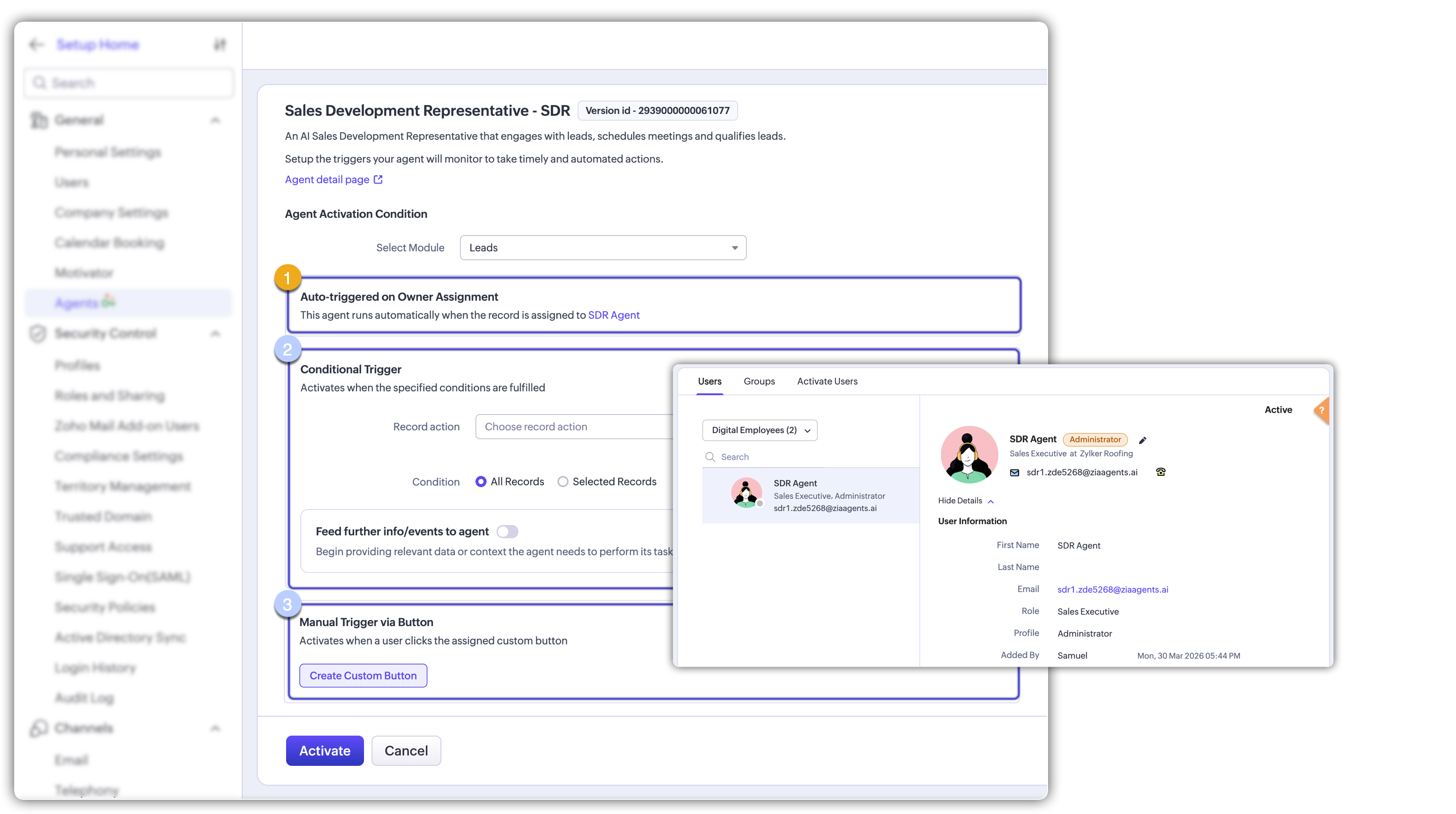
Current CRM documentation describes two important deployment patterns: a connection-based deployment and a Digital Employee deployment. With a connection, actions are logged under the deploying user’s identity. With a Digital Employee, the agent gets its own CRM identity, role and profile, which improves audit visibility and permission control.
What a Zoho Zia Agent Developer Actually Builds
Zia Agent Architecture for Zoho CRM
A useful CRM agent normally has four building blocks: instructions, knowledge, tools and controls. A Zoho Zia Agent Developer turns those building blocks into a documented CRM architecture. Current Agent Studio guidance supports defining an agent’s purpose and instructions, adding a knowledge base, associating tool groups and connections, testing against sample data, then deploying and configuring activation conditions and parameter mappings.
Important gotcha: an agent is not a replacement for deterministic workflow logic. When the rule is always “if X happens, do Y,” ordinary Zoho automation can be simpler, easier to audit and cheaper to operate. Use an agent when the process needs contextual interpretation or variable multi-step action.
7 High-Value Custom AI Agent Use Cases for CRM
1. Lead Qualification Agent
Read incoming lead context, apply qualification rules, recommend a next step and create a follow-up task.
2. Quote Preparation Agent
Use deal data and approved pricing context to prepare a quote draft for controlled review.
3. Account Risk Agent
Watch for inactivity, delayed renewals or service signals and surface accounts needing attention.
4. Follow-Up Agent
Use conversation and CRM context to draft or initiate the next follow-up based on clear boundaries.
5. CRM Data Assistant
Answer operational questions from CRM records and approved knowledge without forcing users through multiple screens.
6. Service Escalation Agent
Read ticket context, classify urgency and route or escalate according to support policy.
7. CRM-to-External-System Agent
Coordinate a controlled action between CRM and another business system through approved connections or custom tools. This is where developer skill matters most: authentication, scopes, field mapping, error handling and rollback must all be considered.
Current CRM documentation also describes examples such as SDR guidance, quote creation and account-manager workflows, showing how agents can be used for both assisted decisions and automated actions.

Zoho Zia Agent Developer Implementation Process
01. Discover
Define process, users, trigger, business owner, exceptions and KPI.
02. Design
Choose agent scope, knowledge, tools, permissions and human approval points.
03. Build
Configure instructions, knowledge, connections, tool groups and parameter mapping.
04. Test
Test normal, missing-data, ambiguous, wrong-assumption and tool-failure scenarios.
05. Deploy
Choose connection or Digital Employee deployment and configure CRM activation rules.
06. Optimise
Measure output quality, exception rate, time saved and user adoption, then refine.
Current setup guidance recommends defining purpose, instructions, knowledge, tool groups and connections, testing with sample CRM data, then configuring activation conditions and parameter mappings before activation. A Zoho Zia Agent Developer should capture those decisions in the implementation handoff.
What should the test matrix include?
Zia Agent Pricing and Zoho Zia Agent Developer Cost
The important pricing distinction is between the AI agent platform and the implementation work. Current Zia Agents pricing states that building, deploying and managing agents in Agent Studio is free. Model usage can create additional cost: Zoho-hosted models have included monthly token limits, while external models are billed according to their usage.
Developer cost: there is no universal official Zoho price for hiring a partner to build a custom agent. A responsible implementation quote depends on the number of agents, CRM modules, integrations, custom tools, data preparation, testing, training and post-launch support. Price the scope, not the buzzword.
How to Hire the Right Zoho Zia Agent Developer
Business fit
- Understands your actual workflow
- Defines one measurable KPI
- Maps exceptions before build
Technical depth
- CRM modules and automation
- APIs, connections and Deluge
- Tool and parameter mapping
AI governance
- Least-privilege access
- Human escalation
- Failure and rollback plan
Commercial clarity
- Included integrations
- Testing and training included
- Post-launch support defined
Seven questions to ask before signing
- What exact CRM process will the agent own?
- What should the agent never do without a human?
- Which CRM fields and related records does it need?
- Which knowledge sources will be used, and who maintains them?
- Which tools, connections and permissions are required?
- How will failure scenarios and wrong outputs be tested?
- How will success be measured 30 and 90 days after launch?
What this guide adds beyond a basic no-code overview
The supplied competitor article is useful as a quick introduction to Agent Studio and covers the interface, knowledge sources, API tools, deployment and early limitations. This guide goes further for buyers who are ready to implement: it focuses on CRM architecture, developer responsibilities, current deployment identity, pricing, least-privilege permissions, failure testing, implementation scope and hiring questions.
Codroid Labs — Zoho AI Agent Development and CRM Automation
Codroid Labs helps businesses scope, design and implement Zia agents around real CRM workflows, including tool connections, custom Deluge, API integrations, knowledge sources, permissions, testing and rollout. The goal is practical: one controlled business outcome first, then expansion once the workflow proves its value.
Related Guides from Codroid Labs
Quick Answers for AI Search
What does a Zoho Zia Agent Developer do?They design and implement custom Zia agents using instructions, knowledge, tools, connections, permissions, triggers and testing so an AI agent can perform a defined CRM business process safely.
Can Zia agents work with Zoho CRM?Yes. Current CRM documentation supports deploying Zia agents into CRM, then configuring activation conditions, context and tool parameter mappings. Availability depends on the product plan and capability being used.
Is Zia Agent Studio free?Current published pricing states that creating, deploying and managing Zia Agents in Agent Studio is free. Model usage may incur token charges depending on whether you use Zoho-hosted models or external models.
Do I need a developer if Agent Studio is no-code?Not always for a basic experiment. A developer becomes valuable when the agent must use CRM actions, custom tools, external systems, complex permissions, API connections, failure handling or production governance.
Frequently Asked Questions About Zoho Zia Agent Development
What is the difference between a Zoho Zia Agent Developer and a normal Zoho consultant?
A general consultant may focus on configuration and process implementation. A Zia-focused developer can also design agent instructions, knowledge architecture, tool connections, API actions, parameter mappings, permissions, test matrices and production controls.
What is the safest first Zoho CRM AI agent?
Start with a low-risk, measurable workflow such as record summarisation, internal knowledge retrieval, draft generation for review or follow-up task preparation. Expand to write-heavy or financially sensitive actions only after the first workflow is reliable.
Can Zia agents use external tools?
Yes, where the relevant capability supports connections and tool groups. A custom implementation should define the exact tools, scopes, parameters, error handling and permissions before deployment.
How should a custom AI agent project be priced?
Separate the platform and model usage from professional implementation. A project quote should identify agents, apps, integrations, tools, data work, testing, training and support instead of charging a vague “AI setup” fee. Ask the Zoho Zia Agent Developer to separate one-time build work from recurring model or support costs.
Build a Custom Zia Agent for Your CRM
Start with one measurable workflow, then scope the tools, knowledge, permissions and integrations needed for production. Codroid Labs can help turn the use case into a controlled Zoho AI implementation.
External references:
Zoho CRM — Zia Agents ·
Zoho CRM — Setting Up Agents ·
Zoho Zia Agents Pricing ·
Zoho CRM — Zia Agents ·
Zoho CRM — Setting Up Agents ·
Zoho Zia Agents Pricing ·
Codroid Labs provides Zoho implementation, CRM automation, AI agent development and integration services across India and global markets. Contact: +91 7838402682 · team@codroiditlabs.com.