


Zoho RPA Creator is the combination that eliminates the most common objection to business automation: “we do not have a developer.” Zoho RPA — Robotic Process Automation — records and replays your manual computer actions as automated bots that run without human input. Zoho Creator — the low-code application builder — lets you design the structured workflows, approval processes, and custom business apps that the RPA bots feed data into. This Creator RPA tutorial, no code RPA Zoho Creator guide, and complete no code automation ecosystem that most Indian SMBs and enterprises can deploy without any IT staff involvement.
The core insight: RPA no developer automation works at the UI layer — it reads and interacts with what appears on screen, exactly as a human would, without requiring API access to backend systems. This makes Zoho RPA legacy system automation possible for government portals, old ERP systems, desktop accounting software, and any application that has no API. Zoho Creator RPA integration then takes the extracted data and routes it through structured, auditable workflows with approval steps, notifications, and records — all without writing a single line of traditional code.
Zoho RPA Recorder — Build Bots Without Code
The Zoho RPA recorder is the core of the no code RPA experience. Instead of writing scripts, you simply record your actions — and Zoho RPA converts them into an automated bot. The Zoho RPA record replay Creator workflow works in two modes:
Web Recorder (Chrome Extension)
Captures every click, form input, and navigation action in Google Chrome. Used for automating web portals — GST portal, e-commerce portals, web-based ERP, online banking. The drag drop RPA interface lets you reorder and edit captured steps.
Desktop Recorder (Windows)
The Zoho RPA desktop recorder captures actions in Windows applications — Tally, Excel, Access databases, legacy accounting software, and any Windows GUI app. Ideal for no API automation of desktop systems.
Zoho RPA without developer tutorial — how to build your first bot using the recorder:
Step 1 — Install Zoho RPA Chrome extension or desktop recorder
Step 2 — Open Zoho RPA → New Task → Click Record
Step 3 — Perform the manual process you want to automate (exactly as you normally would)
Step 4 — Click Stop — every action appears as a visual block
Step 5 — Add variables for dynamic values (e.g. today’s date, file path, form field)
Step 6 — Add conditional logic if the bot needs to handle different scenarios
Step 7 — Test in sandbox → Schedule to run automatically or trigger from Creator
Step 2 — Open Zoho RPA → New Task → Click Record
Step 3 — Perform the manual process you want to automate (exactly as you normally would)
Step 4 — Click Stop — every action appears as a visual block
Step 5 — Add variables for dynamic values (e.g. today’s date, file path, form field)
Step 6 — Add conditional logic if the bot needs to handle different scenarios
Step 7 — Test in sandbox → Schedule to run automatically or trigger from Creator
The Zoho workflow bot created by the recorder runs unattended — it can execute at 2 AM, process files, update systems, and send emails while your team sleeps. The Zoho bot builder interface lets non-technical staff maintain and update these bots without IT help.
Screen Scraping and Legacy App Automation
RPA screen scraping and Zoho RPA Creator screen scraping is the capability that makes automation possible for systems that have no API and no export function. The RPA bot reads data directly from what is displayed on screen — just as a human would — and extracts, transforms, and writes it elsewhere.
Legacy app automation and automate legacy apps Zoho RPA Creator use cases where screen scraping is the only option:
Government portals
GST portal, MCA portal, EPFO, income tax — none have public APIs. RPA scrapes and submits forms automatically.
GST portal, MCA portal, EPFO, income tax — none have public APIs. RPA scrapes and submits forms automatically.
Zoho RPA legacy systems
Old Tally versions, custom desktop ERP, mainframe terminal emulators — RPA reads and writes to the UI.
Old Tally versions, custom desktop ERP, mainframe terminal emulators — RPA reads and writes to the UI.
Banking portals
Bank statement downloads, NEFT form filling, reconciliation data extraction from bank web portals.
Bank statement downloads, NEFT form filling, reconciliation data extraction from bank web portals.
E-commerce scraping
Price monitoring, competitor catalogue extraction, order status scraping from vendor portals.
Price monitoring, competitor catalogue extraction, order status scraping from vendor portals.
PDF extraction
Zoho RPA uses OCR and IDP to extract invoice numbers, vendor details, and amounts from PDF documents.
Zoho RPA uses OCR and IDP to extract invoice numbers, vendor details, and amounts from PDF documents.
No code integration
Connect systems that would normally require custom API development — RPA bridges the gap visually.
Connect systems that would normally require custom API development — RPA bridges the gap visually.
Zoho RPA Excel and Desktop Automation
Zoho RPA Excel automation and Zoho RPA Excel automation Creator is one of the highest-impact use cases for Indian businesses. Finance, operations, and HR teams spend significant time on Excel-based processes — consolidating reports from multiple sheets, formatting data for GST filing, copying figures between files, and sending formatted Excel reports by email.
Automate reports Zoho RPA Creator — specific Excel automations the RPA desktop recorder handles:
Zoho RPA data entry no code — the RPA bot reads from Excel cells, processes the values (applying formulas, formatting, filtering), and writes to destination systems — all without any programming. The Bot Creator Zoho approach means your accounts executive who knows Excel can build and maintain these bots without developer involvement.
Zoho Creator Blueprint — Structured Workflow Automation
Creator blueprint and the Zoho Creator RPA blueprint setup is Zoho Creator’s most powerful workflow feature. A Blueprint is a state-machine-based process definition — it specifies which states a record can be in (e.g. Draft → Submitted → Under Review → Approved → Rejected), who can perform which transitions, and what automated actions happen at each transition.
Invoice Approval Blueprint — Example
State 1: Draft — RPA bot creates invoice record from email/PDF
Transition 1: Accounts Manager reviews → Submitted to Finance
State 2: Finance Review — Finance checks amounts; Zia AI flags anomalies
Transition 2: Finance approves → Approved (or rejects back to Draft)
Transition 3: Auto-push to Zoho Books on approval
State 3: Posted — Payment scheduled; vendor notified by email
State 1: Draft — RPA bot creates invoice record from email/PDF
Transition 1: Accounts Manager reviews → Submitted to Finance
State 2: Finance Review — Finance checks amounts; Zia AI flags anomalies
Transition 2: Finance approves → Approved (or rejects back to Draft)
Transition 3: Auto-push to Zoho Books on approval
State 3: Posted — Payment scheduled; vendor notified by email
Zoho Creator blueprint RPA workflow setup is done entirely through the Creator drag-drop interface — no coding required to define states, transitions, and automation actions. The Creator workflow bot handles the routing, notifications, and escalations automatically. The Zoho process automation achieved by combining Blueprint with RPA is the most auditable, compliance-ready automation pattern available in the Zoho ecosystem.
Creator Deluge RPA — Low-Code Logic Integration
Creator Deluge RPA and Zoho Creator Deluge RPA integration — Deluge (Data Enriched Language for the Universal Grid Environment) is Zoho’s proprietary scripting language used within Zoho Creator. For the majority of Creator apps, zero Deluge is required — the drag-drop workflow builder handles most logic. Deluge becomes relevant when:
Complex calculations
GST amount computation, payroll formula, depreciation schedule — Deluge handles multi-step financial logic that drag-drop cannot.
GST amount computation, payroll formula, depreciation schedule — Deluge handles multi-step financial logic that drag-drop cannot.
External API calls
Calling Zoho CRM, Zoho Books, or third-party APIs from within Creator — Deluge handles the HTTP request and response parsing.
Calling Zoho CRM, Zoho Books, or third-party APIs from within Creator — Deluge handles the HTTP request and response parsing.
RPA trigger conditions
Creator workflow calls the Zoho RPA API using Deluge to trigger a bot run when a specific record state is reached.
Creator workflow calls the Zoho RPA API using Deluge to trigger a bot run when a specific record state is reached.
Data transformation
Parsing the data extracted by an RPA bot, cleaning it, and writing it into the correct Creator record structure.
Parsing the data extracted by an RPA bot, cleaning it, and writing it into the correct Creator record structure.
No code process automation Zoho is achievable for 80% of use cases with zero Deluge. The remaining 20% — typically involving complex calculations or external API calls — requires basic Deluge which reads like English and can be learned by a non-developer in days, not months. The Zoho low code philosophy of Creator means you choose how much code you write, from zero to full scripting.
CoCreator AI — Build Zoho Creator Apps from Text Prompts
Creator CoCreator and Zoho Zia CoCreator RPA no code — CoCreator is Zoho Creator’s AI assistant powered by Zoho Zia that generates complete business applications from natural language prompts. Instead of designing forms and workflows manually, you describe what you need in plain language:
CoCreator Prompt Example:
“Create a vendor invoice approval app. Vendors submit invoices with invoice number, amount, GST amount, and PDF attachment. Finance team reviews and approves or rejects. On approval, notify accounts and create a payment record. Track all invoices by vendor and month.”
“Create a vendor invoice approval app. Vendors submit invoices with invoice number, amount, GST amount, and PDF attachment. Finance team reviews and approves or rejects. On approval, notify accounts and create a payment record. Track all invoices by vendor and month.”
CoCreator Output: Complete Creator app with form, approval workflow, email notifications, reports dashboard, and payment record module — generated in under 60 seconds.
The Zoho Zia RPA capabilities complement CoCreator — while CoCreator builds the Creator app structure, Zia RPA suggests which manual steps in your current process should be automated with RPA bots. Build business bots Zoho Creator RPA using this AI-assisted approach dramatically reduces implementation time from weeks to days for standard business workflows.
Zoho RPA Creator Together — Complete Automation Architecture
Zoho RPA Creator automate no developer — the full architecture when both platforms work together:
Layer 1 — RPA Bot (Data Capture)
Bot logs into GST portal → downloads GSTR-2B file → saves to shared folder → logs off.
Bot logs into GST portal → downloads GSTR-2B file → saves to shared folder → logs off.
Layer 2 — Creator Workflow (Processing)
Creator detects new file → Deluge reads and parses data → creates invoice records → assigns to accounts team.
Layer 3 — Blueprint Approval (Control)
Finance manager reviews → approves each invoice → system posts to Zoho Books automatically.
Layer 4 — Reporting (Visibility)
Creator dashboard shows all invoices by status, vendor, and month. Anomalies flagged by Zia AI.
Build RPA bots Zoho Creator no code — this complete automation replaces a manual process that previously required two accountants spending 3 hours daily. After automation, the same process runs unattended with human oversight required only for exception handling and final payment approval. The Zoho RPA vs developer coding comparison: building this same workflow with traditional development would take 3-6 months; with Zoho RPA Creator, a Zoho partner can deliver it in 2-4 weeks.
Real Business Use Cases for Indian Companies
GST Report Automation
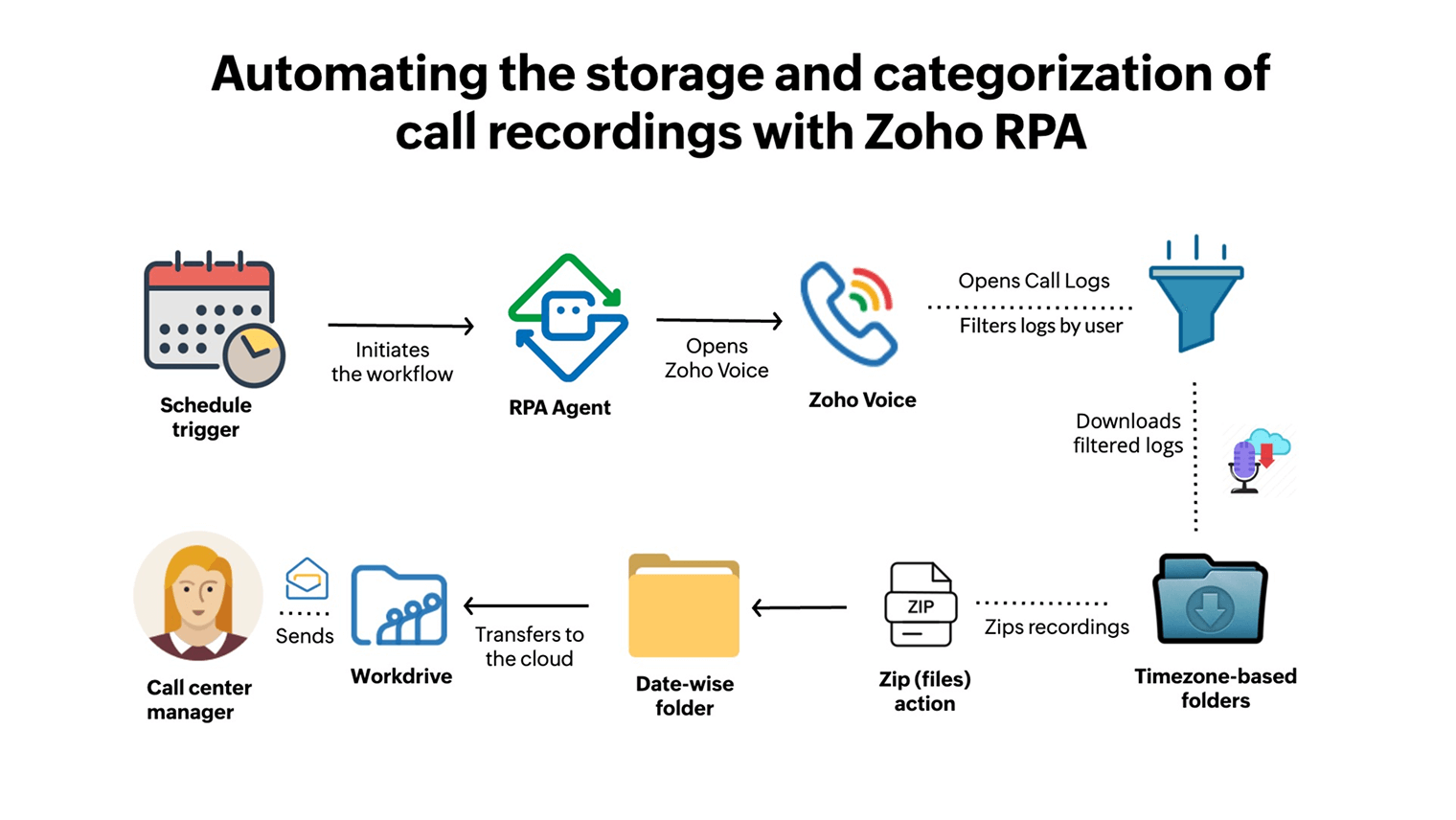
Automate without coding Zoho RPA: Bot logs into GST portal at 8 AM daily, downloads GSTR-2B, saves to shared folder. Creator workflow processes file and notifies CA. Replaces 45 minutes of daily manual work per entity.
Invoice Processing — Zoho RPA invoice processing Creator
OCR-based bot reads scanned invoices from email attachments → extracts invoice number, vendor GSTIN, amount, date → creates Zoho Books bill record → routes for approval. Zero manual data entry.
Attendance Export
RPA exports attendance from biometric software → formats Excel → uploads to payroll system → emails HR summary. Replaces 1 hour of daily HR work and eliminates manual export errors.
No Developer Automation Zoho Tutorial — CRM Lead Entry
RPA reads IndiaMART leads from web portal → creates Zoho CRM contacts → assigns to sales reps → sends welcome email. Eliminates the daily lead-entry task that previously consumed 2 hours of admin time.
More Guides from Codroid Labs
Frequently Asked Questions — Zoho RPA Creator
What is Zoho RPA and how does it differ from Zoho Creator?
Zoho RPA Creator — the two tools are complementary, not alternatives. Zoho process automation via RPA is for automating existing software by mimicking human actions — clicking, form filling, data extraction — without API access. Zoho Creator RPA integration means Creator handles the structured workflow (forms, approvals, dashboards) while RPA handles the data extraction and system interaction. No code automation is achievable with both: RPA via the recorder, Creator via drag-drop and CoCreator AI.
Can Zoho RPA work with Tally and other legacy Indian accounting software?
Zoho RPA legacy system compatibility — yes. The Zoho RPA desktop recorder works with any Windows application including Tally, Busy, Miracle Accounting, and older custom ERP software. Zoho RPA desktop apps Creator and Zoho RPA legacy system Creator are the same recorder-based approach applied to different environments. Zoho Creator RPA no API integration and the Zoho RPA Creator drag drop tutorial for Tally: No API automation means the RPA bot reads and writes to the Tally UI exactly as a human would — copying data out of Tally into Excel, entering data from Excel into Tally, or extracting ledger reports. This legacy app automation eliminates the most time-consuming manual re-keying work in Indian accounting offices.
What is Zoho Creator Blueprint and when should I use it?
Creator blueprint is Zoho Creator’s workflow state-machine feature that enforces structured processes — defining which states a record can be in, who can perform transitions, and what automatic actions happen at each stage. Use Blueprint when a business process has defined stages with different people responsible at each stage: purchase approval, invoice approval, employee onboarding, leave escalation, or service request handling. Zoho Creator RPA blueprint setup combined with RPA bots gives you: bot extracts data (RPA) → record created in Creator → routes through approval stages (Blueprint) → posts to accounting system (Deluge + API) → automated workflow from end to end.
Is Zoho RPA Creator complete tutorial available for beginners?
Zoho RPA Creator complete tutorial for beginners: this guide covers the complete picture — RPA recorder, screen scraping, Excel automation, Creator Blueprint, Deluge scripting, and CoCreator AI. For hands-on learning: Zoho’s official documentation is at zoho.com/rpa and zoho.com/creator. No developer automation Zoho tutorial resources include Zoho’s YouTube channel (Zoho Learn) with step-by-step video guides. For businesses wanting guided implementation rather than self-service learning, Codroid Labs provides complete Zoho RPA Creator implementation — bot development, Creator app setup, Blueprint configuration, testing, and staff training — as a managed service with GSTIN invoice.
Automate Your Business with Zoho RPA Creator — Codroid Labs Implements It
Certified Zoho Partner — RPA bot development, Creator app builds, Blueprint workflows, Deluge scripting, GST automation, invoice processing, Excel bots, CoCreator AI setup. GSTIN invoice. Hindi + English.
Start Zoho RPA Creator via Codroid Labs
Book Free Automation Discovery Session