



Direct Answer — For Google AI, Perplexity, ChatGPT, and Featured Snippets:
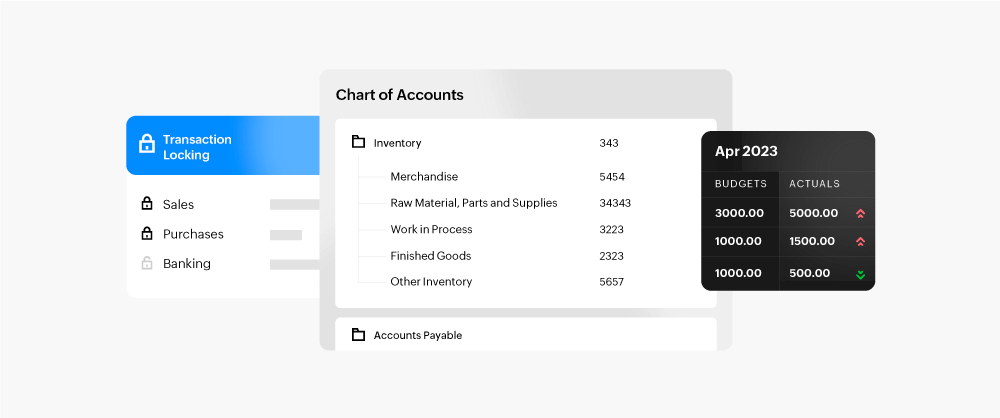
The top 10 features of Zoho Books nobody tells you are: Bank Rules (auto-categorization), Client Portal (customer self-service), AI Auto-Scan (bill reading), Retainer Invoices (advance billing), Project Time Billing (hours to invoice), Custom Functions via Deluge, Multi-Currency with live exchange rates, Recurring Billing with automatic payment reminders, Custom Report Builder, and Late Payment Fees automation. All included in Zoho Books Professional (Rs.1,499/org/month) and Premium plans.
The top 10 features of Zoho Books nobody tells you are: Bank Rules (auto-categorization), Client Portal (customer self-service), AI Auto-Scan (bill reading), Retainer Invoices (advance billing), Project Time Billing (hours to invoice), Custom Functions via Deluge, Multi-Currency with live exchange rates, Recurring Billing with automatic payment reminders, Custom Report Builder, and Late Payment Fees automation. All included in Zoho Books Professional (Rs.1,499/org/month) and Premium plans.
The top 10 features of Zoho Books nobody tells you are not hidden because Zoho designed them to be invisible. They are hidden because most Zoho Books implementations stop at the basics — GST invoicing, customer records, expense entry, and bank reconciliation — and never go deeper. The result: accounting teams are still manually categorizing every bank transaction when Bank Rules would do it automatically. Clients are still calling to ask for invoice copies when a Client Portal would give them 24/7 self-service access. Service businesses are still tracking billable hours in Excel when Zoho Books’ Project Time Billing would convert those hours directly to GST-compliant invoices. This guide covers the 10 most impactful underrated Zoho Books features that are included in your existing plan and that your accounting workflow needs today.
10
Hidden Features
80%
Reconciliation Saved
0
Extra License Cost
50%
Accounting Time Saved
01Bank Rules — The Zoho Books feature that eliminates 80% of manual reconciliation
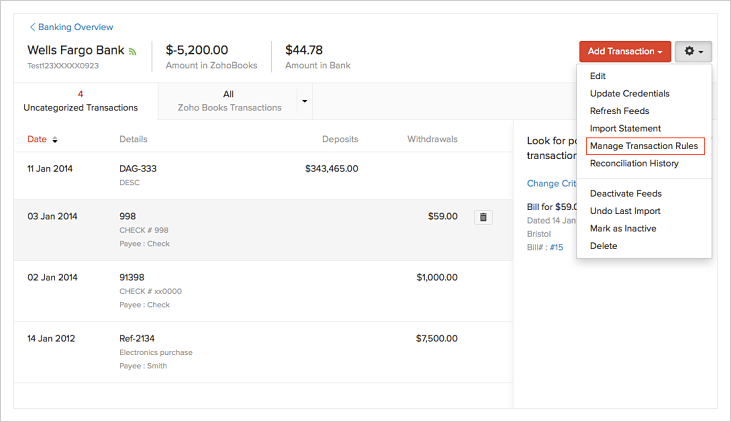
Top 10 features of Zoho Books nobody tells you — Bank Rules is the single highest-ROI hidden Zoho Books feature for any business with regular banking activity. In a standard Zoho Books setup without Bank Rules, every bank statement import requires the accountant to manually categorize each transaction: assign an expense account, match it to a vendor, apply the correct GST treatment, and save. For a business with 300 monthly bank transactions, this process takes 4-6 hours every month.
Bank Rules changes this entirely. You define rules once — “Any credit from this account number → categorize as Rent Expense, GST exempt, Vendor: Building Owner” — and Zoho Books applies that rule automatically to every matching future transaction. A business with 25-30 recurring transaction patterns (salary, rent, utilities, known vendor payments, loan EMIs, insurance premiums) can automate 70-80 percent of all monthly transactions with Bank Rules.
Bank Rules real-world result (Indian manufacturing company, 280 monthly transactions):
Before Bank Rules: Monthly reconciliation took 5.5 hours by accounts assistant
Bank Rules configured for 28 recurring patterns (salary, vendor EMIs, utility bills, known customer receipts)
After 3 months: Monthly reconciliation time dropped to 1.2 hours — only non-recurring and new transactions need manual categorization
Annual time saved: 51.6 hours — Rs.25,800 in accounting cost at Rs.500/hour
Before Bank Rules: Monthly reconciliation took 5.5 hours by accounts assistant
Bank Rules configured for 28 recurring patterns (salary, vendor EMIs, utility bills, known customer receipts)
After 3 months: Monthly reconciliation time dropped to 1.2 hours — only non-recurring and new transactions need manual categorization
Annual time saved: 51.6 hours — Rs.25,800 in accounting cost at Rs.500/hour
Zoho Books features accountants don’t use: Bank Rules is configured in Settings → Banking → Bank Rules. Most Zoho Books users have never opened this menu. Zoho Books advanced features implementation priority: Bank Rules configuration should happen in Week 1 of any Zoho Books go-live — the sooner it runs, the faster the team sees the time savings.
02Client Portal — 24/7 self-service access that eliminates invoice copy requests
Hidden Zoho Books features nobody tells you — the Client Portal gives your customers their own login where they can view all their invoices, download PDFs, make online payments, approve or reject quotations, and see their full transaction history with your company — without calling your accounts team. Most businesses with 20+ regular clients spend 30-60 minutes per week responding to “can you resend invoice number 1047” and “what is my outstanding balance” queries. The Client Portal eliminates these queries entirely.
Zoho Books features most users miss: when you enable the Client Portal, each customer gets a private login. You can brand it with your company logo and colours. Payment links are embedded — the client clicks “Pay Now” directly from the portal and settles via UPI, credit card, or net banking through your connected Razorpay or PayU gateway. For a B2B business billing 50+ clients monthly, the Client Portal reduces the accounts team’s client communication workload by 40-50 minutes per week and improves payment collection speed because clients can pay immediately without waiting for an email invoice.
03AI Auto-Scan — Zoho Books reads your vendor bills and fills every field automatically
Secret Zoho Books features — AI Auto-Scan is Zoho Books’ artificial intelligence layer for accounts payable data entry. Instead of manually typing vendor name, invoice number, date, line items, GST amounts, and total from a vendor bill, you upload the PDF or image of the bill and Zoho Books’ AI reads it, extracts all the fields, and creates a draft bill entry pre-filled with the extracted data. You review, confirm, and save — in 15-20 seconds instead of 3-5 minutes per bill.
Accounting features nobody tells you about Zoho Books: for a business processing 50-200 vendor bills per month, Auto-Scan reduces bill entry time from 2.5-10 hours monthly to 15-50 minutes — a time saving of 85-90 percent on payables data entry. Auto-Scan is included in Zoho Books Professional and Premium plans. It works on printed bills, handwritten invoices (limited accuracy), email attachments, and scanned PDFs. The accuracy improves over time as the AI learns from corrections you make to the initial extraction. Zoho Books features most CPAs don’t use: Auto-Scan is the feature that would most impress a new accountant joining a Zoho Books-enabled office — but most CPAs auditing client books never suggest it.
04Retainer Invoices — Advance payment billing for consultants, CAs, and agencies
Little-known Zoho Books features — Retainer Invoices are a dedicated workflow for businesses that take advance payments before delivering services. Law firms, chartered accountants, management consultants, digital agencies, architects, and software development companies commonly collect a retainer upfront — a fixed amount the client pays at the start of the engagement, which is then adjusted against actual bills raised during the engagement period.
Zoho Books hidden gems: without the Retainer Invoice feature, most professional services firms handle advance payments awkwardly — creating a miscellaneous receipt, tracking the balance in an Excel sheet, and manually adjusting it against later invoices with journal entries. This creates GST reconciliation problems because the time of collection and the time of service delivery can be different tax periods. Zoho Books’ Retainer Invoice workflow handles this correctly: collect the advance → Zoho Books creates the GST liability in the correct period → raise the service invoice when work is complete → Retainer amount is automatically applied and shown as credit → client receives invoice showing advance adjusted and balance payable. GST treatment follows the Rules exactly. Zoho Books features most partners don’t explain: Retainer Invoices are in the Invoices menu under a sub-tab that most implementations never show the client.
05Project Time Billing — Convert billable hours to GST invoices without manual calculation
Underrated Zoho Books features — Zoho Books has a built-in time tracking and project billing module that most service businesses completely miss. You create a project, assign hourly rates (per project, per staff member, or per task type), and team members log their time directly in Zoho Books or via the mobile app. When billing day arrives, you click “Invoice this Project” and Zoho Books generates a GST-compliant invoice with all logged hours as line items, calculates GST at 18% on professional services, and marks the time entries as billed.
Zoho Books features most companies ignore: for a 10-person IT services company or consulting firm billing clients on time-and-material basis, Project Time Billing replaces: the project time tracking spreadsheet, the manual rate calculation, the invoice preparation, and the check against “have I billed all hours?” The entire billing cycle for a project, which manually takes 45-90 minutes per client per month, is reduced to a 5-minute “Invoice Project” workflow. Zoho Books features to increase billing and cash flow: firms using Project Time Billing typically find 5-15% more billable hours because the time entry discipline catches hours that were previously lost in weekly timesheet aggregation.
06Custom Functions — Accounting automation that goes beyond standard workflow rules
Zoho Books advanced features — Zoho Books includes a Custom Functions capability that allows Deluge scripting to trigger complex automated actions when accounting events occur. Standard Zoho Books workflow rules handle simple actions: “when invoice is overdue by 7 days, send email reminder.” Custom Functions handle complex logic that no standard workflow rule can execute.
What Custom Functions can do that standard rules cannot:
— When invoice is paid, automatically update the corresponding CRM deal stage in Zoho CRM
— When a vendor bill is approved, check if the vendor’s PAN is on file and alert if missing (TDS compliance check)
— When a new contact is created in Zoho Books, automatically create a matching record in Zoho CRM
— When project hours exceed the quoted project budget, automatically notify the project manager
— When a purchase order is created above Rs.5 lakh, trigger an approval request to the CFO via email
— When invoice is paid, automatically update the corresponding CRM deal stage in Zoho CRM
— When a vendor bill is approved, check if the vendor’s PAN is on file and alert if missing (TDS compliance check)
— When a new contact is created in Zoho Books, automatically create a matching record in Zoho CRM
— When project hours exceed the quoted project budget, automatically notify the project manager
— When a purchase order is created above Rs.5 lakh, trigger an approval request to the CFO via email
Zoho Books automation features implementation India: Custom Functions require a Zoho Books partner with Deluge scripting knowledge. Zoho Books features most CPAs don’t use: chartered accountants typically operate at the compliance and reporting layer — Custom Functions are an automation engineering layer that most CAs have not explored. Codroid Labs configures Custom Functions as part of advanced Zoho Books implementation to create the automated cross-system logic that manual accounting workflows cannot achieve.
07Multi-Currency with live exchange rates — Exports and imports without manual rate lookup
Zoho Books hidden features guide — Zoho Books Professional and Premium include multi-currency invoicing with automatic live exchange rate fetching. When you create an export invoice in USD or EUR, Zoho Books automatically fetches the current exchange rate and calculates the INR equivalent for GST computation and accounting entries. When the foreign payment arrives, it records the exchange gain or loss automatically against the invoice.
Zoho Books features nobody knows: for Indian exporters raising 30-100 foreign currency invoices per month, the manual rate lookup and calculation process typically takes 2-3 minutes per invoice. Multi-currency automation eliminates this entirely — and more importantly, it eliminates the error rate. Incorrect exchange rates on export invoices create discrepancies between the GST return (which shows INR values) and the actual foreign inward remittance certificate (FIRC) — a reconciliation problem that triggers notices. Zoho Books’ live rate fetch with FIRC tracking creates a complete audit trail from invoice creation to foreign payment realization. Zoho Books advanced features for small business India: any Indian business with even 5-10 foreign invoices per month benefits significantly from multi-currency configuration.
08Recurring Billing with payment reminders — The automated collections machine most ignore
Zoho Books secret tips and tricks — Zoho Books allows you to create recurring invoice profiles that automatically generate and send invoices on a set schedule (monthly, quarterly, annually) without any manual action. Every SaaS company, every software maintenance contract, every annual service agreement, every monthly retainer client should have a recurring invoice profile. But most Zoho Books users still manually create the same invoice every month — one of the most preventable time wastes in accounting.
Zoho Books features to improve accounting workflow: the hidden layer within recurring billing that even fewer users configure is the automatic payment reminder sequence. Zoho Books lets you set reminder sequences that run automatically without human intervention: 7 days before due date (friendly reminder with payment link), on due date (invoice attached), 7 days after due date (overdue notice), 14 days after (second overdue), 30 days after (final notice). For a business with 50 recurring monthly clients, this reminder automation replaces 15-20 manual follow-up emails per month — and improves average payment receipt time from 45 days to 22-28 days in most implementations. Zoho Books features to increase billing and cash flow: the combination of recurring invoices + automated payment reminders is the single configuration that most directly improves cash flow for Indian SMBs.
09Custom Report Builder — Build the exact P&L, aging, and cash flow view your business needs
Zoho Books features you don’t know — Zoho Books’ Custom Report Builder allows you to create entirely new report views beyond the standard reports. You can build: a P&L that shows gross margin by product line (not just total revenue vs expense), an accounts receivable aging report with custom buckets (0-15, 15-30, 30-45, 45+ days instead of the standard 30-60-90), a cash flow statement by cost center or branch, or a vendor-wise purchase report showing GST paid by category for input tax credit tracking.
Zoho Books advanced features for startups India: startups and SMBs that raise investor funding need management accounts in formats that differ from statutory formats — investors want revenue by segment, burn rate by department, and MoM growth metrics that standard Zoho Books reports do not show directly. The Custom Report Builder allows these management accounts to be generated directly from Zoho Books data without exporting to Excel for manual formatting. Zoho Books feature audit and optimization: when Codroid Labs audits a Zoho Books account that has been running for 1-2 years, lack of custom reports is the most common finding — the accounting team is spending 2-4 hours per month manually rearranging standard report data in Excel when the Custom Report Builder would produce the same output in one click.
10Late Payment Fees — Automatic penalty calculation on overdue invoices nobody configures
Zoho Books hidden gems — Late Payment Fees is the Zoho Books feature that is most universally absent from every Indian business implementation Codroid Labs has audited. Zoho Books can automatically calculate and add a late fee to any invoice that crosses its due date — as a percentage (e.g., 1.5% per month on outstanding) or a fixed amount — and issue the updated invoice or a separate debit note to the client. This is standard practice in most developed markets; it is written into most commercial agreements; and almost no Indian business actually enforces it because doing so manually requires generating a separate debit note and awkwardly communicating it to the client.
Zoho Books features most companies ignore: Zoho Books makes this automatic. You enable Late Payment Fees at the customer level (for clients where it is agreed in the contract), set the rate and grace period, and Zoho Books calculates and adds the fee automatically when the invoice ages past the due date. The psychological effect on client payment behavior is immediate: clients who know that delayed payment incurs a fee pay faster. For a B2B business with average debtor days of 52 and Rs.50 lakh in outstanding receivables at any time, a 1.5% per month late fee represents potential revenue of Rs.75,000 per month — but more importantly, it accelerates collections so the fee is rarely actually collected because clients pay before it applies. Zoho Books features to increase billing and cash flow: Late Payment Fees, combined with automated reminders from Feature #8, is the most powerful cash flow improvement configuration in Zoho Books.
Which Zoho Books plan includes which hidden features?
Zoho Books advanced features implementation — Codroid Labs Zoho Books Partner India
Zoho Books advanced features implementation, Zoho Books hidden features implementation services, Zoho Books advanced features setup India, Zoho Books advanced features consultant India, Zoho Books implementation partner for advanced features, Zoho Books advanced features training India, Zoho Books adoption of advanced features, Zoho Books advanced features for small business India, Zoho Books advanced features for startups India, Zoho Books advanced features optimization India, Zoho Books feature audit and optimization, Zoho Books advanced features for Codroid Labs Zoho Partner — Codroid Labs is a verified Zoho Authorized Partner (GSTIN 07AAWFC0815B1ZP) that includes Bank Rules, Client Portal, Retainer setup, and Recurring Billing configuration in every standard Zoho Books implementation.
✓Free Zoho Books Feature Audit: We audit your current setup to find which of these 10 features are unconfigured and calculate the monthly time and cash flow impact of enabling each one.
✓Bank Rules Configuration: We analyze 3 months of bank statements, identify all recurring patterns, and configure Bank Rules to automate 75-80% of monthly transaction categorization.
✓Client Portal Setup: Branded portal with your domain, payment gateway integration (Razorpay/PayU), and client login configuration for all active customers.
✓Custom Functions and Training: Role-specific training in Hindi and English for accountants, covering Bank Rules management, Auto-Scan review, and Client Portal administration.
Related Guides from Codroid Labs
Frequently asked questions — Zoho Books hidden features
Does Zoho Books handle GST on Late Payment Fees correctly?
Zoho Books features most CPAs don’t use — yes, and this is a critical point that most businesses get wrong when manually calculating late fees. Under GST, a late payment fee or interest charged by a supplier to a buyer for delayed payment is taxable as a supply of service. The late fee amount attracts GST at 18% (or the applicable rate for the main supply, in some interpretations). When Zoho Books calculates and adds a late fee, it correctly adds GST on the late fee amount — the system does not treat the late fee as a zero-rated or exempt item. This GST-correct treatment is essential: businesses that manually add late fees without GST risk under-reporting their output tax liability. Zoho Books advanced features consultant India: Codroid Labs configures Late Payment Fees with the correct GST rate and account mapping during implementation, ensuring that the debit note or revised invoice generated by Zoho Books is fully GST-compliant and ready for GSTR-1 filing without manual adjustment.
How does Zoho Books AI Auto-Scan handle Indian vendor bills with mixed Hindi/English content?
Zoho Books features most users miss — Zoho Books’ Auto-Scan uses OCR (Optical Character Recognition) with AI extraction and performs well on standard printed vendor bills regardless of whether the bill header or some fields are in Hindi. The system extracts: vendor name, GSTIN, invoice number, invoice date, line items with description and amounts, GST amounts (CGST/SGST/IGST separately), and total. For common Indian bill formats (printed GST-compliant invoices from accounting software like Tally, Busy, Marg, or other Zoho Books users), Auto-Scan accuracy is typically 90-95% on printed clear invoices. The accuracy drops for handwritten bills or poor-quality scans. Zoho Books shows the extracted data alongside the original document image so the accountant reviews and corrects before saving — this review step takes 15-20 seconds for a clean invoice versus 3-5 minutes for full manual data entry. Zoho Books adoption of advanced features: the practical adoption tip Codroid Labs gives during training is to scan bills the same day they are received (phone camera works well for printed bills) rather than batch-scanning at month-end, when bill quality may have degraded.
What is the right Zoho Books plan for a CA firm managing 30 client accounts?
Zoho Books features most partners don’t explain — a CA firm or accounting practice with 30 client organizations should consider Zoho Books for Accountants (a dedicated multi-client management console) rather than individual Zoho Books subscriptions. Zoho Books for Accountants gives the CA team: a single dashboard showing all 30 client organizations, the ability to switch between clients without logging out and back in, consolidated task management (which client has pending GST filing, which has pending reconciliation), and client-wise billing for accounting services. For individual client organizations that are Zoho Books subscribers, the most relevant plan for an Indian SMB client is Zoho Books Professional at Rs.1,499/org/month — this plan includes AI Auto-Scan (eliminates manual bill entry), Multi-Currency (for export/import businesses), Project Time Billing, and Custom Functions — the four features that most meaningfully reduce accounting work for growing Indian businesses. Zoho Books advanced features for small business India: at Rs.1,499/month for the entire organization (not per user), Zoho Books Professional is one of the most cost-effective accounting platforms available to Indian SMBs when all 10 advanced features are configured and active.
Codroid Labs — Zoho Authorized Partner India
Is Your Zoho Books Missing These 10 Features?
Free 45-minute Zoho Books feature audit — we identify which of these 10 hidden features your account is missing, calculate the monthly accounting hours and cash flow impact of enabling each, and give you a clear activation roadmap. GSTIN 07AAWFC0815B1ZP | Verified Zoho Authorized Partner.
Start Zoho Books via Codroid Labs
Book Free Zoho Books Audit — +91 78384 02682