



Direct answer
zoho zia agent ideas are practical automation patterns you can build around sales, service, finance, HR, projects and marketing workflows. The strongest starting point is a narrow, reversible job. Many zoho zia agent ideas fail when teams start with the most complex workflow. such as lead qualification, ticket triage, follow-up drafting, collections reminders or management summaries, with human approval kept for money, customer commitments and destructive changes.
Updated: September 2026 | Reviewed: Current agent setup and pricing documentation | From Codroid Labs: Zoho implementation and automation guidance
28
practical use cases
practical use cases
5
business areas
business areas
₹0
agent platform fee
agent platform fee
1st
goal: one reliable workflow
goal: one reliable workflow
What Are Zoho Zia Agent Ideas?
zoho zia agent ideas are repeatable ways to turn an AI agent into a bounded business worker. The useful unit is not “AI can do everything.” The best zoho zia agent ideas start with one measurable outcome. It is one clearly defined outcome: qualify a lead, draft a reply, surface a renewal risk, prepare a quote, summarize collections exposure or flag a policy exception.
That matters for SMBs because implementation time is limited. The most useful zoho zia agent ideas are the ones a small team can explain, test and own. A small team does not need 40 clever demos. It needs three or four workflows that remove repetitive work without creating another approval queue.
What Changed: From “AI Prompt” to an Auditable Agent
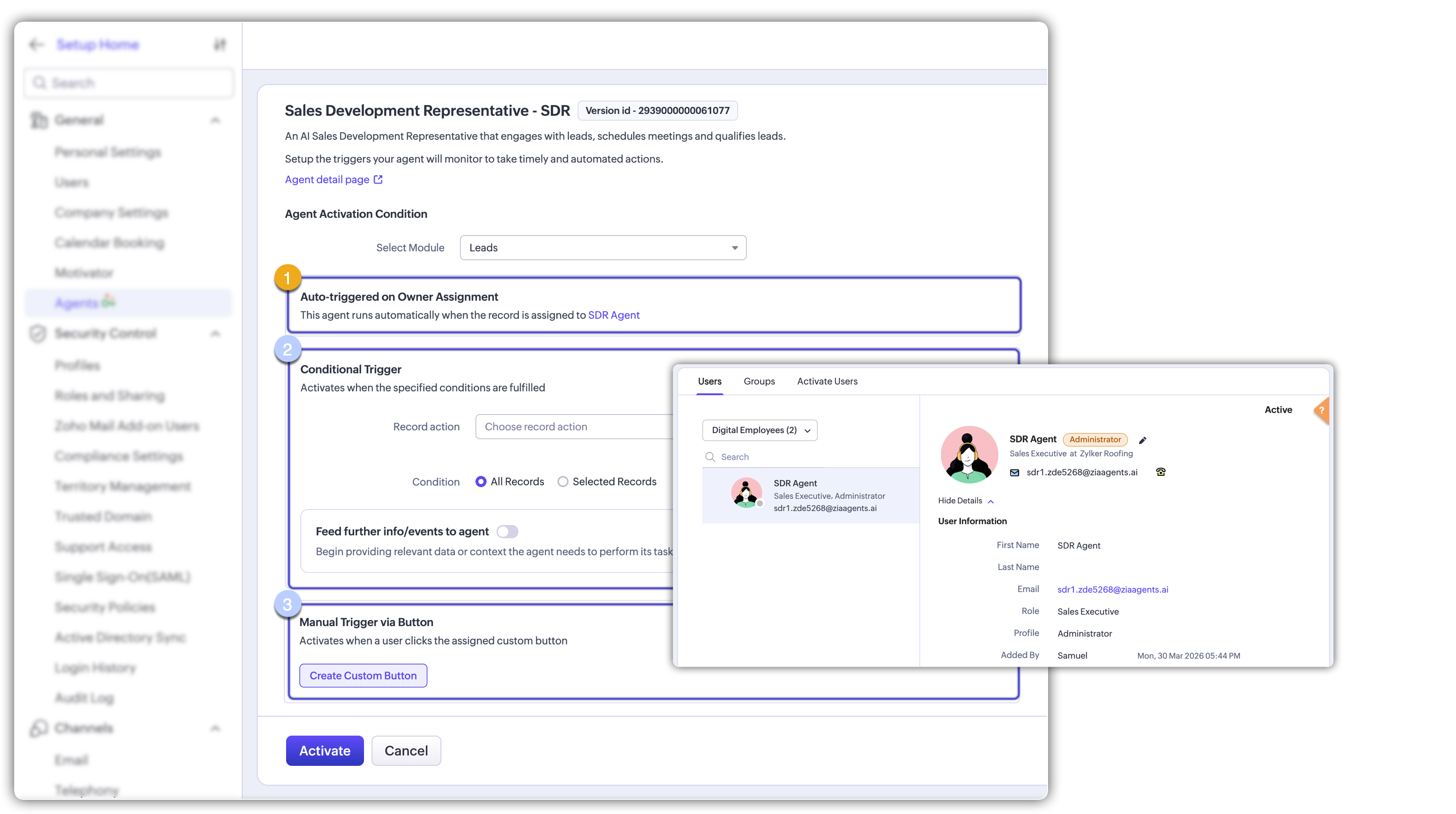
The current agent model is more operational than a chat prompt. Mature zoho zia agent ideas need a trigger, data scope and audit trail. In the CRM workflow, an agent can be created or hired, given a purpose and instructions, supplied with knowledge and tool groups, tested against sample data, and then deployed using a connection or as a Digital Employee. Activation can be tied to a module, conditions or a manual button.
28 Practical Zoho Zia Agent Ideas for Indian SMBs
Use this list as a backlog, not a checkbox exercise. Treat these zoho zia agent ideas as a prioritized backlog, not a promise to automate everything. Start with the workflow that is frequent, measurable and reversible. The strongest zoho zia agent ideas are usually attached to a clear trigger and a clear owner.
USE CASE 01
Lead qualification agent
Apps: CRM Trigger: New lead or manual button
Score fit, identify missing fields and prepare a rep-ready qualification note.
Approval: Human approves.
USE CASE 02
Inbound enquiry triage
Apps: CRM + SalesIQ Trigger: New enquiry
Classify intent, product interest and urgency, then route to the right owner.
Approval: Auto-route; human handles edge cases.
USE CASE 03
Follow-up drafter
Apps: CRM + Mail Trigger: Deal stage change
Draft a follow-up email from CRM context, recent activity and next step.
Approval: Human sends.
USE CASE 04
Quote preparation assistant
Apps: CRM + Inventory Trigger: Quote request
Collect deal details and prepare a draft quote using approved catalog data.
Approval: Approval before send.
USE CASE 05
Dormant lead reactivation
Apps: CRM + Campaigns Trigger: Lead inactive for X days
Find stale opportunities, summarize history and draft a personalized reactivation sequence.
Approval: Human reviews.
USE CASE 06
CRM data quality agent
Apps: CRM Trigger: Scheduled review
Detect inconsistent phone, industry, state, source and duplicate patterns.
Approval: Human approves merges or bulk edits.
USE CASE 07
Sales meeting prep agent
Apps: CRM + Meeting Trigger: Meeting upcoming
Create a one-page brief with account history, open deals, risks and suggested questions.
Approval: Read-only.
USE CASE 08
Post-call action agent
Apps: CRM + Meeting Trigger: Recording or transcript available
Turn meeting notes into structured outcomes, tasks and follow-up points.
Approval: Approve write-backs.
USE CASE 09
Support triage agent
Apps: Desk Trigger: Ticket created
Classify issue, urgency and customer tier and suggest routing.
Approval: Auto-route by rule.
USE CASE 10
Support reply drafter
Apps: Desk + CRM Trigger: Ticket needing response
Draft a concise response using customer context and approved knowledge.
Approval: Human sends sensitive cases.
USE CASE 11
Escalation monitor
Apps: Desk + CRM Trigger: Priority or SLA signal
Find cases that need escalation and prepare a summary for the manager.
Approval: Human decides escalation.
USE CASE 12
Renewal risk agent
Apps: CRM + Desk Trigger: Renewal window
Combine usage, support issues and activity signals into a renewal-risk note.
Approval: Human owns action.
USE CASE 13
Collections follow-up agent
Apps: Books + CRM Trigger: Invoice becomes overdue
Summarize exposure and draft a polite, segmented reminder.
Approval: Human approves send.
USE CASE 14
Cash-risk briefing agent
Apps: Books + Analytics Trigger: Weekly schedule
Create a short cash-risk brief from overdue invoices, trends and open commitments.
Approval: Finance reviews.
USE CASE 15
Expense anomaly checker
Apps: Expense + Books Trigger: Expense submitted
Flag unusual categories, amounts or policy exceptions for review.
Approval: Human decides.
USE CASE 16
Invoice exception agent
Apps: Books Trigger: Invoice status or exception
Explain why an invoice is blocked, missing data or needs review.
Approval: Finance resolves.
USE CASE 17
Customer onboarding agent
Apps: CRM + Projects Trigger: Deal marked won
Create the onboarding checklist, owners and first communication draft.
Approval: Human confirms.
USE CASE 18
Employee onboarding assistant
Apps: People + Learn Trigger: Employee joined
Prepare onboarding checklist, training assignments and reminders.
Approval: HR approves sensitive tasks.
USE CASE 19
Training progress agent
Apps: People + Learn Trigger: Course or review cycle
Identify overdue learning and prepare manager summaries.
Approval: Manager decides.
USE CASE 20
Project deadline enforcer
Apps: Projects Trigger: Task nearing due date
Notify owners, summarize blocked work and escalate overdue items.
Approval: Use approved escalation.
USE CASE 21
SOP compliance checker
Apps: WorkDrive + Creator Trigger: Document or form submitted
Check whether required fields, attachments and approvals are present.
Approval: Human decides exceptions.
USE CASE 22
Campaign performance analyst
Apps: Campaigns + Analytics Trigger: Campaign cycle ends
Summarize results, weak segments and next-test ideas.
Approval: Marketing approves experiments.
USE CASE 23
Content repurposing agent
Apps: Writer + Social Trigger: Approved source content
Turn one approved asset into channel-ready drafts and variants.
Approval: Human reviews.
USE CASE 24
Event follow-up agent
Apps: Backstage + CRM Trigger: Event ends
Segment attendees, draft follow-up and create next-step tasks.
Approval: Human approves.
USE CASE 25
Feedback theme agent
Apps: Survey + CRM Trigger: Feedback collected
Cluster recurring complaints, requests and praise into an action brief.
Approval: Owner decides.
USE CASE 26
Contract renewal watch
Apps: Contracts + CRM Trigger: Renewal window approaching
Extract key dates and renewal actions into a manager-ready summary.
Approval: Approval required.
USE CASE 27
Inventory reorder assistant
Apps: Inventory + Books Trigger: Stock threshold reached
Prepare a reorder recommendation based on thresholds and supplier context.
Approval: Human approves purchase.
USE CASE 28
Executive morning brief
Apps: CRM + Books + Desk + Analytics Trigger: Daily schedule
Combine sales, support, collections and critical tasks into one short management brief.
Approval: Start read-only.
How to Set Up a Zia Agent Without Creating a Mess
- Define one outcome. “Reduce missed follow-ups” is better than “automate sales.”
- Choose the trigger. Use a record event, a condition or a manual button. Narrow triggers reduce accidental runs.
- Feed the right context. Map only the fields and records the agent needs.
- Choose tools and permissions. Read-first is safer than broad write access on day one.
- Test on sample data. Official setup guidance explicitly recommends testing before deployment.
- Pick the identity model. A connection runs under the connected user’s identity; a Digital Employee has its own role, profile and auditable identity.
- Activate, measure and revise. Track false positives, time saved, write-backs, approval rate and cost.
For a first implementation, take the simplest zoho zia agent ideas first: read → recommend → draft → human approve → write. Do not jump straight to uncontrolled writes.
Zia Agent Pricing: What Indian SMBs Actually Pay
The current pricing model is unusually simple at the platform level: the agent platform itself is free, so the cost discussion around these zoho zia agent ideas should focus on model usage and connected subscriptions. Zia Agents themselves are free. The variable cost comes from the language model you run. With Zoho-hosted models, the published Standard tier includes 30 million free tokens per month and the Pro tier includes 20 million; published overage is US$1 per additional million tokens for Standard and US$3 per additional million for Pro. Local taxes such as GST are extra. External model connections can instead use vendor pricing or bring-your-own-key arrangements.
| Cost item | Current published position | SMB planning note |
|---|---|---|
| Agent platform | Free | Budget is driven by model usage and connected app subscriptions. |
| Zoho-hosted Standard | 30M free tokens/month; US$1 per extra 1M | Good starting point for controlled workloads. |
| Zoho-hosted Pro | 20M free tokens/month; US$3 per extra 1M | Use when the task genuinely needs the higher-tier model. |
| External model | Vendor usage pricing applies | Keep a model-cost budget separate from the Zoho subscription budget. |
8 Zia Agent Gotchas That Quietly Derail Projects

- Trigger scope is too broad. “Every record” is rarely a sensible first trigger. Start with a condition that mirrors an actual business rule.
- Permissions are wider than the task. If an agent only needs to read deals and draft a message, do not hand it unnecessary write privileges.
- Money actions skip human approval. Quotes, discounts, credits, refunds and purchasing actions deserve explicit controls.
- Model cost is treated as invisible. The platform can be free while model usage is not. Budget each production batch of zoho zia agent ideas with a clear model-cost ceiling. Measure token-heavy workflows.
- Testing happens on three perfect records. Test missing fields, messy notes, duplicate contacts, conflicting statuses and unusually long histories.
- Identity is misunderstood. A connection-based deployment can run under a user identity; a Digital Employee creates an auditable agent identity with its own role/profile. Decide which model fits your governance.
- Agent lifecycle is ignored. Versioning, deactivation and monitoring belong in the operating process, not just the build checklist.
- Disabling the agent portal is treated as a normal cleanup step. Current documentation warns that disabling the Agent Portal permanently deletes active agents, their configurations, triggers and parameter mappings, and that the action cannot be undone.
Best first move for an Indian SMB: choose one workflow where the failure cost is low, the volume is high and the time saved is easy to measure. A daily management brief or lead follow-up drafter is usually a safer starting point than an agent that can alter financial records.
The 5-Stage Agent Roadmap
| Stage | What you deploy | Success signal |
|---|---|---|
| 1 | Read-only summary | Time saved and useful accuracy |
| 2 | Draft generation | Approval rate above your baseline |
| 3 | Controlled write-back | Low correction rate |
| 4 | Conditional autonomous action | Stable outcomes across edge cases |
| 5 | Multi-app workflow | Measurable business ROI |
How These Zoho Zia Agent Ideas Improve AI Search Visibility
This page is written as a human-use guide, not a wall of keywords. The goal is to make zoho zia agent ideas easy to understand. Generative search systems can surface relevant passages, images and direct answers. Concise definitions, tables, examples, FAQs and first-hand implementation guidance are more useful than repetition.
Strong zoho zia agent ideas define the trigger, scope, approval boundary and KPI. The implementation layer turns generic AI content into useful buying-stage content.
Related Codroid Labs resources
Quick Answers for AI Search
Frequently Asked Questions
1. How many agents should a small business build first?
One or two. A focused pair of zoho zia agent ideas is more useful than a dozen nobody measures. It is a repeatable workflow with a measurable outcome, clear ownership and low correction effort.
2. Can Zia Agents work without human approval?
They can be configured for autonomous actions, but the right zoho zia agent ideas keep humans in the loop for money, legal exposure and destructive changes until the workflow is proven. where the setup and permissions support it. In practice, keep approval around financial, legal, customer-commitment and destructive actions until the workflow has a strong operating history.
3. What is the safest deployment style?
A narrow trigger plus controlled permissions is safer than broad access. A Digital Employee can provide a dedicated role, profile and audit identity.
4. What is the biggest cost mistake?
Ignoring model usage because the agent platform itself is free. Measure token-heavy workflows, run pilots on realistic volumes and set a monthly budget before enabling multiple agents.
5. What is the biggest implementation mistake?
Trying to automate the whole process before defining the exact handoff between AI and human staff. Good agents are boringly specific. That principle should guide every new batch of zoho zia agent ideas.
Turn One Agent Idea Into a Working Workflow
Codroid Labs can map the trigger, data scope, tools, permissions, approval steps and KPI before you deploy. The aim is simple: one reliable workflow first, then scale the pattern across the rest of the stack.
External resources
- Agent deployment documentation
- Agent setup and trigger documentation
- Current agent pricing details for Zoho Zia Agent Ideas
Pricing and feature availability can change. Verify the live documentation before committing a production design.