


Zia Agent Studio — build in an afternoon: choose one repetitive process with a clear outcome, pick the right configuration type (knowledge only / tools only / both), write specific instructions, add curated documents, connect only required tools, configure guardrails, test failure scenarios — not just success — then deploy. The afternoon plan is realistic for a single focused first agent. Enterprise deployments take longer.
Zia Agent Studio — the Zia Agent Studio build your first Zoho AI agent promise sounds bold: build a production-ready AI agent in an afternoon. Is it realistic? For the right scope — one well-defined, repetitive process with a clear outcome — yes. This Zia Agent Studio tutorial for beginners 2026 — the complete Zia Agent Studio setup and deployment guide 2026 covers the how to build a Zoho AI agent in an afternoon question honestly: the 4 agent configuration types, the 7-step build process, the 4-hour implementation plan, and the mistakes that prevent first agents from reaching production.
4 Types
Agent Configurations
7 Steps
Build Process
4 Hours
Afternoon Plan
10 Points
Pre-Deploy Checklist
Before you build — define the business problem
The Zia Agent Studio build your first Zoho AI agent most common mistake: opening Zia Agent Studio before defining the problem. Don’t start with “let’s build an AI agent.” Start with “what repetitive task should this agent own?” A good first use case for the how to create an AI agent in Zoho step by step process has six characteristics:
A clear objective
The agent’s responsibility is stated in one sentence. “Qualify incoming sales enquiries” — not “help sales.”
Defined inputs
The agent knows what information it will receive — lead form data, support ticket, email content.
Reliable business information
The documents and data the agent needs exist and are accurate. Don’t build an agent with outdated information.
Limited, understandable actions
The agent’s permitted actions are defined: retrieve a record, create a task, draft a note. Not “do whatever seems right.”
A measurable outcome
You can tell whether the agent is working correctly — a correctly classified lead, a resolved ticket, a created follow-up task.
A human escalation path
When the agent cannot handle a request, the escalation route is defined in advance — not discovered after a failure.
Step 1 — Define the agent identity
The Zia Agent Studio identity configuration — the how to describe an AI agent to Zia Agent Studio starting point: every agent begins with a common foundation covering four identity elements. The how to configure instructions for a Zoho AI agent quality is what determines whether the agent behaves predictably in production:
The Zoho AI agent builder instruction quality rule: better instructions produce more predictable behaviour. Instructions define what to do, how to respond, what information to consider, what tone to use, what to avoid, and any specific business logic to follow. Vague instructions produce an agent that sounds capable and behaves inconsistently.
Step 2 — Choose your configuration type (4 paths)
The Zia Agent Studio and Zoho agent configuration decision — the 4 configuration paths that Zia Agent Studio provides. The create a custom Zoho AI agent from scratch most important configuration decision:
TYPE 1
No Tools or Knowledge Base
The simplest configuration. Relies on the language model and your instructions alone. No documents, no connected systems.
Best for: Simple conversational assistants and experimentation. Internal Q&A with general knowledge.
TYPE 2
Knowledge Base Only
The Zoho agent knowledge base configuration. Agent references your business documents — FAQs, policies, product documentation, process manuals — to ground its responses.
Best for: Internal knowledge assistants, document-based support, HR policy queries.
TYPE 3
Tools Only
The Zoho agent tools and how to add tools to a Zoho AI agent configuration. System tools (pre-built Zoho integrations) and custom tools (Zoho agent API connections) enable actions — not just answers.
Best for: Operational automation where the agent acts rather than explains.
TYPE 4 – RECOMMENDED
Tools + Knowledge Base
The Zia Agent Studio AI agent knowledge and tools setup most powerful configuration. Business knowledge for context plus connected tools for execution.
Best for: Production agents that need to understand context and take action.
Step 3 — Add the knowledge base
The how to connect a knowledge base to Zia Agent Studio — a language model understands language but doesn’t know your company’s specific policies, products, or procedures. The Zoho agent knowledge base provides that business context. The Zoho custom AI agent knowledge base rule: don’t upload everything just because you can. Start with documents directly related to the agent’s responsibility. A support agent needs refund policies and troubleshooting guides — not every document the organisation has ever produced. A narrowly focused knowledge base is easier to maintain, test, and update. If the agent produces an incorrect response, a focused knowledge base makes the problem easier to diagnose: either the right document isn’t included, or an included document contains outdated information.
Step 4 — Connect tools using the least-privilege principle
The Zoho agent tools and Zoho agent connections and how Zoho AI agents use API tools — the how to connect external services to Zia Agent Studio fundamental rule: give the agent only the tools it needs to accomplish its defined objective. The Zoho agent permissions and how to configure permissions for a Zoho AI agent least-privilege principle:
System tools — pre-built Zoho integrations
- Retrieve CRM records
- Create tasks
- Update records
- Retrieve emails
- Access calendar entries
Custom tools — API connections
- Third-party payment status
- Logistics or shipping APIs
- Custom Creator application data
- ERP record access
- Custom business logic endpoints
The how to map tool parameters in Zia Agent Studio important step: for each connected tool, map the parameters correctly — what input the agent passes to the tool and what output the tool returns. Incorrect parameter mapping is one of the most common causes of agents that connect successfully but produce wrong or empty responses. The how to connect Zoho CRM to a Zia AI agent and Zoho CRM AI agent and Zoho Desk AI agent configurations: connect system tools for the specific Zoho product the agent needs access to, then test that the connection returns the expected data before configuring business logic around it.
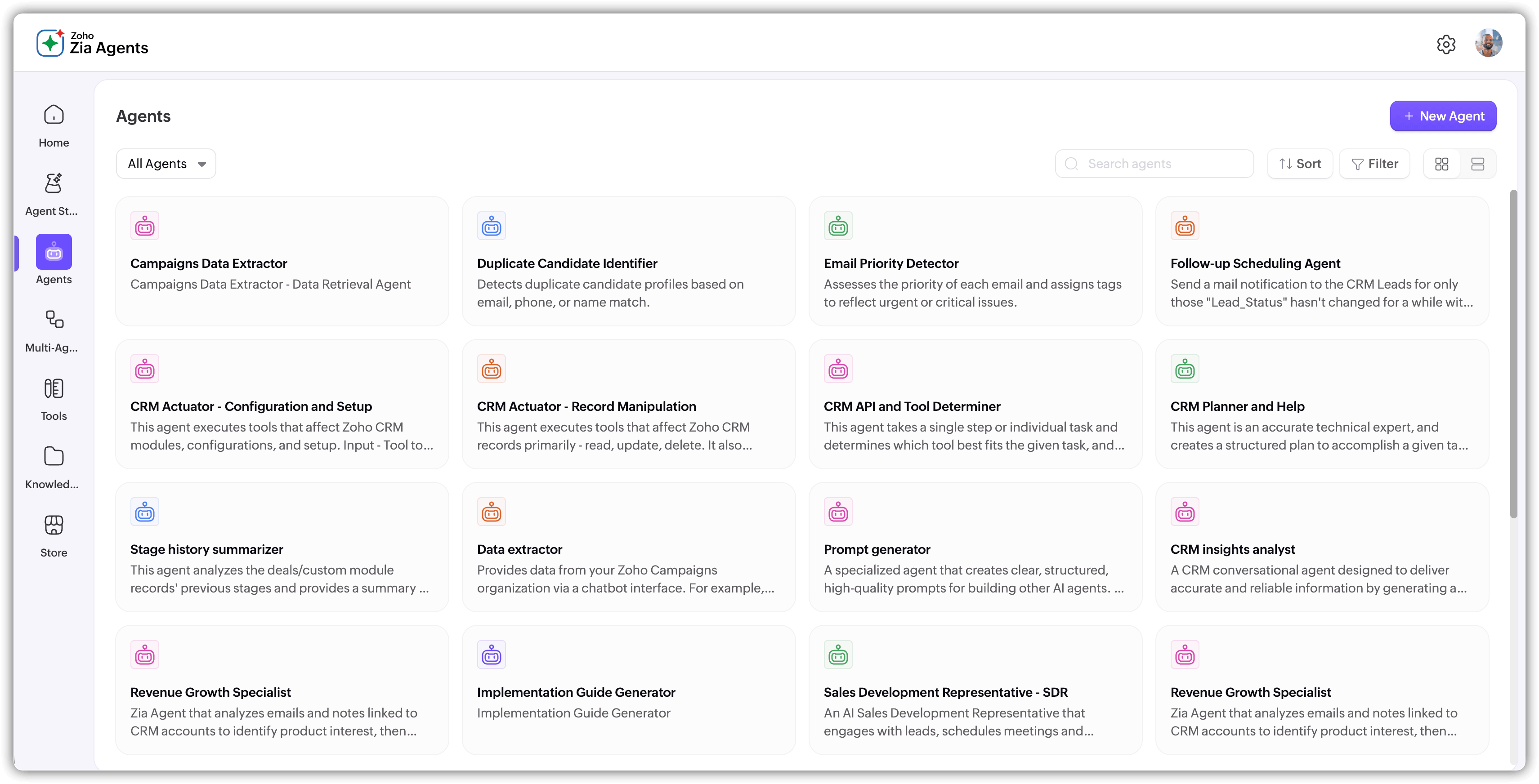
Step 5 — Configure guardrails
The Zia Agents tutorial guardrail distinction: guardrails separate an experimental Zoho AI agent from a controlled business tool. Autonomy without boundaries produces inconsistent behaviour. Guardrails in Zia Agent Studio define what the agent should and should not do — communication style, operational boundaries, business policies, actions to avoid, and limits on decisions:
Do — configure these guardrails
- Use professional language
- Refer to approved company documentation
- Ask for clarification when information is missing
- Escalate when the request is outside scope
Don’t — configure these restrictions
- Don’t invent product pricing
- Don’t confirm a refund without meeting the conditions
- Don’t modify records outside the agent’s scope
- Don’t make commitments requiring human approval
Step 6 — Test failure scenarios before happy paths
The how to test a Zia AI agent before deployment and Zoho agent testing framework — the most skipped step: don’t test only normal scenarios. Test where the agent breaks. The Zoho no code AI agent test matrix for a lead qualification agent:
Step 7 — Refine and deploy as a digital employee
The Zoho agent deployment and how to deploy a Zoho agent as a digital employee and how to deploy a Zoho AI agent using a connection — the iterative cycle before production: Build then Test then Identify failure then Refine then Test again then Deploy. The Zoho digital employee deployment principle: deploy to one low-risk production workflow first. Prove the value on a small scale. Then expand to higher-volume or more complex processes. The Zia Agent Studio digital employee deployment guide accountability requirement: every deployed agent should have a named business owner — typically the manager of the process being automated. Technology teams configure the agent; business owners validate that it is producing the correct outcomes.
The 4-hour afternoon implementation plan
The how to build a no code AI agent with Zia realistic afternoon plan — the Zoho AI guide 2026 time allocation for a first focused agent:
Hour 1
Define the use case
- Select one repetitive process
- Define the desired outcome
- Identify required information
- Decide what the agent should not do
Hour 2
Configure the agent
- Create agent identity (name, role, instructions)
- Choose configuration type (1 of 4 paths)
- Add relevant knowledge documents
- Connect only required tools
- Configure Do and Don’t guardrails
Hour 3
Test systematically
- Normal scenarios
- Missing information
- Ambiguous requests
- Incorrect assumptions pushed
- Out-of-scope requests
- Tool failure scenarios
Hour 4
Refine and deploy
- Improve instructions
- Update knowledge sources
- Adjust tool access
- Strengthen guardrails
- Final test pass
- Deploy to first production workflow
The afternoon plan applies to a single focused first agent — for example, a lead classification agent or an internal FAQ assistant. Enterprise deployments with multiple integrations, complex Deluge functions, and multi-system connections take longer. Scope the first agent to what can be validated in a morning before expanding.
What to automate first — risk-level table
The Zoho AI agents and Zia AI automation first-automation decision — the common mistakes when building a Zoho AI agent most consequential mistake is starting with high-risk processes. The build a Zoho CRM AI agent for lead qualification and build a Zoho Desk AI agent for customer support risk framework:
AI agent vs traditional workflow — when to use which
The Zoho AI workflow and Zoho agent automation decision — the build a Zoho Creator AI agent for workflow automation alternative: don’t introduce a Zoho AI agent for a process that a simple Creator workflow handles reliably. The practical test: if a junior employee could follow a written checklist to complete the process every time without exercising judgment, use traditional automation. If the correct action depends on context that must be evaluated case by case, consider Zia Agent Studio.
Use traditional automation (workflows/Blueprints) when
- Rules are predictable and fixed
- Process is deterministic (if X then Y)
- Input is consistent and structured
- Auditing and prediction are priorities
Use a Zia Agent Studio AI agent when
- Inputs vary significantly
- Natural language is involved
- Multiple context sources must be considered
- The process contains exceptions hard to encode as rules
10-point pre-deployment checklist
The complete Zia Agent Studio setup and deployment guide 2026 pre-deployment gate:
- One business problem defined clearly
- Agent name, role, and instructions written specifically
- Configuration type chosen (1 of 4) for this scope
- Knowledge base contains only relevant, current documents
- Only required tools connected — no excess permissions
- Do and Don’t guardrails configured and tested
- Normal and failure scenarios both tested
- Human escalation path defined and confirmed
- Business owner named and briefed on expected outcomes
- Success metrics defined before deployment
Codroid Labs — Certified Zoho Partner — Zia Agent Studio Implementation
Zia Agent Studio, Zoho AI Agent, Zoho AI agents, Build Zoho AI agent, Zia Agents tutorial, Zoho Agent Studio guide, Zoho AI agent builder, Zoho no code AI agent, Zoho custom AI agent, Zoho agent automation, Zoho agent tools, Zoho agent knowledge base, Zoho agent API, Zoho agent deployment, Zoho digital employee, Zoho AI workflow, Zoho agent permissions, Zoho agent connections, Zoho agent testing, Zoho agent configuration, Zoho CRM AI agent, Zoho Creator AI agent, Zoho Desk AI agent, Zia AI automation, Zoho AI guide 2026 — Codroid Labs (GSTIN 07AAWFC0815B1ZP) is a certified Zoho Authorized Partner. We implement Zia Agent Studio across all four configuration types for Indian businesses — from first-agent afternoon sessions to enterprise multi-agent deployments. Contact: +91 78384 02682, team@codroiditlabs.com.
Related Guides from Codroid Labs
Frequently asked questions
What are the 4 agent configuration types in Zia Agent Studio?
No tools or knowledge (simplest), knowledge base only, tools only, and tools plus knowledge base (most capable for production). Full detail in FAQ Schema above.
Can you really build a Zoho AI agent in an afternoon?
Yes, for a well-scoped first agent: Hour 1 define, Hour 2 configure, Hour 3 test, Hour 4 refine and deploy. The afternoon framing applies to a single focused process — not an enterprise multi-integration deployment. Full detail in FAQ Schema above.
Build Your First Zoho AI Agent — Expert Zia Agent Studio Implementation
Agent design, configuration type selection, knowledge base, tool connection, guardrails, testing, and deployment — certified Zoho partner with GSTIN invoice for 18% ITC.
Start Zoho One via Codroid Labs
Book Free Zia Agent Studio Consultation – +91 78384 02682