


Zoho Flow integration connects Zoho CRM, Books, Projects, People, Desk, and all other Zoho apps to 1,000+ third-party tools including Google Workspace, Slack, Mailchimp, Razorpay, Shopify, and WhatsApp platforms — without any coding. A Flow has three parts: Trigger (event that starts it), Logic (conditions and branches), and Action (what happens in the connected app). Setup: create flow → select trigger app → authorize → configure trigger conditions → add action → map fields → test → enable.
Zoho Flow integration is the no-code solution to a problem that every multi-tool business encounters: the same data must be entered in three different systems, emails from one platform do not appear in another, and the sales team has no idea when a payment is received because the accounting software does not talk to the CRM. Integrate Zoho Flow across your Zoho applications and your third-party tools, and data flows automatically between systems the moment relevant events occur. This complete Zoho Flow integration guide for beginners step-by-step covers the architecture, the 10 most valuable workflows for Indian businesses, the step-by-step setup process, and the API/webhook extension for tools that do not have native Flow connectors.
1000+
Apps Supported
10
India Workflows
No-code
Visual Builder
Included
in Zoho One
What is Zoho Flow — components and how it works
Zoho Flow integration is Zoho’s no-code automation platform connecting 1,000+ applications through visual drag-and-drop flow building. A Zoho Flow workflow consists of three core components that the Zoho Flow guide and Zoho Flow basics cover:
The key distinction from Zoho CRM’s built-in workflow rules: Zoho Flow integration works across apps outside the Zoho ecosystem. Workflow rules automate actions within Zoho. Flow extends that automation to Google Workspace, Razorpay, Mailchimp, Slack, WooCommerce, and any app with an API or webhook endpoint. Automate Zoho Flow: a single flow can trigger actions in 5-10 different apps simultaneously from one event in Zoho — creating a multi-app automation chain that previously required custom code.
10 practical Zoho Flow integration workflows for Indian businesses
The top 10 practical Zoho CRM workflows to get started with automation using Zoho Flow — built for Indian B2B and B2C contexts:
Step-by-step Zoho Flow workflow creation guide for businesses
The step-by-step Zoho Flow workflow creation guide for businesses and complete Zoho Flow trigger and action setup guide for beginners — using the IndiaMART to CRM to Google Sheets flow as the example:
Step 1: Create new FlowGo to zoho.com/flow → Click Create Flow → Name it “IndiaMART Lead to Sheets + Slack”. Select the type: Flow (for event-based) or Scheduled (for time-based batch operations).
Step 2: Configure TriggerClick + Trigger → Select App: Zoho CRM → Event: New Lead. Authorize Zoho CRM. Set filter: Lead Source = IndiaMART (so only IndiaMART leads trigger this flow).
Step 3: Add Logic (optional)Click + Logic → Add Branch: If City is in [Delhi, Noida, Gurgaon] → route to Path A (North team). Else → Path B (other regions). Each path can have different actions.
Step 4: Add First ActionClick + Action → Select App: Google Sheets → Action: Create Row. Authorize Google Sheets. Select spreadsheet. Map fields: Lead Name → Name, Email → Email, Company → Company, City → City.
Step 5: Add Second ActionClick + Action after Google Sheets → Select App: Slack → Action: Post Message. Select channel: #leads. Compose message: “New IndiaMART lead: {{Lead Name}} from {{Company}}, {{City}}”.
Step 6: Test and EnableClick Test → Zoho Flow runs the flow against a sample lead record. Verify the Google Sheet row was created and the Slack message was posted. Fix any mapping errors. Click Enable. Done.
Key Zoho Flow integrations — app-specific setup notes
The most searched Zoho Flow integration combinations and their India-specific configuration notes:
How to integrate Zoho CRM with Mailchimp using Zoho Flow: Trigger = Zoho CRM New Lead. Action = Mailchimp Add Subscriber. Map: Lead Email → Subscriber Email, First Name → First Name, Company → Company tag. Set Mailchimp list = “CRM Leads”. Add a second condition: if Lead Status = Qualified → add to “Qualified Prospects” list in Mailchimp. This Zoho Flow automation for email marketing platforms integration guide creates a live bridge between your CRM and email marketing without manual list exports.
Zoho Flow integration guide for Zoho Books and accounting apps — Razorpay to Zoho Books: Trigger = Razorpay Payment Captured. Logic = if payment status = “captured”. Action = Zoho Books Create Invoice → set status = Paid. Map Razorpay order ID to invoice reference. Map customer email to Zoho Books contact lookup (if contact exists, link; if not, create). This is the most time-saving flow for Indian e-commerce and SaaS businesses — every successful payment automatically generates a GST-compliant invoice in Zoho Books without any manual work. How to automate invoices using Zoho Flow integration guide: this exact configuration handles it.
How to connect Zoho Projects with Slack using Zoho Flow: Trigger = Zoho Projects → Task Status Changed to Completed. Action = Slack → Post Message to #project-updates channel. Map task name, project name, and assignee. Also add: Trigger = New Critical Task Created → Slack message with due date and assignee. This gives the entire team real-time Slack visibility into project progress without anyone having to check Zoho Projects manually.
How to sync Zoho CRM with Google Sheets using Zoho Flow: Trigger = Zoho CRM Lead Edited. Logic = if Lead Status changes to Qualified. Action = Google Sheets Update Row (find existing row by email, update Status column to Qualified). This creates a real-time lead tracker that the entire team can view in Google Sheets without CRM login access.
Zoho Flow integration with Office 365 Outlook email tutorial: Trigger = Zoho CRM Deal Closed Won. Action = Office 365 Outlook → Send Email. Compose deal-won notification to management with deal name, amount, and account name merged from CRM fields. Also add: Zoho Books Create Proforma Invoice as a second action in the same flow.
Zoho Flow API, webhooks, and custom connectors
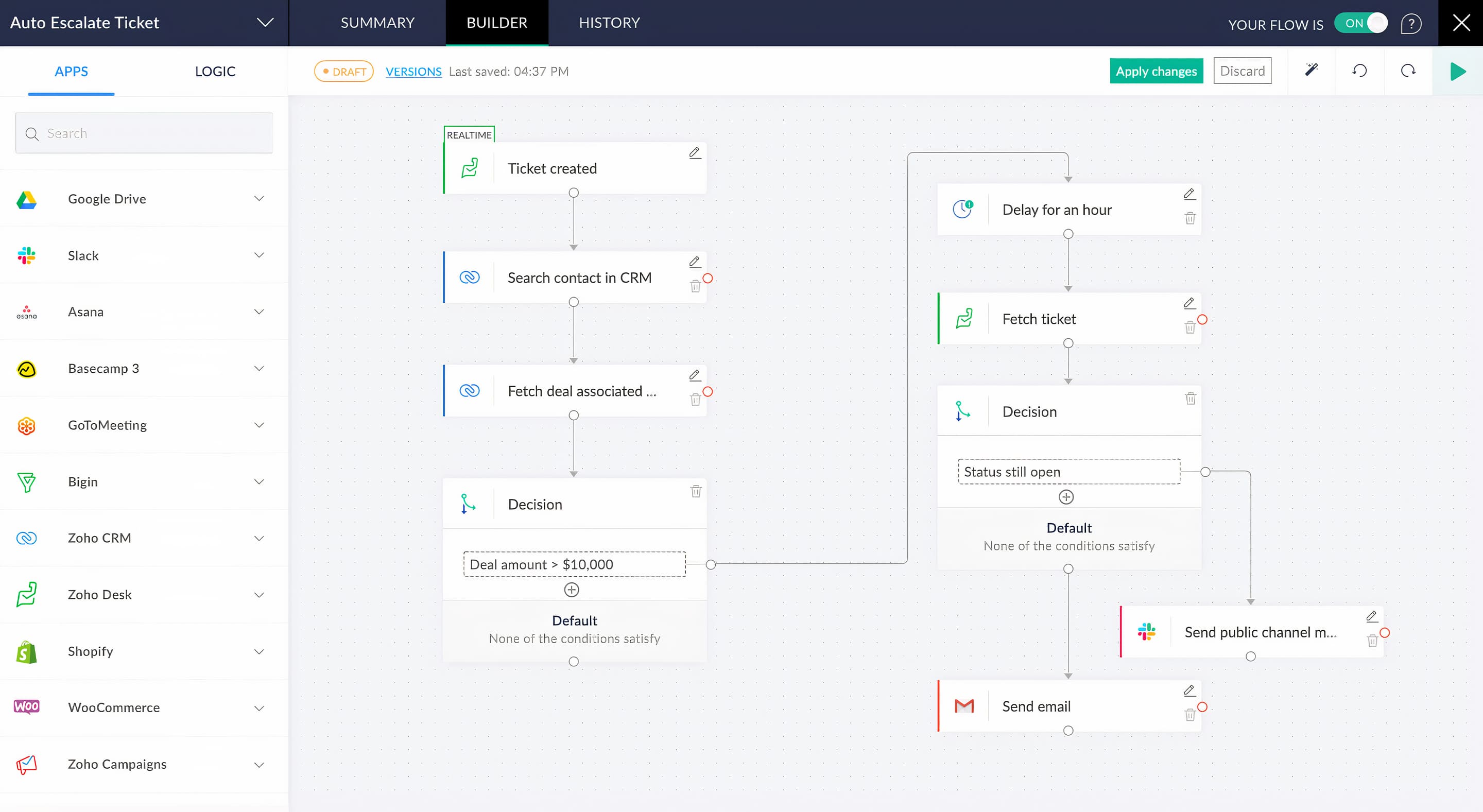
The Zoho Flow API and Zoho Flow connector extensions enable integration with any application that exposes a REST API or supports webhooks — covering the tools that do not have native Zoho Flow connectors yet. How to create custom integrations in Zoho Flow developer guide: webhooks in Zoho Flow work in two directions. Incoming webhook: Zoho Flow generates a unique URL — any external application that can send an HTTP POST to that URL (almost all modern SaaS tools can) can trigger a Flow. This covers IndiaMART, custom portal submissions, India-specific B2B marketplaces, and legacy systems that have webhook functionality but no Zoho Flow connector. Outgoing webhook/API call: Zoho Flow can send data to any REST API endpoint as an Action, with full control over HTTP method (GET/POST/PUT), headers, and body format (JSON, form data). Combined with Zoho Flow’s Deluge custom function support, this creates a no-code-to-low-code bridge — the visual builder for the 80% of logic that is standard, and Deluge scripting for the 20% that requires custom data transformation.
Zoho Flow vs Zoho Deluge — when to use which
Professional Zoho Flow integration checklist for enterprise implementation
The professional Zoho Flow integration checklist for enterprise implementation — 8 steps before enabling any Flow in a production environment:
Zoho Flow pricing — what is included in Zoho One
Zoho Flow is included in Zoho One subscriptions (All Employee Rs.1,250/employee/month and Flexible Rs.3,500/user/month — verified 2026 pricing) with a task limit commensurate with the Zoho One plan. Standalone Zoho Flow pricing: Free plan (limited flows and tasks), Standard plan, and Professional plan — current task limits and prices at zoho.com/flow/pricing. For most Indian SMBs deploying 5-15 flows with moderate transaction volumes, the Zoho One-included Zoho Flow quota is sufficient. For businesses with very high-volume flows (ecommerce with hundreds of daily orders, high-lead-volume businesses), a dedicated Zoho Flow Professional plan or task add-on may be required. A certified partner assesses task usage requirements during the pre-implementation design phase.
Codroid Labs — certified Zoho Flow integration partner India
Complete Zoho Flow integration guide for beginners step-by-step, Zoho Flow integration guide for Zoho Books and accounting apps, how to set up Zoho Flow integration with third-party tools 2024, complete Zoho Flow connector guide for Google Workspace integration, Zoho Flow integration guide for Zoho Desk customer support, best Zoho Flow connectors for task management and automation, Zoho Flow integration with QuickBooks accounting software guide, Zoho Flow automation guide for leads and contact management, Zoho Flow integration for inventory management systems tutorial, Zoho Flow integration guide for payment gateway platforms, Zoho Flow workflow automation for sales team productivity guide — Codroid Labs is a verified Zoho Authorized Partner (GSTIN 07AAWFC0815B1ZP) designing and implementing Zoho Flow integration workflows for Indian businesses.
Zoho Flow help, Zoho Flow setup, Zoho Flow tutorial, Zoho Flow guide, integrate Zoho Flow, flow integration Zoho, Zoho Flow tips, Zoho Flow examples, connect Zoho Flow, Zoho Flow code, flow automation Zoho, Zoho Flow basics, Zoho Flow now, sync Zoho Flow, Zoho Flow service, flow guide Zoho, Zoho Flow tools, Zoho Flow data, Zoho Flow apps, Zoho Flow connector — our Zoho Flow integration engagements include: requirements mapping (which integrations will deliver the most ROI), flow architecture design (trigger, logic, action chain with data mapping), build and test, documentation with business context, and post-deployment monitoring setup. Zoho Flow automation guide for Zoho CRM Business full tutorial: CRM-centric flows typically start with IndiaMART lead routing and expand to deal-won automation and overdue invoice follow-up. The Zoho Flow integration guide for Zoho Analytics and reporting tools: Zoho Analytics can trigger flows when custom alert conditions are met — sending Slack or email notifications that make your dashboards actionable without manual monitoring. Contact: +91 78384 02682, team@codroiditlabs.com.
Related Guides from Codroid Labs
Frequently asked questions — Zoho Flow integration
Can Zoho Flow integrate with Magento eCommerce?
The Zoho Flow integration with Magento eCommerce platform tutorial: Zoho Flow has a Magento connector that triggers on New Order, Order Status Changed, New Customer, and other Magento events. For a standard Indian eCommerce business running Magento: Trigger = Magento New Order → Actions: Zoho Inventory deduct stock + Zoho Books create invoice + Zoho CRM update customer record + notification email to warehouse team. If using Magento 2 with a custom setup not covered by the standard connector, Zoho Flow’s incoming webhook approach works: configure Magento to POST order data to the Zoho Flow webhook URL, and Zoho Flow parses the JSON and routes it to Zoho Inventory, Books, and CRM. This Zoho Flow integration for inventory management systems tutorial approach works for Magento 2, WooCommerce, custom PHP stores, and any eCommerce platform that supports outbound webhooks.
What is the difference between Zoho Flow and Zoho CRM workflow rules for Indian businesses?
Zoho Flow integration vs Zoho CRM workflow rules — the key distinction for Indian businesses: Zoho CRM workflow rules automate actions within Zoho CRM (and other Zoho apps using CRM as the trigger) without requiring separate Zoho Flow configuration. Workflow rules are faster to set up for standard Zoho-only automations (send email when lead is created, update field when deal stage changes). Zoho Flow is needed when the automation must reach outside Zoho — updating Google Sheets, posting to Slack, triggering Mailchimp, sending to Razorpay, or connecting to any non-Zoho application. In practice, Indian businesses use both: CRM workflow rules for internal Zoho automation and Zoho Flow for the cross-platform connections to Google Workspace, Slack, payment gateways, and marketing tools. They complement rather than replace each other. The Zoho Flow workflow automation for sales team productivity guide recommendation: deploy CRM workflow rules first for the foundational sales process automation, then add Zoho Flow connections to extend those automations to your team’s communication and productivity tools. External reference: Zoho Flow official documentation and connector list.
Connect Your Zoho Apps to Everything — With Zoho Flow
IndiaMART to CRM to Google Sheets, Razorpay to Zoho Books auto-invoice, Shopify to Inventory, Slack notifications — 10 India-specific Zoho Flow integrations designed and deployed by a certified Zoho partner. GSTIN invoice, transparent INR pricing. Free consultation.
Start Zoho One via Codroid Labs
Book Free Flow Integration Audit – +91 78384 02682