


Shopify Zoho CRM integration — the Shopify + Zoho CRM integration guide that Indian D2C brands and ecommerce businesses have been waiting for. Without this integration, your Shopify store and Zoho CRM are two isolated systems: marketing sees store analytics but not CRM data; sales sees CRM records but not order history; support handles tickets without seeing what the customer bought last month. Every data transfer is manual, error-prone, and always a day behind. This Shopify and Zoho CRM sync guide covers all six sync types with verified 2026 setup steps.
Shopify Zoho CRM integration via the Zoho Shopify app eliminates this gap entirely. Shopify CRM sync runs automatically: new customer on Shopify → Contact created in CRM. Order placed → Sales Order synced. Cart abandoned → Deal created with recovery link. Product updated → CRM catalogue updated. Inventory low → stock alert fired. This is the Zoho CRM Shopify guide and Shopify to Zoho CRM integration tutorial that covers all six syncs from installation through advanced automation with Zoho Flow.
Step-by-Step: Connect Shopify Store to Zoho CRM
Connect Shopify store to Zoho CRM, Shopify Zoho CRM app installation guide, Shopify Zoho CRM plugin setup, and Shopify Zoho CRM setup guide — the Zoho Shopify app is installed from within Zoho CRM, not from the Shopify App Store:
1
Install Shopify Zoho plugin — Zoho CRM → Setup → Marketplace → All Extensions → search “Shopify for Zoho CRM” → Install. Select profile: Admins only (recommended) or All users.
2
Enter Shopify Credentials — Store Name, Domain URL (yourstore.myshopify.com), Client ID, Client Secret from your Shopify Partner App. Click Authenticate. The Shopify Zoho connector is now authorized.
3
Select Sync Type — Shopify Zoho sync direction: One-Way (Shopify → Zoho CRM) recommended for most stores. Two-way only when CRM updates should push back to Shopify (product prices, customer data).
4
Conflict Management — “Shopify always wins” for customer data. “CRM always wins” for deal stages. Prevents data overwrite in either direction during Shopify data sync.
5
Enable Abandoned Cart Sync — Toggle ON. Include guest checkouts for maximum recovery coverage. Abandoned carts auto-create Deals in Zoho CRM.
6
Start Historical Sync — Click Start Sync. Shopify Zoho CRM historical data sync imports last 60 days. Monitor Sync History log — failed records can be individually re-synced.
Sync 1 — Shopify Customer Sync and Lead Management
Shopify customer sync, sync Shopify customers to Zoho CRM, Shopify contact sync, Shopify lead sync, and Shopify customer data sync with Zoho CRM — every Shopify customer automatically creates or updates a record in Zoho CRM. The Shopify Zoho CRM integration for lead management maps:
New customers → CRM Leads
First-time buyers and email subscribers sync as Leads for sales team follow-up. Lead scoring rules auto-qualify by purchase value and product category.
First-time buyers and email subscribers sync as Leads for sales team follow-up. Lead scoring rules auto-qualify by purchase value and product category.
Repeat buyers → CRM Contacts
Customers with 2+ orders sync as Contacts with complete purchase history, total spend, order frequency, and last order date visible in CRM.
Customers with 2+ orders sync as Contacts with complete purchase history, total spend, order frequency, and last order date visible in CRM.
360-Degree Customer View
Support teams see full Shopify order history inside Zoho CRM — no switching between platforms during support calls. Shopify CRM tools for unified visibility.
Support teams see full Shopify order history inside Zoho CRM — no switching between platforms during support calls. Shopify CRM tools for unified visibility.
Marketing Segmentation
Customer tags from Shopify sync to CRM — segment by product category, city, or purchase frequency for targeted Zoho Campaigns automation.
Customer tags from Shopify sync to CRM — segment by product category, city, or purchase frequency for targeted Zoho Campaigns automation.
Sync 2 — Shopify Order Sync and Sales Tracking
Shopify order sync, sync Shopify orders with Zoho CRM, Shopify sales sync, and Shopify order management with Zoho CRM — orders placed on Shopify automatically appear in Zoho CRM Sales Orders module. The Shopify Zoho CRM automation for sales includes:
Shopify order → Zoho CRM Sales Order data sync:
Order ID, order number, order status (open / fulfilled / cancelled / refunded)
Line items: product name, SKU, quantity, unit price, total discount applied
Payment: amount paid, gateway (Razorpay / PayU / COD), payment status
Shipping: courier, tracking number, delivery address, shipping cost
Customer: linked to CRM Contact with full purchase history updated
Order ID, order number, order status (open / fulfilled / cancelled / refunded)
Line items: product name, SKU, quantity, unit price, total discount applied
Payment: amount paid, gateway (Razorpay / PayU / COD), payment status
Shipping: courier, tracking number, delivery address, shipping cost
Customer: linked to CRM Contact with full purchase history updated
Zoho CRM ecommerce reporting — once orders sync, Zoho Analytics dashboards show: revenue by product, revenue by city, average order value by customer segment, and month-on-month growth. For Indian D2C brands, each synced order triggers GST invoice generation in Zoho Books — IGST for interstate, CGST/SGST for intrastate — without any manual invoice creation.
Sync 3 — Abandoned Cart Recovery Automation
Shopify Zoho CRM for ecommerce automation — abandoned cart recovery is the single highest-ROI feature. Indian e-commerce businesses lose 60-70% of cart additions to abandonment. The Shopify Zoho CRM abandoned cart automation recovers 15-25% with zero manual effort:
Abandoned Cart → Zoho CRM Recovery Workflow:
Cart abandoned on Shopify → Deal created in Zoho CRM (Stage: “Abandoned Cart”) within 5 minutes
Hour 1: Automated email with cart items + 10% discount code + payment link
Hour 24: Follow-up email “Your items are running low in stock”
Hour 72: High-value carts (>Rs.2,000) assigned to sales rep for personal call
Purchase completed → Deal auto-updates to “Closed Won” + invoice triggered in Zoho Books
Cart abandoned on Shopify → Deal created in Zoho CRM (Stage: “Abandoned Cart”) within 5 minutes
Hour 1: Automated email with cart items + 10% discount code + payment link
Hour 24: Follow-up email “Your items are running low in stock”
Hour 72: High-value carts (>Rs.2,000) assigned to sales rep for personal call
Purchase completed → Deal auto-updates to “Closed Won” + invoice triggered in Zoho Books
Sync 4 — Shopify Product Sync and Catalogue Management
Shopify product sync and Shopify product sync to Zoho CRM — Shopify products sync to the Products module in Zoho CRM. Sales reps can create quotations directly from synced product data without checking Shopify separately. Variants (size, colour) map as individual product entries linked to their parent product. Real-time Shopify data sync keeps pricing current in CRM without manual updates.
Sync 5 — Zoho Inventory Shopify Integration
Zoho inventory Shopify and Zoho ecommerce integration — adding Zoho Inventory to the Zoho CRM integration stack provides the warehouse layer. The Zoho store sync through Zoho Inventory updates Shopify available quantities in real time after every fulfillment:
Real-time stock update
Order shipped from Zoho Inventory → Shopify available quantity reduces. Prevents overselling across all Shopify storefronts instantly.
Order shipped from Zoho Inventory → Shopify available quantity reduces. Prevents overselling across all Shopify storefronts instantly.
Multi-warehouse
Map Shopify locations to separate Zoho Inventory warehouses. Auto-dispatch from nearest warehouse. Critical for brands with Delhi + Mumbai + Bangalore stock.
Map Shopify locations to separate Zoho Inventory warehouses. Auto-dispatch from nearest warehouse. Critical for brands with Delhi + Mumbai + Bangalore stock.
GST invoice automation
Every Shopify order generates GST invoice in Zoho Books via Inventory. IGST/CGST/SGST auto-applied by customer delivery state — zero manual tax work.
Every Shopify order generates GST invoice in Zoho Books via Inventory. IGST/CGST/SGST auto-applied by customer delivery state — zero manual tax work.
Sync History and error fix
Monitor failed syncs in Inventory Sync Log. Re-sync individual records. Export sync reports for audit. Shopify Zoho CRM sync errors fix guided by log messages.
Monitor failed syncs in Inventory Sync Log. Re-sync individual records. Export sync reports for audit. Shopify Zoho CRM sync errors fix guided by log messages.
Sync 6 — Shopify Zoho Flow: Advanced No-Code Automation
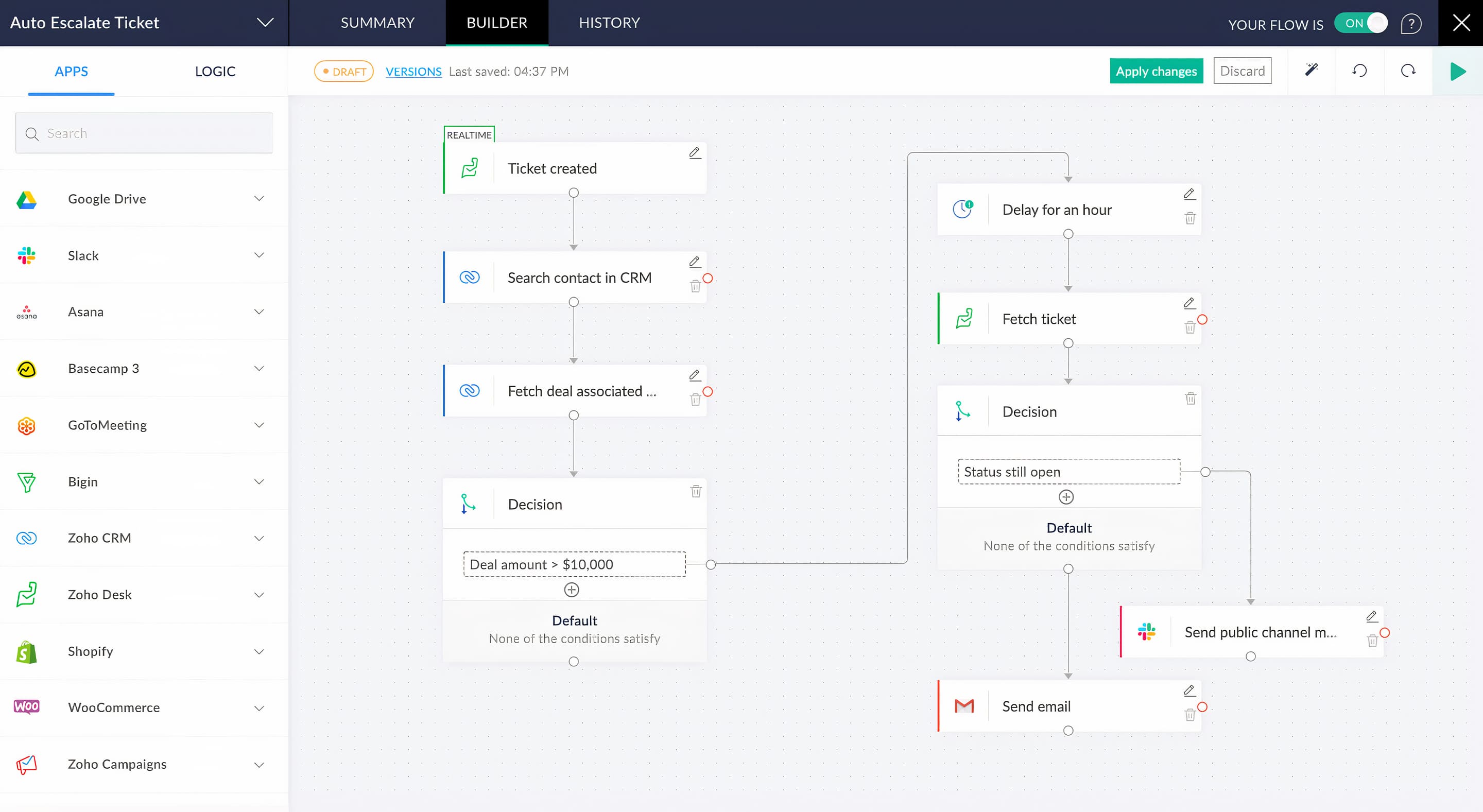
Shopify Zoho flow, Shopify Zoho app automation, and Shopify Zoho CRM workflow automation — Zoho Flow extends the native Shopify integration with no-code workflows connecting Shopify to 1,000+ applications:
Multi-Store, Field Mapping, and Historical Data Sync
Shopify Zoho CRM multi-store integration, Shopify Zoho CRM field mapping guide, and Shopify Zoho CRM historical data sync — configuration for advanced deployments:
Multi-Store Setup
Shopify Zoho CRM multi-store integration: add each Shopify store as a separate connection in the Zoho CRM extension. All stores share one unified CRM contact database. Orders tagged by source store. Unified inventory via Zoho Inventory.
Shopify Zoho CRM multi-store integration: add each Shopify store as a separate connection in the Zoho CRM extension. All stores share one unified CRM contact database. Orders tagged by source store. Unified inventory via Zoho Inventory.
Field Mapping
Shopify Zoho CRM field mapping guide: map Shopify Customer Tags → CRM Customer Segment picklist. Shopify Customer Note → CRM Internal Notes. Map only needed fields to reduce sync load and error risk.
Shopify Zoho CRM field mapping guide: map Shopify Customer Tags → CRM Customer Segment picklist. Shopify Customer Note → CRM Internal Notes. Map only needed fields to reduce sync load and error risk.
Historical Data Sync
Default: last 60 days. For older data — use the date-range re-sync in Sync History. Import in 60-day batches to avoid timeout. Shopify Zoho CRM complete integration tutorial: always test with 30 days before importing full history.
Default: last 60 days. For older data — use the date-range re-sync in Sync History. Import in 60-day batches to avoid timeout. Shopify Zoho CRM complete integration tutorial: always test with 30 days before importing full history.
Best Practices
Best way to connect Shopify and Zoho CRM: (1) Deduplicate CRM contacts first. (2) Enable abandoned cart. (3) Map Shopify tags to CRM segments. (4) Monitor Sync Log weekly. (5) Set reorder alerts in Zoho Inventory.
Best way to connect Shopify and Zoho CRM: (1) Deduplicate CRM contacts first. (2) Enable abandoned cart. (3) Map Shopify tags to CRM segments. (4) Monitor Sync Log weekly. (5) Set reorder alerts in Zoho Inventory.
Shopify Zoho CRM Sync Errors Fix Guide
Shopify Zoho CRM sync errors fix — four most common errors and exact resolution:
Who Benefits from Shopify Zoho CRM Integration
Shopify Zoho CRM integration for small business: D2C brands, boutiques, 50-500 orders/month
Zoho ecommerce integration enterprise: Multi-store, multi-warehouse, 1,000+ orders/month
Fashion and beauty brands: Customer LTV tracking, loyalty automation
B2B wholesale: Credit limit workflows, bulk order management
More Guides from Codroid Labs
Frequently Asked Questions — Shopify Zoho CRM Integration
How to integrate Shopify with Zoho CRM for a D2C brand?
How to integrate Shopify with Zoho CRM for D2C — the three-layer approach: (1) Install the Zoho Shopify app from Zoho Marketplace for native customer, order, product, and abandoned cart sync. (2) Add Zoho Flow for advanced automation — loyalty campaigns, high-value order alerts, Zoho Desk ticket creation on refunds. (3) Connect Zoho Inventory for real-time stock management, GST invoicing, and multi-warehouse dispatch. This Shopify Zoho CRM complete integration tutorial covers the full stack. Implementation from Codroid Labs takes 1-2 weeks for a standard D2C setup.
Does Shopify Zoho CRM integration support Indian GST?
Zoho ecommerce and GST — yes, via Zoho Inventory and Zoho Books integration. When a Shopify order syncs to Zoho Inventory, the fulfillment triggers a GST invoice in Zoho Books: IGST is applied automatically for interstate deliveries; CGST/SGST for intrastate. HSN/SAC codes configured at the product level in Zoho Inventory apply to every invoice without manual selection. For businesses above the e-invoicing threshold, IRN generation via the IRP portal is automatic. This makes Shopify Zoho CRM integration particularly valuable for Indian D2C brands that need GST compliance at scale without manual invoice creation.
What is the Shopify Zoho CRM integration cost in 2026?
Shopify Zoho CRM integration cost breakdown: the Shopify extension is included at no additional cost with Zoho CRM Professional ($23/user/month) and above. Zoho Inventory for stock management starts at $29/org/month (Standard). Zoho Flow for advanced automation — free tier included, paid plans from $10/org/month. Shopify Zoho CRM integration for small business: a 3-user team with Zoho CRM Professional + Zoho Inventory Standard pays approximately $69 + $29 = ~$98/month (Rs.8,200) for the complete integration stack. Implementation services from Codroid Labs — contact for scope-based estimate. GSTIN invoice provided for 18% ITC recovery on all services.
Set Up Shopify + Zoho CRM Integration — Codroid Labs Implements It
Complete setup: customer sync, order automation, abandoned cart, Zoho Inventory GST invoicing, multi-store, field mapping, Zoho Flow automation. Certified Zoho partner. GSTIN invoice. PAN India.
Start Zoho via Codroid Labs
Book Free Integration Consultation