


This Zoho CRM API tutorial for beginners is a complete 2026 developer guide for building production integrations with Zoho CRM — covering OAuth 2.0 authentication setup, REST endpoint operations across all CRM modules, COQL query language, bulk record import, webhook configuration, and working code examples in Node.js, Python, and PHP. Whether you are integrating Zoho CRM with a custom application, automating data sync between systems, or building a scalable workflow engine, this guide covers every component you need.
Zoho CRM API V8 is the current production version as of April 2026. It is REST-based, returns JSON, uses OAuth 2.0 for authentication, and supports both single-record and bulk operations. The base URL varies by data centre — Indian businesses use https://www.zohoapis.in/crm/v8/ — and all API calls are token-authenticated with rate limits based on your Zoho CRM plan tier. This Zoho CRM API tutorial uses the India data centre throughout the examples; replace .in with .com, .eu, or .com.au for other data centres.
Codroid Labs has implemented Zoho CRM API integrations for Indian businesses across real estate (99acres lead sync), manufacturing (IndiaMART integration), e-commerce (Shopify and WooCommerce sync), and custom internal tools. The patterns in this guide reflect production code patterns from those implementations — not theoretical API calls.
Zoho CRM API V8 — Quick Reference (India DC)
API Base URL: https://www.zohoapis.in/crm/v8/
OAuth Endpoint: https://accounts.zoho.in/oauth/v2/
Auth Header: Authorization: Zoho-oauthtoken {access_token}
Token Lifetime: Access token 1 hour | Refresh token long-lived
Data Format: JSON (request and response)
Bulk Limit: 200 records per COQL query
Zoho CRM API Glossary — Key Terms Every Zoho Developer Should Know
Zoho developer: Anyone building integrations using Zoho APIs and Zoho SDK packages.
Zoho OAuth (Zoho auth): OAuth 2.0 protocol used for API authentication. Returns access token + refresh token.
Zoho access token: Short-lived bearer token (1 hour validity) used in Authorization header for every API call.
API docs: Official reference at zoho.com/crm/developer/docs/api/v8/
CRM endpoints: URL paths like /Leads, /Contacts, /Deals — each endpoint maps to a CRM module.
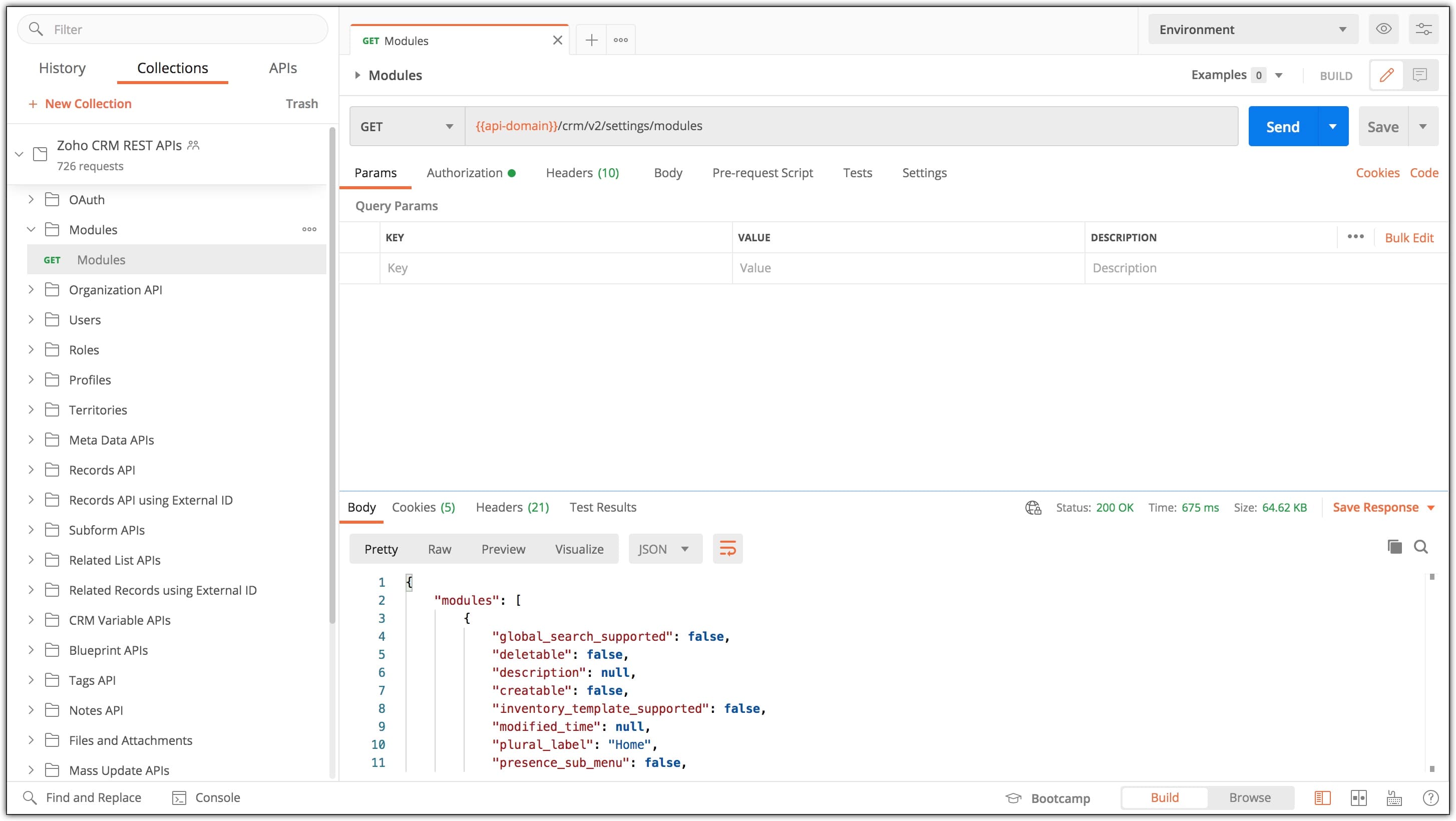
CRM modules API: Endpoints for accessing module metadata and records — Leads, Contacts, Deals, Tasks, Campaigns, Invoices.
Zoho leads API: Specifically the /Leads endpoint group for managing lead records — most-used endpoint.
Zoho records: Individual data entries in any CRM module — each has a unique 19-digit record ID.
API CRUD: Create, Read, Update, Delete — the four standard operations on Zoho records.
CRM webhook: HTTP callback triggered by record changes via the Notification API.
API limit: Daily API call quota based on Zoho CRM plan tier — Enterprise has higher limits than Standard.
Zoho error codes: Standard HTTP codes (400, 401, 403, 429, 500) plus Zoho-specific error JSON structure.
Zoho Node.js, Zoho PHP: Official SDK packages — npm install @zohocrm/nodejs-sdk-8.0 or composer require zohocrm/php-sdk-8.0.
API code example: Working snippets shown later in this tutorial for production integration patterns.
CRM API guide: This complete Zoho CRM API tutorial covering all major patterns end-to-end.
Zoho CRM API OAuth 2.0 tutorial: The 7-step authentication flow detailed in section 2 below.
What Is Zoho CRM API and What Can It Do
Zoho CRM API is a REST-based interface that lets developers programmatically access and manipulate every piece of data inside Zoho CRM. It is the backbone of every serious Zoho integration and the natural starting point for any Zoho CRM API for beginners learning path — whether you are syncing leads from a website form, importing thousands of records from a legacy CRM, or building a custom dashboard that pulls real-time pipeline data. This Zoho CRM API tutorial covers all four primary API categories: REST APIs, Bulk Read API, Notification API for webhooks, and COQL Query API.
REST APIs (Core APIs)
Day-to-day CRUD operations across all CRM modules. Use cases: sync leads from website forms, update customer data from mobile apps, fetch sales pipeline reports, retrieve module metadata. The Zoho CRM REST API tutorial 2026 examples below cover all four operations.
Bulk Read API
Asynchronous large-volume data export. Create a bulk job, track via Job ID, download results in CSV or ZIP. Use cases: full data backup, system migration, monthly analytics export. Designed to bypass per-call rate limits when extracting millions of records.
Notification API (Webhooks)
Real-time webhook notifications when records are created, updated, or deleted in CRM. Use cases: trigger external workflows on new lead creation, notify Slack on deal closure, real-time sync to data warehouse. The Zoho CRM API webhook setup process is covered later in this guide.
Query API (COQL)
SQL-like query language for advanced data retrieval. Supports SELECT, WHERE, ORDER BY, LIMIT, OFFSET. Returns up to 200 records per query. Eliminates the need to create complex custom views — fetch exactly the data you need with a single SELECT statement.
7-Step OAuth 2.0 Authentication Setup
Zoho CRM API authentication setup is the most critical part of any integration. Zoho CRM API OAuth 2.0 ensures user credentials are never exposed to your application — your code only ever sees temporary access tokens that can be revoked at any time. Here is the complete 7-step setup process used in every production integration.
1
Register Application at Zoho API Console
Visit the Zoho API Console and create a new Self Client or Server-based Application. Zoho generates two credentials: Client ID and Client Secret. Save these securely — never commit to Git, never expose in frontend code. Specify the Redirect URI where Zoho will return the authorization code (for example, https://yourapp.com/oauth/callback).
2
Define Required OAuth Scopes
Scopes determine what your app can access. Common scopes for Zoho CRM API integration:
ZohoCRM.modules.ALL          // Full access to all modules
ZohoCRM.modules.leads.READ   // Read-only access to Leads
ZohoCRM.modules.leads.CREATE // Create leads only
ZohoCRM.settings.ALL         // CRM settings access
ZohoCRM.users.ALL            // User management
ZohoCRM.bulk.ALL             // Bulk API access
ZohoCRM.notifications.ALL    // Webhook subscriptions
3
Get Authorization Code (User Consent)
Direct the user to Zoho’s consent URL. After they grant access, Zoho redirects back to your URL with an authorization code in the query string.
https://accounts.zoho.in/oauth/v2/auth?
  scope=ZohoCRM.modules.ALL&
  client_id=YOUR_CLIENT_ID&
  response_type=code&
  access_type=offline&
  redirect_uri=https://yourapp.com/oauth/callback
4
Exchange Code for Access Token
POST the authorization code to the token endpoint with your client credentials:
POST https://accounts.zoho.in/oauth/v2/token

grant_type=authorization_code
client_id=YOUR_CLIENT_ID
client_secret=YOUR_CLIENT_SECRET
redirect_uri=https://yourapp.com/oauth/callback
code=AUTHORIZATION_CODE_FROM_STEP_3

// Response:
{
  "access_token": "1000.abc123...",
  "refresh_token": "1000.def456...",
  "expires_in": 3600,
  "api_domain": "https://www.zohoapis.in",
  "token_type": "Bearer"
}
5
Make Authenticated API Calls
Include the access token in every API request via the Authorization header:
GET https://www.zohoapis.in/crm/v8/Leads
Authorization: Zoho-oauthtoken 1000.abc123...
Content-Type: application/json
6
Refresh Expired Access Tokens
Access tokens expire after 1 hour. Use the refresh token to obtain a new access token without requiring user re-authentication:
POST https://accounts.zoho.in/oauth/v2/token

grant_type=refresh_token
client_id=YOUR_CLIENT_ID
client_secret=YOUR_CLIENT_SECRET
refresh_token=YOUR_REFRESH_TOKEN

// Response: new access_token (valid 1 hour)
7
Implement Token Storage and Auto-Refresh
Production code must handle token expiry automatically. Store both tokens encrypted in your database. Wrap every API call in a function that checks token expiry before calling, refreshes if needed, and retries the call. Never make raw API calls without this wrapper — they will fail in production within an hour of deployment.
CRUD Operations — Create, Read, Update, Delete with Code
CRUD operations across Zoho CRM API modules (Leads, Contacts, Deals, Tasks, Campaigns) are the foundation of any Zoho CRM API tutorial. Below are the complete request and response examples for all four operations against the Leads module. The same patterns apply to Contacts, Deals, Tasks, Campaigns, and any custom module.
Create — Zoho CRM API Create Lead Tutorial (POST)
POST https://www.zohoapis.in/crm/v8/Leads
Authorization: Zoho-oauthtoken {access_token}
Content-Type: application/json

{
  "data": [
    {
      "Last_Name": "Sharma",
      "First_Name": "Rajesh",
      "Email": "rajesh@example.com",
      "Phone": "+919876543210",
      "Company": "Acme Pvt Ltd",
      "Lead_Source": "Website",
      "City": "New Delhi"
    }
  ]
}

// Response: 201 Created with new record ID
Read — Zoho CRM API Fetch Records Example (GET)
// Get all leads (paginated)
GET https://www.zohoapis.in/crm/v8/Leads?page=1&per_page=200

// Get specific lead by ID
GET https://www.zohoapis.in/crm/v8/Leads/{record_id}

// Search leads by criteria
GET https://www.zohoapis.in/crm/v8/Leads/search?
  criteria=(Email:equals:rajesh@example.com)

// Response includes data array with all field values
Update — Zoho CRM API Update Contact Tutorial (PUT)
PUT https://www.zohoapis.in/crm/v8/Leads/{record_id}
Authorization: Zoho-oauthtoken {access_token}

{
  "data": [
    {
      "Phone": "+919999988888",
      "Lead_Status": "Qualified"
    }
  ]
}

// Response: 200 OK with updated timestamp
Delete — Zoho CRM API Delete Records Guide (DELETE)
// Delete single record
DELETE https://www.zohoapis.in/crm/v8/Leads/{record_id}

// Delete multiple records (up to 100)
DELETE https://www.zohoapis.in/crm/v8/Leads?
  ids=ID1,ID2,ID3

// Response: 200 OK with deletion confirmation
COQL Queries — Advanced Filtering and Sorting
COQL (CRM Object Query Language) is the most powerful feature in the Zoho CRM API V8 for advanced data retrieval. It uses SQL-like syntax to filter, sort, and limit results — eliminating the need to create dozens of custom views in the CRM UI.
// Endpoint:
POST https://www.zohoapis.in/crm/v8/coql
POST https://www.zohoapis.in/crm/v8/coql
// Body:
{
“select_query”: “SELECT Last_Name, Email, Lead_Status FROM Leads
WHERE City = ‘New Delhi’
AND Lead_Status = ‘Qualified’
ORDER BY Created_Time DESC
LIMIT 50”
}
// Response:
{
“data”: [
{“Last_Name”: “Sharma”, “Email”: “…”, “Lead_Status”: “Qualified”},
…
],
“info”: {“count”: 50, “more_records”: true}
}
COQL supports SELECT with field list, WHERE for filtering with operators (equals, not_equals, contains, starts_with, between, in), ORDER BY for sorting, and LIMIT/OFFSET for pagination. Maximum 200 records per query — for larger datasets, use Bulk Read API. This is the most efficient approach for any Zoho CRM API integration guide implementation needing complex filters.
Bulk Read API for Large Data Operations
When you need to export 10,000, 100,000, or 1 million+ records, calling the standard REST API in a loop will hit rate limits within minutes. The Zoho CRM API bulk records import and export pattern uses the asynchronous Bulk Read API instead.
3-Step Bulk Read Workflow
// Step 1: Create bulk job
POST https://www.zohoapis.in/crm/bulk/v8/read
{
  "query": {
    "module": {"api_name": "Leads"},
    "fields": ["Last_Name", "Email", "Phone", "City"]
  }
}
Response: { "job_id": "1234567890" }

// Step 2: Check job status (poll until COMPLETED)
GET https://www.zohoapis.in/crm/bulk/v8/read/1234567890
Response: { "state": "COMPLETED", "result": { "download_url": "..." } }

// Step 3: Download CSV/ZIP file
GET https://www.zohoapis.in/crm/bulk/v8/read/1234567890/result
Notification API and Webhook Setup
For Zoho CRM API real time sync, webhooks are essential. Instead of polling the API every minute to check for new leads, you subscribe to webhook notifications — Zoho POSTs to your endpoint the instant a record is created, updated, or deleted.
// Subscribe to webhook for new leads
POST https://www.zohoapis.in/crm/v8/actions/watch
POST https://www.zohoapis.in/crm/v8/actions/watch
{
“watch”: [
{
“channel_id”: “1000000”,
“events”: [“Leads.create”, “Leads.edit”, “Leads.delete”],
“channel_expiry”: “2026-12-31T23:59:59+05:30”,
“notify_url”: “https://yourapp.com/webhook/zoho”,
“token”: “your_secure_validation_token”
}
]
}
// Your endpoint receives POST when event fires:
{
“module”: “Leads”,
“operation”: “insert”,
“ids”: [“NEW_RECORD_ID”],
“token”: “your_secure_validation_token”
}
Production Code Examples — Node.js, Python, PHP
Working code examples for the most common Zoho CRM API integration languages.
Zoho CRM API Node.js Tutorial — Create Lead
// Node.js with axios
const axios = require('axios');

async function createLead(accessToken, leadData) {
  try {
    const response = await axios.post(
      'https://www.zohoapis.in/crm/v8/Leads',
      { data: [leadData] },
      {
        headers: {
          'Authorization': `Zoho-oauthtoken ${accessToken}`,
          'Content-Type': 'application/json'
        }
      }
    );
    return response.data;
  } catch (error) {
    console.error('Zoho CRM API error:', error.response?.data);
    throw error;
  }
}

// Usage:
createLead(token, {
  Last_Name: 'Sharma',
  Email: 'rajesh@example.com',
  Company: 'Acme Pvt Ltd'
});
Zoho CRM API Python Example — Fetch Records
# Python with requests
import requests

def fetch_leads(access_token, page=1, per_page=200):
    url = "https://www.zohoapis.in/crm/v8/Leads"
    headers = {
        "Authorization": f"Zoho-oauthtoken {access_token}",
        "Content-Type": "application/json"
    }
    params = {"page": page, "per_page": per_page}

    response = requests.get(url, headers=headers, params=params)
    response.raise_for_status()
    return response.json()

# Usage:
data = fetch_leads(access_token)
for lead in data.get("data", []):
    print(lead["Last_Name"], lead["Email"])
Zoho CRM API PHP Integration — Update Contact
<?php
// PHP with cURL
function updateContact($accessToken, $recordId, $updateData) {
    $url = "https://www.zohoapis.in/crm/v8/Contacts/{$recordId}";
    $ch = curl_init($url);

    curl_setopt_array($ch, [
        CURLOPT_RETURNTRANSFER => true,
        CURLOPT_CUSTOMREQUEST  => "PUT",
        CURLOPT_POSTFIELDS     => json_encode(["data" => [$updateData]]),
        CURLOPT_HTTPHEADER     => [
            "Authorization: Zoho-oauthtoken {$accessToken}",
            "Content-Type: application/json"
        ]
    ]);

    $response = curl_exec($ch);
    curl_close($ch);
    return json_decode($response, true);
}
?>
Best Practices and Common Pitfalls
After implementing dozens of Zoho CRM API integrations for Indian clients, here are the patterns that separate production-quality code from prototypes.
- Always use API V8 (latest): Older versions have fewer features and will eventually be deprecated. Migrate any V2/V3/V7 code to V8 as part of any refactoring.
- Never log access or refresh tokens: Even in development logs. Tokens grant full access to CRM data. Use environment variables and encrypted database storage.
- Implement exponential backoff retry: When you hit rate limits (HTTP 429), wait progressively longer between retries — 1s, 2s, 4s, 8s. Never retry instantly.
- Use Bulk Read for >200 records: Looping individual GET calls will fail at scale. The Zoho CRM API rate limits explained rule: bulk operations always use bulk endpoints.
- Handle field-level errors carefully: Zoho CRM API error handling guide — check response status codes (400 invalid data, 401 token expired, 403 insufficient permission, 429 rate limited, 500 server error) and map them to user-friendly messages.
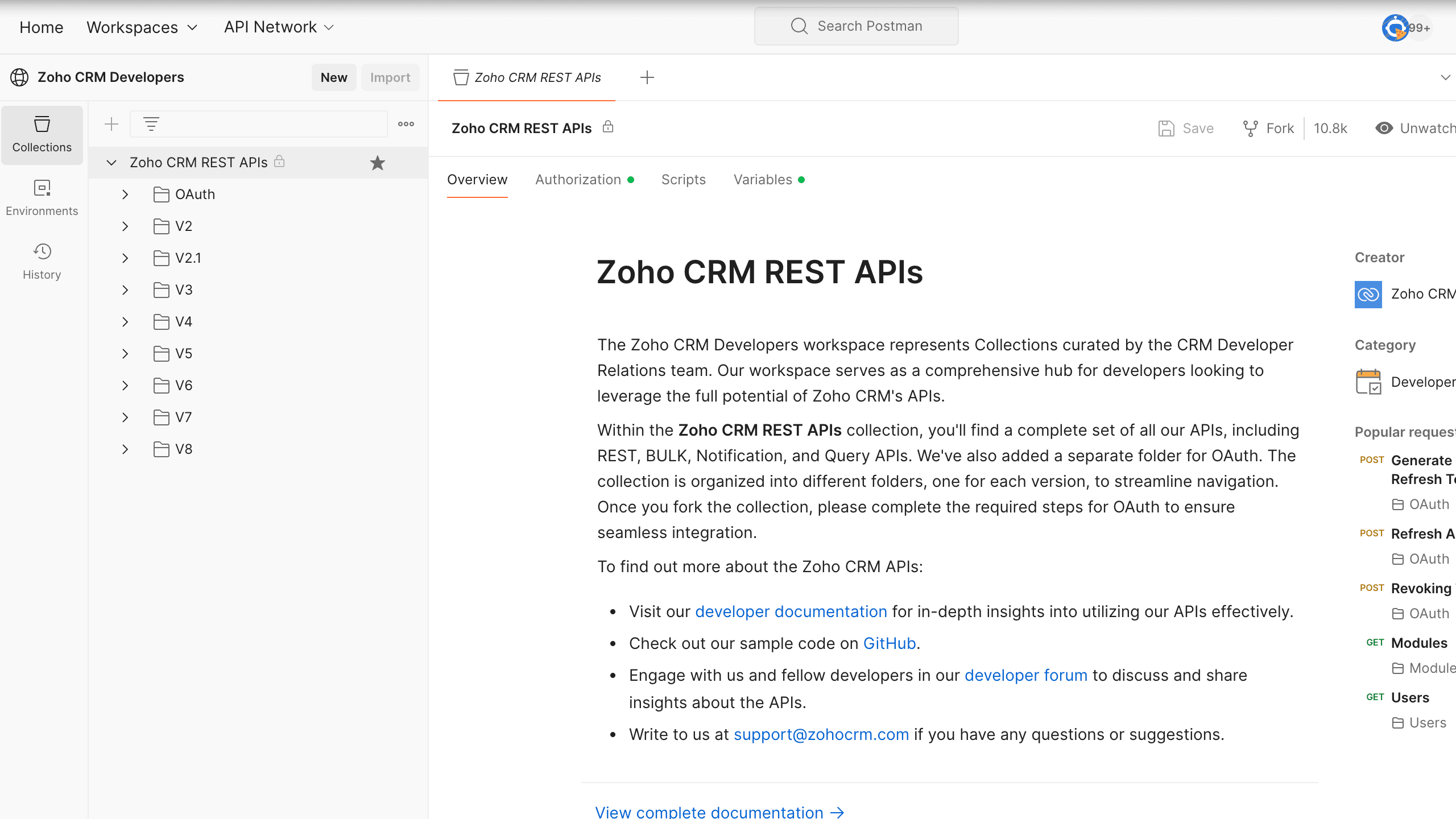
- Use Postman for development (Zoho CRM API JavaScript tutorial workflow): The Zoho CRM API Postman tutorial workflow — import the official Postman collection, test calls interactively, then translate working calls to your production language.
- Subscribe to webhooks instead of polling: Polling every minute consumes API credits unnecessarily. Webhooks deliver real-time notifications using zero API quota.
More Guides from Codroid Labs
Frequently Asked Questions — Zoho CRM API Tutorial
What is Zoho CRM API and how does it work?
Zoho CRM API is a REST-based set of endpoints that lets developers programmatically read, create, update, and delete CRM data. It uses OAuth 2.0 for authentication, JSON for data exchange, and supports all CRM modules (Leads, Contacts, Deals, Custom Modules) plus advanced features like COQL queries, Bulk operations, and Notification webhooks. The current version is V8 with India data centre at https://www.zohoapis.in/crm/v8/.
How do I authenticate Zoho CRM API requests?
Zoho CRM API authentication setup uses OAuth 2.0. Register your app at Zoho API Console for Client ID and Client Secret. Direct user to consent URL to obtain authorization code. Exchange code at token endpoint for access token (1 hour) and refresh token (long-lived). Pass access token in Authorization header as Zoho-oauthtoken. Refresh token before expiry to maintain access without user re-authentication.
What programming languages support Zoho CRM API?
Zoho CRM API supports any language that handles HTTP and JSON. Official SDKs available for Node.js, Python, PHP, Java, .NET, Ruby, JavaScript. This Zoho CRM API tutorial includes working code examples for Node.js (axios), Python (requests), and PHP (cURL). Postman is recommended for testing API calls before writing production code.
What are Zoho CRM API rate limits?
Rate limits depend on your Zoho CRM plan tier — Enterprise plan has significantly higher API call credits than Professional or Standard. Monitor X-RATELIMIT-REMAINING response header. For bulk operations exceeding 200 records, use Bulk Read API instead of looped REST calls. Implement exponential backoff retry for 429 errors. Webhooks reduce polling load by delivering real-time notifications.
Where can I find Zoho CRM API SDK download tutorial and full course free resources?
Official SDKs for Node.js, Python, PHP, Java, .NET, Ruby, and JavaScript are available at zoho.com/crm/developer/docs/sdk/. The Zoho CRM API SDK download tutorial documentation covers installation, OAuth setup, and code samples per language. For a Zoho CRM API full course free resource, Zoho hosts the official Developer Hub with tutorials covering modules list, custom fields, and integration patterns. Codroid Labs provides additional implementation consulting for production deployments.
How do I work with Zoho CRM API modules list and custom fields?
The Zoho CRM API modules list tutorial approach: GET https://www.zohoapis.in/crm/v8/settings/modules returns all modules including standard (Leads, Contacts, Deals) and any custom modules. The Zoho CRM API custom fields tutorial approach: GET …/settings/fields?module=Leads returns all field definitions including custom fields with API names, data types, and validation rules. Use these metadata calls before writing data operations.
Where can I get Zoho CRM API documentation?
Official Zoho CRM API documentation is available at zoho.com/crm/developer/docs/api/v8/. For the Zoho CRM API documentation guide approach with implementation help: Codroid Labs as a certified Zoho partner provides API integration consulting, custom SDK development, and production debugging. Contact team@codroiditlabs.com or +91 78384 02682.
Need Zoho CRM API Integration? Codroid Labs Builds Production Integrations
Certified Zoho partner — OAuth setup, custom REST integrations, COQL implementation, webhook architecture, and SDK customisation in Node.js, Python, and PHP. Fixed price. GST invoice.
Zoho CRM API V8 Official Docs
Book Free API Integration Consultation