


Zoho Payments India — quick answer: Customer pays (UPI/card/net banking) → Zoho Payments encrypts and validates → funds temporarily held in Zoho Payments Account → settled to business bank account per payout schedule. PCI DSS compliant. Integrates with Zoho Books for invoice-linked payments. Payment links available for service businesses without e-commerce checkout.
Zoho Payments India — the how Zoho Payments works in India question is straightforward on the surface but misunderstood at the critical point: most businesses assume a successful customer payment is the same as money arriving in their bank account. It isn’t. There are two separate stages, and understanding the gap between them is essential for cash flow planning. This Zoho Payments guide 2026 — the complete Zoho Payments India tutorial for beginners 2026 and how to set up Zoho Payments in India reference — covers the complete payment flow, all supported payment methods, the settlement process, Zoho Books integration, and the practical setup steps for Indian businesses.
7 Steps
Payment-to-Bank Flow
UPI + Cards
+ Net Banking
PCI DSS
Compliant Security
2-Stage
Settlement Process
What is Zoho Payments?
Zoho Payments India — the Zoho Payments digital payment guide for Indian businesses starting point: Zoho Payments is a payment gateway and transaction platform designed for Indian businesses. It acts as the technology layer between a customer making a payment and the business receiving it. The Zoho payment gateway connects customers, banks, payment networks (card networks and NPCI for UPI), and the merchant’s bank account. The Zoho digital payments platform is not just a payment processing tool — it connects payment collection with the broader Zoho Finance ecosystem including Zoho Books and Zoho Invoice, making it particularly valuable for businesses that want a connected sales → invoice → payment → reconciliation workflow rather than separate disconnected systems.
Key players in every Zoho Payments transaction
The Zoho Payments payment gateway process explained begins with understanding the participants:
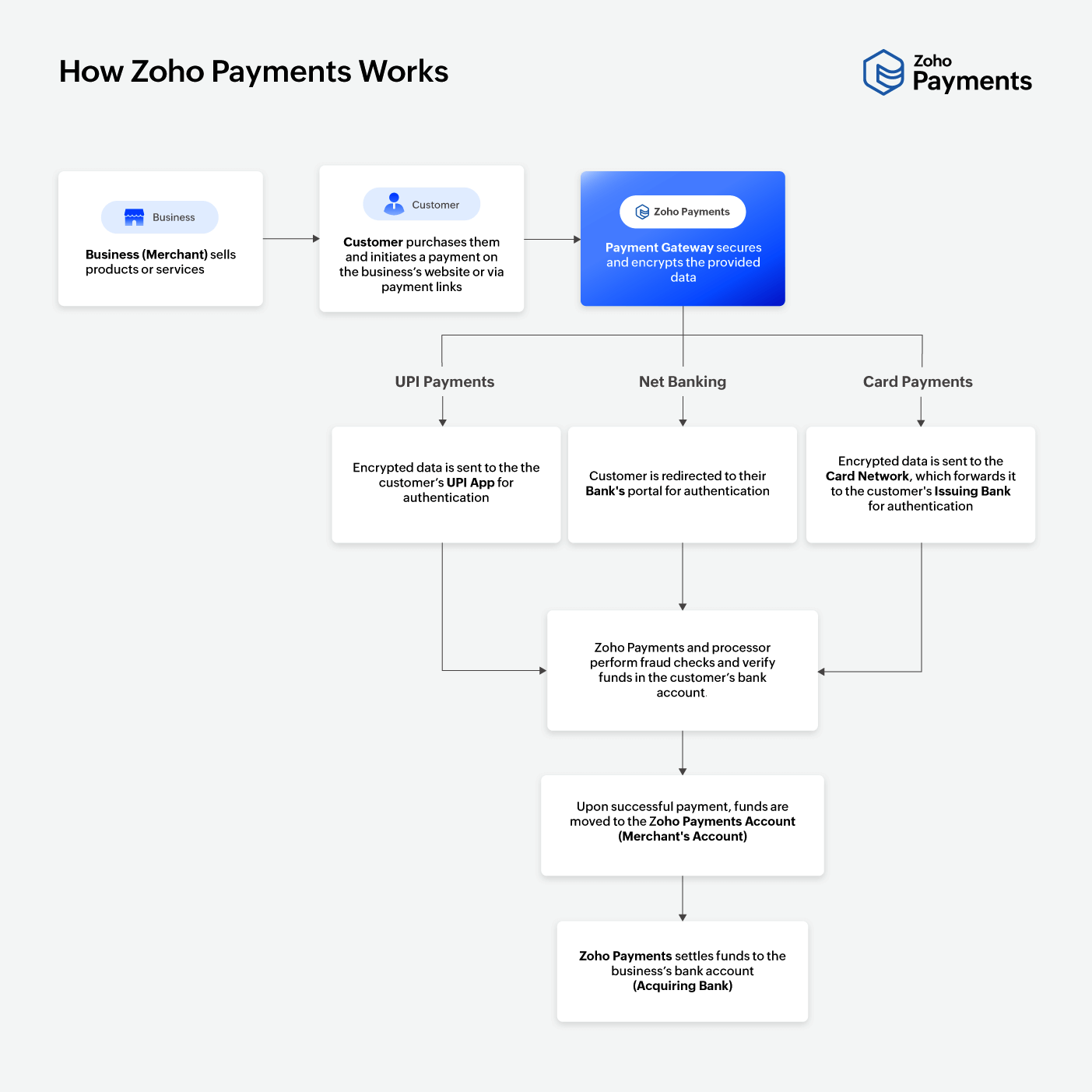
7-step Zoho Payments flow — customer payment to business bank
The how customers pay through Zoho Payments and Zoho Payments payment gateway process explained complete 7-step journey:
Step 1Customer receives a payment option
The how to accept online payments with Zoho Payments customer entry point: the customer receives an invoice with a Pay Now button, a standalone payment link, or a checkout page embedded in the business’s website. The Zoho online payments collection path begins here.
Step 2Customer selects a payment method
The Zoho payment methods and Zoho Payments cards UPI and net banking setup choice: the customer selects from UPI (authenticated via UPI PIN in their app), credit or debit card (with bank authentication), or net banking (redirected to their bank’s portal). The Zoho card payments and Zoho net banking options support the full range of India’s major digital payment infrastructure.
Step 3Payment data is encrypted
The Zoho payment processing security layer: payment information is transmitted through the gateway using encryption and PCI DSS compliant infrastructure. This is the point where sensitive card or UPI authentication data is protected during transmission between the customer’s device and the payment network.
Step 4Authentication and fraud checks
The Zoho payment collection validation stage: the transaction goes through authentication (UPI PIN, card 3D Secure, net banking credentials), fraud detection checks, and bank-side validation of sufficient funds. If checks succeed, the transaction proceeds. If they fail, the customer receives information about the declined payment where available.
Step 5Customer receives confirmation
A successful transaction generates confirmation for the customer. The Zoho payment dashboard records the transaction with status, amount, method, and reference details. Failed transactions allow the customer to retry with a different method or resolve the bank-side issue.
Step 6Funds move to Zoho Payments Account
The Zoho payment settlement first stage: successfully processed payments move into the merchant’s Zoho Payments Account — a temporary holding stage before the final payout. This is the critical distinction most businesses miss: a successful customer payment does not mean the funds are immediately in your business bank account.
Step 7Payout to business bank account
The Zoho payment payouts and Zoho Payments payout schedule and settlement time final stage: Zoho Payments transfers the funds to the business’s bank account according to the payout schedule selected by the merchant. The how Zoho Payments transfers money to bank accounts process: payout schedule, settlement timing, and applicable transaction-level deductions are confirmed in the current Zoho Payments documentation at signup.
Supported payment methods 2026
The Zoho payment methods and Zoho Payments bank transfer and net banking guide full coverage:
UPI
The Zoho UPI payments method: standard UPI payments, UPI QR code scanning, and UPI Intent (opens the customer’s preferred UPI app automatically). The Zoho UPI AutoPay and Zoho recurring payments capability: UPI AutoPay mandates enable recurring autopay collections for subscription businesses.
Cards
The Zoho card payments support: Visa, Mastercard, and RuPay credit and debit cards. Card transactions go through standard card network authentication (3D Secure / OTP) from the issuing bank before funds are captured.
Net Banking
The Zoho net banking method: the customer is redirected to their bank’s internet banking portal to authenticate and authorize the payment. The Zoho bank transfer alternative for customers who prefer bank-to-bank authentication over card or UPI.
Zoho Payments UPI — QR code, AutoPay, and Intent payments
The Zoho Payments UPI payment collection step by step and Zoho Payments UPI QR code payment setup and Zoho Payments UPI ID and UPI Intent payments:
UPI Standard
The customer enters the business’s UPI ID or scans a QR code, and authenticates with their UPI PIN. Instant confirmation for both customer and merchant.
UPI QR Code
The Zoho Payments UPI QR code payment setup: a QR code displayed on a payment link or checkout page — the customer scans it with any UPI app to initiate payment without typing details.
UPI AutoPay
The Zoho UPI AutoPay and Zoho Payments recurring UPI AutoPay setup: the customer sets up a recurring mandate that auto-deducts future payments on the scheduled date — no manual payment required for each cycle.
UPI Intent
The Zoho Payments UPI ID and UPI Intent payments: on mobile, UPI Intent automatically opens the customer’s preferred UPI app (PhonePe, GPay, Paytm) to complete the payment — no manual app switching required.
Payment links — collect money without an e-commerce checkout
The Zoho payment links and how to create payment links in Zoho Payments — the collection method most useful for service businesses, consultants, agencies, and educational institutions:
Payment link workflow:
Create payment request → Set amount and description → Share link via email/message
→ Customer opens link → Customer pays (UPI/card/net banking)
→ Transaction processed → Business receives payout
The Zoho payment collection advantage of payment links: no website checkout or e-commerce setup is required. A consultant can send a payment link directly in an email for a fixed project fee. An educational institution can send parents a payment link for fee collection. A freelancer can generate a payment link for a client invoice in minutes. The Zoho Payments pricing for Indian businesses 2026 for payment links follows the same transaction-based structure as other payment methods — check the current Zoho Payments documentation for current fee rates before deploying at scale.
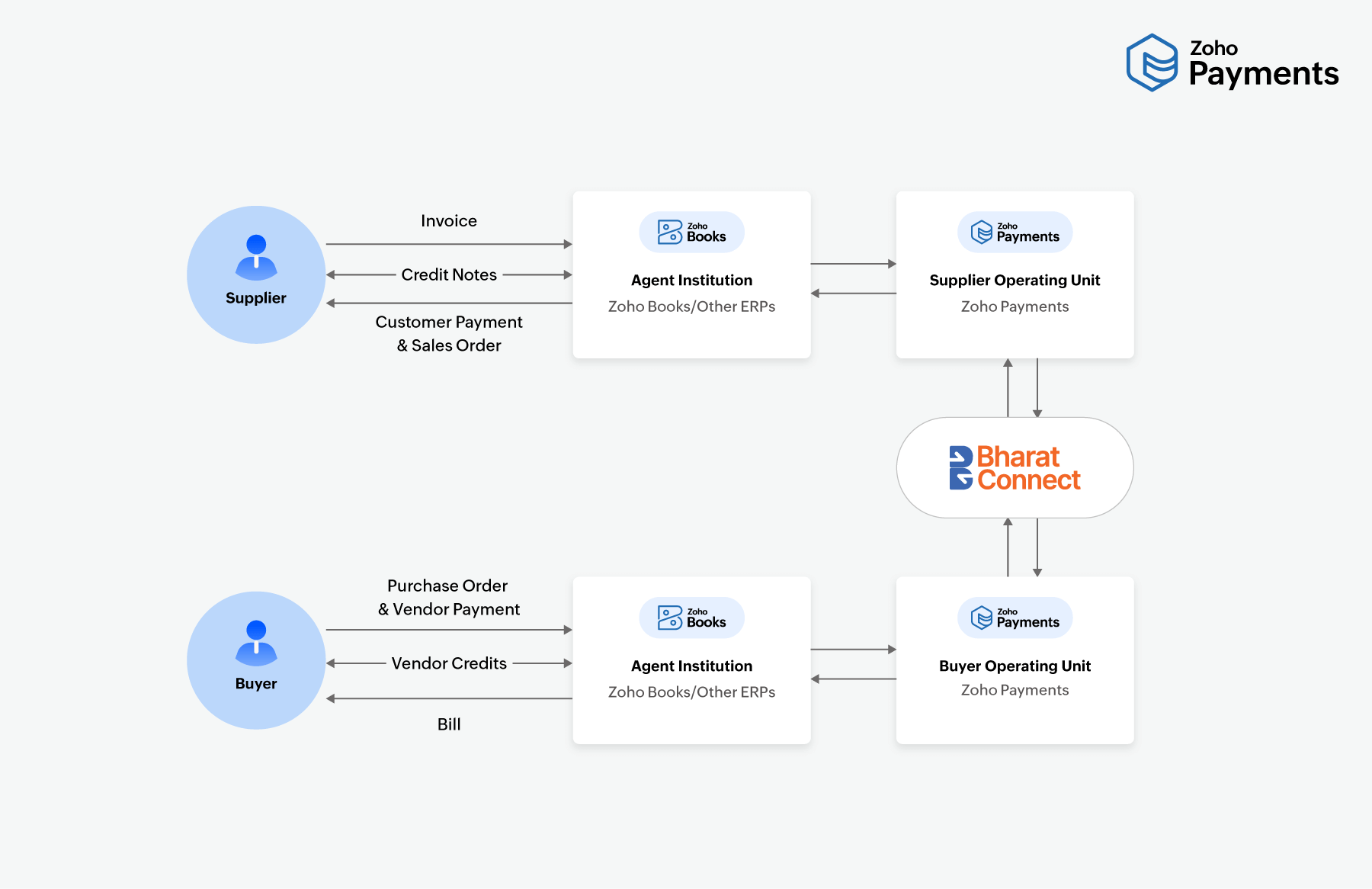
Zoho Payments + Zoho Books integration
The Zoho Payments integration with Zoho Books and how to collect customer payments using Zoho Books — the Zoho payment integration that eliminates manual reconciliation:
The Zoho Payments integration with Zoho Commerce follows the same principle for e-commerce businesses — payment collection connects to the order and inventory workflow rather than requiring separate reconciliation. The Zoho payment dashboard provides a unified view of all transactions, pending settlements, and payout status in one place.
Security — PCI DSS compliance and encryption
The Zoho payment processing security infrastructure — the Zoho Payments India security architecture:
Encryption
Payment information is encrypted during transmission between the customer’s device and the payment network. This protects sensitive card numbers, UPI credentials, and net banking authentication data from interception during the payment flow.
PCI DSS compliance
Zoho Payments is PCI DSS (Payment Card Industry Data Security Standard) compliant. This certification means the platform meets the security requirements set by card networks for processing, storing, and transmitting cardholder data.
The Zoho digital payments security responsibility note: PCI DSS compliance covers the Zoho Payments infrastructure. Merchant-side security — admin account access controls, API key management, website security, and internal payment controls — remains the merchant’s responsibility. The Zoho payment refunds and dispute handling process is documented in the Zoho Payments support documentation — review this before deploying to understand the refund and chargeback workflow.
Settlement and payout — the two-stage process
The Zoho Payments payment settlement process in India and Zoho payment payouts — the most important operational distinction in Zoho Payments:
Stage 1: Customer Payment
Customer pays → Authenticated → Zoho Payments Account (temporary hold)
Stage 2: Payout to Business Bank
Zoho Payments Account → Payout schedule → Business bank account
Stage 1 and Stage 2 are separate. Do not plan cash flow assuming instant bank credit.
The Zoho Payments payout schedule and settlement time and Zoho Payments transaction fees and platform charges: the current payout schedule, settlement timelines, and applicable transaction-level fees are specified in the Zoho Payments subscription agreement and product documentation. The Zoho Payments fees and Zoho Payments pricing structure should be reviewed at the current Zoho Payments official page before deployment — the Zoho Payments INR fee structure for different payment methods (UPI, card, net banking) may differ and can change. Always verify current rates before committing to volume.
Failed payments — what happens and what to do
The how to track failed payments in Zoho Payments and Zoho Payments payment reports and transaction tracking:
A failed payment does not always indicate deliberate non-payment. Failures occur during authentication (wrong PIN, expired OTP), bank processing (insufficient funds, bank-side technical error), or payment-network validation. The Zoho Payments refund and payment cancellation process and the Zoho payment dashboard provide visibility into failed transaction reasons where available. Best practice: monitor failed transactions actively rather than assuming every incomplete payment is abandoned. Provide customers with an alternative payment method option after a failure — a customer who can’t pay by card can often pay via UPI. The Zoho Payments payment reports and transaction tracking dashboard records all transaction outcomes, making it possible to identify patterns in payment failures that indicate configuration or user-experience issues.
Zoho Payments for different business models in India
E-commerce
The Zoho Payments integration with Zoho Commerce for online store checkout — UPI, card, and net banking on the checkout page.
Professional Services
Consultants and agencies use Zoho payment links or Zoho Books invoice payments for client billing.
Subscription Businesses
The Zoho UPI AutoPay and Zoho recurring payments for auto-deduction on fixed billing cycles.
Retail and B2B
Invoice-linked payments via Zoho Books for B2B receivables management and GST-compliant billing.
Education
Fee collection via payment links — no e-commerce setup required for term-wise or monthly collections.
Non-Profits
Contribution and donation collection via payment links and QR codes — subject to applicable eligibility requirements.
Codroid Labs — Certified Zoho Finance Partner — Zoho Payments and Books Implementation
Zoho Payments India, Zoho Payments, Zoho payment gateway, Zoho digital payments, Zoho UPI payments, Zoho online payments, Zoho payment links, Zoho payment processing, Zoho payment collection, Zoho payment methods, Zoho card payments, Zoho net banking, Zoho wallet payments, Zoho bank transfer, Zoho UPI AutoPay, Zoho recurring payments, Zoho payment settlement, Zoho payment payouts, Zoho payment refunds, Zoho payment dashboard, Zoho payment integration, Zoho Payments pricing, Zoho Payments fees, Zoho Payments INR, Zoho Payments guide 2026 — Codroid Labs (GSTIN 07AAWFC0815B1ZP) is a certified Zoho Authorized Partner. We implement Zoho Payments alongside Zoho Books, Zoho Commerce, and the Zoho Finance suite for Indian businesses. Contact: +91 78384 02682, team@codroiditlabs.com.
Related Guides from Codroid Labs
Frequently asked questions
How does Zoho Payments work in India?
7-step flow: customer pays via UPI/card/net banking → encrypted transmission → authentication and fraud checks → funds held in Zoho Payments Account → payout to business bank account per selected schedule. Full detail in FAQ Schema above.
How does Zoho Payments integrate with Zoho Books?
Zoho Payments adds a Pay Now button to Zoho Books invoices. When the customer pays, the invoice status auto-updates in Zoho Books — eliminating manual bank transfer monitoring and reconciliation. Full detail in FAQ Schema above.
Set Up Zoho Payments for Your Business — Expert Help
UPI, cards, net banking, payment links, Zoho Books integration — certified Zoho Finance partner with GSTIN invoice for 18% ITC.
Start Zoho Payments via Codroid Labs
Book Free Zoho Payments Consultation – +91 78384 02682