


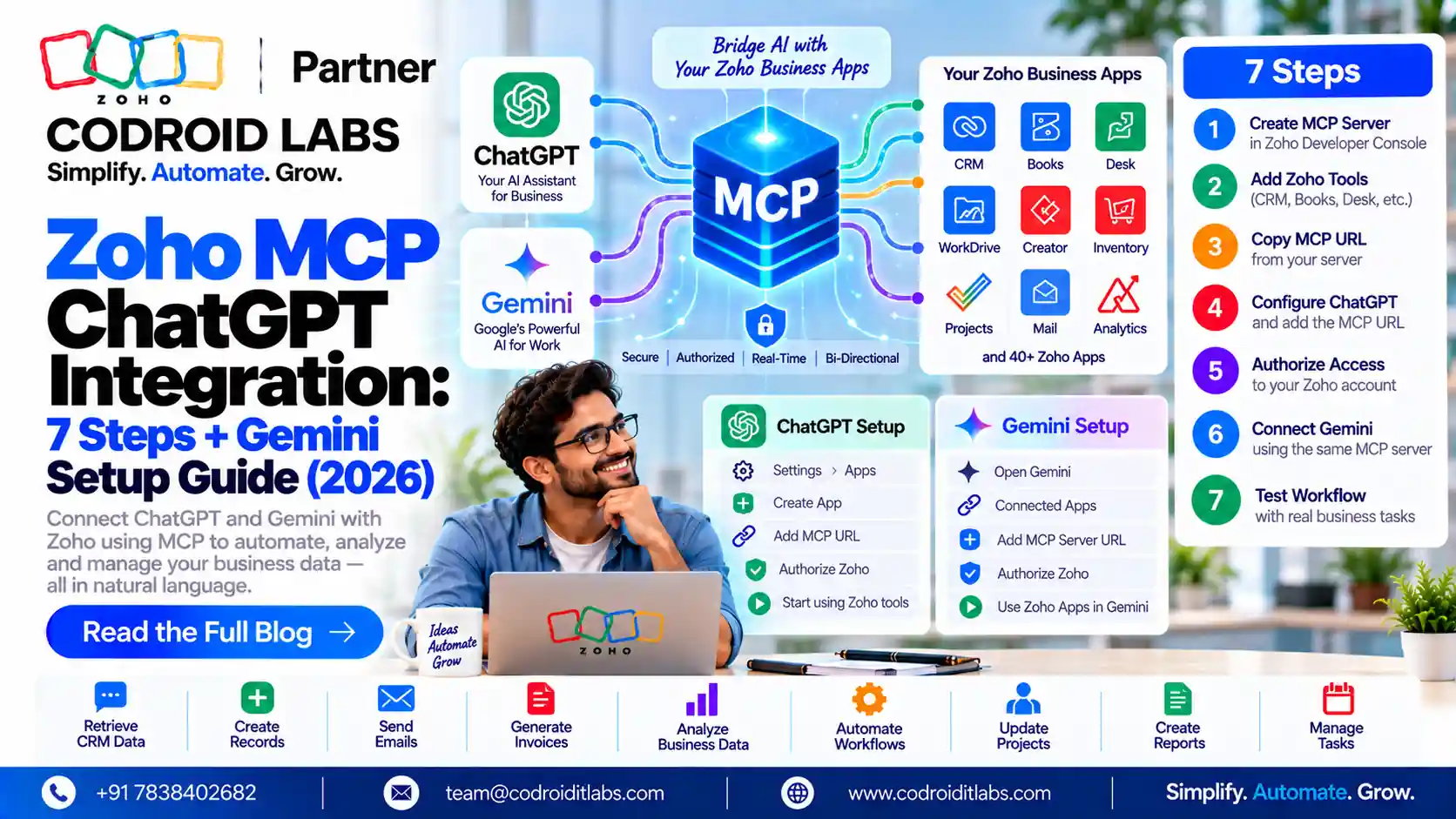
Setup Guide · Updated October 2026
Zoho MCP ChatGPT Integration: 7 Steps, Plus Gemini CLI Setup
Zoho MCP ChatGPT integration lets ChatGPT read and act on your Zoho data through a Zoho MCP server you control. This guide explains Zoho MCP, gives 7 setup steps checked against Zoho and OpenAI documentation, then covers Gemini CLI, security, use cases, troubleshooting and cost.
Updated: 7 October 2026
Reviewed against: Zoho MCP help, OpenAI developer docs and Gemini CLI docs
From: Codroid Labs, Zoho Partner, New Delhi
Reviewed against: Zoho MCP help, OpenAI developer docs and Gemini CLI docs
From: Codroid Labs, Zoho Partner, New Delhi
Short answer
Create a Zoho MCP server in the Zoho MCP console, add tools, copy the server URL, then add it in ChatGPT as a custom MCP server with OAuth and approve access. You need a ChatGPT plan with developer mode, such as Plus or Pro. Zoho MCP itself costs nothing extra.
$0
Zoho MCP licence, per Zoho
7
Steps to connect ChatGPT
OAuth
Authentication for the connection
HTTP
Streamable HTTP transport for Gemini CLI
What Zoho MCP Is and Why Zoho MCP ChatGPT Integration Matters
MCP stands for Model Context Protocol, an open standard that lets AI tools call outside services. Zoho's Zoho MCP page says it connects language models to Zoho's APIs, data models and actions, so an AI can turn plain instructions into real work across your apps.
A Zoho MCP server is a server you create in the Zoho MCP console. You choose which tools it exposes, such as creating a lead or replying to a ticket. Per Zoho's getting started guide, the console also offers pre-configured servers for common workflows.
The Zoho MCP ChatGPT integration simply points ChatGPT at that server. ChatGPT then sees only the tools you added, and acts only after you approve access. That control is why a Zoho MCP ChatGPT integration suits small teams that want AI help without handing over full admin access.
For how this compares with Zoho's own agents, read Zoho MCP vs Zia Agents. For the basics, see what Zoho MCP is.
Before You Start the Zoho MCP ChatGPT Integration
- A Zoho account with the apps you want to connect, such as CRM, Desk or Books.
- An eligible ChatGPT plan. OpenAI's pricing page lists developer mode (beta) for Plus and Pro, not Free or Go. Business and Enterprise workspaces follow admin policies.
- Admin rights in Zoho for the tools you plan to connect.
- A clear list of actions you want ChatGPT to perform. Fewer tools mean fewer mistakes, and a smaller Zoho MCP ChatGPT integration is easier to test.
Zoho MCP ChatGPT Integration: 7 Verified Steps
Steps 1 to 4 follow Zoho's implementation guide. Steps 5 to 7 follow OpenAI's Connect and test guide. ChatGPT menu labels change often; Zoho's own guides still show older labels such as Settings, Apps and Create App.
Step 1: Create a Zoho MCP server
Open the Zoho MCP console, click Create MCP Server, name it and click Create. Or pick a pre-configured server, such as CRM Data and Metadata Operations, and click Create.
Step 2: Add tools
In the Tools section, click Add Tools, search for your Zoho product, tick the tools you need and add them. Start with read-only tools. A read-only Zoho MCP ChatGPT integration lets you check answers before ChatGPT can change any record.
Step 3: Connect each tool with OAuth
Zoho asks you to authenticate added tools with OAuth 2.1, either on demand per user or through a shared connection set up by a Super Admin.
Step 4: Copy the server URL
Go to Connect in the left sidebar and copy the MCP server URL. It contains an API key, so treat it like a password. Anyone with this URL can use your Zoho MCP ChatGPT integration tools.
Step 5: Add a custom MCP server in ChatGPT
In ChatGPT, open Plugins, select the plus button and choose Add custom MCP server. Enter a name and description, and paste the Zoho URL as the MCP server URL.
Step 6: Set OAuth and approve access
Set authentication to OAuth, review the risk warning and confirm. Zoho's Zoho Billing MCP help says you then see two permission screens; review the permissions and accept both.
Step 7: Test in a new chat
Start a new conversation, select your Zoho app with @ or from the plus menu, and try a read request first. After adding tools in Zoho, select Refresh on the connection in ChatGPT.
That completes the Zoho MCP ChatGPT integration. Keep a short list of test prompts and rerun them whenever you change tools. Note the date and the tools enabled, so you can trace any change later.
Zoho MCP Gemini Setup With Gemini CLI
Zoho's implementation guide does not include a Gemini-specific section. It does cover any custom MCP client that supports HTTP or streamable HTTP, and the Gemini CLI MCP documentation supports that transport. This zoho mcp gemini setup uses those two documented paths:
- Create the Zoho MCP server, add tools and copy the server URL (steps 1 to 4 above).
- Install Gemini CLI as described in its documentation.
- Add the server with the documented command:
gemini mcp add --transport http zoho <YOUR_MCP_URL>. Use-s userto save it in your user settings instead of the project. - Start Gemini CLI and run
/mcpto confirm the server and its tools are listed. - If the server asks for OAuth, Gemini CLI opens a browser and handles the token. Your machine must accept a localhost redirect.
We have not found a Zoho page that confirms Gemini CLI by name, so test on a non-production Zoho account first. For the Gemini app in a browser, we could not verify an official custom MCP option, so it is left out.
Gotcha: do not use –trust
Gemini CLI's –trust flag bypasses all tool confirmation prompts. With write tools on a Zoho MCP server, keep confirmations on.
More on Gemini: Zoho MCP with Google Gemini.
Security and Permissions for Zoho MCP ChatGPT Integration
| Control | What the docs say | What to do |
|---|---|---|
| Server URL | Contains an API key; treat it as a password | Never paste it in chats or tickets |
| Regenerate key | Zoho lets you regenerate the API key | Do it if the URL leaks |
| Tool OAuth | OAuth 2.1, per user or via shared connections | Prefer per-user sign-in |
| Tool scope | Only the tools you add are exposed | Start read-only; add writes later |
| ChatGPT developer mode | OpenAI warns about risky write actions and untrusted servers | Confirm each write action |
| Workspace policy | Business and Enterprise admins control custom MCP servers | Ask your admin first |
Write a simple policy: which tools are allowed, who can connect them, and which actions need a human check. Review the Zoho MCP ChatGPT integration tool list every quarter and remove tools nobody uses.
Zoho MCP Server Use Cases
Zoho's MCP page gives sample prompts across sales, marketing, support and finance. Practical ideas for a Zoho MCP ChatGPT integration:
| Team | Example request | Zoho app |
|---|---|---|
| Sales | Mark a deal as won and schedule an onboarding call | Zoho CRM |
| Marketing | Schedule a campaign and target leads from one city | Zoho Campaigns |
| Support | Find open tickets, set them in progress and send a holding reply | Zoho Desk |
| Finance | Create an invoice for a customer for consulting services | Zoho Books |
| Managers | Summarise this week's new leads by source | Zoho CRM |
The first four rows mirror Zoho's published sample prompts. For more, see Zoho MCP and ChatGPT for business and the Zoho MCP Claude guide.
Zoho MCP ChatGPT Integration Troubleshooting
| Problem | Likely cause | Fix |
|---|---|---|
| No option to add a custom MCP server | Plan without developer mode, or workspace policy | Use Plus or Pro, or ask your workspace admin |
| ChatGPT cannot connect | Wrong or partial URL | Copy the full URL again from Connect |
| New Zoho tools do not appear | Connection not refreshed | Select Refresh on the connection in ChatGPT |
| Tool call fails with an auth error | Tool not connected in Zoho | Reconnect the tool in the Zoho MCP console |
| Actions stop during the day | Zoho API limit reached | Check your edition's API limits |
| Gemini CLI OAuth fails | Localhost redirect blocked | Run on a machine with a local browser |
If a step still fails, check Zoho's implementation guide again, or read our Zoho MCP integration guide.
Zoho MCP ChatGPT Integration Pricing
Zoho's MCP pricing page says Zoho MCP is $0, with no separate subscription. Each action uses the API limits of your existing Zoho editions; it supports Zoho services and many third-party apps.
| Item | Price | Note |
|---|---|---|
| Zoho MCP | $0 | Uses your existing Zoho API quota |
| Zoho CRM Standard (India) | ₹800/user/month | Billed annually, plus GST |
| Zoho CRM Enterprise (India) | ₹2,400/user/month | Billed annually, plus GST |
| ChatGPT Plus | US$20/month | approx. ₹1,926 |
| ChatGPT Pro | From US$100/month | approx. ₹9,630+ |
ChatGPT prices showed in US dollars on OpenAI's page; INR is approx. at ₹96.3 per dollar and may differ at checkout. In short, the Zoho MCP ChatGPT integration adds no Zoho fee; your cost is the ChatGPT plan and your Zoho editions. We have not included Gemini CLI pricing, as it depends on your Google account and was not verified here.
Get your Zoho MCP setup right the first time
Codroid Labs is a Zoho Partner in New Delhi. We handle complex API integrations using Deluge, Zoho CRM customisation, data migration and training, and can help you choose safe tools and permissions. Call +91 7838402682 or email team@codroiditlabs.com.
Quick Answers
Is Zoho MCP free?
Yes. Zoho lists it at $0; actions use your Zoho API limits.
Which ChatGPT plans work?
OpenAI lists developer mode for Plus and Pro; Business and Enterprise follow admin settings.
Do I need to code?
No. Zoho's console and ChatGPT's custom server form need no code.
Does it work with Gemini?
Gemini CLI can add a streamable HTTP MCP server; Zoho has no Gemini-specific guide.
Is the server URL secret?
Yes. Zoho says to treat it like a password.
Zoho MCP ChatGPT Integration FAQs
How do I set up a zoho mcp chatgpt integration?
Create a Zoho MCP server, add and connect tools, copy the server URL, add it in ChatGPT as a custom MCP server with OAuth, approve access and test in a new chat.
What is a zoho mcp server?
A server you create in the Zoho MCP console that exposes chosen Zoho or third-party tools to AI clients through a secure URL.
How does zoho mcp gemini setup work?
Use Gemini CLI: run gemini mcp add with the http transport and your Zoho MCP URL, then check the server with the /mcp command.
Does ChatGPT Free support Zoho MCP?
No. OpenAI lists developer mode as unavailable on Free and Go.
Can ChatGPT change my Zoho data?
Yes, if you add write tools. Start with read-only tools and confirm each write action.
What if my server URL leaks?
Regenerate the API key in the Zoho MCP console and update the URL in ChatGPT.
Does Zoho MCP add extra API limits?
No. Zoho says each action counts against the API quota of the Zoho service involved.
Connect AI to your Zoho apps safely
Book a free consultation for a tool list, a permission plan and a tested setup.
References (official sources, checked 7 October 2026)