



As a Zoho Partner, we often see businesses hitting a productivity wall. You’ve invested in the Zoho ecosystem, but now you face a critical choice: Zoho Flow vs. Custom Deluge Scripting.
Choosing the wrong path can lead to a messy architecture or, worse, hitting a Deluge statement limit right in the middle of a high-volume sales day. This guide will show you exactly when to use each to dominate your business automation.
Table of Contents
1. Understanding the Basics: Zoho Flow vs. Custom Deluge Scripting
Automation in Zoho isn’t “one size fits all.”
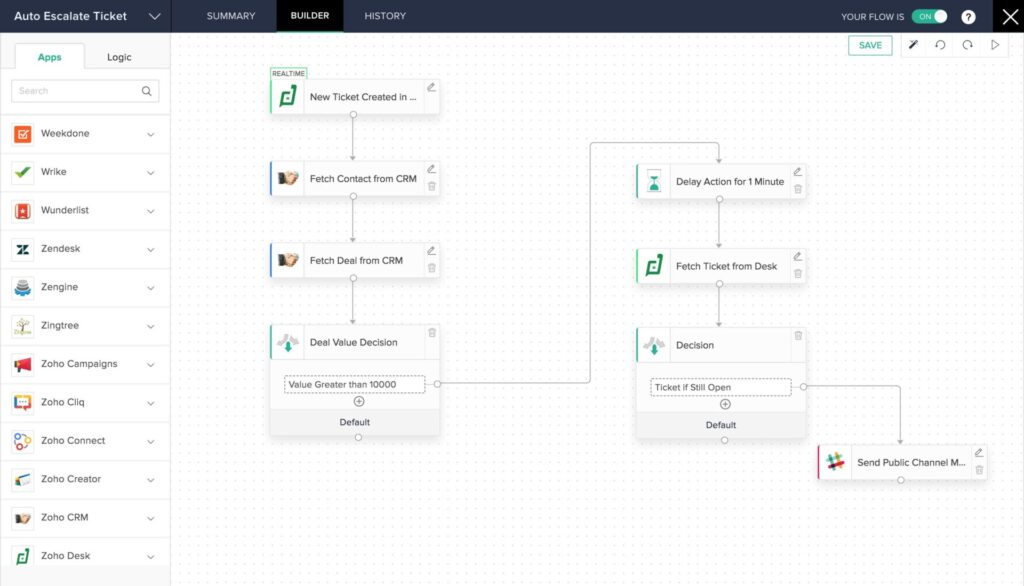
Zoho Flow is an iPaaS (Integration Platform as a Service). Think of it as the glue that connects 1,000+ apps using a visual interface. It’s perfect for high-level orchestration where you need to see the map of your data movement.
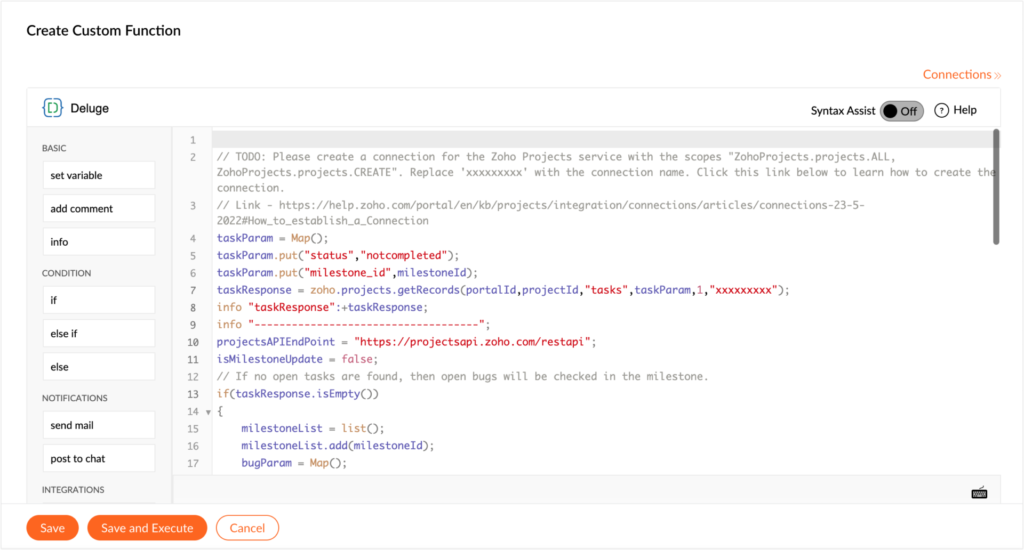
Custom Deluge Scripting is the native language of Zoho. It lives inside specific apps like CRM, Books, or Creator. When you need to perform surgical-level data manipulation, Deluge integration tasks are your best friend.
2. When to Choose Zoho Flow: The Visual Orchestrator
Zoho Flow shines when your automation spans across multiple non-Zoho applications.
- Multi-App Workflows: If you need to trigger an action in Shopify that updates Zoho CRM and then sends a message to Slack, Zoho Flow is the fastest route.
- Error Visibility: Flow provides a visual history of every execution. If something fails, you can see exactly where the node broke.
- Standard Connectors: It saves you from writing complex Deluge connections for apps that already have pre-built triggers.
3. When Custom Deluge Scripting is Non-Negotiable
As a Zoho Partner, we know that heavy-duty business logic belongs in Deluge. If your process requires high-speed execution within a single app, scripting is the winner.
Custom Deluge Scripting is required when:
- You need to manipulate Deluge variables dynamically within a record.
- You are performing complex math or sub-form iterations.
- You need to bypass the latency often found in webhooks.
4. Mastering Deluge Integration Tasks and Variables
To build million-dollar systems, you must understand Deluge integration tasks. These are pre-built shortcuts that allow you to interact with other Zoho services without manually calling APIs.
Common Deluge Examples
For instance, using the zoho.crm.updateRecord() task is far more efficient than a generic webhook. This is a prime example of how Deluge functions simplify what would otherwise be a complex API call.
// Example: Updating a Lead Status using Deluge variables
leadId = 123456789;
updateData = {"Status": "Contacted"};
response = zoho.crm.updateRecord("Leads", leadId, updateData);
Using Deluge tasks effectively allows you to clean data, validate emails, and ensure your Deluge integration is seamless and logically sound.
5. The Dreaded Deluge Statement Limit: How to Avoid It
One of the biggest hurdles for growing businesses is the Deluge statement limit. Currently, Zoho apps have caps on how many lines of code can execute in a single trigger.
How to stay under the limit:
- Avoid Infinite Loops: Ensure your
for eachloops are tight and targeted. - Optimize Deluge Tasks: Use specific search criteria rather than fetching all records.
- Offload to Zoho Flow: If you have to process 10,000 records, push that task to Zoho Flow to keep your CRM performance snappy.
6. Comparing Dates and Complex Logic
In business, timing is everything. Whether it’s calculating contract expirations or lead follow-ups, you will frequently need to Deluge compare dates.
Deluge Example: Date Comparison
currentDate = zoho.currentdate;
expiryDate = "2025-12-31".toDate();
if(currentDate > expiryDate)
{
    info "Contract Expired";
}
This level of precision is often easier to handle via a script than through a visual builder. Managing Deluge variables for dates ensures your automation remains accurate across time zones.
7. Conclusion: The Hybrid Strategy
For a million-dollar automation setup, you don’t choose one; you use both.
- Use Zoho Flow as your Project Manager to oversee high-level app connections.
- Use Custom Deluge Scripting as your Specialist to handle deep data work inside the apps.
As an authorized Zoho Partner, we specialize in navigating these technical waters. We ensure your Deluge connections are secure, your Deluge variables are optimized, and your workflows never hit a limit.
Ready to Get Started on Zoho?
Let’s build your business the smart way — with Zoho and Codroid Labs by your side.
📅 Book your free consultation now
When should I use Zoho Flow instead of a Deluge script?
Use Zoho Flow when you need to connect two or more different applications (like moving data from Shopify to Zoho CRM) and want a visual map of the process. Use Custom Deluge Scripting when you need to perform high-speed calculations, complex data validation, or “surgical” updates within a single Zoho app.
What is the Deluge statement limit and how do I avoid it?
The Deluge statement limit is the maximum number of code lines Zoho allows to run in a single execution (often 5,000 for standard workflows). To avoid hitting this, optimize your Deluge variables, use filtered criteria in your for each loops to reduce iterations, and move massive bulk-processing tasks to Zoho Flow.
Can I use Deluge functions inside Zoho Flow?
Yes! Zoho Flow features a “Custom Functions” block. This allows you to write Deluge scripts directly inside a Flow. This is the ultimate “hybrid” strategy: use Flow to bridge the apps and Deluge to handle the complex logic or Deluge integration tasks that standard Flow blocks can’t manage.
How do you Deluge compare dates for automation?
In Deluge, you compare dates by converting strings to date objects using the .toDate() function. Once converted, you can use simple relational operators (like >, <, or ==) to trigger actions based on deadlines, expiration dates, or follow-up schedules.
Do I need “Deluge connections” for every integration?
Not necessarily. For standard Zoho-to-Zoho tasks, you can use built-in Deluge integration tasks. However, if you are connecting to an external third-party API that isn’t natively supported, you will need to set up a Deluge connection to handle the OAuth authentication securely.