


Automation Stack by Edition · Checked 15 October 2026
Zoho CRM Workflow Automation by Edition: Rules, Blueprint, Deluge, WhatsApp and Telephony
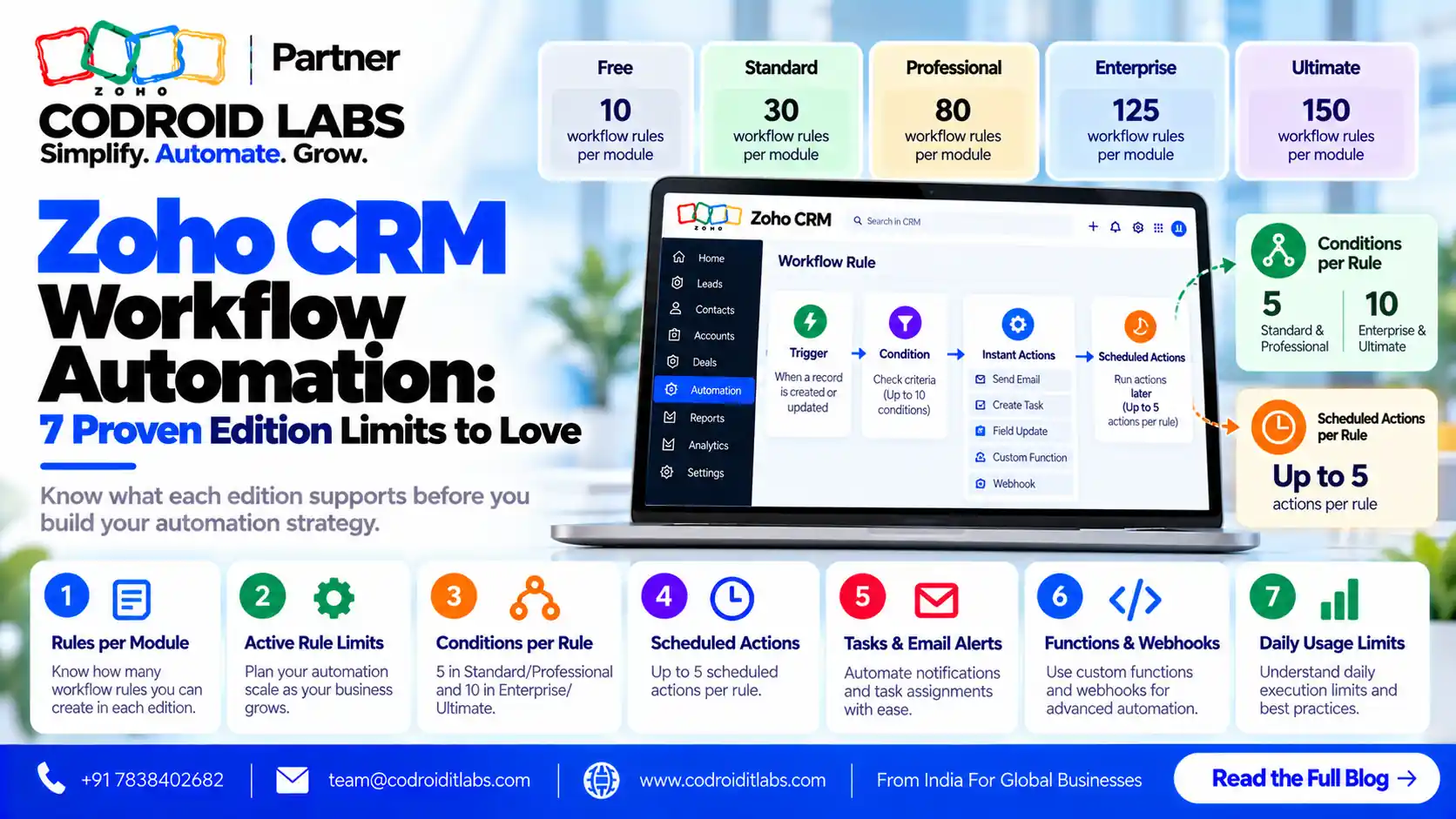
Zoho CRM workflow automation depends heavily on your edition: the same idea can be a simple rule on Standard, an enforced Blueprint on Professional, or a Deluge function on Enterprise. This guide maps every automation layer to the edition that unlocks it, with verified limits, six Deluge examples, a Blueprint flow, WhatsApp setup and a clear upgrade decision.
Checked: 15 October 2026
Source: Zoho CRM feature comparison, developer docs and help pages
By: Codroid Labs, a Zoho Partner and Zoho AI Enabled Partner
Source: Zoho CRM feature comparison, developer docs and help pages
By: Codroid Labs, a Zoho Partner and Zoho AI Enabled Partner
Short answer
Standard (₹800 per user a month, annual) gives 30 workflow rules per module, assignment rules, webhooks, WhatsApp Business and PhoneBridge, but no Blueprint. Professional (₹1,400) adds 80 rules per module, 3 Blueprints and scheduled mass email. Enterprise (₹2,400) adds 125 rules, 50 Blueprints, approval processes and Deluge functions as workflow actions. On Standard and Professional, functions run only through extensions. Prices are GST extra.
The Zoho CRM Workflow Automation Stack
In short: Zoho CRM automation is a stack: workflow rules, assignment rules, Blueprint, functions written in Deluge, and channels such as WhatsApp and telephony. Each layer unlocks at a different edition.
Think of zoho crm workflow automation as layers. Each layer builds on the one below, and higher layers need higher editions:
| Layer | What it does | Starts at |
|---|---|---|
| Workflow rules | Trigger emails, tasks, field updates and webhooks on record events or dates | Free (limited), Standard |
| Assignment rules | Route new records to the right owner | Standard |
| Blueprint | Enforce stage-by-stage processes with required actions | Professional |
| Journeys and scheduled mass email | Multi-step nurturing and scheduled sends | Professional |
| Approval processes | Route records for sign-off | Enterprise |
| Deluge functions in workflows | Custom logic, lookups, calculations and API calls | Enterprise |
| Channels: WhatsApp and PhoneBridge | Messaging and calls linked to records | Standard |
If you are new to the basics, our Zoho CRM automation guide covers common rules. This post focuses on which zoho crm workflow automation features each edition allows and when to upgrade.
Zoho CRM Workflow Automation Limits by Edition
In short: Standard allows 30 workflow rules per module and no Blueprint; Professional raises that to 80 rules and 3 Blueprints; Enterprise allows 125 rules, 50 Blueprints and functions as workflow actions.
From Zoho's feature comparison and pricing page, checked 15 October 2026. Prices per user a month, annual billing, GST extra:
| Feature | Standard | Professional | Enterprise |
|---|---|---|---|
| Price (annual / monthly) | ₹800 / ₹1,300 | ₹1,400 / ₹2,100 | ₹2,400 / ₹3,000 |
| Workflow rules per module | 30 (15 active), 5 conditions | 80 (40 active), 5 conditions | 125 (75 active), 10 conditions |
| Workflow rules per org | 2,500 (2,000 active) | 2,500 (2,000 active) | 2,500 (2,000 active) |
| Assignment rules | 10 per module | 20 per module | 50 per module |
| Webhooks per day (org) | 25,000 or 100 per user | 50,000 or 100 per user | 500,000 or 500 per user |
| Blueprints | None | 3 | 50 |
| Transitions per Blueprint | None | 10 | 100 |
| Scheduled mass email | None | 10 per module | 10 per module |
| Journeys | None | 1 active | 5 active |
| Approval processes | None | None | 10 active per module |
| Functions as workflow action | No (extensions only) | No (extensions only) | Yes: 1 instant and 5 time-based per rule |
| Function credits per day | 5,000 + 200 per user (max 15,000) | 5,000 + 200 per user (max 20,000) | 20,000 + 500 per user (max 400,000) |
| WhatsApp Business | Yes (credits) | Yes (credits) | Yes (credits) |
| Zoho PhoneBridge | Yes | Yes | Yes |
In the rule rows, the number in brackets is how many can be active at once. The org-wide cap of 2,500 is the same on every paid edition. The tighter limit is per module. Every zoho crm workflow automation plan should start from these numbers.
Zoho CRM Professional vs Standard Automation: When to Upgrade
In short: Upgrade from Standard to Professional when you need Blueprint, more workflow rules or scheduled mass email; upgrade to Enterprise when you need Deluge functions inside workflows or approval processes.
| If you need | Edition |
|---|---|
| Basic alerts, tasks, field updates and lead routing | Standard |
| More than 30 rules on a busy module | Professional |
| Enforced sales stages (Blueprint) | Professional |
| Scheduled mass email or one nurture journey | Professional |
| Approvals for discounts or quotes | Enterprise |
| Deluge functions triggered from workflows or Blueprint | Enterprise |
| More than 3 Blueprints | Enterprise |
The zoho crm professional vs standard automation choice usually comes down to Blueprint. If a single process needs enforcing, Professional is enough. If you plan custom code inside your zoho crm workflow automation, budget for Enterprise. Extra cost per user per year on annual billing: Professional is ₹7,200 more than Standard, and Enterprise is ₹12,000 more than Professional, before GST. See our Zoho CRM pricing India guide for the full plans.
Zoho CRM Blueprint Example Flow
In short: Blueprint turns a process into enforced stages with transitions, so a deal cannot move forward until required fields and actions are done.
Zoho CRM Blueprint is part of Zoho's process management tools. A Blueprint has states (stages) and transitions (the actions that move a record). Here is a lead qualification example that fits within Professional's 10-transition limit:
| From state | Transition | Required before moving | To state |
|---|---|---|---|
| New | Contact attempt | Call outcome and notes | Attempted |
| Attempted | Connected | Budget range and timeline fields | Contacted |
| Contacted | Qualify | Need, decision maker, product interest | Qualified |
| Contacted | Disqualify | Reason (picklist) | Disqualified |
| Qualified | Book demo | Demo date and owner | Demo booked |
| Demo booked | Convert | Demo feedback | Converted to deal |
Use common transitions for actions allowed from any state, such as Disqualify. Professional allows 2 common transitions per Blueprint and Enterprise allows 10. See the Blueprint FAQ for rules on editing live Blueprints. Blueprint is the layer of zoho crm workflow automation that enforces order.
Zoho Deluge Examples for CRM Automation
In short: Deluge is Zoho's scripting language. Each function run uses one credit, automation functions time out after 30 seconds, and full workflow access starts at Enterprise.
Deluge is Zoho's scripting language, documented in the Deluge help. Per Zoho's function limits page, functions are fully available on Enterprise and higher; Standard and Professional can use them only through extensions. Each run uses one credit, automation functions (workflow, Blueprint, approval) time out after 30 seconds, scheduled functions after 15 minutes, and a single run can execute up to 200,000 lines.
These zoho deluge examples extend zoho crm workflow automation and assume a function argument such as leadId or dealId mapped from the record. Replace custom field API names with your own.
1. Format an Indian mobile number
lead = zoho.crm.getRecordById("Leads", leadId);
mobile = ifnull(lead.get("Mobile"), "").replaceAll("[^0-9]", "");
if(mobile.length() == 10)
{
    mobile = "+91" + mobile;
}
updateMap = Map();
updateMap.put("Mobile", mobile);
resp = zoho.crm.updateRecord("Leads", leadId, updateMap);
info resp;
2. Create an onboarding task when a deal is won
deal = zoho.crm.getRecordById("Deals", dealId);
taskMap = Map();
taskMap.put("Subject", "Onboarding call: " + deal.get("Deal_Name"));
taskMap.put("Due_Date", zoho.currentdate.addDay(2).toString("yyyy-MM-dd"));
taskMap.put("What_Id", dealId);
taskMap.put("$se_module", "Deals");
resp = zoho.crm.createRecord("Tasks", taskMap);
info resp;
3. Calculate 18% GST into a custom field
deal = zoho.crm.getRecordById("Deals", dealId);
amount = ifnull(deal.get("Amount"), 0).toDecimal();
gst = (amount * 0.18).round(2);
updateMap = Map();
updateMap.put("GST_Amount", gst);
resp = zoho.crm.updateRecord("Deals", dealId, updateMap);
info resp;
4. Check for an existing contact by email
lead = zoho.crm.getRecordById("Leads", leadId);
email = ifnull(lead.get("Email"), "");
if(email != "")
{
    matches = zoho.crm.searchRecords("Contacts", "(Email:equals:" + email + ")");
    if(matches.size() > 0)
    {
        updateMap = Map();
        updateMap.put("Description", "Existing contact found: " + matches.get(0).get("id"));
        zoho.crm.updateRecord("Leads", leadId, updateMap);
    }
}
5. Copy the account owner onto a new deal
deal = zoho.crm.getRecordById("Deals", dealId);
acc = deal.get("Account_Name");
if(acc != null)
{
    account = zoho.crm.getRecordById("Accounts", acc.get("id"));
    updateMap = Map();
    updateMap.put("Owner", account.get("Owner").get("id"));
    zoho.crm.updateRecord("Deals", dealId, updateMap);
}
6. Scheduled check for leads not yet contacted
leads = zoho.crm.getRecords("Leads", 1, 200);
for each lead in leads
{
    if(lead.get("Lead_Status") == "Not Contacted")
    {
        taskMap = Map();
        taskMap.put("Subject", "Follow up: " + ifnull(lead.get("Last_Name"), ""));
        taskMap.put("What_Id", lead.get("id"));
        taskMap.put("$se_module", "Leads");
        taskMap.put("Owner", lead.get("Owner").get("id"));
        zoho.crm.createRecord("Tasks", taskMap);
    }
}
Reference: get records, update record, create record and search records in the Deluge help. Example 6 reads one page of 200 records; loop through pages for larger data and keep within the daily credit limit. For a gentler start, see our Deluge scripting for beginners.
Zoho CRM WhatsApp Integration India: Setup Steps
In short: Zoho CRM has a native WhatsApp Business channel from Standard upward; you need a verified business, a WhatsApp Business account and an eligible number, and business-initiated messages use credits.
Zoho CRM includes a native WhatsApp Business channel on Standard, Professional and Enterprise (not Free). Per Zoho's WhatsApp Business help, you need:
- A verified business and a verified WhatsApp Business account.
- A registered phone number for the WhatsApp Business API that meets the platform's number rules and is not tied to another provider.
- Admin access in Zoho CRM.
- Go to Setup, Channels, Business Messaging.
- Under WhatsApp, click Details, then Integrate.
- Sign in to your business account, then select or create the WhatsApp Business account and profile.
- Verify the WhatsApp Business number.
- In CRM, give the profile a nickname, choose the number and set routing preferences.
- Buy credits under Business Messaging (available once the number is active) and set auto recharge with a minimum balance.
- Create message templates and use them in workflows or cadences.
Messages sent by your business are charged against credits. Zoho's CRM help does not list a fixed credit price, so check the amount shown in your account when you buy. A zoho crm whatsapp integration india setup works best when templates are approved before you build zoho crm workflow automation around them.
Telephony With Zoho PhoneBridge
In short: Zoho PhoneBridge connects hosted and on-premise phone systems to Zoho CRM from Standard upward, so calls can be logged and placed from records.
Zoho PhoneBridge, listed on the feature comparison for Standard and higher, connects hosted and on-premise phone systems to Zoho CRM. Once connected, teams can click to call from records, see caller details on incoming calls and log calls automatically, which in turn can trigger zoho crm workflow automation such as follow-up tasks. Zoho's omnichannel page describes calls, email and messaging in one place. Check that your phone system is supported before you buy.
How to Build Zoho CRM Workflow Automation in 8 Steps
In short: Build the stack in eight steps: map the process, pick the edition, add rules, add Blueprint, add functions, connect channels, test and monitor.
- Map the process: Write each stage, owner and hand-off for one process, such as lead to deal.
- Pick the edition: Use the edition table to match the layers you need; start lower if unsure.
- Add workflow and assignment rules: Automate alerts, tasks, field updates and lead routing first.
- Add a Blueprint: On Professional or higher, enforce the stages that most often go wrong.
- Add Deluge functions: On Enterprise or higher, add custom logic for calculations, checks and updates.
- Connect channels: Set up WhatsApp Business with credits and PhoneBridge for calls.
- Test in a safe setup: Test with sample records, check every trigger, and watch credit usage.
- Monitor and tune: Review rule counts, failures and credits monthly and remove unused rules.
Zoho's workflow rules help explains triggers, conditions and actions in detail. Keep the first version of your zoho crm workflow automation small, then add layers as the team adopts it.
Help With Zoho CRM Workflow Automation
Codroid Labs is a Zoho Partner and a Zoho AI Enabled Partner, recognised by Zoho after completing the AI Accelerator Series 2026. We map your process to the right edition, build rules, Blueprints and Deluge functions, and set up WhatsApp and telephony. Call +91 7838402682 or email team@codroiditlabs.com.
Book a 30-min automation callStart a Zoho CRM trial
Quick Answers
Does Standard include Blueprint?
No. Blueprint starts at Professional with 3 Blueprints.
How many zoho crm workflow automation rules does Standard allow?
30 per module, 15 active, with 5 conditions per rule.
Can I run Deluge on Professional?
Only through extensions; workflow function actions start at Enterprise.
Is WhatsApp included?
Yes, from Standard; business-initiated messages use credits.
What is the function timeout?
30 seconds for workflow, Blueprint and approval functions.
Which edition suits zoho crm workflow automation with custom code?
Enterprise, at ₹2,400 per user a month on annual billing.
Zoho CRM Workflow Automation FAQs
What is zoho crm workflow automation?
It is the set of rules, processes and functions in Zoho CRM that act on records automatically, such as sending emails, creating tasks, updating fields and calling webhooks.
Which edition do I need for zoho crm blueprint?
Professional allows 3 Blueprints with 10 transitions each; Enterprise allows 50 Blueprints with 100 transitions each.
Can Standard run Deluge functions?
Standard and Professional can use functions only through extensions. Functions as workflow actions start at Enterprise.
How do function credits work?
Each Deluge function run uses one credit. Enterprise gets 20,000 credits plus 500 per user each 24 hours, up to 400,000 including add-on credits.
Does Zoho CRM support WhatsApp in India?
Yes. The native WhatsApp Business channel is available from Standard, with a verified business, an eligible number and message credits.
Which telephony works with Zoho CRM?
Zoho PhoneBridge connects supported hosted and on-premise phone systems to Zoho CRM from Standard upward.
Is it worth upgrading from Standard to Professional for zoho crm workflow automation?
Yes, if you need Blueprint, more than 30 rules on a module, scheduled mass email or a journey. Otherwise Standard may be enough.
Plan your automation stack
Bring one process. Leave with the rules, Blueprint and functions it needs, and the edition that fits.