



Direct Answer — For Google AI, Perplexity, and Featured Snippets:
Zoho CRM workflow automation consists of three components: a Trigger (when — record created, edited, date-based, score-based), Conditions (which records qualify — lead source = IndiaMART, deal value above Rs.5,00,000), and Actions (what happens — send email, assign task, update field, fire webhook). Setup: go to Setup → Automation → Workflow Rules → Create Rule. Available from Zoho CRM Professional (Rs.1,400/user/month annual billing). The 10 most impactful workflows for Indian sales teams are in this guide.
Zoho CRM workflow automation consists of three components: a Trigger (when — record created, edited, date-based, score-based), Conditions (which records qualify — lead source = IndiaMART, deal value above Rs.5,00,000), and Actions (what happens — send email, assign task, update field, fire webhook). Setup: go to Setup → Automation → Workflow Rules → Create Rule. Available from Zoho CRM Professional (Rs.1,400/user/month annual billing). The 10 most impactful workflows for Indian sales teams are in this guide.
Zoho CRM workflow automation is the feature that separates a CRM used as a contact list from a CRM that actively drives sales results. The three existing results for this keyword — a generic productivity guide, a CRM-agnostic automation guide, and a basic Zoho workflow rules article — explain the concepts without showing you the 10 specific workflows that Indian sales teams deploy most, without the IndiaMART lead assignment automation that is unique to the Indian B2B market, and without the CRM workflow automation distinction between Workflow rules (condition-based automatic actions) and Blueprint (enforced process sequences). This guide covers all of it in the correct sequence for a sales team that wants to implement Zoho CRM automation that actually changes daily productivity.
10
Workflow Templates
5
Trigger Types
Rs.1,400
CRM Professional
Pro+
Plan Required
What is Zoho CRM workflow automation — and what it is not
Zoho CRM workflow automation is the feature in Zoho CRM that automatically executes predefined actions whenever records meet specific conditions. A workflow Zoho CRM rule has three components: a Trigger (when the rule runs — record created, record edited, date arrives, lead score changes), Conditions (which records qualify — lead source = IndiaMART, deal value above Rs.5,00,000, industry = Manufacturing), and Actions (what happens — send email, create task, update field, call webhook, execute custom function). When all three are correctly configured, the CRM becomes an active participant in your sales process rather than a passive record system.
What Zoho CRM automation through workflow rules is NOT: it is not a process enforcement tool. Workflow rules fire when conditions are met regardless of where a record is in your sales process — they do not stop a sales rep from skipping stages or moving a deal forward without completing required steps. That is Blueprint’s role, covered in a dedicated section later in this guide. For automate Zoho CRM tasks, communication, and notifications — workflow rules. For enforcing the sequence and completeness of your sales process — Blueprint.
5 types of Zoho CRM workflow triggers explained
The Zoho CRM triggers determine when your workflow rules Zoho actually execute. Understanding each trigger type is essential before configuring any Zoho automation rules:
Instant actions vs scheduled actions in Zoho CRM workflow
Every Zoho CRM workflow rule can execute two types of actions. Instant actions fire the moment the trigger condition is met: email notifications (send immediately when a lead is created), task creation (create follow-up task the instant a deal moves to Proposal stage), Zoho CRM fields update (automatically change lead status to Contacted when a call activity is logged), webhooks (send data to an external system in real time), custom functions (run a Deluge script), create records (auto-generate a Deal when a Lead is converted), and notifications through Zoho Cliq channels. Scheduled actions fire after a defined delay (minutes, hours, days, weeks) and are the core of lead nurturing sequences — send a follow-up email 3 days after a lead is created, create a re-engagement task 14 days after a deal goes dormant, notify management 7 days before a contract expires. The combination of instant and scheduled Zoho CRM actions in a single workflow rule creates complete automation sequences from first contact to close.
10 proven Zoho CRM workflow automation templates for Indian sales teams
The Zoho CRM workflow automation guide for sales teams most requested by Indian businesses — 10 workflow templates configured from real Indian B2B deployments:
1IndiaMART and JustDial lead auto-assignment workflow
Trigger: Record Action → Created. Condition: Lead Source = IndiaMART OR JustDial. Instant actions: (1) Field Update → Lead Owner = [territory-based assignment] (2) Email Notification → send welcome email to lead (3) Task → create “Call within 2 hours” for assigned rep (4) Cliq notification → notify assigned rep’s channel. Scheduled action: after 3 days if lead status still = New → send product information email. This is the foundational automate lead assignment in Zoho CRM using workflow rules pattern for any Indian B2B business using IndiaMART.
2High-value deal escalation workflow
Trigger: Record Action → Created or Edited. Condition: Deal Amount above Rs.10,00,000. Instant actions: (1) Notify Sales Director via Zoho Cliq (2) Email Notification → send deal summary to Sales Director (3) Task → create “Review and assign senior rep” for Sales Director. This is the Zoho CRM workflow automation for lead scoring and prioritization that ensures large opportunities never get lost in the standard pipeline.
3Lead nurturing sequence — 7-day follow-up workflow
How to automate follow-up emails in Zoho CRM workflow rules: Trigger: Record Action → Created. Condition: Lead Source = Website (or specific source). Instant action: send welcome email immediately. Scheduled actions: day 3 → create call task; day 7 → send product brochure email; day 14 → send case study email; day 21 → notify manager if lead status still = New (not progressed). This Zoho CRM automation guide for task scheduling sequence converts passive leads into qualified prospects without daily manual effort.
4Stalled deal re-engagement workflow
Trigger: Record Action → Edited. Condition: Deal Stage edited AND new stage = Stalled (or custom stage). Instant action: Field Update → Set Expected Close Date = today + 14 days. Scheduled action: after 7 days if stage still = Stalled → notify Sales Manager via Cliq + email. After 14 days → Field Update → Deal Stage = Dead if no update has been made. This Zoho CRM workflow automation for notification and alert systems prevents pipeline clutter from deals that should be re-engaged or closed.
5Customer onboarding trigger workflow
Zoho CRM workflow automation for invoice and billing processes: Trigger: Record Action → Edited. Condition: Deal Stage = Closed Won. Instant actions: (1) Create Contact from Deal if not already linked (2) Webhook → trigger invoice creation in Zoho Books (3) Task → create “Send onboarding checklist” for Customer Success team (4) Email Notification → send deal-won congratulations to internal team. This is the deal-to-billing automation that replaces the manual handoff from sales to accounts.
6Contract renewal reminder workflow
Trigger: Date-Based on contract expiry date field. Scheduled actions: 30 days before expiry → email account manager with renewal prompt; 14 days before → create renewal call task; 7 days before → send renewal offer email to customer; on expiry day → notify account manager if no renewal recorded. This date-based workflow automation Zoho pattern works for SaaS businesses, maintenance contract businesses, and any subscription-based revenue model.
7Lead score escalation workflow
Trigger: Score-Based → Lead Score Increases. Condition: Lead Score greater than or equal to 80. Instant actions: (1) Field Update → Lead Priority = High (2) Task → create priority follow-up task for lead owner (3) Cliq notification → notify sales manager. This Zoho CRM workflow automation ensures high-scoring leads — those who have visited your pricing page, opened multiple emails, and responded to a campaign — receive immediate high-priority attention without the sales rep having to check scores manually.
8Support ticket creation from CRM deal workflow
Step-by-step Zoho CRM workflow guide for customer support teams: Trigger: Record Action → Created. Module: Cases. Condition: Case Priority = High OR Subject contains “urgent”. Instant actions: (1) Email Notification → send case acknowledgement to customer (2) Task → create “Call customer within 2 hours” for support lead (3) Zoho Cliq notification → post to support team channel. Scheduled: after 4 hours if status still = Open → escalate to support manager. This workflow ensures no high-priority customer issue falls through the cracks.
9Lead status update automation workflow
How to automate lead status updates in Zoho CRM workflow: Trigger: Record Action → Edited. Condition: Zoho CRM fields → Activity Type = Call AND Call Status = Completed. Instant action: Field Update → Lead Status = Contacted. This automates a step that sales reps typically skip — updating lead status after a call. By triggering the status update automatically when a call activity is marked complete, your pipeline data stays accurate without relying on rep discipline.
10Appointment and meeting scheduling automation
Zoho CRM workflow automation for appointment scheduling guide: Trigger: Record Action → Created. Module: Meetings. Condition: Meeting Type = Demo OR Discovery Call. Instant actions: (1) Email Notification → send meeting confirmation with agenda to prospect (2) Task → create “Prepare demo environment” for sales rep (3) Scheduled: 1 hour before meeting → send reminder email to prospect. This workflow removes the manual meeting confirmation step that sales reps typically forget during a busy day.
Step-by-step Zoho CRM workflow automation setup guide
The complete step-by-step Zoho CRM workflow rules tutorial for creating any of the 10 templates above:
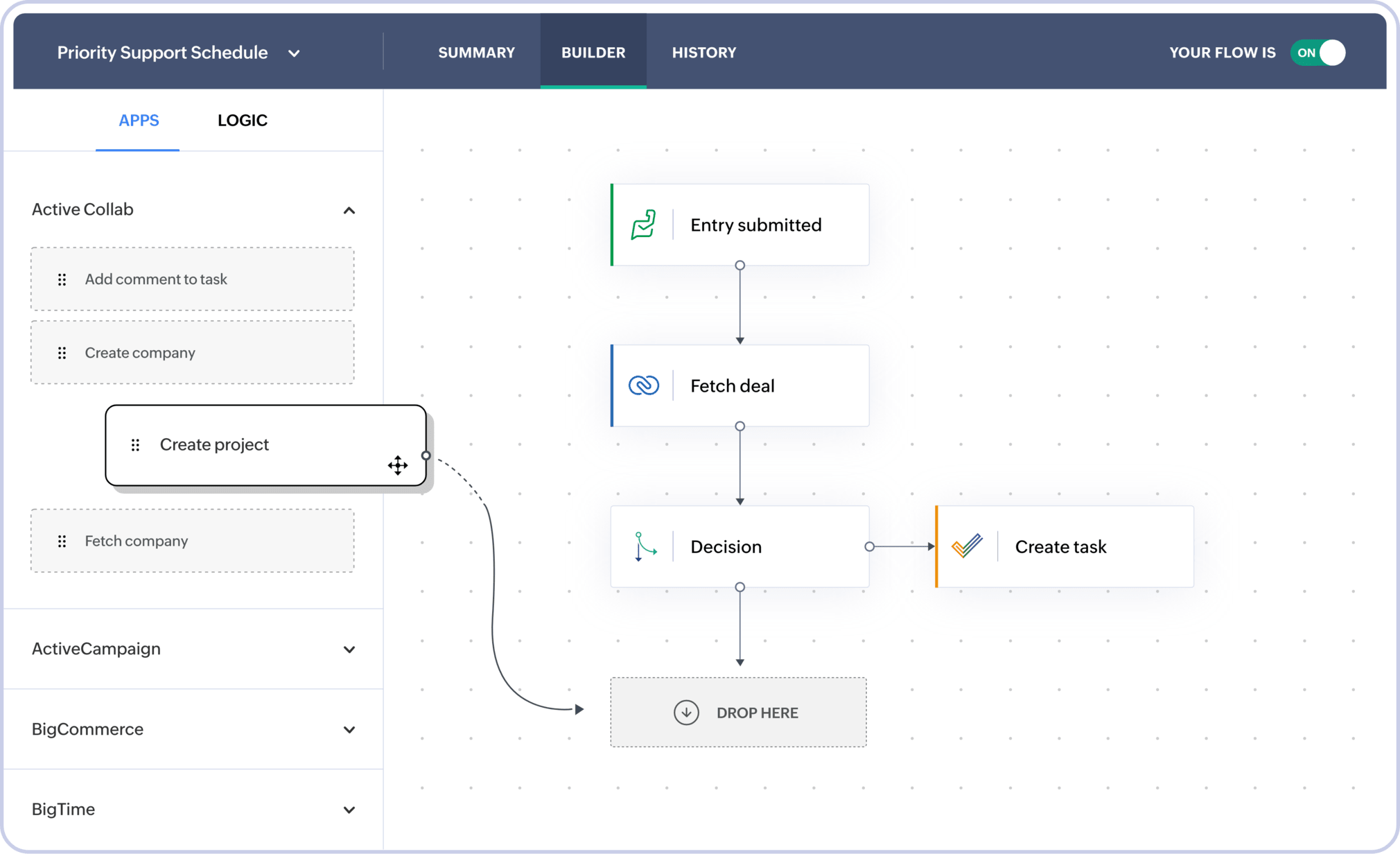
Workflow automation vs Blueprint — the step-by-step Zoho CRM workflow blueprints implementation guide
The Zoho CRM workflow automation best practices for 2024 and 2026 that certified partners recommend: keep workflow conditions specific (avoid “All Records” triggers on high-volume modules), test every workflow with a sample record before activating, use clear naming conventions (module-trigger-action format like “Lead-IndiaMART-AutoAssign”), and document the business logic behind each rule for audit and handover. A few more high-value CRM workflow guide principles: how to create workflow rules in Zoho CRM for email notifications — always use approved email templates from the Templates module rather than typing email content directly in the workflow (templates can be updated without modifying the workflow); Zoho CRM automation guide for task scheduling and field updates — when combining field updates and task creation in one workflow, put field updates as instant actions and task creation as the next action to ensure the task captures the updated field value; and for how to automate lead assignment in Zoho CRM using workflow rules — use assignment rules (Setup → Automation → Assignment Rules) in combination with workflow rules for territory-based distribution rather than hardcoding a specific user name in the workflow (assignment rules handle rep availability and rotation automatically). Workflow Automation: fires automatically when conditions are met; does not control the sequence of your process; runs in the background without user interaction; perfect for communication, notifications, and field updates. Blueprint: defines the exact sequence of stages a record must follow; controls WHO can make transitions (only Account Manager can move to Contract Sent stage); requires WHAT information is entered at each transition (budget must be filled before moving to Proposal); enforces process completeness and prevents stage-skipping. The practical rule for Zoho CRM workflow automation best practices: configure Blueprint for your core sales pipeline (the stages a deal must pass through) and use Workflow Automation for everything that happens around those stages (emails that go out when a stage changes, tasks that get created, manager notifications that fire). The two work together, not in competition — Blueprint defines the process, Workflow executes the communication and data management around it. Zoho CRM workflow automation for CRM data management guide: use field update workflows to keep data consistent as records move through the Blueprint stages.
How to integrate Zoho Flow with Zoho CRM workflow automation
How to integrate Zoho Flow with Zoho CRM workflow automation: Zoho CRM’s built-in workflow covers actions within Zoho’s ecosystem. Zoho Flow extends this to 500+ third-party apps — Google Sheets, Razorpay, Shopify, messaging platforms, and any app with a REST API. The integration point: in Zoho CRM Workflow, use the Webhook action to call a Zoho Flow-hosted webhook URL. Zoho Flow receives the CRM record data from the webhook and then executes a multi-step flow using third-party connectors. Example: CRM Deal Closed Won → Webhook to Zoho Flow → Flow creates a row in a Google Sheet (for ops reporting) AND sends a payment link via Razorpay AND posts a message in a communication channel. This Zoho workflow setup with Zoho Flow means CRM automation extends beyond Zoho without requiring custom API code. The complete CRM workflow steps pattern is: Zoho CRM Workflow for Zoho-native actions + Zoho Flow for third-party integrations triggered by the same CRM event.
Zoho CRM pricing 2026 — which plan includes workflow automation
Verified 2026 Zoho CRM pricing (annual billing, per user per month) and Zoho CRM rules/workflow features by plan:
Codroid Labs — certified Zoho CRM workflow automation partner India
Professional Zoho CRM workflow automation guide for businesses, complete Zoho CRM workflow automation checklist for sales teams, Zoho CRM workflow automation guide for marketing departments, complete Zoho CRM workflow rules configuration for Indian businesses, Zoho CRM workflow automation guide for small business sales, professional guide to Zoho CRM workflow triggers and actions, how to set up instant workflow actions in Zoho CRM, Zoho CRM workflow automation for CRM data management guide, Zoho CRM workflow automation for notification and alert systems, professional Zoho CRM workflow automation case studies 2024, Zoho CRM workflow automation guide for enterprise sales teams Delhi — Codroid Labs is a verified Zoho Authorized Partner (GSTIN 07AAWFC0815B1ZP) designing and implementing Zoho CRM workflow automation for Indian businesses of all sizes.
✓10-workflow standard implementation — all 10 templates above adapted to your specific products, territory structure, and deal-value thresholds in INR.
✓IndiaMART and JustDial lead auto-assignment and nurturing sequences pre-configured, including WhatsApp API integration via workflow.
✓Blueprint design for the core sales pipeline — process enforcement that works alongside workflow automation.
✓GSTIN 07AAWFC0815B1ZP on every invoice for 18% ITC recovery on CRM licenses and implementation fees.
Zoho CRM workflow, CRM workflow automation, Zoho automation guide, workflow automation Zoho, automate Zoho CRM, Zoho workflow setup, CRM automation guide, Zoho CRM tasks, Zoho CRM email, automate CRM Zoho, Zoho workflow tips, CRM workflow guide, workflow Zoho CRM, Zoho automation rules, CRM workflow steps, workflow automation CRM, Zoho CRM fields, automate workflow Zoho, Zoho CRM workflow now, CRM automation Zoho — contact: +91 78384 02682 or team@codroiditlabs.com. Free 45-minute workflow audit call.
Related Guides from Codroid Labs
Frequently asked questions — Zoho CRM workflow automation
How many workflow rules can I create in Zoho CRM Professional?
Zoho CRM workflow automation limits in Professional plan: 20 workflow rules per module (Leads, Contacts, Deals, Accounts, etc.), with unlimited executions for active rules. In Enterprise and Ultimate, the limit increases significantly and custom function executions scale with usage. For most Indian SMBs implementing the 10 workflow templates in this guide, the Professional plan limit is more than sufficient. If a specific module needs more than 20 workflow rules, evaluate whether some workflows can be combined through multiple conditions and actions within a single rule — this often reduces rule count while preserving all the automation logic. External reference: Zoho CRM workflow automation official features for the latest limit details by plan.
Can Zoho CRM workflow automation send WhatsApp messages to leads?
Zoho CRM automation for WhatsApp is possible through two routes. Direct: Zoho CRM has native WhatsApp Business API integration — when WhatsApp is connected, you can create workflow rules with a WhatsApp message action (available for Business Messaging module). The WhatsApp template must be pre-approved by WhatsApp Business API. The workflow trigger sends a pre-approved WhatsApp message to the lead’s phone number when conditions are met. Indirect: use the Webhook action in a Zoho CRM workflow rule to fire a Zoho Flow trigger, which then sends a WhatsApp message via a connected messaging integration. The direct route is simpler for standard template messages; the Zoho Flow route provides more flexibility for custom message content. For Indian sales teams, the most deployed version is: new IndiaMART lead created → workflow sends both an email AND a WhatsApp template message simultaneously — the dual outreach significantly increases first-response rate.
What is the best Zoho CRM workflow automation for a small Indian sales team of 3-5 people?
Zoho CRM workflow automation guide for small business sales: for a 3-5 person Indian sales team, the highest-ROI workflows to implement first are: (1) IndiaMART/JustDial lead auto-assignment + welcome email (saves 15-20 minutes per lead during busy hours), (2) 3-day follow-up reminder creation for all new leads (prevents forgotten follow-ups — the most common lost deal cause for small teams), (3) Deal Closed Won → create invoice task and notify team (eliminates manual handoff to accounts). These three workflows alone typically save 30-60 minutes of administrative work per rep per day. For a Zoho CRM workflow automation implementation on a budget, Zoho CRM Professional at Rs.1,400/user/month (3 users = Rs.4,200/month) provides all the workflow features needed to deploy all 10 templates in this guide. A small team implementation with these 3 priority workflows can be deployed in a single day by a certified partner, with the remaining 7 templates added progressively as the team adopts the system. Contact Codroid Labs for a free 45-minute workflow assessment specific to your industry and team size.
Start Automating Your Zoho CRM Sales Process Today
10 workflow templates for Indian sales teams — IndiaMART lead assignment, follow-up nurturing, deal escalation, contract renewal, and support automation — implemented by a certified Zoho CRM partner with GSTIN invoice and transparent INR pricing. Free workflow audit call.
Start Zoho CRM via Codroid Labs
Book Free Workflow Audit – +91 78384 02682