



Zoho CRM Radio Buttons and numeric sliders have officially arrived to transform how you interact with your data. For any business using a CRM, the speed and accuracy of data entry are paramount. The latest update to the Zoho CRM Layout Editor introduces two highly anticipated field formats: Radio Buttons and Sliders for Numeric Fields. These additions are designed specifically to make it easier for your users to fill out forms across all modules, providing both convenience and a significant boost to visual appeal.
In this guide, we will explore why these updates matter and how you can leverage them to improve your workflow.
Table of Contents
Why Zoho CRM Radio Buttons are a Game-Changer
When managing a complex database, the layout of your fields can determine how quickly a salesperson can update a lead. By using Zoho CRM Radio Buttons, you reduce the number of clicks required to select an option compared to a traditional picklist or dropdown menu.
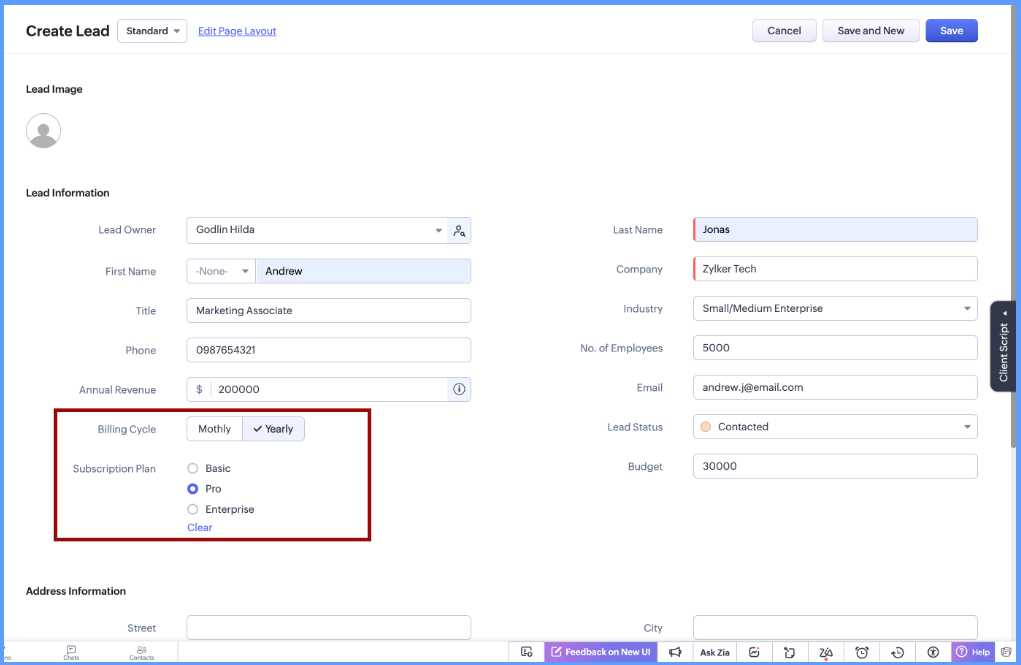
Enhancing Visual Appeal and Convenience
According to the sources, these new field formats are included in the Layout Editor to provide convenience and visual appeal. In a fast-paced sales environment, being able to see all available options at a glance via a radio button, rather than clicking into a dropdown, saves valuable seconds and reduces cognitive load.
1. Streamlined Data Entry in the Layout Editor
The primary benefit of the Zoho CRM Radio Buttons is their integration into the Layout Editor. This allows administrators to customise modules with a more modern interface. Instead of typing in numbers, the new Sliders for Numeric Fields allow for a tactile, visual way to input data ranges.
2. Improved Accuracy with Numeric Sliders
Alongside the focus on Zoho CRM Radio Buttons, the introduction of numeric sliders is equally important. Sliders prevent “fat-finger” errors on mobile devices by allowing users to drag a pointer to a specific value or range, ensuring that the data entered into your CRM remains clean and consistent.
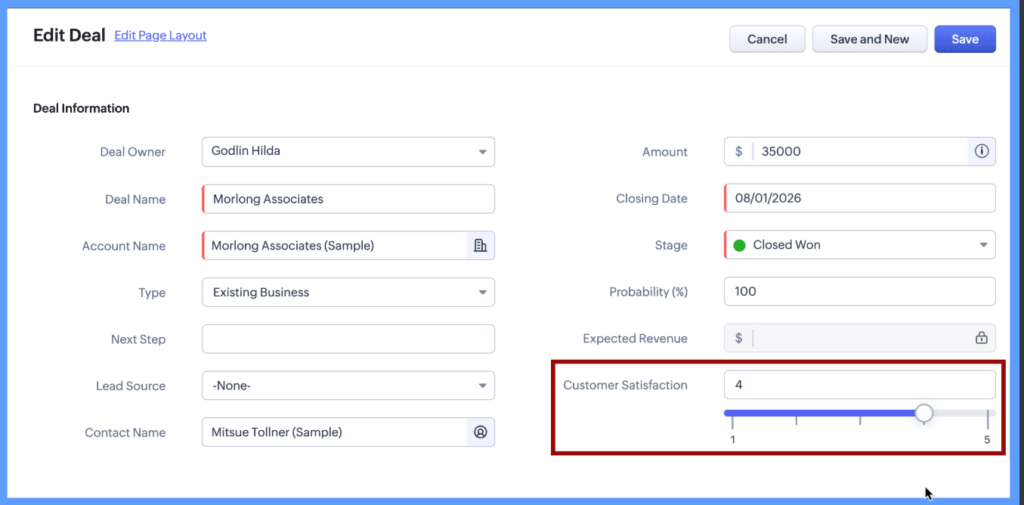
3. Faster Form Completion Across All Modules
One of the most powerful aspects of this update is that these formats are available across all modules. Whether you are updating a “Lead,” a “Deal,” or a custom module, the Zoho CRM Radio Buttons ensure a uniform user experience.
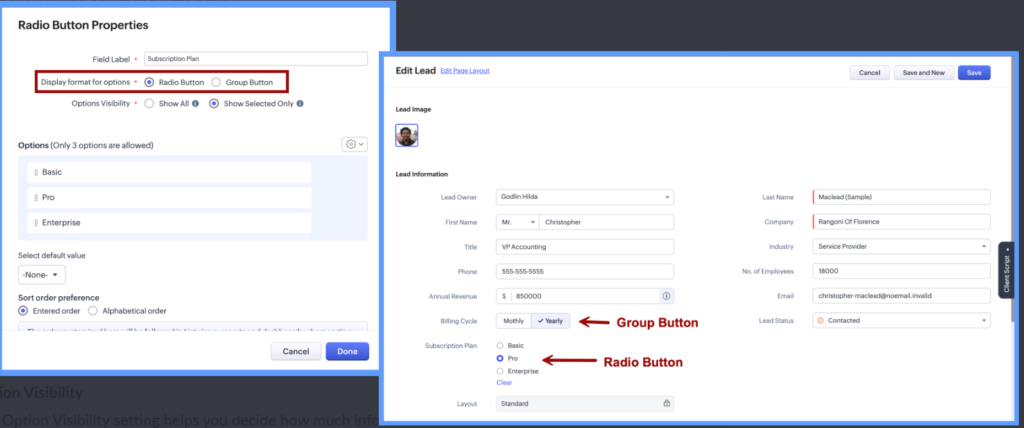
4. Better User Adoption Through Visual Design
User adoption is the biggest hurdle for any CRM implementation. By using Zoho CRM Radio Buttons, the interface becomes more intuitive. Visual cues, like a selected radio button or a slider position, provide immediate feedback to the user, making the system feel more responsive and less like a chore to update.
5. Mobile Optimisation and Responsiveness
For sales teams on the road, the Zoho CRM Radio Buttons are far superior to small text fields. Tapping a button is easier than typing on a mobile keyboard. This update ensures that your CRM is as functional on a smartphone as it is on a desktop.
6. Real-Time Deployment in Specific Data Centres
It is important to note that this feature is rolling out strategically. As of the latest update, these features are currently available for the CN (China), JN (Japan), AU (Australia), and CA (Canada) Data Centres. If you are operating within these regions, you can access these updates in both the Free and Standard editions of Zoho CRM.
7. Simple Implementation for Administrators
Setting up Zoho CRM Radio Buttons does not require complex coding. Because they are part of the Layout Editor, administrators can simply drag and drop these new field formats into their existing forms.
How to Get Started
To begin using these features, navigate to your CRM settings and open the Layout Editor. Look for the “Radio Button” and “Numeric Slider” options in the field list. By replacing your most-used picklists with Zoho CRM Radio Buttons, you can immediately see an improvement in how your team interacts with the software.
Conclusion
The introduction of Zoho CRM Radio Buttons and numeric sliders is a clear indication of Zoho’s commitment to user experience. By focusing on visual appeal and convenience, they have made data entry a more seamless process for users across the globe.
If you are in one of the supported Data Centres, start experimenting with Zoho CRM Radio Buttons today to see how they can transform your business workflows.
Ready to Get Started on Zoho?
Let’s build your business the smart way — with Zoho and Codroid Labs by your side.
📅 Book your free consultation now