


In the world of Kraft paper sales, where customization, bulk pricing, and just-in-time delivery reign supreme, every minute counts. Sales teams in packaging and manufacturing industries face high-volume, complex B2B transactions that involve everything from custom GSM requirements to strict inventory timelines. Without the right tools, errors creep in, quotes take days, and opportunities slip through the cracks.
That’s where Zoho CRM for Kraft Paper Sales steps in—not just as a contact management tool, but as a strategic engine to streamline, automate, and accelerate your entire sales lifecycle.
Table of Contents
1. Use CPQ + Subforms to Streamline Custom Kraft Paper Quoting
One of the biggest pain points in Kraft paper sales is creating accurate, detailed quotes with multiple specifications—like GSM (grams per square meter), bursting strength, reel width, coating type, and order quantity. Traditionally, this process involves spreadsheets, email chains, and back-and-forth with technical teams. It’s slow, error-prone, and unprofessional.
The Hack: Build a Custom Quoting System Using Zoho CPQ and Subforms
With Zoho CRM’s Configure-Price-Quote (CPQ) module and Subforms, you can create a dynamic quoting workflow directly within the CRM.
Here’s how:
- Create a Custom Module or use Subforms under Quotes to capture all essential specs: GSM, paper grade, roll diameter, coating (e.g., moisture-resistant), quantity (in kgs or tonnes), and delivery location.
- Predefine pricing rules based on volume tiers (e.g., ₹80/kg for 1–10 tonnes, ₹75/kg for 10–50 tonnes).
- Set dropdowns and validation rules so reps can’t submit incomplete specs.
Why This Works for Kraft Paper Sales
- Eliminates manual errors from copy-paste quoting.
- Speeds up quote generation from hours to minutes.
- Ensures consistency across teams and regions.
- Integrates seamlessly with Zoho Invoice for faster order processing.
💡 Pro Tip: Link this system with your ERP or production planning tool via Zoho Flow to auto-check capacity before finalizing quotes.
2. Automate Inventory-Linked Reorder Alerts to Prevent Overpromising
Nothing damages client trust faster than promising 30 tonnes of 120 GSM unbleached Kraft paper—only to realize two weeks later it’s out of stock.
Many Kraft paper suppliers struggle with inventory misalignment between sales and warehouse teams. This leads to delayed deliveries, contract penalties, and lost repeat business.
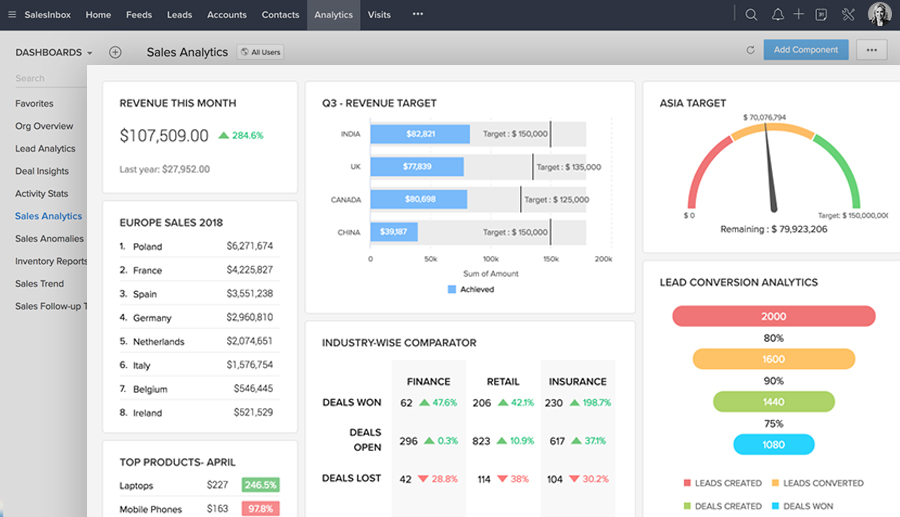
The Hack: Set Up Workflow Rules Tied to Real-Time Inventory Data
Use Zoho Workflow Automation to sync your CRM with Zoho Inventory or a third-party WMS (Warehouse Management System) via API.
Steps to implement:
- Create a field in your Product module: “Available Stock (in tonnes)”.
- Use Zoho Flow or API tasks to pull real-time stock levels nightly.
- Set up a Workflow Rule that triggers when stock falls below a threshold (e.g., <5 tonnes for Grade A Kraft).
- Automatically notify the sales manager and freeze quoting for that grade until restocked.
You can even automate email/SMS alerts using Zoho Cliq or Twilio integration.
Why This Matters
- Prevents overcommitment and backorders.
- Enables proactive communication with clients: “We’re low on 110 GSM—can we suggest a comparable alternative?”
- Builds credibility by showing transparency.
🔄 Bonus: Use Forecast Reports in Zoho Analytics to predict future demand based on historical sales and seasonality.
3. Enforce a Stage-Based Sales Process with Zoho Blueprint
The B2B Kraft paper sales cycle is long and complex. It often includes:
- Initial inquiry
- Sample dispatch
- Lab testing
- Price negotiation
- Trial order
- Final contract signing
Without structure, deals stall at “Sample Sent” for weeks—killing momentum and forecast accuracy.
The Hack: Map Your Sales Process Using Zoho Blueprint
Zoho CRM Blueprint acts like a GPS for your sales reps. It enforces required actions before moving a deal forward.
How to apply it:
- Define your sales pipeline stages: Prospecting → Sample Requested → Sample Shipped → Test Results Received → Quote Sent → Negotiation → Closed Won.
- Use Mandatory Fields and Checklists at each stage:
- Before moving from “Sample Shipped” to “Test Results,” require upload of test report PDF.
- Before closing, require manager approval and signed NDA.
- Assign time-based SLAs: e.g., “Quote must be sent within 48 hours of sample approval.”
Why This Works
- Eliminates stage-skipping and guesswork.
- Provides real-time visibility into bottlenecks.
- Helps new reps follow best practices from day one.
- Improves forecast accuracy for management.
📊 Insight: According to Sales Insights Lab (DoFollow), structured sales processes improve win rates by up to 28%.
4. Leverage Zia AI for Smart Follow-Ups and Lead Prioritization
Competition in the Kraft packaging market is fierce. Low-cost alternatives from Southeast Asia, recycled paper innovations, and tight margins mean you can’t afford to lose leads due to poor follow-up.
Timing is everything.
The Hack: Activate Zia, Zoho’s AI Assistant, for Lead Scoring and Predictive Engagement
Zia AI analyzes behavioral data across emails, calls, and CRM activity to:
- Score leads based on engagement (e.g., opened email 3x, replied twice).
- Predict the best time to call or send a follow-up email.
- Flag at-risk deals (e.g., no contact in 14 days).
Implementation steps:
- Enable Zia Lead Scoring in Settings.
- Train Zia with historical data: what traits did your closed-won customers have?
- Use Zia Insights dashboard to identify “hot” leads ready for a quote.
- Set Smart Tasks to remind reps: “Call Mr. Sharma—he viewed your quote twice this week.”
Why This Drives Results
- Reps spend time on high-intent prospects, not cold calls.
- Reduces missed opportunities during decision-making windows.
- Personalizes outreach using AI-powered recommendations.
🤖 Example: A packaging company in Gujarat saw a 35% increase in conversion after using Zia to prioritize follow-ups on leads that requested samples.
5. Empower Field Teams with the Zoho CRM Mobile App
Sales reps visiting paper mills, packaging units, or client factories need instant access to product specs, pricing, and quoting tools—without returning to the office.
The Hack: Use Zoho CRM Mobile App with Check-In & Photo Capture
The Zoho CRM Mobile App turns your smartphone into a full-featured sales assistant.
Key features for Kraft paper sales:
- Check-in/Check-out: Log site visits with GPS timestamp—proves activity and improves accountability.
- Capture Photos: Snap competitor packaging or paper samples and attach them directly to the Account or Lead.
- Create Quotes On-Site: Pull product details, apply bulk pricing, and email PDF quotes from the field.
- Offline Mode: Works even in remote industrial areas with poor connectivity.
Why Mobility Matters
- Accelerates response time: “You need 50-tonne jumbo reels? I’ll send a quote before I leave your facility.”
- Documents real-world competition: Seeing a rival’s kraft bag design helps R&D innovate.
- Improves team discipline with automated visit logs.
📱 Pro Use Case: A sales manager in Tamil Nadu reduced follow-up time from 3 days to same-day by using mobile check-ins and instant quoting.
Bonus Tips: Maximize Your ROI with Zoho CRM for Kraft Paper Sales
Beyond the top 5 hacks, here are additional ways to optimize:
🔄 Integrate with Production Planning Tools
Sync CRM data with Zoho Projects or MRP systems to align sales forecasts with plant capacity.
📈 Build Custom Dashboards
Create a Kraft Paper Sales Dashboard showing:
- Top performing grades
- Regional demand trends
- Lead conversion funnel
- Inventory vs. pipeline alignment
🔗 Connect with ERP Systems
Use Zoho Flow to connect CRM with Tally, SAP, or Oracle for seamless order-to-cash workflows.
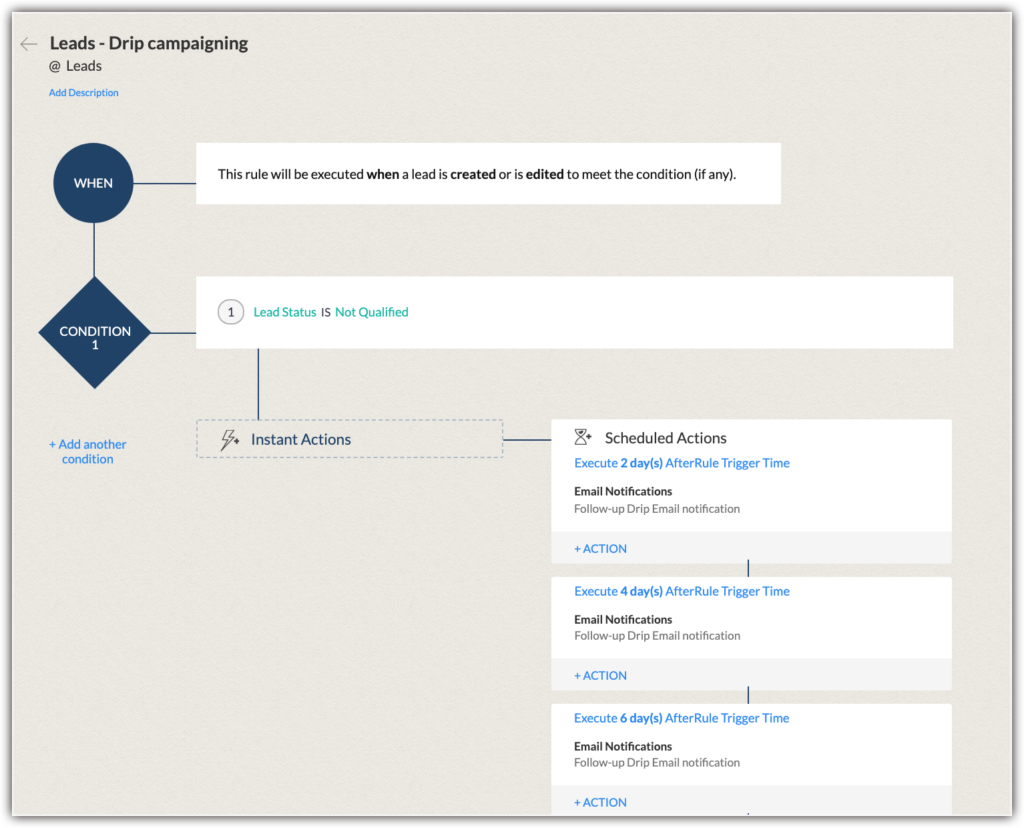
Visual: Zoho CRM Workflow for Kraft Paper Sales
Final Thoughts: Why Zoho CRM Is a Game-Changer for Kraft Paper Suppliers
The Kraft paper industry is evolving—from sustainability demands to digital procurement platforms. To stay competitive, sales teams need more than spreadsheets and WhatsApp updates.
Zoho CRM for Kraft Paper Sales offers:
- Faster, accurate quoting with CPQ
- Real-time inventory visibility
- Structured, compliant sales processes
- AI-driven lead prioritization
- Mobile empowerment for field reps
When implemented strategically, Zoho CRM doesn’t just track sales—it drives them.
Ready to Get Started on Zoho?
Let’s build your business the smart way — with Zoho and Codroid Labs by your side.
📅 Book your free consultation now