


Managing a high-growth online store requires seamless access to your backend tools. Whether you are a seasoned merchant or a new entrepreneur, mastering the Zoho Commerce login process is your first step toward scaling your digital storefront and turning visitors into loyal customers.
As an experienced Zoho partner, we have seen firsthand how streamlined access leads to better management and higher revenue. In this guide, we break down everything you need to know about accessing your dashboard, troubleshooting login issues, and leveraging the mobile ecosystem for your business.
Table of Contents
What is Zoho Commerce?
Before diving into the technical details, it is important to understand the engine behind the portal. What is Zoho Commerce? It is a comprehensive e-commerce platform designed to help businesses build, manage, and scale their online presence.
Unlike basic site builders, it integrates directly with the entire Zoho ecosystem, including CRM and accounting tools. Given the massive Zoho company size—with a global workforce of over 15,000 employees—merchants benefit from a stable, world-class infrastructure that can handle millions of visitors.
Step-by-Step Zoho Commerce Login Guide
To access your storefront backend and begin managing your products, follow these precise steps to ensure a secure session:
- Navigate to the Homepage: Open your browser and go to the official Zoho commerce website.
- Locate the Sign-In Area: Look for the “Sign In” button usually positioned at the top right of the page.
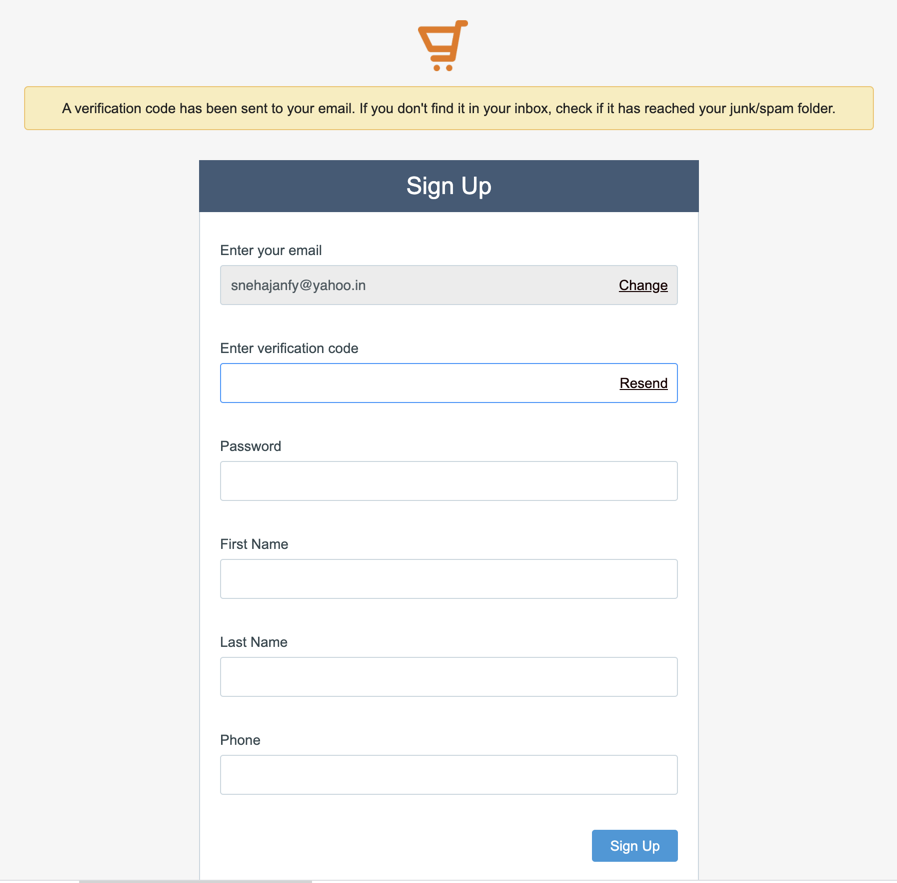
- Enter Your Credentials: Input your registered email address and the secure password you created during setup.
- Security Verification: If you have enabled two-factor authentication, enter the unique code sent to your mobile device or email.
Note for Shoppers: If you are an end-user trying to track an order, you should look for the Zoho commerce customer login section on the specific store where you made your purchase, as this is separate from the merchant administration portal.
Zoho Commerce Social Login: Quick Access
Efficiency is a cornerstone of modern digital marketing. To save time, many merchants utilize the Zoho commerce social login feature. This allows you to bypass traditional password entry by linking your account to trusted third-party providers. You can access your Zoho e-commerce login through:
- Google Workspace
- Microsoft
Using a social login reduces entry friction and ensures you can jump into your dashboard with a single click, which is especially helpful for entrepreneurs managing multiple business profiles.
Managing Your Store via the Zoho Commerce App
In today’s fast-paced market, e-commerce management doesn’t stop when you leave your desk. The Zoho commerce app is available on both iOS and Android platforms, providing a mobile version of your desktop dashboard.
- Instant Notifications: Receive alerts the moment a lead turns into a sale.
- Inventory Management: Update stock levels or product details directly from your warehouse using your phone.
- Biometric Security: The app supports FaceID and fingerprint recognition, making it the fastest and most secure way to handle your business on the go.
Zoho Commerce Price: Is It Worth the Investment?
Understanding the Zoho commerce price structure is vital for calculating your long-term ROI. Zoho offers tiered plans to fit various business scales, ensuring you only pay for the features you actually need.
| Plan | Best For | Key Feature |
| Starter | New Businesses | 2,000 Products |
| Professional | Growing Brands | Abandoned Cart Recovery |
| Advanced | Enterprise Scale | Advanced SEO & Analytics |
Whether you are a startup or a large-scale enterprise, the platform provides the scalability required to grow without technical bottlenecks.
Why Work with Zoho Partners?
Working with a certified partner provides more than just a basic technical setup. We focus on the “big picture”—helping you optimize your Zoho commerce login security, integrating complex data flows, and ensuring your site is built to rank on search engines.
- Custom Strategy: We help align the platform’s tools with your specific sales goals.
- Seamless Integration: We ensure your store talks perfectly to Zoho Books, CRM, and Inventory.
- Expert Growth Support: As your traffic hits the million-user mark, we provide the technical expertise to keep your site fast and reliable.
Final Thoughts
Your Zoho commerce login is more than just a gateway; it is the control center for your entire digital empire. By mastering the login process and utilizing the mobile tools available, you position your business to stay ahead of the competition.
Ready to Get Started on Zoho?
Let’s build your business the smart way — with Zoho and Codroid Labs by your side.
📅 Book your free consultation now
1. How to create Zoho Commerce login?
To create a Zoho Commerce login, you must first create a Zoho account. Go to Zoho’s signup page, register using your email or Google account, verify your email, then enable Zoho Commerce from the Zoho dashboard. Your Zoho account credentials become your Zoho Commerce login.
2. How to check Zoho Commerce login?
To check your Zoho Commerce login, visit the Zoho login page and sign in using your registered email and password. If you can access the Zoho dashboard and see Zoho Commerce listed under your apps, your login is active and valid.
3. How to make Zoho Commerce login?
You don’t “make” a separate Zoho Commerce login. Zoho uses one universal Zoho ID. Once you have a Zoho account, you simply activate Zoho Commerce inside it. Same login, multiple Zoho products.