



Switching from Freshdesk to Zoho Desk: Is It Worth It?
Making a choice between Freshdesk vs Zoho is one of the most critical decisions a customer experience leader will make this year. If you are currently feeling the integration friction or reaching the functional limits of your current setup, you aren’t alone. Thousands of companies are currently initiating a Freshdesk to Zoho Desk migration to modernize their support operations.
As an experienced Zoho Partner, we have witnessed first-hand how the right help desk doesn’t just “solve tickets”—it drives customer lifetime value. But is the switch actually worth the effort? Let’s dive into the data-backed reality of making the move in 2026.
Table of Contents
The 2026 Landscape: Zoho Desk vs Freshdesk
When comparing Zoho Desk vs Freshdesk, both platforms offer world-class ticketing. However, the philosophy behind them is vastly different. Freshdesk is built for standalone simplicity, while Zoho Desk is engineered for contextual support within a unified business ecosystem.
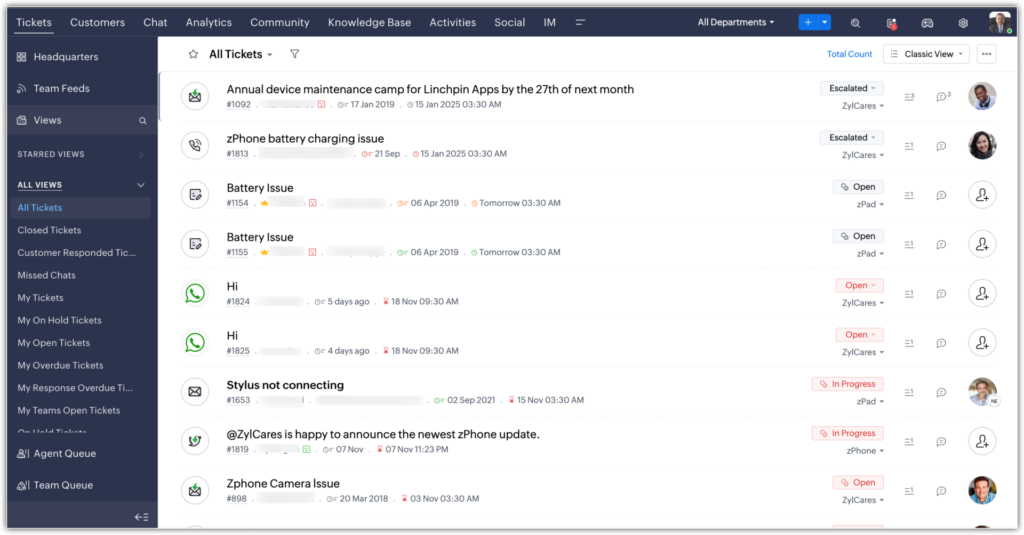
In 2026, the “hidden complexity” of help desks is becoming a major pain point. While many platforms offer a clean UI, advanced features like AI-powered bots and deep customization are often restricted to the highest tiers. Zoho Desk provides enterprise-grade power across its architecture, allowing for a more flexible growth path.
Key Feature Comparison
| Feature | Zoho Desk | Freshdesk |
| Primary AI Assistant | Zia (Context-aware) | Freddy AI (Predictive) |
| CRM Integration | Deep Native Integration | Connector-based |
| Process Management | Blueprints (Rigid Workflows) | Automations (Event-based) |
| Customization | High (Extensive API/Deluge) | Moderate (Standard UI) |
7 Reasons Why the Migration is Worth It
If you are evaluating Freshdesk vs Zoho, here is why the move often yields significant operational dividends:
1. Superior Ecosystem Integration
If your sales team uses Zoho CRM, the Freshdesk to Zoho Desk migration is a strategic necessity. Your support agents can see CRM data—such as active deals, account history, and customer notes—directly inside the ticket window. This eliminates the “information silo” that plagues most support teams.
2. Contextual AI with “Zia”
While Freshdesk vs Zendesk vs Zoho all offer AI capabilities, Zoho’s Zia is built for context. She doesn’t just suggest help articles; she performs real-time sentiment analysis. If a customer’s tone becomes negative, Zia can automatically escalate the ticket to a manager before the agent even responds.
3. Unlimited Scalability
Many teams outgrow their initial help desk software once they require complex cross-departmental workflows. Zoho Desk is built to handle thousands of agents and millions of tickets without compromising on speed or searchability.
4. Advanced Process Automation (Blueprints)
Zoho Desk’s “Blueprints” ensure your team follows your exact Standard Operating Procedures (SOPs). You can mandate that certain fields are filled or specific approvals are met before a ticket can move to the next stage—a level of governance that is often missing in other platforms.
5. Multi-Brand Help Centers
Managing multiple products or subsidiaries? Zoho Desk allows you to create distinct, fully branded help centers for different brands under one central portal, keeping your customer-facing presence professional and organized.
6. Specialized Migration Tools
The technical barrier for a Freshdesk to Zoho Desk migration has never been lower. Specialized migration tools allow you to map your existing ticket fields, contact data, and historical records to ensure that no data is lost during the transition.
7. Unified Omnichannel Support
Zoho Desk excels at unifying messages from WhatsApp, Email, Telephony, and Social Media into a single conversational thread. This ensures that your agents have a 360-degree view of the customer journey regardless of the channel used.
The Triple Threat: Zendesk vs Freshdesk vs Zoho Desk
Many organizations ask: How do these compare to the legacy industry giant, Zendesk? When looking at Zendesk vs Freshdesk vs Zoho Desk, the choice usually comes down to your technical resources and long-term vision.
- Zendesk: Highly powerful but often requires a dedicated developer to maintain and customize.
- Freshdesk: Great for teams who want a simple interface but may find the feature set limiting as they scale into complex automation.
- Zoho Desk: The balanced choice. It offers the high-end power of Zendesk with a more intuitive setup, making it the preferred choice for growing enterprises.
Step-by-Step Migration Process
A successful Freshdesk to Zoho Desk migration follows these four critical phases:
- Data Auditing: Clean your existing database. Resolve old tickets and delete duplicate contacts before moving them to the new system.
- Workflow Mapping: Don’t just copy your old processes—improve them. Use Zoho’s Blueprint feature to refine your ticket lifecycle.
- Pilot Testing: Perform a trial migration with a small batch of data to ensure that all custom fields and tags are mapping correctly.
- Team Enablement: Train your agents on the new interface. Since Zoho Desk is built for productivity, the learning curve is typically very short.
Final Verdict: Should You Switch?
Is it worth it? Absolutely. If you want a help desk that scales with your ambition without hitting “feature walls,” the Freshdesk to Zoho Desk migration is a smart, future-proof move. You gain better visibility, smarter AI, and a more cohesive way to manage customer relationships.
Ready to start your journey?
As your dedicated Zoho Partner, we specialize in making this transition seamless. We handle the heavy lifting—from data mapping to API integrations—so your support team never misses a beat.
Contact our migration experts today to begin your transition!
Ready to Get Started on Zoho?
Let’s build your business the smart way — with Zoho and Codroid Labs by your side.
📅 Book your free consultation now
How long does a Freshdesk to Zoho Desk migration usually take?
The timeline for a Freshdesk to Zoho Desk migration depends on your ticket volume and data complexity. Small to mid-sized databases can often be migrated within 24 to 48 hours. For larger enterprises with over 100,000 tickets and extensive attachments, the process may take 3 to 5 business days to ensure full data integrity.
Can I migrate my ticket history and attachments safely?
Yes. When moving from Freshdesk vs Zoho, you can migrate tickets, contacts, accounts, attachments, and even your private notes. Using specialized migration tools or a Zoho Partner ensures that the “Threading” (the conversation history) remains intact, so your agents don’t lose the context of past customer interactions.
Will my ticket IDs change after switching to Zoho Desk?
By default, most help desks assign new IDs upon import. However, during a Freshdesk to Zoho Desk migration, you can map your old Freshdesk IDs into a “Custom Field” in Zoho Desk. This allows your team to search for legacy ticket numbers easily during the transition period.