


Table of Contents
Managing a growing business without a unified data flow is like trying to steer a ship in a storm without a compass. As a Zoho CRM specialist, I have seen firsthand how fragmented data—leads stuck in spreadsheets, support tickets lost in email, and recruitment pipelines disconnected from sales—can cost a company millions in lost opportunities.
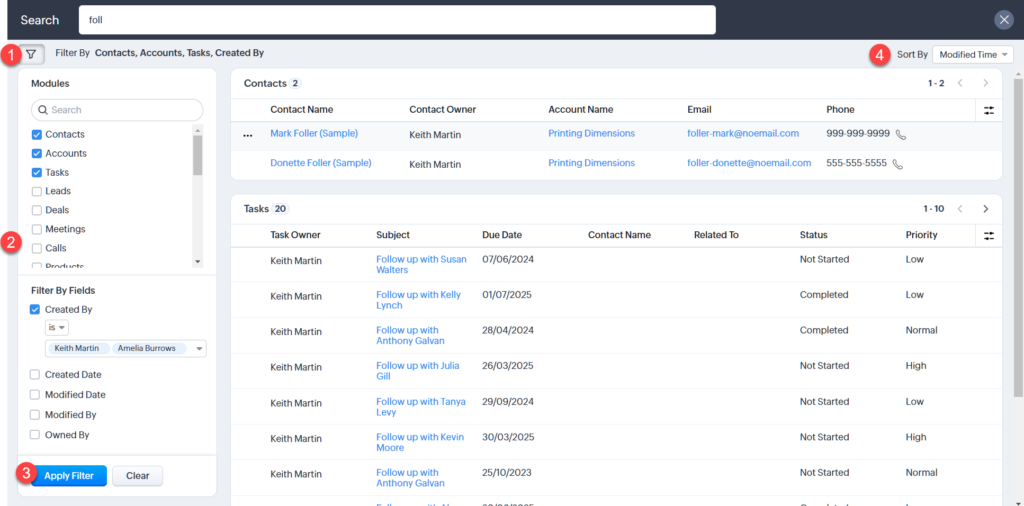
To truly dominate your niche in today’s market, you don’t just need a software subscription; you need a high-performance ecosystem. That requires deep technical expertise in Zoho CRM integration and the ability to turn complex business logic into automated, revenue-generating workflows.
1. The ROI of a Certified Zoho CRM Specialist
A true Zoho CRM specialist does more than just toggle settings and add users. They act as the architect of your entire sales engine. By leveraging advanced CRM expert strategies, we ensure that every touchpoint—from the first lead capture to the final invoice—is tracked, measured, and optimized for conversion.
When you partner with a specialist, you aren’t just paying for a setup; you are investing in:
- Elimination of Data Silos: Ensuring sales, marketing, and support have a unified view.
- Advanced Automation: Reducing manual CRM integration tasks by up to 70%.
- Custom Scaling: Using the Zoho CRM integration API to connect proprietary tools.
2. Deep Dive: Leveraging the Zoho CRM Integration API
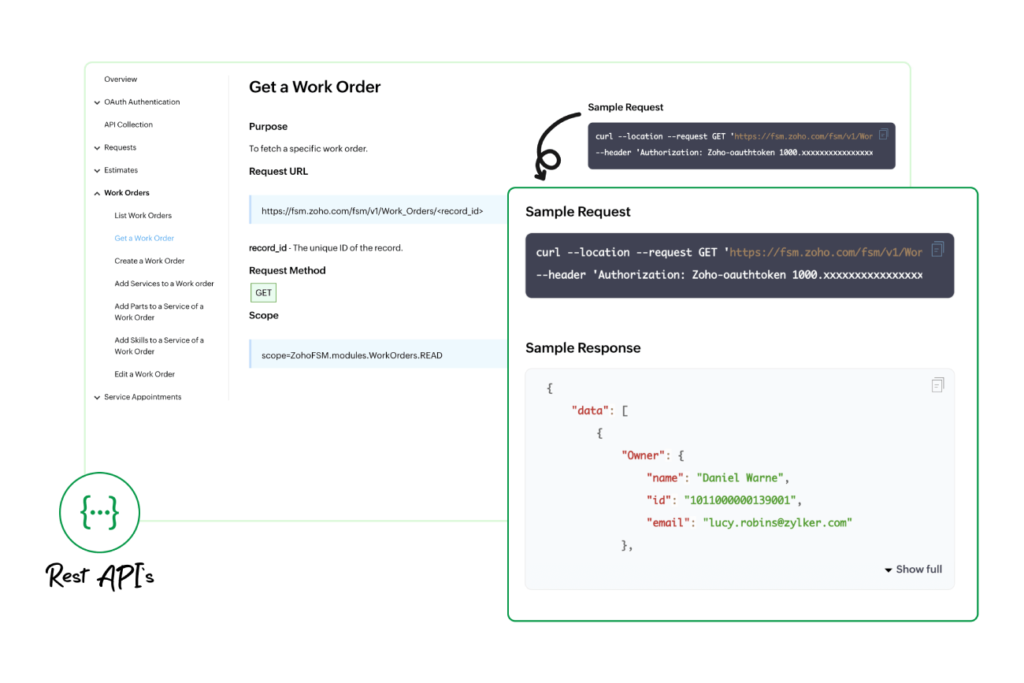
For enterprises with unique requirements, standard “out-of-the-box” connectors often fall short. This is where a Zoho CRM specialist utilizes the Zoho CRM integration API (REST API) to build custom bridges between your CRM and external ERPs, custom-built apps, or legacy databases.
Whether you are performing a simple data push or a complex multi-way sync, understanding the API limits, rate limiting, and authentication protocols is vital for system stability.
Expert Insight: A Zoho CRM expert will always prioritize OAuth 2.0 protocols. This ensures your data remains secure while maintaining a persistent connection that won’t break during high-traffic intervals.
3. High-Impact Zoho CRM Integration Tasks for Growth
To turn millions of website visitors into qualified leads, your CRM must be proactive rather than reactive. Here are the essential CRM integration tasks we prioritize to maximize efficiency:
- Lead Scoring Automation: Automatically rank leads based on website behavior and engagement.
- Real-time Financial Sync: Ensuring your accounting software and sales data match instantly to prevent billing errors.
- Third-party Communication: Integrating WhatsApp, VoIP, or Slack directly into the lead record.
- Custom Deluge Scripting: Creating “if-this-then-that” logic that handles complex business math automatically.
- Executive Dashboards: Building 100% accurate reports that update in real-time for stakeholder reviews.
4. Syncing the Suite: Zoho Recruit and Zoho Desk
A CRM expert knows that sales is only one part of the customer journey. To provide a 360-degree view of your business, you must integrate your “front-of-house” and “back-of-house” operations.
Zoho CRM Integration with Zoho Recruit
The Zoho CRM integration with Zoho Recruit allows your account managers and recruiters to stay in perfect sync. When a sales deal is won, the system can automatically trigger a job opening in Recruit to fulfill that new contract. This eliminates the “information gap” and ensures your operations team is never blindsided by new sales.
Integrate Zoho CRM with Zoho Desk
Customer retention is where the real profit lies. When you integrate Zoho CRM with Zoho Desk, your support agents can see a customer’s entire purchase history while handling a ticket. Conversely, your sales team can see if a lead has open support issues before they try to upsell them, preventing awkward and brand-damaging sales calls.
5. Why Every Project Needs a Zoho CRM Integration Document
Transparency is the hallmark of a professional service. Every successful deployment requires a comprehensive Zoho CRM integration document. This technical roadmap serves as your company’s “source of truth,” detailing:
- Field Mapping Logic: Exactly which data points move between systems.
- Workflow Triggers: What specific actions cause an automated response.
- API Endpoints: A map for future developers to understand the custom architecture.
Having a clear Zoho CRM integration document ensures that as your team grows, your system knowledge remains institutionalized rather than stuck in one person’s head.
6. Conclusion: Ready to Scale with a CRM Expert?
The difference between a CRM that costs you money and a CRM that makes you money is the quality of the implementation. As a Zoho CRM specialist, our goal is to build a system that works while you sleep, capturing every lead and nurturing every customer.
If you are ready to stop fighting with your software and start scaling your business with a proven Zoho CRM expert, your journey begins with a strategic audit of your current tech stack.
Ready to Get Started on Zoho?
Let’s build your business the smart way — with Zoho and Codroid Labs by your side.
📅 Book your free consultation now
How to integrate Zoho CRM with Zoho Social
Zoho CRM integrates natively with Zoho Social to capture leads from social media, track interactions, and assign leads automatically. You can sync brand mentions, messages, and leads without custom code.
How to integrate Zoho CRM with Zoho Creator
Zoho Creator connects with Zoho CRM using built-in connectors or APIs. You can push custom app data into CRM modules and pull CRM data into Creator apps for advanced workflows.
How to integrate Zoho CRM with Zoho Analytics
Zoho Analytics pulls CRM data for advanced reporting and dashboards. It supports scheduled sync, cross-module analysis, and AI-based insights for better decision-making.
How to integrate Zoho CRM with Zoho Projects
This integration syncs deals with projects automatically after deal closure. Sales teams and project teams stay aligned on timelines, tasks, and billing.
How to integrate Zoho CRM with a website
You can integrate using web forms, APIs, Zoho Flow, or widgets. Website leads flow directly into CRM with tracking, automation, and lead assignment rules.
Is Zoho CRM free?
Yes, Zoho CRM has a free plan for up to 3 users with basic features. Advanced automation, integrations, and analytics require paid plans.
Is Zoho CRM open source?
No, Zoho CRM is not open source. However, it offers extensive APIs and customization options for developers.
Zoho CRM integration
Zoho CRM integrates with Zoho apps, third-party tools, and custom systems. Integrations can be done via native connectors, Zoho Flow, or REST APIs.
Zoho CRM integration tasks
Integration tasks include data sync, field mapping, automation triggers, API handling, error management, and security configuration.
Zoho CRM integration API
Zoho CRM APIs allow developers to create, read, update, and delete CRM data. They are used for custom integrations with external systems.
Why Zoho CRM is best
Zoho CRM offers strong automation, deep customization, and competitive pricing. It fits startups to enterprises without locking users into rigid workflows.
Why Zoho CRM is used
Businesses use Zoho CRM to centralize sales, marketing, and customer data. It improves visibility, automation, and team productivity.
Why Zoho CRM
Zoho CRM balances flexibility, cost, and scalability. It integrates well with Zoho’s ecosystem and external tools.
Why choose Zoho CRM
It’s chosen for its customization, strong API support, automation features, and value for money compared to competitors.
Why Zoho is used
Zoho is used because it provides an all-in-one business ecosystem with strong privacy, affordability, and product depth.
What is Zoho CRM?
Zoho CRM is a cloud-based customer relationship management platform. It helps businesses manage leads, deals, automation, and customer interactions.
WhatsApp Zoho CRM integration
This integration allows businesses to send and receive WhatsApp messages inside Zoho CRM. Conversations are linked to leads and contacts for better tracking.
Zoho CRM integration document
Integration documentation provides API references, authentication methods, limits, and examples. It is essential for building stable custom integrations.