Zoho CRM Hidden Features: 19 Powerful Capabilities Your Sales Team Has Never Opened (2026)
Zia AI. SalesSignals. Blueprint. Canvas. Cadences. Macros. Sandbox. CommandCenter. Lead Scoring. Wizards. Most sales teams use five features. Here are nineteen that change what CRM actually does for your pipeline.
Zoho CRM hidden features — 19 powerful capabilities most sales teams pay for but have never configured, tested, or connected to their actual sales process
Zoho CRM hidden features — the honest diagnosis: most sales teams use CRM as a digital contact list. The biggest opportunity isn’t adding another sales tool. It is activating the capabilities already inside Zoho CRM that your team has never opened, configured, or connected to their actual sales process.
Zoho CRM hidden features — the 19 Zoho CRM features your sales team has never opened guide exists because the biggest CRM problem in most organisations isn’t a lack of capability. It is the hidden Zoho CRM features most sales teams overlook while continuing to use workarounds, spreadsheets, and manual processes for problems that the CRM already solves. This complete guide to overlooked Zoho CRM features 2026 covers all 19 capabilities with what each one solves, which teams should prioritise it, and how it connects to the others.
19 Features
Most Teams Never Open
5 Questions
Sales Team Audit
1 Workflow
Connected Customer Lifecycle
3 Tiers
Start/Grow/Connect
Tier 1 — Intelligence and prioritisation (1–4)
These are the Zoho CRM hidden features that make the CRM predictive rather than merely reactive. Most teams use CRM to record what happened; these features help predict and prioritise what should happen next.
1 Zoho CRM Zia AI — from record-keeping to prediction
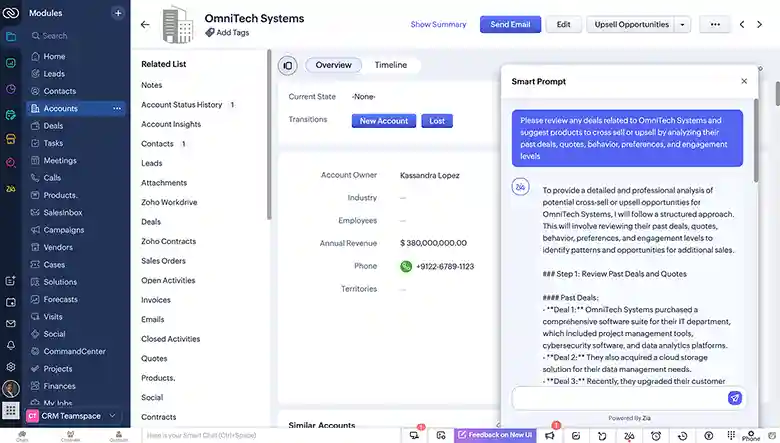
The Zoho CRM Zia AI and how Zia AI improves Zoho CRM sales productivity — most sales teams use CRM to store what already happened. Zia brings AI capabilities that help salespeople understand what is likely to happen: sales insights, deal predictions, record analysis, next-action recommendations, and AI-assisted activity management. The Zoho CRM sales features upgrade: instead of manually reviewing every lead to decide who to call, Zia’s predictions surface the opportunities most likely to convert. The pointer: don’t introduce Zia broadly. Start with one specific repetitive sales problem — lead prioritisation, deal risk identification, or email response suggestions — and measure whether Zia reduces the manual work involved before expanding.
The Zoho CRM SalesSignals — the Zoho crm salesignals for real time lead alerts capability — and the broader Zoho CRM SalesSignals feature — sales teams often discover customer intent too late, after a prospect has already moved on. SalesSignals brings customer interactions into the salesperson’s attention in real time: email engagement, website activity, social interactions, form submissions, call activity. The Zoho CRM overlooked features most commercially valuable application: a prospect who opens your proposal email three times in one day is signalling intent. Without SalesSignals, the salesperson discovers this hours or days later. With it, the follow-up happens while intent is highest. The objective is not generating more notifications — it is identifying signals that genuinely deserve salesperson attention.
3 Zoho CRM lead scoring — stop working leads oldest-to-newest
The Zoho CRM lead scoring and how to configure lead scoring in Zoho CRM and Zoho CRM scoring rules for prioritizing prospects — not every lead deserves the same attention. The lead scoring and scoring rules capabilities assign priority scores based on profile characteristics and engagement behaviour: high engagement plus ideal customer profile equals higher priority and earlier salesperson attention. The Zoho CRM sales productivity impact: combine website visitor tracking behaviour with lead scoring instead of treating every visitor or form submission as equally urgent. The audit question for every sales team: are your salespeople deciding which leads to call based on data, or simply working from the oldest lead at the top of the list?
4 Zoho CRM Web Forms — automatic lead capture
The Zoho CRM Web Forms and Zoho CRM Web Forms for automatic lead capture — web forms connect website enquiries directly into CRM as leads or contacts, eliminating manual data entry and ensuring no enquiry is missed or delayed. Combined with assignment rules for automatic routing and lead scoring for prioritisation, web forms become the entry point of an automated lead management process rather than a manual inbox that someone checks periodically.
Zoho CRM hidden features
Tier 2 — Process, automation and productivity (5–11)
These are the Zoho CRM sales features that structure how your team follows the sales process, automates repetitive work, and executes daily tasks. Most teams have some workflows configured; almost none have Cadences, Blueprints, Macros, Wizards, or Sandbox properly activated.
5 — Zoho CRM Blueprint
The Zoho CRM Blueprint and Zoho CRM Blueprint for enforcing sales processes — workflows automate individual actions; Blueprint controls how records move through the entire sales process. New Deal → Qualification → Proposal → Negotiation → Approval → Closed — with mandatory activities and information required at each stage before progression. If your sales process currently exists only inside a document or someone’s memory, Blueprint makes it enforced, measurable, and consistent across every salesperson.
6 — Zoho CRM Cadences
The Zoho CRM Cadences and how to use Zoho CRM Cadences for sales follow up — structured follow-up sequences where each touchpoint (email, call, task) is scheduled and tracked automatically. Without Cadences, follow-up frequency depends on individual salesperson habits. With Cadences, every lead receives consistent structured engagement regardless of which salesperson owns it. The adoption result: follow-up doesn’t fall through the gaps when a salesperson is busy.
7 — Zoho CRM Macros
The Zoho CRM Macros and how to use Macros for repetitive sales tasks in Zoho CRM — one-click execution of multi-step actions that salespeople currently perform manually one step at a time: send this email, update this field, create this task, add this note. A salesperson who performs the same 4-step sequence after every demo call can do it in one click with a Macro. The Zoho CRM features that save sales reps time most immediate and practical capability for daily use.
8 — Zoho CRM Canvas
The Zoho CRM Canvas and Zoho CRM Canvas custom sales record layouts — standard CRM layouts don’t always surface the information salespeople need. Canvas provides a visual way to design record layouts around the decision-making process rather than generic field ordering. A sales representative may need: customer information → current opportunity → recent interactions → next action → key documents — not 40 unrelated fields in default order. Design the screen around how salespeople actually work.
The Zoho CRM workflow automation and Zoho CRM workflow rules for automated follow ups and Zoho CRM assignment rules for automatic lead routing — if a salesperson performs the same administrative action every day, investigate automation. Assignment rules automatically route incoming leads to the right salesperson based on territory, source, product interest, or other criteria — eliminating manual lead distribution and the delays it introduces. The caution: avoid creating dozens of overlapping workflows. Automation should simplify — not create a complex web that nobody understands.
10 — Zoho CRM Wizards for sales team adoption
The Zoho CRM Wizards and Zoho CRM Wizards for better sales team adoption — Wizards guide salespeople through structured data entry in a step-by-step format rather than presenting all fields at once. The Zoho CRM sales productivity application: for processes with multiple required fields (onboarding a new client, creating a complex deal, capturing a service request), Wizards prevent incomplete records by making the data entry process sequential and logical. Lower error rates and higher data completeness result from guiding users through the process.
11 — Zoho CRM Sandbox — test before production
The Zoho CRM Sandbox and Zoho CRM Sandbox for testing sales workflows — most teams configure workflows, blueprints, and automation changes directly in the live production CRM. The Sandbox provides an isolated testing environment where changes can be built, tested, and validated before going live. The Zoho CRM hidden automation features for sales managers most important safety capability: a workflow change that breaks an automated process in production affects every salesperson immediately. Sandbox testing eliminates that risk — test the change first, deploy with confidence.
Tier 3 — Integration, analytics and extensibility (12–19)
These are the Zoho CRM features 2026 that connect CRM to the rest of the business — field service, document management, analytics, forecasting, and the broader customer lifecycle. They represent the biggest shift from CRM as a sales tool to CRM as a business operating layer.
The Zoho CRM CommandCenter and Zoho CRM CommandCenter for customer journey automation — customer journeys involve multiple touchpoints before a prospect becomes a customer. CommandCenter (formerly called Journey Orchestration) allows businesses to design and manage entire customer experiences across stages and interactions: lead nurturing, onboarding, re-engagement, post-sale communication. The connected approach: map the customer journey first, then configure the CRM around that journey. Not isolated automations. One orchestrated journey with branching logic.
13 — Zoho CRM email insights
The Zoho CRM email insights and how to use email insights in Zoho CRM — email integration connects customer communications with CRM records, but email insights go further: open tracking, click tracking, and engagement data that connects email behaviour to sales signals. The Zoho CRM omnichannel principle: a sales conversation that lives only in someone’s inbox is invisible to the rest of the team. Email integration and insights make customer communication a shared team asset, not a private inbox.
14 — Zoho CRM advanced analytics and dashboards
The Zoho CRM analytics and Zoho CRM dashboards and Zoho CRM advanced analytics and sales dashboards — most teams use only: monthly sales, open deals, won deals. Advanced analytics answer more valuable questions: which salesperson has the strongest conversion rate, where are deals getting stuck, which lead sources generate better opportunities, how long does the average deal take, and what is changing month over month. Build dashboards that answer specific management questions — not dashboards that look impressive but don’t drive decisions.
15 — Zoho CRM sales forecasting
The Zoho CRM sales forecasting and Zoho CRM sales forecasting features teams overlook — sales managers need more than a list of open opportunities. Forecasting compares Target vs Pipeline vs Expected Revenue vs Actual Revenue continuously — not just at month-end. The Zoho CRM hidden features forecasting pointer: don’t treat forecasting as a monthly reporting exercise. Use it continuously to identify pipeline gaps early enough for the team to respond and close them before the period ends.
16 — Zoho CRM omnichannel engagement
The Zoho CRM omnichannel communication for sales teams — customers don’t communicate through only one channel. Omnichannel capabilities bring email, phone, social, website, and other touchpoints into a unified CRM view. The goal: instead of seeing email, website, social, calls, and CRM as separate activities, the sales team understands them as parts of one customer journey — enabling genuinely personalised conversations and eliminating the frustration of asking customers for information they already provided through another channel.
The Zoho CRM hidden features most valuable for service-led businesses: the CRM–Zoho FSM integration connects a closed deal directly to field service operations — service requests, estimates, work orders, appointments. Deal Won → Work Order → Technician Assigned → Service Completed → CRM Timeline Updated. That is considerably better than: Deal Won → Email Manager → Call Technician → Send Spreadsheet → Wait for Update. Two-way synchronisation keeps sales and service teams sharing context rather than operating on different information.
18 — Quotes and inventory integration
Zoho CRM’s inventory, quotes, and sales operations capabilities reduce the gap between Opportunity → Product → Quote → Order → Delivery. For businesses with complex product sales or recurring orders, connecting these processes inside or alongside CRM reduces manual data re-entry between systems and the errors it introduces. The Zoho CRM sales automation principle: every handoff between systems is an opportunity for data to be wrong or delayed.
19 — CRM customisation and extensibility
The Zoho CRM features 2026 final and most overlooked capability: the CRM’s ability to adapt to the organisation rather than forcing the organisation into a generic workflow. Modules, fields, layouts, workflows, blueprints, functions, integrations, reports, and user experiences can all be customised. The principle: how to unlock unused Zoho CRM sales features is often less about discovering new buttons and more about redesigning the ones already present to match how the team actually works.
19-feature problem-to-solution reference table
#
Feature
Problem it solves
1
Zia AI
Manual analysis, no predictions
2
SalesSignals
Missed customer intent signals
3
Lead Scoring + Scoring Rules
Leads worked oldest-first, not best-first
4
Web Forms
Manual lead entry and routing delays
5
Blueprint
Inconsistent sales process per salesperson
6
Cadences
Ad-hoc follow-up, gaps in pipeline
7
Macros
Repetitive multi-step manual tasks
8
Canvas
Generic layouts that don’t match how team works
9
Workflow + Assignment Rules
Manual administrative work and lead routing
10
Wizards
Incomplete records from complex data entry
11
Sandbox
Production changes tested live, risking breakage
12
CommandCenter
Fragmented, disconnected customer journeys
13
Email Insights
Invisible email engagement, missed signals
14
Advanced Analytics + Dashboards
Surface-level reporting, no operational insight
15
Sales Forecasting
Pipeline gaps discovered too late
16
Omnichannel Engagement
Fragmented customer touchpoints, repetition
17
FSM Integration
Sales-to-service gaps and information loss
18
Quotes and Inventory
Manual re-entry between sales and operations
19
Customisation
Generic CRM that doesn’t match business process
5-question sales team audit — find which features matter most
The hidden Zoho CRM features most sales teams overlook discovery approach — the Zoho CRM features sales teams should start using identification method: ask every salesperson these five questions and their answers will produce a specific, prioritised list:
Question 1: What do you use every day?
Everything not mentioned is a candidate for the unused features list. Features that nobody mentions are either not needed or not yet discovered.
Question 2: What do you still do manually?
Manual recurring actions are automation opportunities. Macros, Cadences, Workflows, and Blueprint address different types of manual repetition.
Question 3: What do you still maintain in Excel?
Spreadsheets running alongside CRM indicate either a missing CRM configuration or an undiscovered capability — data that belongs inside the CRM but isn’t there.
Question 4: Which application do you switch to most?
Question 5: What information do you wish you had before calling a customer?
Missing pre-call information identifies dashboard gaps, analytics needs, SalesSignals requirements, or data integration opportunities. This question consistently surfaces the highest-value feature activation priorities.
What are the most overlooked Zoho CRM features for sales teams?
Top 10: Zia AI, SalesSignals, Blueprint, Canvas, Lead Scoring, CommandCenter, Cadences, Macros, Sandbox, Sales Forecasting. Full detail in FAQ Schema above.
How do I know which Zoho CRM features my sales team is not using?
5-question audit: what do you use daily, what do you do manually, what is still in Excel, which app do you switch to most, what information do you wish you had pre-call? Answers identify the highest-priority feature activations. Full detail in FAQ Schema above.
Activate the Zoho CRM Features Your Sales Team Is Missing
5-question sales team audit, feature activation, Blueprint configuration, Cadences setup, Zia AI, Canvas — certified Zoho CRM partner with GSTIN invoice for 18% ITC.