


Zoho People biometric integration after-go-live support — the implementation is live. Fingerprint devices are mounted. Face recognition terminals are enrolled. Employees are scanning in every morning. And then, three weeks after go-live, the payroll run reveals that 47 employees have zero attendance records for the past week. The HR manager checks the biometric device — punches are recording correctly. The issue is somewhere between the device and Zoho People, and nobody in the team has the expertise to diagnose it.
Post go-live support for Zoho People biometric integration — this is the scenario that plays out in growing Indian businesses that invest in biometric attendance integration but underinvest in post-implementation support. The integration itself is technically sophisticated: real-time data flow from biometric hardware through network protocols to Zoho People’s attendance module, then into payroll calculations. Each link in this chain can fail. Zoho People biometric integration after go-live support ensures rapid diagnosis and resolution when it does. This guide covers the 7 most common post-go-live issues and the resolution approach for each.
Codroid Labs — Zoho People Biometric Support Partner India
Phone: +91 78384 02682
Email: team@codroiditlabs.com
GSTIN: 07AAWFC0815B1ZP
Coverage: PAN India, remote support
Support Hours: Mon-Sat, 9 AM-7 PM IST
Languages: Hindi + English
Issue 1 — Biometric Sync Failures After Go-Live
Biometric sync, Zoho sync issues, and Zoho biometric attendance sync troubleshooting — sync failure is the most common and most urgent post-go-live issue. Punches are being registered at the device but not appearing in Zoho People. The diagnostic process follows a structured layered approach:
Zoho People biometric sync issue resolution — the most common sync failure cause in Indian businesses is a change in the office network configuration (new router, ISP change, static IP reassignment) that breaks the device’s connection to the Zoho ADMS server. Zoho troubleshooting for this: update the ADMS server address in the biometric device settings to point to Zoho’s ADMS endpoint, and verify that the device can reach this endpoint on the correct port. Zoho attendance support from Codroid Labs: we diagnose sync failures remotely via TeamViewer or AnyDesk on the device’s management PC within 4 hours of the support ticket.
Issue 2 — Employee ID Mapping Errors
Zoho People employee ID mapping after go-live, Zoho People attendance mapping support, and Zoho mapping — employee ID mapping is the most common cause of missing or misattributed attendance records. The biometric device assigns each enrolled employee a numeric ID (001, 002, 003). Zoho People maintains its own internal employee ID. These two IDs must be explicitly mapped in:
Zoho People → Operations → Attendance → Biometric ID Mapping
Mapping Error Type 1: Missing Employee
New employee enrolled in device after go-live but not added to Zoho People Biometric ID Mapping. Punches record on device but appear as “Unmatched Employee” in sync log. Fix: add the new employee to mapping immediately after device enrollment.
New employee enrolled in device after go-live but not added to Zoho People Biometric ID Mapping. Punches record on device but appear as “Unmatched Employee” in sync log. Fix: add the new employee to mapping immediately after device enrollment.
Mapping Error Type 2: Wrong ID Match
Device enrolled Employee A as ID 001, but mapping links 001 to Employee B. All of Employee A’s attendance is recorded under Employee B. Fix: export current mapping, compare against device enrollment list, correct mismatches, re-import.
Device enrolled Employee A as ID 001, but mapping links 001 to Employee B. All of Employee A’s attendance is recorded under Employee B. Fix: export current mapping, compare against device enrollment list, correct mismatches, re-import.
Mapping Error Type 3: Duplicate IDs
Same device ID used for multiple employees after device re-enrollment (common after device replacement). Fix: clear device enrollment for affected employees, re-enroll with unique IDs, update mapping accordingly.
Same device ID used for multiple employees after device re-enrollment (common after device replacement). Fix: clear device enrollment for affected employees, re-enroll with unique IDs, update mapping accordingly.
Prevention
Zoho People biometric setup and maintenance support: maintain a master mapping register. Any new device enrollment must be immediately matched to a Zoho People employee ID. Monthly mapping audit detects drift before it causes payroll issues.
Zoho People biometric setup and maintenance support: maintain a master mapping register. Any new device enrollment must be immediately matched to a Zoho People employee ID. Monthly mapping audit detects drift before it causes payroll issues.
Issue 3 — Shift Configuration and Overtime Calculation Errors
Zoho attendance, Zoho HRMS support, and Zoho People go-live support for HRMS — shift configuration errors are the most common cause of incorrect overtime calculations and payroll disputes. Typical post-go-live shift issues:
Common Shift Configuration Errors — Post Go-Live:
Grace period not set: employees scanning at 9:03 AM are marked late even if policy allows 5-minute grace → Fix: set Grace Period field in Work Shift settings
Maximum working hours not capped: employees with double-shift records show 20+ hours, triggering incorrect overtime → Fix: set Max Hours cap in shift configuration
Half-day boundary wrong: system marks full-day absence when employee leaves at 2 PM because half-day checkout threshold is misconfigured → Fix: adjust half-day policy timing
Rotational shifts not rotating: system applies same fixed shift to all employees including those on rotating schedule → Fix: configure Shift Rotation rules in Zoho People
Grace period not set: employees scanning at 9:03 AM are marked late even if policy allows 5-minute grace → Fix: set Grace Period field in Work Shift settings
Maximum working hours not capped: employees with double-shift records show 20+ hours, triggering incorrect overtime → Fix: set Max Hours cap in shift configuration
Half-day boundary wrong: system marks full-day absence when employee leaves at 2 PM because half-day checkout threshold is misconfigured → Fix: adjust half-day policy timing
Rotational shifts not rotating: system applies same fixed shift to all employees including those on rotating schedule → Fix: configure Shift Rotation rules in Zoho People
Zoho People biometric integration maintenance service — shift optimization is an ongoing support activity, not a one-time setup. As policies change (new shift added for night operations, modified grace period for remote employees), the Zoho People maintenance partner updates shift configurations in Zoho People and validates the impact on attendance records before the next payroll run.
Issue 4 — Payroll Mismatches from Attendance Gaps
Zoho People support and Zoho HR support for payroll issues — when attendance sync fails for even a few days, the downstream impact on payroll can be significant: absent-marked days trigger leave deductions, incorrect overtime calculations change net salaries, and employees dispute payment leading to HR escalations. After implementation support for Zoho People attendance and Zoho biometric attendance sync troubleshooting for payroll recovery:
Step 1: Identify the gap period
From Zoho People attendance reports, identify which employees have missing attendance for which dates. Cross-reference against biometric device attendance logs to confirm the device recorded punches correctly.
From Zoho People attendance reports, identify which employees have missing attendance for which dates. Cross-reference against biometric device attendance logs to confirm the device recorded punches correctly.
Step 2: Export device data
Export raw attendance data from the biometric device for the gap period. Most devices export in CSV format with columns: Employee ID, Date, Time, Direction (IN/OUT).
Export raw attendance data from the biometric device for the gap period. Most devices export in CSV format with columns: Employee ID, Date, Time, Direction (IN/OUT).
Step 3: Bulk upload to Zoho People
Use the Zoho People Attendance Bulk Import feature to upload the device CSV data. Map columns to Zoho People format (Employee, Date, Check-In Time, Check-Out Time).
Use the Zoho People Attendance Bulk Import feature to upload the device CSV data. Map columns to Zoho People format (Employee, Date, Check-In Time, Check-Out Time).
Step 4: Reprocess payroll
After attendance correction, reprocess payroll for the affected period. Validate against the previous payroll run to confirm only expected changes from the attendance correction.
After attendance correction, reprocess payroll for the affected period. Validate against the previous payroll run to confirm only expected changes from the attendance correction.
Issue 5 — Device Connectivity After Firmware or IP Change
Zoho device support and Zoho People attendance device post go-live support — biometric devices require periodic firmware updates from the manufacturer (ZKTeco, eSSL, etc.) for security patches and feature updates. After a firmware update, the device may reset its network configuration, losing the ADMS server address and breaking the Zoho People sync. Similarly, if the office network’s IP addressing changes (new router, ISP change), the static IP assigned to the device may be in the wrong subnet.
Zoho People fingerprint device support after go-live and Zoho People device integration support India — Codroid Labs provides proactive firmware management: we track manufacturer firmware release schedules, test updates in a sandbox configuration before applying to production devices, and update the ADMS/API configuration after each firmware upgrade to restore sync. Zoho People biometric vendor support: we maintain compatibility matrices for all major Indian biometric brands (ZKTeco, eSSL, Hikvision) and manage device-side configuration changes alongside Zoho People configuration.
Issue 6 — Attendance Regularization Workflow Problems
Attendance automation, Zoho People attendance automation support, and Zoho People onboarding and support services — attendance regularization allows employees to request corrections for missed punches (forgot to scan out, device was offline, worked from a different location). Post-go-live regularization issues:
Issue: No approval workflow configured
Employees submit regularization requests but they auto-approve without manager review, leading to abuse. Fix: configure mandatory manager approval in regularization settings with a defined SLA (approve within 48 hours).
Employees submit regularization requests but they auto-approve without manager review, leading to abuse. Fix: configure mandatory manager approval in regularization settings with a defined SLA (approve within 48 hours).
Issue: Monthly limit not set
Employees can submit unlimited regularizations, creating a workaround for habitual late attendance. Fix: set a monthly regularization limit per employee category (3-5 per month typical for most Indian businesses).
Employees can submit unlimited regularizations, creating a workaround for habitual late attendance. Fix: set a monthly regularization limit per employee category (3-5 per month typical for most Indian businesses).
Issue: Regularization period too short
Policy only allows correction within 3 days of the missed punch, but payroll runs at month-end. Employees cannot correct issues from 2 weeks ago. Fix: extend the correction window to match the payroll cycle.
Policy only allows correction within 3 days of the missed punch, but payroll runs at month-end. Employees cannot correct issues from 2 weeks ago. Fix: extend the correction window to match the payroll cycle.
Issue: No notification to HR
HR is unaware of approved regularizations and cannot audit unusual patterns. Fix: configure Zoho Cliq or email notifications to HR admin on every approved regularization exceeding 2 per employee per month.
HR is unaware of approved regularizations and cannot audit unusual patterns. Fix: configure Zoho Cliq or email notifications to HR admin on every approved regularization exceeding 2 per employee per month.
Issue 7 — New Device and Employee Onboarding Support
Zoho onboarding, Zoho People onboarding and support services, and Attendance integration for growing teams — as the business grows, new biometric devices are added (new office, new branch, additional access points) and new employees join continuously. Each requires structured onboarding to maintain sync accuracy:
Fingerprint integration and Zoho People support for fingerprint devices — new device onboarding checklist: (1) Configure device network settings (static IP, ADMS server address). (2) Test connectivity to Zoho ADMS endpoint. (3) Enroll all relevant employees with unique device IDs. (4) Add device ID mappings for each enrolled employee in Zoho People Biometric ID Mapping. (5) Perform test sync: one employee checks in → verify record appears in Zoho People attendance within 5 minutes. (6) Configure shift assignment for employees at this location.
Zoho People support for face recognition integration — face recognition devices (Hikvision, ZKTeco Pro series) require additional setup: face enrollment quality validation (photo taken in good lighting, no accessories obscuring face), anti-spoofing settings configuration, and liveness detection enabling. These settings affect recognition accuracy in operational conditions and require post-go-live tuning based on real-world rejection rates in the first 2-4 weeks of operation.
Zoho People After Go-Live Support Services — India
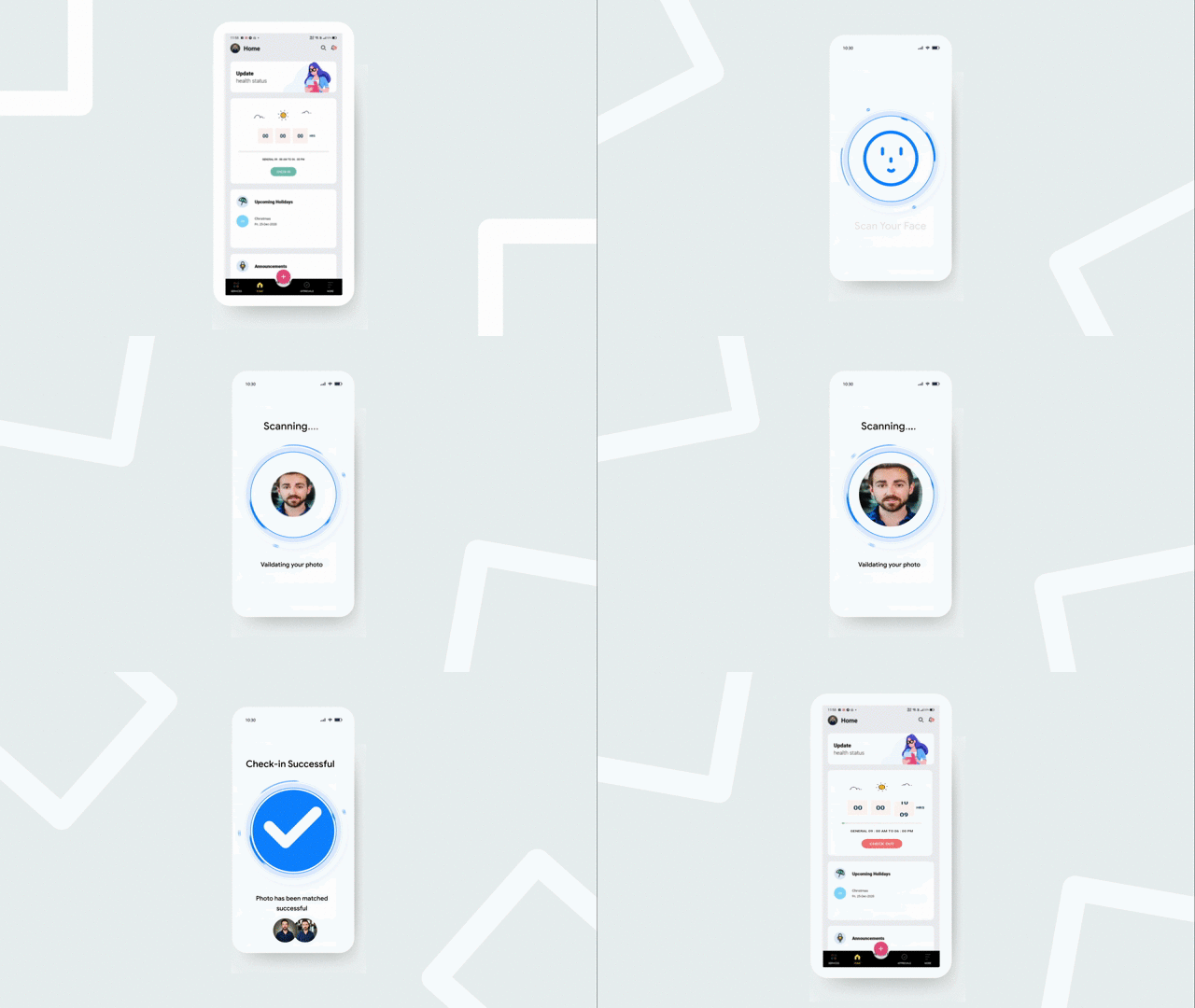
Best Zoho People support partner for biometrics, Zoho People continuous support after implementation, Zoho People attendance system support partner, and Zoho People post deployment support — Codroid Labs provides structured after-go-live support through three service tiers:
Zoho People API biometric integration support and Zoho People plugin biometric support service — Codroid Labs handles both integration types. API-based integration support covers: OAuth token management, API rate limit monitoring, custom webhook troubleshooting, and API version migration when Zoho updates its People API. Plugin-based integration support covers: plugin version compatibility with Zoho People updates, network configuration changes, and plugin reconfiguration after device replacement. Zoho People after go-live troubleshooting: most issues are diagnosed and resolved remotely via screen share without requiring onsite visit — reducing resolution time and cost for businesses across India.
Zoho support services from Codroid Labs — Zoho People help and Zoho People maintenance details: GSTIN invoice (07AAWFC0815B1ZP) for 18% ITC recovery on all AMC services. Hindi and English support. Coverage across PAN India via remote delivery + onsite visits for Noida, Greater Noida, Ghaziabad, and Delhi NCR. Zoho partner, Zoho consultant, and Zoho implementation expertise across the full Zoho People and Zoho Payroll ecosystem.
More Guides from Codroid Labs
Frequently Asked Questions — Zoho People Biometric After Go-Live Support
What is the difference between API and plugin biometric integration in Zoho People?
Zoho People API biometric integration support vs Zoho People plugin biometric support service: API-based integration uses Zoho People’s REST API to push attendance data from the biometric device or its middleware server to Zoho People in real time. This requires technical configuration — authentication, endpoint setup, payload mapping — but provides maximum flexibility and real-time sync. Plugin-based integration uses a Zoho People-provided plugin that connects compatible biometric devices (ZKTeco, eSSL) through a simpler configuration. Plugin setup is faster with less technical expertise required, but is limited to supported device models. Zoho People setup recommendation: for standard Indian biometric brands (ZKTeco, eSSL), plugin integration is sufficient. For custom or enterprise devices, API integration provides better reliability and monitoring.
How often should Zoho People biometric sync be monitored after go-live?
Zoho People biometric integration maintenance service monitoring schedule: daily (automated) — sync log check for failed records; alert threshold: more than 5 failed syncs in a day triggers investigation. Weekly — attendance completeness check: are all active employees showing attendance for all working days? Any 100% zero-attendance employees indicate a mapping or device issue. Monthly — full attendance audit against device records; shift configuration review; regularization approval rate analysis. Before each payroll run — mandatory attendance finalization check: ensure no employee has pending regularization requests or unexplained absent marks that will affect salary. Biometric support AMC from Codroid Labs automates most of these checks with automated alerts.
Can Zoho People biometric integration work for multiple office locations?
Attendance integration for multi-location organizations — yes. Zoho People supports multiple biometric devices across multiple office locations, all syncing to one Zoho People organization. Each location’s devices sync independently but feed into the same centralized attendance database. Employees who work at different locations can be enrolled in multiple devices — their punches from any location are recorded against their single Zoho People profile. Zoho People device integration support India: Codroid Labs manages multi-location configurations for businesses with offices in Delhi NCR, Mumbai, Bangalore, Chennai, and other cities — each device configured and monitored individually with centralized reporting for HR and payroll teams.
Zoho People Biometric After Go-Live Issues? Codroid Labs Fixes It
Sync troubleshooting, ID mapping fixes, shift config, payroll mismatch resolution, device connectivity, regularization setup, new device onboarding. Certified Zoho partner. GSTIN invoice. Hindi + English. PAN India.
Start Zoho People via Codroid Labs
Book Free Support Call — +91 78384 02682