


Gmail to Zoho Mail migration is the most common email switch happening across Indian businesses in 2026 — and the most underestimated one. Most teams assume moving email is a complex, week-long IT project. The reality is that Zoho provides a free, built-in Migration Wizard that transfers all emails, folder structure, contacts, and calendar events from Gmail to Zoho Mail in 2-4 hours without any paid third-party tool.
The reasons Indian businesses make the switch are consistent: Google Workspace has no INR billing (USD charges increase with exchange rate movements), no GST-compliant invoice for ITC recovery, no ad-free privacy guarantee, and costs Rs.270/user/month versus Zoho Mail Lite at Rs.59/user/month. For a 25-person team, that is Rs.63,300 in annual savings — before accounting for GST input tax credit.
This guide covers every step of Gmail to Zoho Mail migration — from the first DNS record to the final Gmail cancellation — with the specific settings, error solutions, and India-specific context that generic migration guides never include. Codroid Labs is a certified Zoho Mail partner in Delhi NCR and has completed this migration for hundreds of Indian teams.
Quick Facts — Gmail to Zoho Mail Migration
Migration tool cost: Free (built into Zoho Admin Console)
Emails deleted from Gmail: No — Gmail remains intact
Time for 5 users (5GB each): 2-4 hours
Time for 50 users (large mailboxes): 24-48 hours
What transfers: Emails, folders, contacts, calendar
Zoho Mail Lite India price: Rs.59/user/month
Why Indian Businesses Are Moving from Gmail to Zoho Mail in 2026
The Gmail to Zoho Mail migration decision for most Indian businesses comes down to four specific advantages that Zoho offers and Gmail does not — particularly in the Indian regulatory and pricing environment.
Cost Saving — Rs.63,300+ Per Year for 25 Users
Google Workspace Business Starter costs Rs.270/user/month. Zoho Mail Lite costs Rs.59/user/month. For 25 users, the annual saving is Rs.63,300. For 100 users, it exceeds Rs.2.5 lakh. Zoho bills in INR with no currency risk — Google bills in USD, so every exchange rate movement increases your effective cost.
Privacy — Zero Email Scanning, No Ads
Zoho Mail has a legally binding commitment to never scan email content for advertising purposes. Gmail processes account data across Google’s advertising ecosystem. For businesses handling client communications, financial data, or legally privileged correspondence, Zoho’s no-scan policy is a compliance advantage.
GST Input Tax Credit — 18% Back on Every Invoice
Zoho Mail purchased through Codroid Labs includes a GST-compliant invoice (GSTIN: 07AAWFC0815B1ZP, SAC 998315) enabling full 18% ITC recovery. Google Workspace invoices through Google’s global entity do not provide equivalent ITC for most Indian businesses — meaning every payment to Google is a net cost with no tax recovery.
Indian Data Centre — DPDP Act Alignment
Zoho’s Chennai data centre option allows businesses to keep email data on Indian servers — important for DPDP Act alignment, government supplier compliance requirements, and regulated industries like BFSI and healthcare. Google Workspace does not offer Indian data residency on standard plans.
What Gets Transferred During Gmail to Zoho Mail Migration
Understanding exactly what Gmail to Zoho Mail migration covers — and what requires separate steps — prevents surprises during the process.
One important note on Gmail labels: Gmail uses a label system where a single email can have multiple labels — which means the same email may appear in multiple Gmail folders simultaneously. When this migrates to Zoho Mail (which uses a traditional folder structure), Zoho’s deduplication setting prevents multiple copies of the same email appearing in your inbox. Enable this in the Migration Wizard settings before running.
5-Step Gmail to Zoho Mail Migration Guide — Complete 2026 Walkthrough
This is the exact process Codroid Labs follows for every Gmail to Zoho Mail migration. Complete these steps in sequence — skipping steps or doing them out of order is the primary reason migrations fail.
1
Set Up Zoho Mail Account and Create All User Accounts
Sign up for Zoho Mail at zoho.com/mail. In the Admin Console, click Add Domain and enter your company domain. Add the TXT verification record to your domain registrar’s DNS panel and wait for verification (15-30 minutes).
Create a Zoho Mail account for every employee whose Gmail you plan to migrate. This step must be completed before starting the Migration Wizard — the tool will not create accounts, it only populates existing ones. Use the same email format as Gmail (firstname.lastname@yourdomain.com) to maintain consistency.
India note: Choose annual billing and purchase via Codroid Labs for a GST-compliant invoice enabling 18% ITC recovery from your first payment.
2
Configure DNS — Update MX Records and Authentication
In your domain registrar’s DNS panel, update the MX records to point to Zoho’s mail servers. Zoho Admin Console shows the exact MX record values under Domains. Delete the existing Google MX records and replace them with Zoho’s records.
Add Zoho’s SPF record as a TXT entry: v=spf1 include:zoho.in ~all (for India-hosted accounts). In Zoho Admin Console, go to Email Authentication and generate your DKIM key. Add it as a TXT record at the subdomain shown. MX record propagation takes 30 minutes to 4 hours.
Critical: Do not delete Gmail MX records until you have confirmed that new emails are arriving in Zoho Mail. Run both MX records in parallel for 24-48 hours during the migration period.
3
Prepare Gmail for IMAP Access
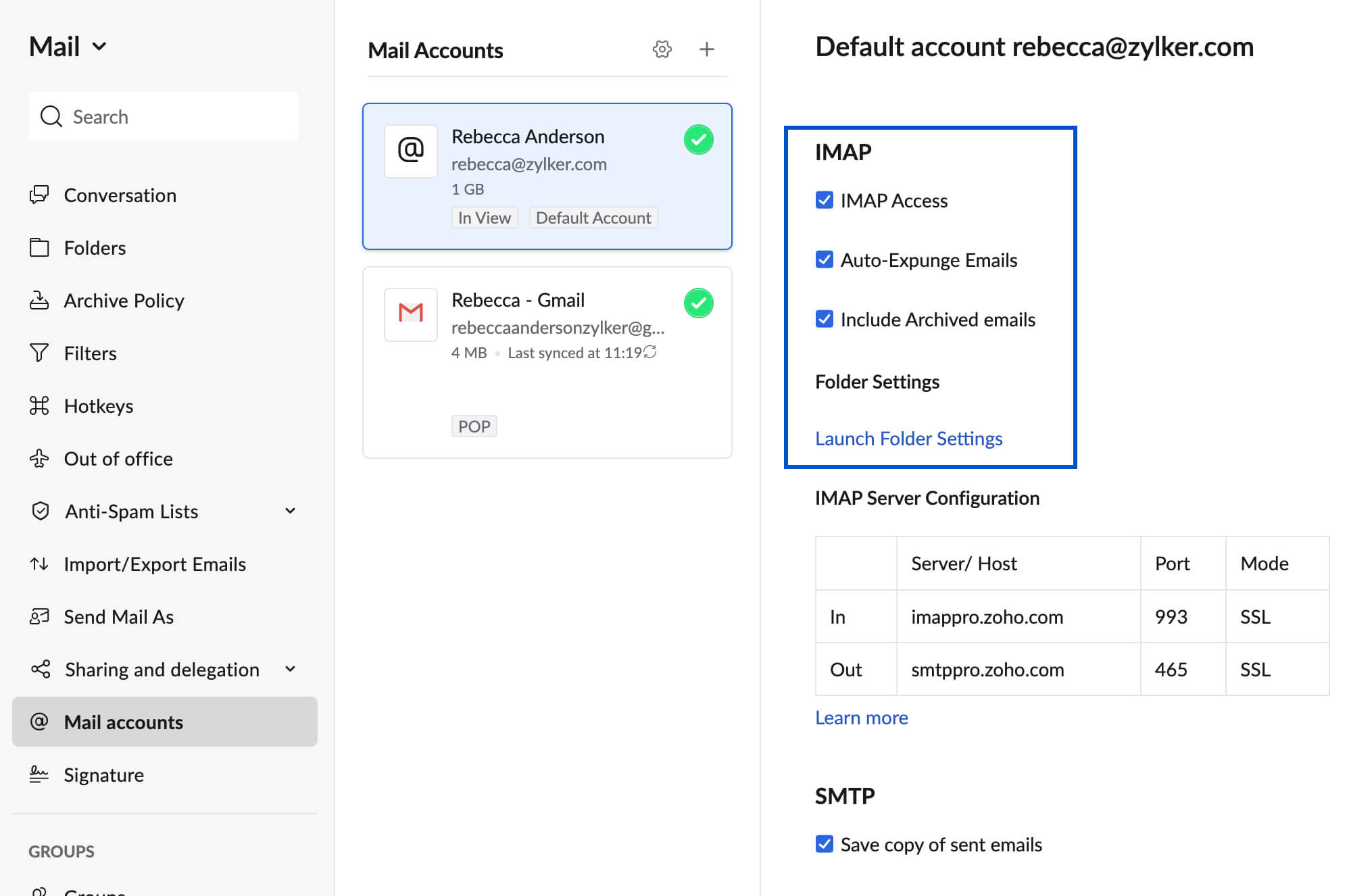
For each Gmail account to be migrated, open Gmail Settings (gear icon) and go to the Forwarding and POP/IMAP tab. Under IMAP Access, ensure “Enable IMAP” is selected. Save changes. This is required for Zoho’s Migration Wizard to connect to Gmail as the source.
If Gmail accounts have 2-Factor Authentication (2FA) enabled, do not use the regular Gmail password in Zoho’s migration tool. Instead, generate an App Password: go to your Google Account, then Security, then 2-Step Verification, then App Passwords. Select “Mail” as the app and generate a 16-character password. Use this App Password in the Migration Wizard.
For Google Workspace (business Gmail) accounts, the Workspace admin may need to enable “Less secure app access” or set up OAuth credentials — check with your current Google Workspace admin before starting.
4
Run the Zoho Mail Migration Wizard
This is the core of Gmail to Zoho Mail migration. In Zoho Admin Console, navigate to Migration, then Email Migration, then click Add Migration. Select “G Suite / Google Workspace” or “Gmail” as the source type.
Enter the Gmail IMAP server details: server address imap.gmail.com, port 993, SSL enabled. Add the source Gmail accounts with their App Passwords. Map each Gmail account to the corresponding Zoho Mail account. Select which folders to migrate (recommended: select all folders). Set a date range if you only need emails from a specific period.
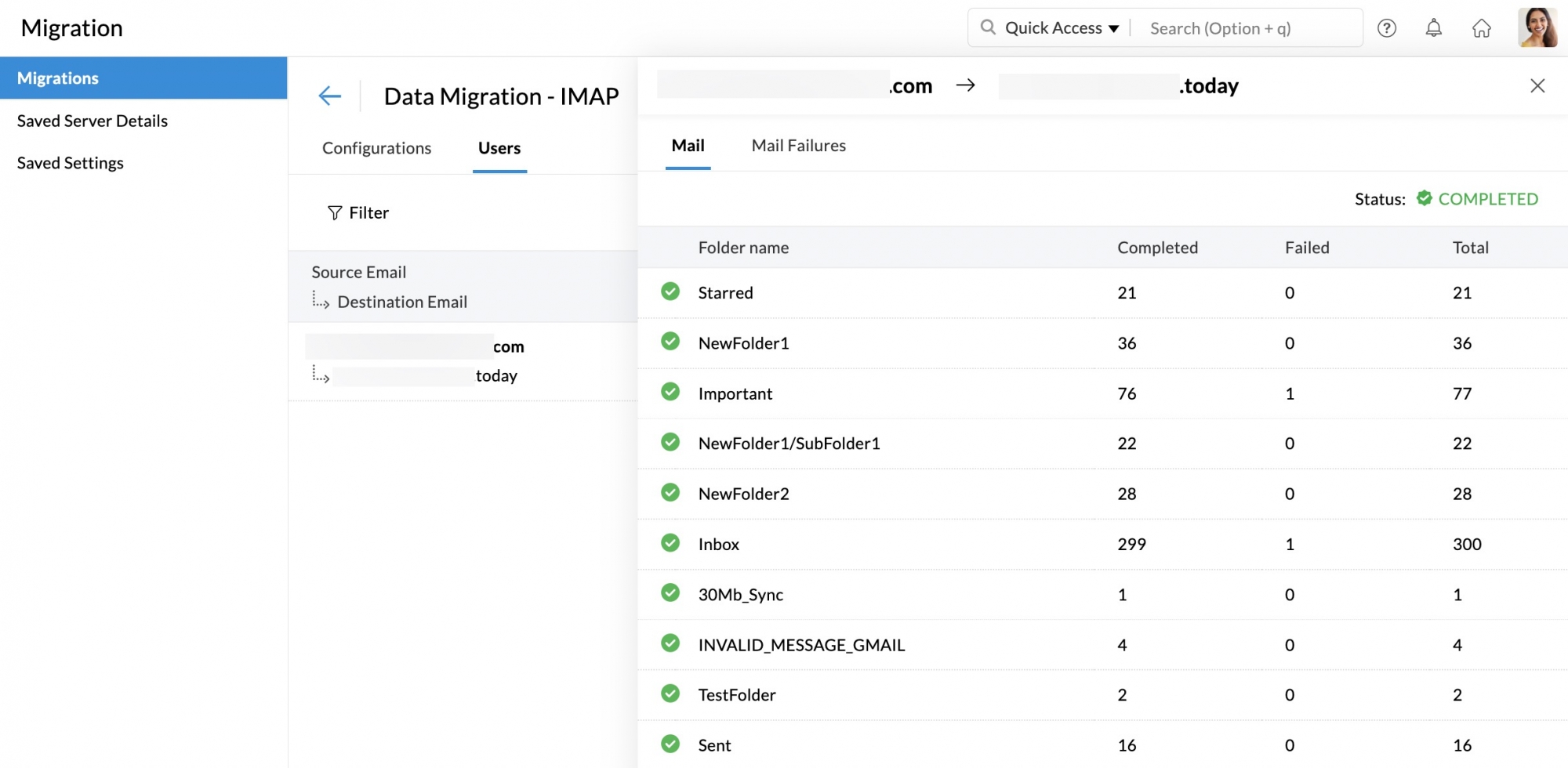
Enable Deduplication to prevent duplicate emails from Gmail’s multi-label system creating multiple copies in Zoho folders. Click Start Migration. The progress dashboard shows real-time migration status, estimated time, emails migrated, and any errors.
Tip: Start the migration at 8pm or on a Saturday. Migration runs in the background and users can continue using both Gmail and Zoho during the process. Large mailboxes (20GB+) may take 24-36 hours to complete.
5
Verify, Migrate Contacts and Calendar, Then Cut Over
Once the email migration shows 100% complete in the dashboard, open 5-10 migrated email accounts and spot-check: verify Sent Mail is present, check that attachments open correctly, confirm old emails from 2+ years ago are present, and verify folder structure matches Gmail labels.
Contacts migration: In Gmail, go to contacts.google.com and export as CSV (Google CSV format). In Zoho Mail, go to Contacts and click Import. Upload the CSV and map the fields. Contacts including phone numbers, addresses, and notes transfer completely.
Calendar migration: In Google Calendar, open Settings, then your calendar, then Export. Download the ICS file. In Zoho Calendar, go to Settings then Import and upload the ICS file. All events, recurring meetings, and reminders transfer.
Once verification is complete, update MX records to point exclusively to Zoho (remove Google MX records). Cancel your Google Workspace subscription on the exact renewal date — Google does not pro-rate cancellations.
Common Gmail to Zoho Mail Migration Errors and How to Fix Them
These are the four most common errors in Gmail to Zoho Mail migration — along with the exact fix for each.
Error 1 — Authentication Failed (Wrong Password)
Cause: You entered the Gmail account’s regular login password. If 2-Step Verification is enabled on Gmail, the regular password will not work for IMAP connections.
Fix: Generate an App Password from Google Account > Security > 2-Step Verification > App Passwords. Select Mail as the app type. Use the 16-character App Password in the Zoho Migration Wizard instead of your regular Gmail password.
Error 2 — Duplicate Emails in Zoho Folders
Cause: Gmail uses labels, not folders. An email with 3 labels (Inbox, Important, Work) will appear as 3 separate emails in 3 separate Zoho folders during migration.
Fix: Enable Deduplication in the Migration Wizard settings before starting. This setting detects emails with identical Message-ID headers and keeps only one copy. If migration has already run without deduplication, use Zoho Mail’s built-in duplicate finder in Advanced Settings.
Error 3 — Migration Stops After a Few Hours
Cause: Gmail imposes IMAP rate limits on large data transfers. If the migration tool pulls too many emails too quickly, Gmail temporarily blocks the IMAP connection.
Fix: In the Migration Wizard, reduce the migration speed setting. Pause the migration for 1 hour and then resume — Gmail’s rate limit resets. For very large migrations (100+ users), split the migration into batches of 20-25 users and run them sequentially.
Error 4 — Storage Limit Reached in Zoho
Cause: The Zoho Mail plan’s per-user storage limit is smaller than the Gmail mailbox being migrated. Zoho Mail Lite (5GB) will reject migration data if the Gmail account exceeds 5GB.
Fix: Check each Gmail account’s storage usage before starting migration (Gmail Settings > Storage). Upgrade affected accounts to Zoho Mail Lite 10GB (Rs.99/user/month) or Mail Premium (Rs.199/user/month, 50GB) as needed. Alternatively, use date-based filtering to migrate only emails from the past 2-3 years.
Post-Migration Checklist After Gmail to Zoho Mail Migration
The Gmail to Zoho Mail migration is complete when the Migration Wizard shows 100% for all users. But four post-migration tasks are required before you can safely cancel Gmail.
Post-Migration Checklist
1
Verify email delivery into Zoho
Send a test email from an external Gmail account to your Zoho Mail address. Confirm it arrives. Reply from Zoho Mail and confirm the reply arrives correctly. Check spam folder settings.
2
Set up Zoho Mail mobile app for all team members
Download Zoho Mail app (iOS and Android). Sign in with the Zoho account credentials. Configure mobile push notifications. For team rollout, the Zoho Admin can send configuration links to all users.
3
Configure email signature and auto-responder
Set up professional email signatures for all users in Zoho Admin Console under Organisation Email Signature. Configure out-of-office auto-responder templates. Import Gmail filters as Zoho Mail rules where required.
4
Cancel Google Workspace on exact renewal date
Google Workspace does not pro-rate cancellations. Cancel on the exact renewal date — cancelling one day late means paying for another full billing cycle. Set a calendar reminder 5 days before the renewal date to confirm cancellation.
Zoho Mail India Pricing — What You Pay After Gmail to Zoho Mail Migration
All Zoho Mail prices below are annual billing, excluding 18% GST. Purchased through Codroid Labs with a GST-compliant invoice enabling full ITC recovery. Compare against Google Workspace Business Starter at Rs.270/user/month to calculate your annual saving.
More Guides from Codroid Labs
What Indian Businesses Say After Completing Gmail to Zoho Mail Migration
“We migrated 35 users from Google Workspace to Zoho Mail Lite with Codroid Labs in one day. Migration ran overnight — zero data loss. We save Rs.88,200 per year. The GST invoice recovered another Rs.15,876 in ITC. Best software decision we made this year.”
“I was worried about losing 8 years of emails. Codroid Labs ran the Gmail to Zoho Mail migration overnight — every email, every attachment, every folder was there in the morning. Not a single item missing. The migration tool is genuinely free and works perfectly.”
Frequently Asked Questions — Gmail to Zoho Mail Migration
Can I transfer my Gmail to Zoho Mail?
Yes. Gmail to Zoho Mail migration is fully supported using Zoho’s free built-in Migration Wizard in the Admin Console. You can transfer emails, folder structure, contacts, and calendar events from Gmail to Zoho Mail using IMAP — server to server, without any paid third-party tool.
Will I lose emails during Gmail to Zoho Mail migration?
No, if done correctly. The Zoho Migration Wizard copies emails from Gmail — it does not delete anything from Gmail. Your Gmail account remains fully intact during and after the migration. The most common cause of data loss is starting the migration before all Zoho user accounts are created.
Is Gmail to Zoho Mail migration free?
Yes. Zoho Mail’s Migration Wizard is free — included in all paid Zoho Mail plans. No additional migration tool purchase is required. Codroid Labs performs the full migration setup — DNS, IMAP configuration, Migration Wizard, contacts, and calendar — at no additional charge with every Zoho Mail activation through our partner link.
How long does Gmail to Zoho Mail migration take?
For a 5-user team with up to 5GB per mailbox: 2-4 hours. For a 50-user organisation with large mailboxes: 24-48 hours. The migration runs in the background — users can access both Gmail and Zoho Mail during the process. Codroid Labs recommends starting at 8pm or on a weekend to avoid disruption.
What is Zoho Mail pricing in India after migration?
Zoho Mail Lite at Rs.59/user/month (5GB) or Rs.99/user/month (10GB) is the most popular choice for Indian businesses migrating from Gmail. Both include IMAP access and full business email features. Google Workspace Business Starter costs Rs.270/user/month — meaning a 25-user team saves Rs.63,300 per year with Zoho Mail Lite.
Let Codroid Labs Handle Your Gmail to Zoho Mail Migration
We manage the entire process — domain DNS setup, IMAP migration, contacts and calendar transfer, team training, and GST invoice. Free as part of every Zoho Mail activation. India-wide. Hindi or English.