


Introduction : Zoho Analytics vs Tableau vs Power BI
Zoho Analytics is a leading agentic AI-powered, self-service business intelligence (BI) and data analytics platform that enables organizations to convert raw data into actionable insights within minutes. In a data-driven business environment, selecting the right analytics tool is a strategic decision, not a cosmetic one.
While competitors like Tableau and Microsoft Power BI deliver powerful visualization and reporting capabilities, Zoho Analytics differentiates itself through its balance of simplicity, intelligent automation, and seamless ecosystem integration.
Zoho Analytics excels with its AI-assisted insights, natural language queries, automated data preparation, and deep integration with the Zoho ecosystem and third-party apps—making it especially effective for growing businesses that need fast insights without heavy technical dependency. In contrast, Tableau often demands higher technical expertise, and Power BI is most effective within Microsoft-centric environments.
Table of Contents
1. Seamless Data Integration and Preparation
One of the primary strengths of Zoho Analytics is its ability to connect and blend data from over 500 different sources. Users can import data from local files, cloud drives like Google Drive and Amazon S3, or connect live to databases such as MySQL, PostgreSQL, and Oracle.
Unlike many platforms that require external tools for data cleaning, Zoho Analytics includes a dedicated “Data Preparation Studio”. This module allows data engineers and analysts to model, cleanse, and enrich data using over 250 transform functions without any coding. This ensures that your datasets are high-quality and ready for analysis immediately.
2. Advanced Agentic AI with “Ask Zia”
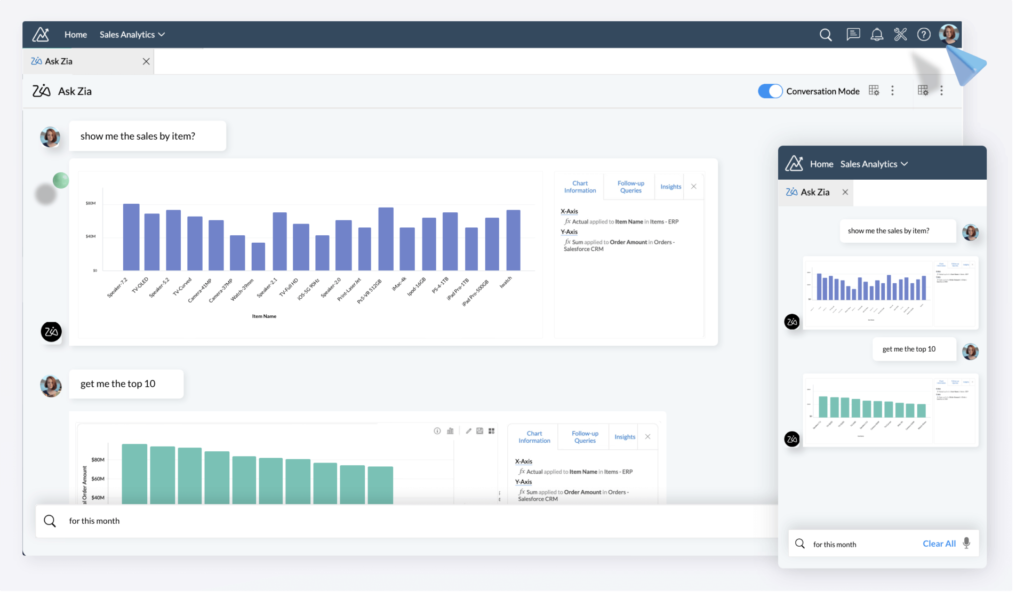
The platform is built to democratise analytics through its conversational AI agent, Ask Zia. Users can interact with their data using natural language, asking questions like “What was the revenue growth last month?” and receiving answers in the form of reports or widgets.
Beyond simple Q&A, the Zoho Analytics AI suite includes:
- Zia Insights: Automated narratives that explain important trends and anomalies in your data.
- Diagnostic Insights: AI-driven analysis to identify the root causes or “key drivers” behind specific data points.
- Predictive AI: Tools for forecasting future outcomes using univariate and multivariate models.
3. Zoho Analytics vs Tableau: The Agentic Advantage
When comparing Zoho Analytics vs Tableau, both platforms are shifting toward “agentic analytics.” Tableau has introduced “Tableau Next,” an agentic platform that combines AI and a trusted semantic layer to turn insights into actions. However, Tableau’s advanced AI features are often bundled in the “Tableau+ Bundle,” which requires specific Flex credits and an annual contract.
In contrast, Zoho Analytics integrates its AI capabilities across various plans, offering a more accessible entry point for small to mid-sized businesses looking for AI-powered forecasting and anomaly detection.
4. Zoho Analytics vs Power BI: Integration and Ecosystem
In the battle of Zoho Analytics vs Power BI, the choice often depends on your existing ecosystem. Microsoft Power BI is deeply integrated with the Microsoft 365 suite and Microsoft Fabric, making it a natural choice for Windows-centric organisations.
However, Zoho Analytics offers a broader range of “out-of-the-box” integrations for non-Microsoft apps. It provides over 100 pre-built reports for popular business applications like Salesforce, HubSpot, Zendesk, and even social media platforms like YouTube and LinkedIn. For businesses using a diverse tech stack, Zoho Analytics provides a more “unified” view of business insights.
5. Flexible Deployment and Lower Total Cost of Ownership
Zoho Analytics is designed with a low total cost of ownership (TCO) in mind. It offers transparent, upfront pricing with a “pay-as-you-go” model that allows users to upgrade, downgrade, or cancel at any time.
Deployment options are highly flexible:
- Cloud: Fully hosted on Zoho’s secure cloud.
- On-Premise: Can be installed on your own servers behind a firewall.
- Public/Private Cloud: Deployment available on AWS, Google Cloud, and Microsoft Azure.
- White-Label/Embedded: Businesses can rebrand the platform as their own to offer analytics to their clients.
6. Visual Storytelling and Collaboration
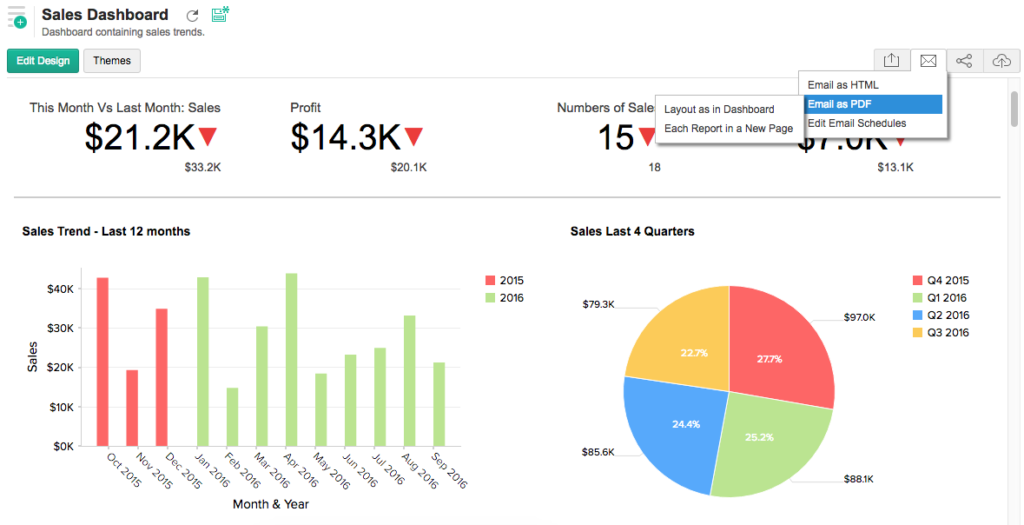
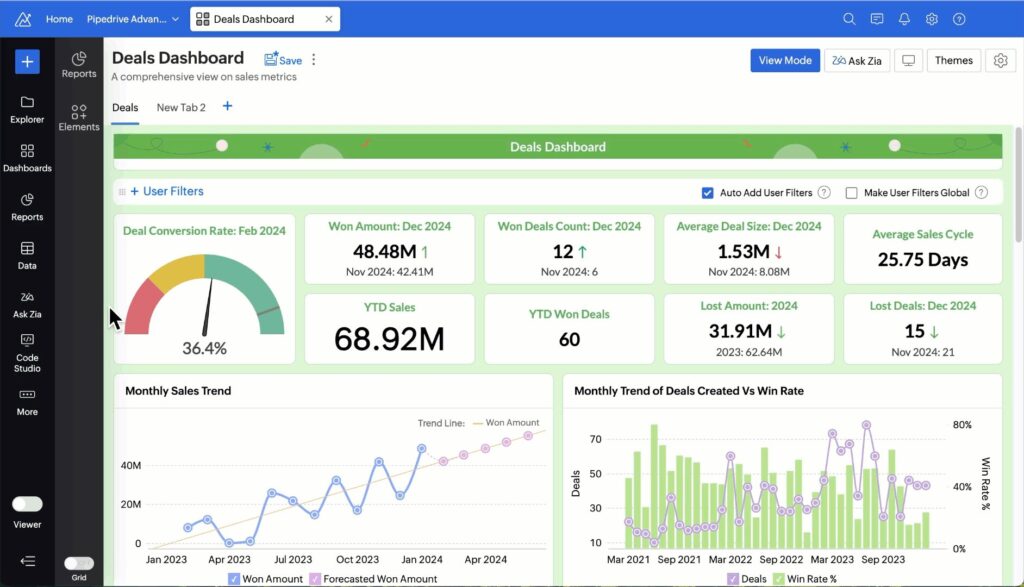
Data is only valuable if it can be shared effectively. Zoho Analytics provides over 50 visualization options, including geo-maps, heat maps, and funnel charts. These can be compiled into “Data Stories” using interactive slideshows or dedicated web portals.
Collaboration is built into the workflow through fine-grained access permissions, allowing teams to share reports securely via email, Slack, or Microsoft Teams. This ensures that “Business Users” can access critical information without needing deep technical expertise.
7. Unmatched Scalability for Growing Businesses
From its “Free Plan” for two users to the “Enterprise” and “Dedicated Compute” plans, Zoho Analytics scales with your business. The platform can handle millions of rows of data and offers robust APIs and SDKs for developers to build custom analytical solutions.
Conclusion
Whether you are a data scientist building ML models in the “Code Studio” or a business leader looking for a quick revenue snapshot, Zoho Analytics provides a comprehensive, secure, and user-friendly environment. Its ability to blend data from any source and provide AI-driven insights makes it a formidable competitor to Tableau and Power BI.
Ready to Get Started on Zoho?
Let’s build your business the smart way — with Zoho and Codroid Labs by your side.
📅 Book your free consultation now