


Table of Contents
The Critical Need for a Manufacturing-Specific Zoho Books GST Guide
For an Indian manufacturer, GST is more than a tax—it is a complex system of Input Tax Credits (ITC), HSN codes, and supply chain logistics. With the latest compliance updates in 2025, the margin for error has vanished.
A generic accounting setup often leads to rejected ITC claims or incorrect tax liability. This Zoho Books GST Guide is designed specifically to help manufacturers automate their compliance, ensuring every rupee of tax paid on raw materials is accurately tracked, recorded, and recovered.
Step 1: Enabling GST and Business Preferences
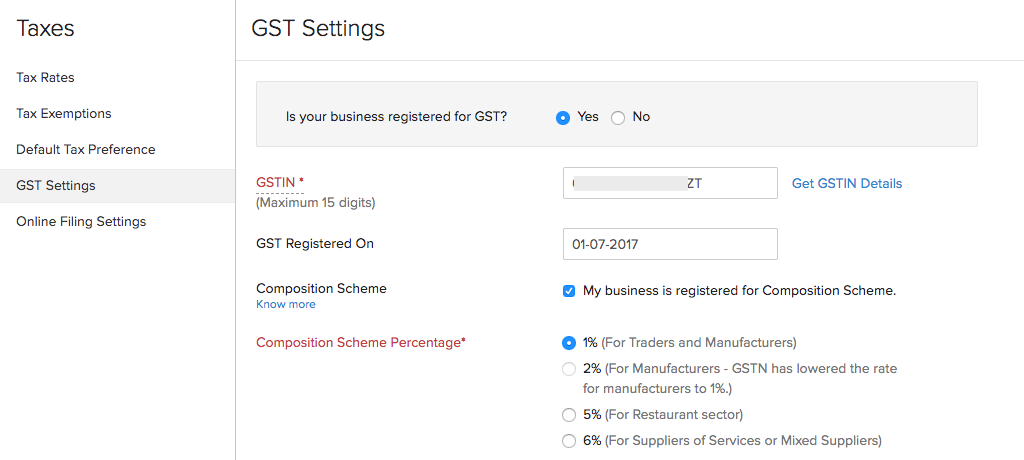
The first step in your gst zoho books journey is ensuring your organization profile is legally compliant.
- Navigate to Settings: Go to Taxes and then GST Settings.
- Enable Registration: Toggle on “Is your business registered for GST?”
- Input Data: Enter your 15-digit GSTIN accurately.
- Reverse Charge: For manufacturers, it is vital to enable “Reverse Charge” for purchases from unregistered dealers or specific goods like scrap metal.
Step 2: How to Add GST in Zoho Books for Raw Materials
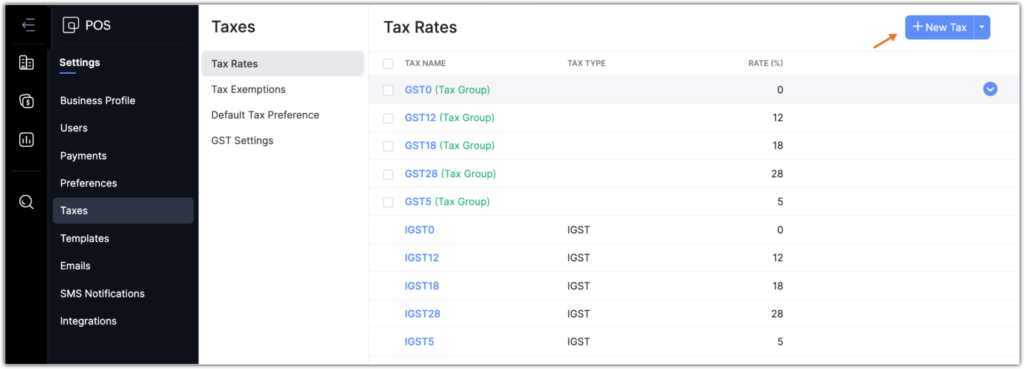
Knowing how to add gst in zoho books for inward supplies is the heartbeat of your cash flow.
- Vendor Categorization: When creating a vendor, select the correct GST Treatment (Registered, Unregistered, or SEZ).
- Automated ITC Tracking: When you record a bill for raw materials, the system automatically calculates the Input CGST, SGST, or IGST based on the state of supply.
- Importing Machinery: If you are importing heavy machinery, ensure you select “Overseas” treatment to track Basic Customs Duty (BCD) alongside your IGST.
Step 3: Mastering HSN Codes and Tax Slabs for Finished Goods
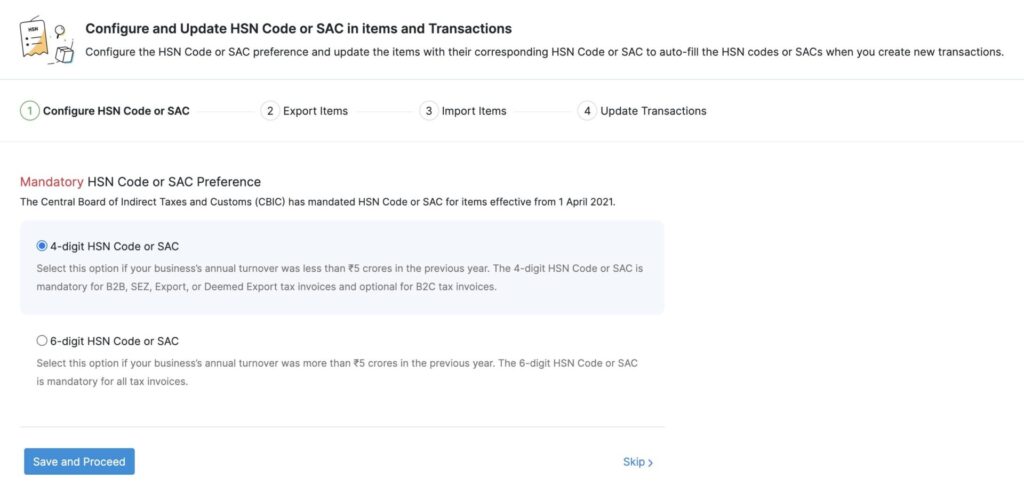
In any comprehensive Zoho Books GST Guide, we must emphasize HSN codes. For manufacturers with a turnover above ₹5 crores, 6-digit HSN codes are mandatory on all B2B invoices.
Step 4: Handling E-Invoicing and E-Way Bills
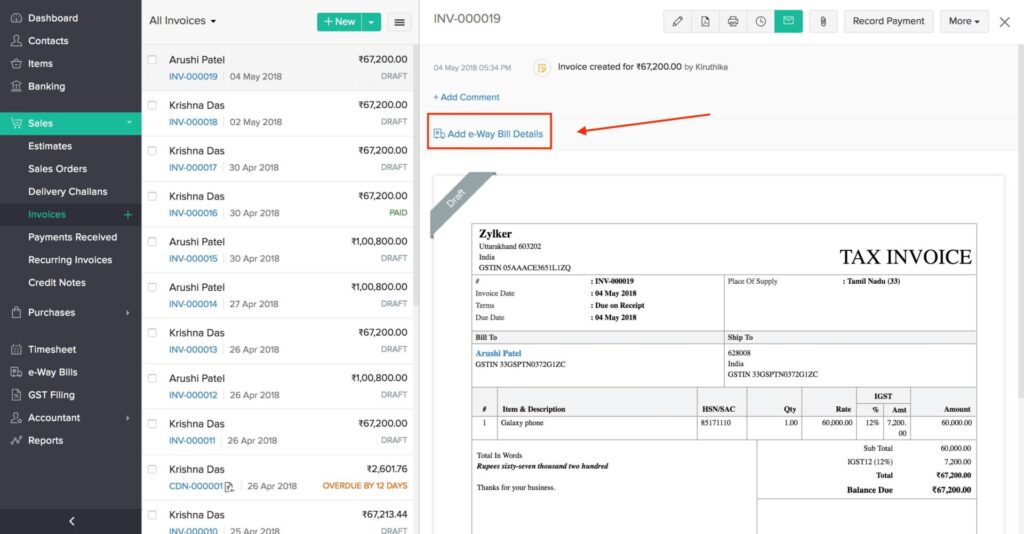
- E-Invoice Integration: Connect your software directly to the IRP (Invoice Registration Portal).
- E-Way Bill Generation: When moving finished goods from the factory to the distributor, generate E-Way bills directly from the invoice screen to avoid manual data entry errors on the government portal.
Step 5: Automated Zoho Books GST Filing and Reconciliation
The ultimate goal of this Zoho Books GST Guide is to make zoho books gst filing a seamless, monthly routine rather than a stressful event.
- GSTR-1 Preparation: The system automatically compiles your sales into the required government format.
- GSTR-2B Reconciliation: Use the built-in reconciliation tool to pull data from the GSTN. Match it against your purchase bills to ensure your suppliers have filed their returns so you don’t lose your ITC.
- GSTR-3B Summary: Review your tax liability summary and push it directly to the portal.
Common Mistakes Manufacturers Make with GST
| Pitfall | Impact | Solution |
| Incorrect HSN Codes | Penalties and customer dissatisfaction. | Use the HSN Finder during item setup. |
| Missing Reverse Charge | Tax non-compliance on specific raw materials. | Enable Reverse Charge in Tax Preferences. |
| Delayed Reconciliation | High cash flow loss from unclaimed ITC. | Perform weekly GSTR-2B matching. |
| Wrong Place of Supply | Incorrect IGST/CGST application. | Validate customer addresses before invoicing. |
Final Thoughts for Manufacturers
Success in the Indian manufacturing sector requires air-tight financial compliance. By following this Zoho Books GST Guide, you transform your accounting into a streamlined engine that protects your profit margins and ensures you remain in the government’s good books.
Ready to automate your GST compliance?
Contact our team today for a custom Zoho Books implementation for your manufacturing unit!
Ready to Get Started on Zoho?
Let’s build your business the smart way — with Zoho and Codroid Labs by your side.
📅 Book your free consultation now
Frequently Asked Questions (FAQs)
1. How do I enable the new 2025 GST rates?
Navigate to Settings, then Taxes, and select Tax Rates. You can manually add the new slabs here or use the “Bulk Update” feature to change rates for all HSN-linked items simultaneously.
2. Can Zoho Books handle GST for Job Work?
Yes. Use the “Delivery Challan” feature for goods sent for job work. Once the goods are returned as finished products, the challan can be converted into a Bill or Invoice as per manufacturing GST rules.
3. How do I fix a GST mismatch in my filing?
Use the GSTR-2B Reconciliation tool. It highlights discrepancies between your internal records and the government portal, allowing you to notify suppliers or adjust your claims before the deadline.
4. Is e-invoicing mandatory for all manufacturers?
In 2025, it is mandatory for businesses with an Annual Aggregate Turnover above ₹10 crore. However, adopting it regardless of turnover improves transparency and professional standing with large-scale B2B clients.