


Admin How-To · Updated 21 October 2026
Zia Agents Zoho CRM Workflow Rules (September 2026): What Indian Teams Can Automate
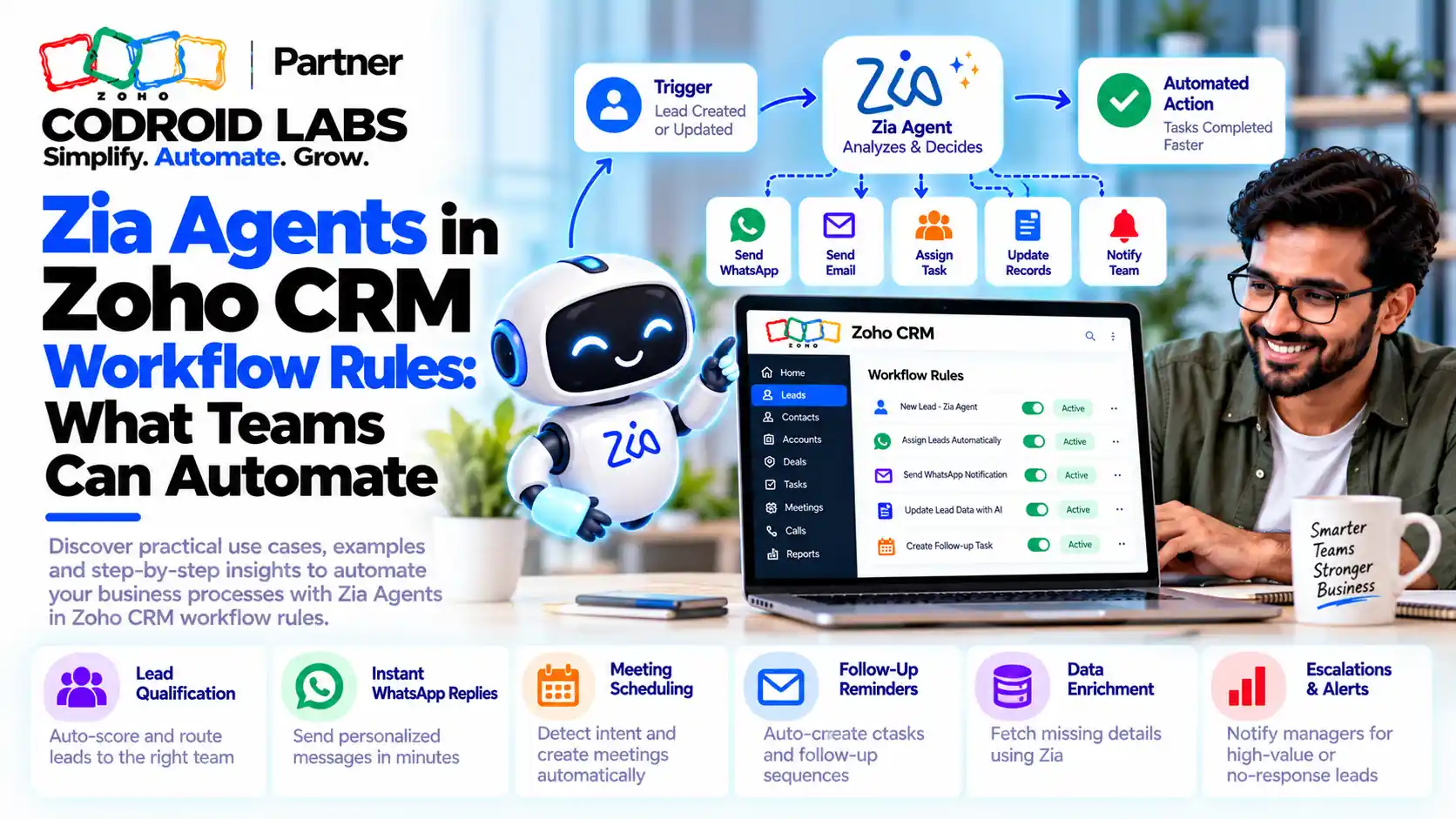
A Zia Agents Zoho CRM workflow is a workflow rule that calls a deployed Zia Agent as one of its actions, so the rule decides when to run and the agent reads the record and decides how to act. This guide covers setup, editions, credits, India data centre questions and PAN or GSTIN checks.
Updated: 21 October 2026
Sources: Zoho CRM announcements and help, Zia Agents help and pricing, Zoho CRM What's New September 2026
By: Codroid Labs, a Zoho Partner and Zoho AI Enabled Partner
Sources: Zoho CRM announcements and help, Zia Agents help and pricing, Zoho CRM What's New September 2026
By: Codroid Labs, a Zoho Partner and Zoho AI Enabled Partner
Short answer
Since September 2026, a workflow rule can call a deployed Zia Agent with a query that uses merge fields. It needs Professional or above and is available in the US, IN, EU, AU and CN data centres. Agents are free to build; model usage beyond the monthly free allowance is paid. Zoho-hosted models keep processing inside Zoho's regional infrastructure. Zoho announced PAN and GSTIN verification agents for India in July 2025; check the Agent Store in your account before you plan around them.
Why Admins Are Asking About Zia Agents Zoho CRM Workflow Rules
In short: The September 2026 update made agents part of everyday automation, so admins now need clear answers on edition, data centre, cost and Indian KYC use.
Operations and IT teams on Zoho CRM Enterprise and Zoho One noticed a new option in the workflow action list after the September 2026 release. The same questions keep coming: which edition, whether data leaves India, the cost, and whether an agent can verify a PAN or GSTIN.
This is a practical Zia Agents Zoho CRM workflow guide: what Zoho has confirmed, how to set it up, and where the limits are.
What Changed in September 2026
In short: Two changes matter: a Zia Agent action inside workflow rules, and five native Customize with Agent assistants for CRM settings.
| Change | What it does | Where you find it |
|---|---|---|
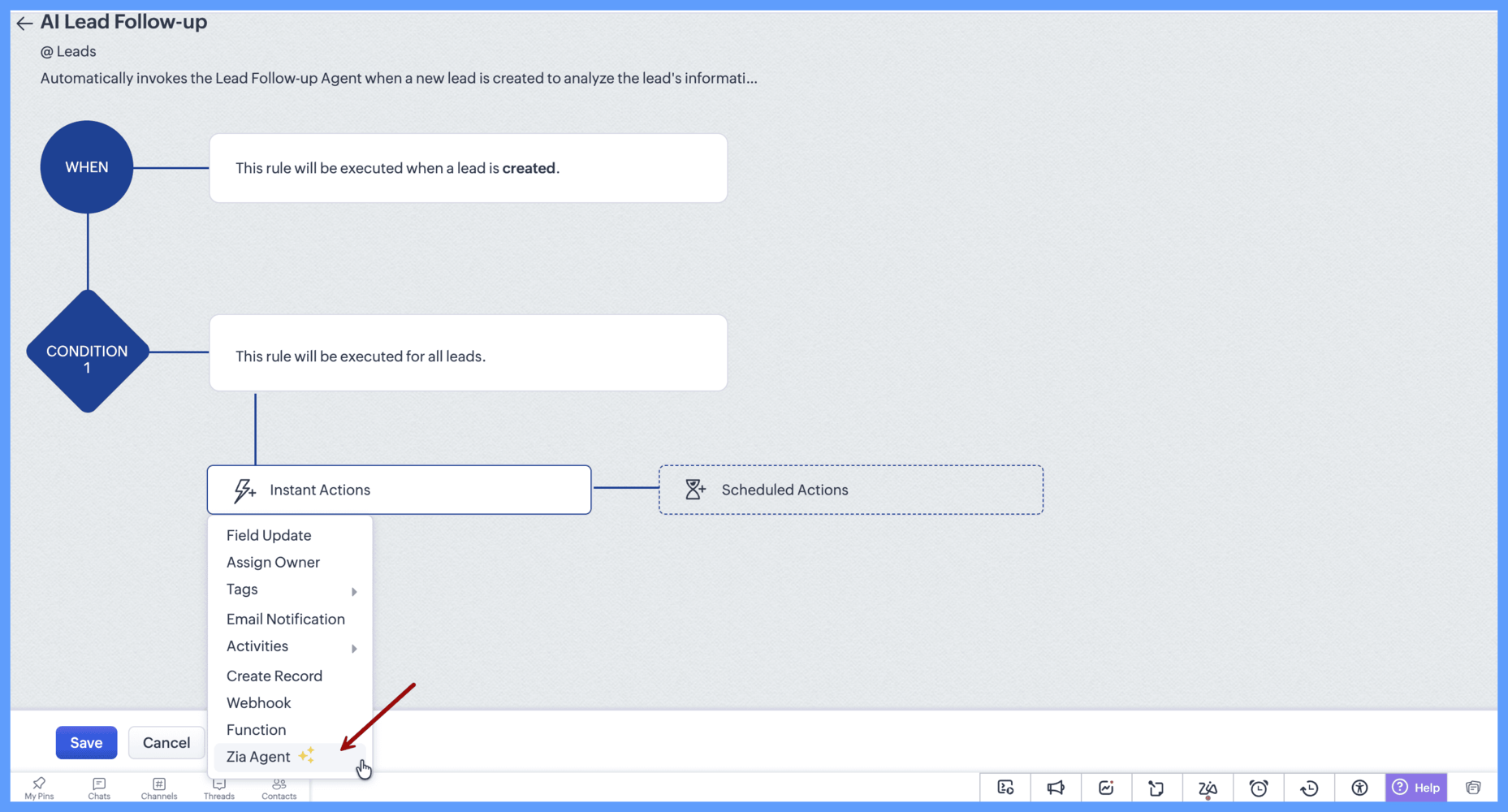
| Zia Agent as a workflow action | A workflow rule sends a query to a deployed agent, which analyses the record and acts with its configured tools | Workflow rule > Actions > Zia Agent |
| Native customization agents | Five agents configure profiles, roles, data sharing rules, review processes and segmentation from a prompt | Customize with Agent button on each settings page |
Zoho announced both in its workflow agents announcement, the native agents announcement and the September 2026 community digest.
Zoho's example: when a new lead is created, the workflow calls a lead follow-up agent that has tools to read the lead and create an email draft. The draft reflects that lead's company, role and requirement and appears in Email Drafts for review. That is the core idea of every Zia Agents Zoho CRM workflow.
Editions and Data Centres for Zia Agents in Workflow Rules
In short: Zia Agents in workflow rules need Professional or above in the US, IN, EU, AU or CN data centres.
| Feature | Editions | Data centres (as announced) |
|---|---|---|
| Zia Agents in workflow rules | Professional and above | US, IN, EU, AU, CN |
| Native Customize with Agent | Professional, Enterprise, Ultimate, Zoho One, CRM Plus | US, IN, EU, AU, JP; others in phases |
| Deploying Zia Agents into CRM | Zoho CRM paid plans, with Agent API enabled | Depends on the models available in your data centre |
Zoho's help on deploying Zia Agents in Zoho CRM lists paid plans as the base requirement for deployment. Using zia agents in workflow rules needs Professional or higher, so Enterprise and Zoho One teams qualify.
Zoho CRM prices from the feature list, checked 21 October 2026, per user a month, GST 18% extra:
| Edition | Billed annually | Billed monthly |
|---|---|---|
| Professional | ₹1,400 | ₹2,100 |
| Enterprise | ₹2,400 | ₹3,000 |
| Ultimate | ₹2,600 | ₹3,200 |
Zoho One lists ₹1,250 (annual) or ₹2,500 (monthly) per employee on the all-employee plan, and ₹3,500 or ₹4,000 per user on the flexible plan, GST 18% extra. See our Zoho CRM pricing India guide for plan details.
Credits and Costs of a Zia Agents Zoho CRM Workflow
In short: Building and deploying agents is free; you pay only for model usage beyond the monthly free tokens on Zoho-hosted models, or vendor rates for external models.
| Model route | Free allowance | After the allowance |
|---|---|---|
| Zoho-hosted standard models | 30 million tokens a month | Prepaid wallet; 1 credit per 1,000 tokens |
| Zoho-hosted pro model (on request, US and IN) | 20 million tokens a month | 3 credits per 1,000 tokens |
| External models through Zoho's keys | None | Vendor token rates, deducted from the wallet |
| Bring your own key | Not applicable | Paid directly to the model vendor |
Source: Zia Agents pricing and model configuration help. Zoho states rates in US dollars, with 1 USD equal to 1,000 AI credits and local taxes extra. Free tokens reset on the 1st of each month and do not roll over; purchased credits do.
Every run of a Zia Agents Zoho CRM workflow uses tokens, so a rule firing on every edit costs far more than one firing on creation. Tight criteria are the main cost control. Zoho CRM API credits are a separate per-edition limit.
Data Residency for a Zia Agents Zoho CRM Workflow in India
In short: Pick a Zoho-hosted model if your data must stay in the India data centre; an external model you connect with your own key processes data with that vendor.
Zoho's CRM architecture note says Zia's predictive, generative and agentic services run in the same regional infrastructure as the CRM data, and that Zia LLM runs on Zoho's servers in its US, India and Europe data centres. The model help says the same: with Zoho-hosted models your data stays within Zoho's infrastructure, while with your own key it is processed by the vendor you connect.
Zoho's model table lists Zoho-hosted models for the IN data centre. For a Zia Agents Zoho CRM workflow that touches identity or financial data, choose one of those and record the choice in your data protection notes. Models vary by data centre, so confirm on your agent creation screen.
How to Set Up a Zia Agents Zoho CRM Workflow in 8 Steps
In short: Build and deploy the agent, add it as a workflow action, write a query with merge fields, test on sample records, then activate.
- Pick one record event: Choose a module and trigger such as Lead created or Deal stage changed, with narrow criteria.
- Build or hire the agent: Create it in Zia Agents with instructions, knowledge and only the tool groups it needs, or hire one from the Agent Store.
- Choose the model: Pick a Zoho-hosted model if data must stay in the India data centre.
- Test with sample CRM data: Run the agent inside Zia Agents against real-looking records, including bad inputs.
- Deploy into Zoho CRM: Deploy using a connection or as a digital employee, then confirm it shows under Setup > General > Agents.
- Add the workflow action: In the workflow rule, add the Zia Agent action and select the deployed agent.
- Write the query: Tell the agent what to do, with merge fields for record details.
- Activate and review: Switch the rule on for a small segment first and review outputs daily for two weeks.
A sample query for a lead rule: “Review lead ${Leads.Last Name} from ${Leads.Company} in ${Leads.City}. Read the Description, then draft a short follow-up email that answers their stated requirement. Do not quote prices.”
Our guide to building a Zia Agent covers instructions and knowledge in depth. This page covers wiring it into a Zia Agents Zoho CRM workflow.
7 Uses Indian Teams Can Automate With Zia Agents in Workflow Rules
In short: Use agents where each record needs judgement, such as tailored follow-ups or summaries, and keep fixed logic in normal actions.
Example designs only, not Zoho templates.
| # | Workflow trigger | What the agent does |
|---|---|---|
| 1 | Lead created | Drafts a personalised follow-up email for a rep to review (Zoho's own example) |
| 2 | Lead created from a web form | Summarises the requirement in a note so the owner knows the context before calling |
| 3 | Deal moves to Negotiation | Reviews the deal history and notes and suggests next steps as a task |
| 4 | Deal stalled for a set number of days (scheduled rule) | Writes a re-engagement draft based on the last conversation |
| 5 | Account created with a GSTIN field filled | Calls a verification tool and writes the result to a field (see the next section) |
| 6 | Case or service request linked to an account | Summarises related open deals and recent activity for the account manager |
| 7 | Quote request received | Collects the product, quantity and delivery details into a draft for the sales team |
Keep fixed rules, such as assigning an owner, as normal workflow actions; they cost nothing per run. A Zia Agents Zoho CRM workflow is worth it where each record needs reading and judgement. For more automation patterns, see our Zoho CRM automation guide.
Zia Agent GSTIN PAN Verification in India Inside a Zoho CRM Workflow
In short: Zoho announced India verification agents for PAN and GSTIN in July 2025; for anything beyond those, a custom tool calling your chosen verification service is the route.
Zoho's July 2025 announcement said it launched AI agents for Indian businesses to verify PAN, Voter ID, Udyog Aadhar, GSTIN, driving licence, LPG connection and electricity bill, available from the agent marketplace. We could not confirm the current listing, edition rules or per-check charges of these agents on an official page as of 21 October 2026, so check the Agent Store in your own account first.
If a ready agent is not listed for you, or you need a different check, the verifiable route for zia agent gstin pan verification india is a custom one:
- Choose a verification service your compliance team has approved.
- Codroid Labs sets up a connection and a custom tool so the agent can call that service with the PAN or GSTIN from the record.
- The agent writes back a status such as Verified, Mismatch or Not found, plus the registered name, into CRM fields.
- A normal workflow or review process then decides what happens next, such as blocking a deal stage until a reviewer approves.
Keep a human approval for mismatches; the agent fetches and compares, it does not decide.
Zoho CRM Customize With Agents: The Native Settings Assistants
In short: Customize with Agent builds profiles, roles, sharing rules, review processes and segmentation from a plain-language prompt.
| Agent | What it configures |
|---|---|
| Profiles | Permissions for modules, fields, setup actions and features |
| Roles | Roles and reporting hierarchies |
| Data sharing | Sharing rules between roles, users, groups and teams |
| Review process | Review criteria, reviewers and review actions |
| Segmentation | RFM segmentation rules, labels and scores |
To use zoho crm customize with agents, enable Zoho Hosted LLM under Setup > Zia > Models in the Internal LLM section. Each user approves an agent once, and it then works within that user's existing CRM permissions. They change settings, not records; test in a sandbox where possible.
Guardrails for a Zia Agents Zoho CRM Workflow
In short: Limit when the workflow fires, give the agent only the tools it needs, choose the deployment identity carefully and review outputs before full rollout.
| Decision | Options | Our advice |
|---|---|---|
| Deployment identity | Connection (Login With User or Fixed) or digital employee with its own role and profile | Digital employee when you want a separate audit trail |
| Tools | Any tool groups and connections | Only what the task needs; read before write |
| Trigger | Create, edit, field update, date or scheduled | Fire once per event, with narrow criteria |
Watch usage under Settings > Plan & Billing in Zia Agents for the first month of each Zia Agents Zoho CRM workflow.
Help With Zia Agents in Workflow Rules
Codroid Labs is a Zoho Partner and a Zoho AI Enabled Partner, recognised by Zoho after completing the AI Accelerator Series 2026. We design the workflow criteria, build and test the agent, set up custom verification tools and train your admins. Call +91 7838402682 or email team@codroiditlabs.com.
Book a free agent workflow callStart a Zoho CRM trial
Quick Answers
Is Zia Agent a workflow action?
Yes, since September 2026.
Which edition?
Professional and above.
Is it in the India data centre?
Yes, IN is listed.
Do agents cost money?
Building is free; model usage beyond free tokens is paid.
Zia Agents Zoho CRM Workflow FAQs
What is a Zia Agents Zoho CRM workflow?
A workflow rule that includes a deployed Zia Agent as an action. The rule supplies the trigger and record, and the agent uses its instructions and tools to decide how to act.
Which Zoho CRM editions support Zia Agents in workflow rules?
Professional and above, including Enterprise, Ultimate and Zoho One, in the US, IN, EU, AU and CN data centres as of the September 2026 announcement.
Does using an agent in a workflow cost extra?
Zia Agents are free to build and deploy. Model usage beyond the monthly free token allowance on Zoho-hosted models, or any use of external models, is charged.
Does my data stay in India?
With Zoho-hosted models, processing stays within Zoho's regional infrastructure. With an external model or your own key, the data is processed by that vendor.
Does Zoho have an official PAN or GSTIN verification agent?
Zoho announced India verification agents for PAN and GSTIN in July 2025. We could not confirm their current listing or charges on an official page, so check the Agent Store in your account.
What is Customize with Agent in Zoho CRM?
Five native agents that configure profiles, roles, data sharing, review processes and segmentation from a plain-language prompt, on Professional and above.
Can an agent update records from a workflow?
Yes, if you give it tools that update records. Start with drafts and notes, and add write access once the outputs are reliable.
Put your first agent into a workflow rule
Bring one process. Leave with the trigger, agent design, model choice and a test plan.
Related guides
Zoho references (checked 21 October 2026)
- Zoho CRM: Make your workflows smarter with Zia Agents
- Zoho CRM: Introducing native agents
- Zoho Community Digest, September 2026 Part 3
- Zoho CRM help: Zia Agents in Zoho CRM
- Zia Agents help: model configuration and credits
- Zia Agents pricing
- Zoho CRM: architecture and AI services
- Zoho news: Zia Agents launch, July 2025
- Zoho CRM feature list and prices