


Zoho Creator + Deluge 2026
No Code Required
India GST + WhatsApp + Inventory
5 Steps — 3 to 5 Weeks
Codroid Labs — Certified Zoho Partner
No Code Required
India GST + WhatsApp + Inventory
5 Steps — 3 to 5 Weeks
Codroid Labs — Certified Zoho Partner
Build a Custom Order Management
App in 5 Steps Without Code:
Zoho Creator + Deluge Guide for
Indian Businesses 2026
By Codroid Labs — Certified Zoho Creator Partner India
April 2026
22 min read
Includes Deluge Code + India GST Logic
April 2026
22 min read
Includes Deluge Code + India GST Logic
When you build a custom order management app in 5 steps without code, every Indian business — from a Rajkot auto parts manufacturer to a Bengaluru IT services company — needs a system to manage orders. But custom software costs ₹10-40 lakh to build and months to deploy. Zoho Creator solves this problem: you can build a custom order management app in 5 steps without code — with India-specific GST invoicing, WhatsApp order notifications, inventory tracking, and live business dashboards — in 3-5 weeks at a fraction of the cost. This guide shows you exactly how to build a custom order management app in 5 steps without code using Zoho Creator and Deluge scripting, with every India-specific requirement covered — including CGST/SGST/IGST auto-calculation, e-invoice IRP integration, and Tally data sync.

1. Why Indian Businesses Need to Build a Custom Order Management App Without Code
Every Indian business that handles orders — manufacturers, distributors, e-commerce sellers, IT service providers, pharma distributors — eventually outgrows Excel and WhatsApp. But the alternatives present a dilemma: off-the-shelf order management software does not fit your exact process, and custom-coded software costs ₹10-40 lakh and takes 12-18 months to build.
The Indian Business Order Management Problem
- → Orders tracked in WhatsApp groups and Excel
- → No GST invoice auto-generation
- → Stock counts done manually — errors common
- → Customer not notified of order status
- → No real-time dashboard for management
- → Custom software costs ₹10-40 lakh
Zoho Creator + Deluge Solves All of This
- ✓ Custom order forms matching your exact process
- ✓ GST invoice auto-generated — CGST/SGST/IGST
- ✓ Inventory auto-deducted on order confirmation
- ✓ WhatsApp DLT notifications at every status
- ✓ Live dashboard — revenue, orders, stock, payments
- ✓ Costs ₹915/user/month — go-live in 3-5 weeks
2. What Is Zoho Creator — Plain Language for Indian Business Owners
Zoho Creator is a low-code application development platform that lets you build a custom order management app in 5 steps without code — or any custom business application — using a visual drag-and-drop builder. Think of it as Microsoft Access on steroids, running in the cloud, with WhatsApp integration, mobile apps, and Deluge scripting for business logic.
Zoho Creator India Pricing 2026
Standard
₹915
/user/month (annual)
25,000 records/app, 1 GB file storage, basic workflows
Professional
₹1200
/user/month (annual)
Unlimited records, advanced Deluge, custom domains
Enterprise
₹1500
Custom development cost
12-18 months timeline vs 3-5 weeks with Zoho Creator
Deluge (Data Enriched Language for the Universal Grid Environment) is Zoho Creator’s scripting language. It reads like plain English and handles business logic — calculating GST, connecting to external APIs, sending WhatsApp messages, and updating records across Zoho apps. You do not need to be a programmer to write basic Deluge — and Codroid Labs writes the complex Deluge functions for every client implementation.
3. Step 1 — Design Your Order Form and Data Structure
The first critical step when you build a custom order management app in 5 steps without code is build a custom order management app in 5 steps without code is designing your data structure. In Zoho Creator, every data table is a Form. Your Order Management App needs at minimum three related forms.
Form 1: Orders
Order ID (Auto-number)
Customer Name
Customer GSTIN
Product (Lookup → Products)
Quantity
Unit Price (Auto from Product)
GST Rate (5/12/18/28%)
Order Status (Dropdown)
Delivery Address
Invoice Amount (Formula)
Form 2: Products
Product Name
SKU Code
HSN / SAC Code
Unit Price (₹)
GST Rate
Opening Stock
Current Stock (Formula)
Reorder Level
Category
Form 3: Customers
Customer Name
GSTIN
GST State Code (auto)
Mobile (WhatsApp)
Email
Billing Address
Credit Limit (₹)
Outstanding Balance
Payment Terms
India-Specific Field: Customer GSTIN State Code Extraction. When you add the Customer GSTIN field to your Order Form, add a formula field that extracts the first 2 characters of the GSTIN — this is the state code. Your business state code is already stored in the app settings. A Deluge function compares these two codes: if they match, the invoice uses CGST+SGST; if they differ, the invoice uses IGST. This is the foundation of GST compliance in your custom order management app.
4. Step 2 — Build the Inventory Tracking Module with Auto Stock Deduction
The second step when you decide to build a custom order management app in 5 steps without code is build a custom order management app in 5 steps without code is adding inventory intelligence. When an order is confirmed, the system should automatically deduct the ordered quantity from stock and alert the purchase team when stock falls below reorder level.
Deluge Workflow — Auto Stock Deduction on Order Confirmation
// Trigger: On Order Status changed to “Confirmed”
void onOrderConfirmed(int order_id)
{
order = Orders[ID == order_id];
product = Products[ID == order.Product];
// Deduct ordered quantity from stock
new_stock = product.Current_Stock – order.Quantity;
product.Current_Stock = new_stock;
// Alert if stock falls below reorder level
if(new_stock < product.Reorder_Level)
{
sendmail
[
from: “orders@yourcompany.com”
to: “purchase@yourcompany.com”
subject: “Low Stock Alert: ” + product.Product_Name
message: “Current stock: ” + new_stock + “. Reorder now.”
];
}
}
This Deluge workflow runs automatically every time an order is confirmed. No manual stock count needed. Codroid Labs writes and tests this for your product catalogue during implementation.
5. Step 3 — Add GST Invoice Generation with Deluge (CGST/SGST/IGST Auto-Select)
Step 3 is the most India-specific part — when you build a custom order management app in 5 steps without code, this step separates a compliant Indian system from a generic one. No competitor blog covers this — generic Zoho Creator tutorials show basic invoicing but miss the critical CGST/SGST vs IGST auto-selection logic that Indian businesses legally require.
Deluge Function — GST Auto-Calculation (CGST/SGST vs IGST)
// Your GST State Code — change to your state (e.g., 07 for Delhi, 29 for Karnataka)
string YOUR_STATE_CODE = “07”;
void generateGSTInvoice(int order_id)
{
order = Orders[ID == order_id];
customer_gstin = order.Customer_GSTIN;
// Extract state code from customer GSTIN (first 2 digits)
customer_state = customer_gstin.subString(0, 2);
taxable_value = order.Quantity * order.Unit_Price;
gst_rate = order.GST_Rate / 100;
if(customer_state == YOUR_STATE_CODE)
{
// Intra-state: CGST + SGST
cgst_amount = taxable_value * (gst_rate / 2);
sgst_amount = taxable_value * (gst_rate / 2);
igst_amount = 0;
}
else
{
// Inter-state: IGST only
cgst_amount = 0;
sgst_amount = 0;
igst_amount = taxable_value * gst_rate;
}
total_amount = taxable_value + cgst_amount + sgst_amount + igst_amount;
// Update invoice fields in order record
order.CGST_Amount = cgst_amount;
order.SGST_Amount = sgst_amount;
order.IGST_Amount = igst_amount;
order.Invoice_Amount = total_amount;
}
Codroid Labs extends this function to include: HSN code mapping, multiple line items, e-invoice IRP submission for businesses above ₹5 crore, and PDF invoice generation with your company letterhead.
6. Step 4 — Create WhatsApp and Email Notification Workflows
The fourth step is critical — when you build a custom order management app in 5 steps without code, automated notifications are what make the app build a custom order management app in 5 steps without code is creating automated notifications. Indian customers expect WhatsApp updates — not emails. Zoho Creator connects to WhatsApp Business API via webhook for DLT-compliant automated messages at every order status change.
WhatsApp Notification Triggers
Order Received: “Dear {Customer}, your order #{Order_ID} for {Product} has been received. Amount: ₹{Invoice_Amount}. We will process it within 24 hours.”
Order Confirmed: “Your order #{Order_ID} is confirmed and in production. Expected dispatch: {Dispatch_Date}.”
Dispatched: “Order #{Order_ID} dispatched via {Courier}. Tracking: {Tracking_ID}. Expected delivery: {Delivery_Date}.”
Payment Due: “Invoice #{Invoice_ID} of ₹{Amount} is due on {Due_Date}. Please arrange payment. Contact: {Phone}.”
Zoho Creator Workflow Setup
Trigger: Order Status field changes to “Confirmed”
Action 1: Execute Deluge function → WhatsApp webhook call to BSP
Action 2: Send email to customer with PDF invoice attached
Action 3: Create task for dispatch team in Zoho Creator
Condition: Only if Customer_Mobile is not empty
7. Step 5 — Build the Order Management Dashboard
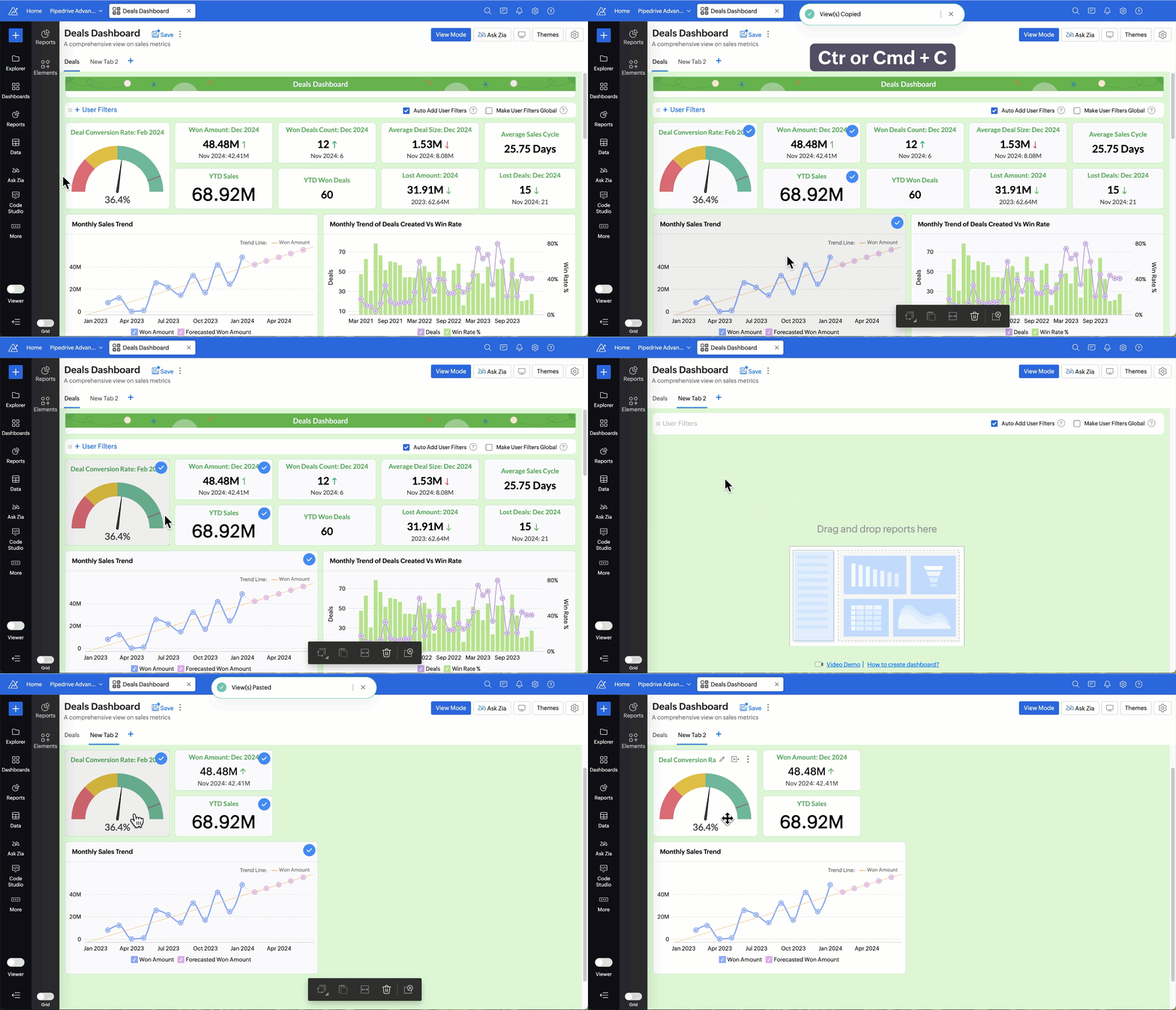
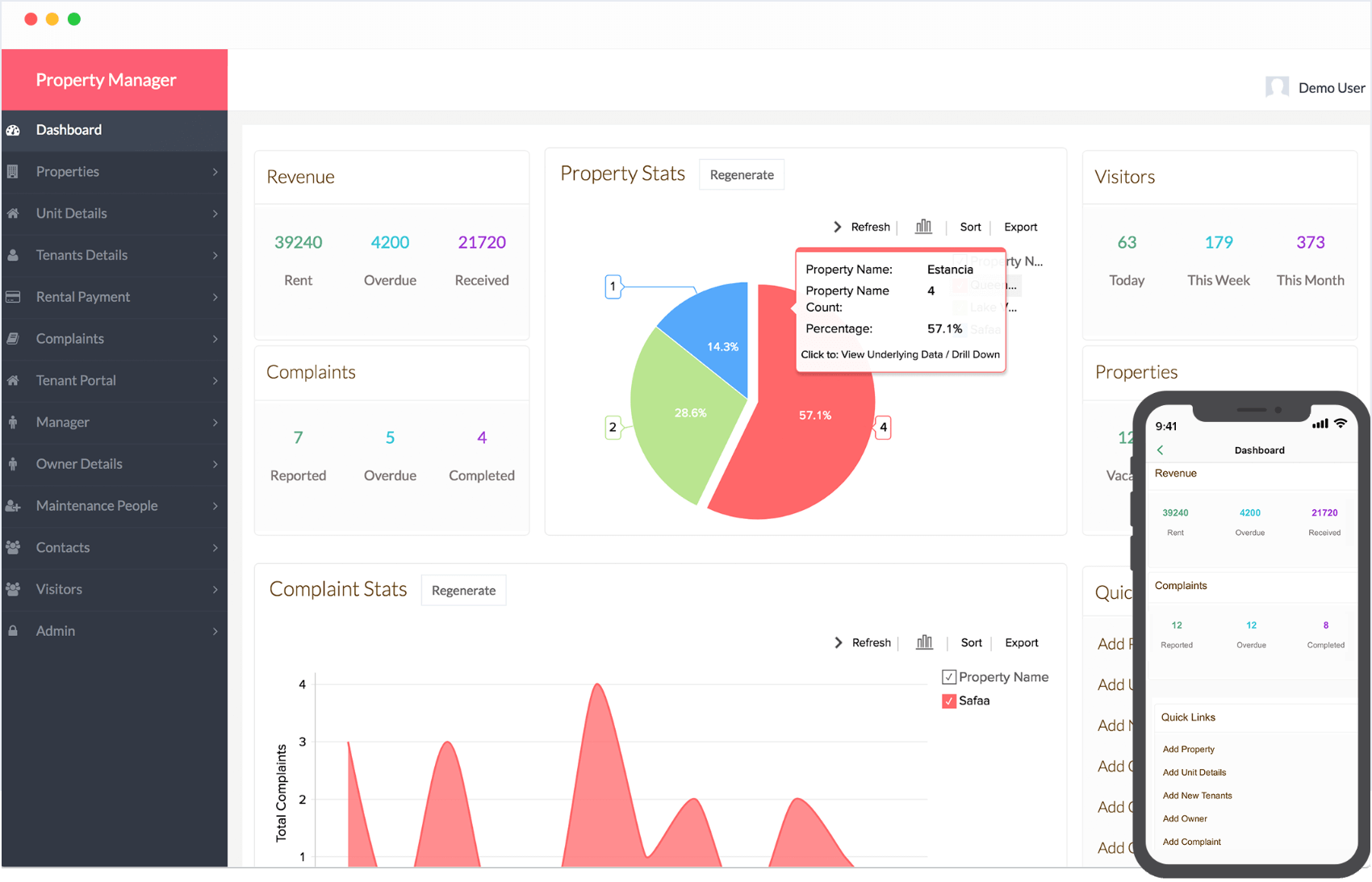
The final step — when you build a custom order management app in 5 steps without code — is creating the management dashboard build a custom order management app in 5 steps without code is creating the management dashboard. Zoho Creator’s Reports section lets you build charts, tables, and KPI metrics without any code — all reading live from your order database.
Orders by Status (Pie Chart)
Visual breakdown of Pending / Processing / Dispatched / Delivered orders — management sees bottlenecks at a glance. Clickable — drill down to individual orders at each stage.
Revenue by Month (Bar Chart)
Monthly order revenue from Invoice_Amount field — shows seasonality, growth trends, and monthly targets vs actuals. Separate bar for GST collected.
Top Products by Volume (Table)
Products ranked by total quantity ordered — helps identify best-sellers and slow movers. Useful for purchase planning and pricing decisions.
Outstanding Payments (Alert Table)
Invoices where payment status is Unpaid, sorted by overdue days — shows who owes money and how long. WhatsApp payment reminder can be sent directly from this report.
Low Stock Alert Report
All products where Current Stock is below Reorder Level — with current stock, reorder level, and last purchase date. Purchase team sees this every morning.
KPI Homepage Metrics
Today’s new orders, This week’s revenue, Pending orders count, Overdue payment total — four key numbers on the homepage that management checks daily.
8. Complete Deluge Code Reference — Order Status Update with WhatsApp Notification
This is the section no other Zoho Creator order management tutorial provides — complete, working Deluge code for the India-specific workflow that ties together order status change, WhatsApp notification, and invoice generation in one function.
Deluge — Complete Order Status Update with WhatsApp + Invoice (India)
// Full workflow — triggers when Order Status changes
void onStatusChange(int order_id, string new_status)
{
order = Orders[ID == order_id];
customer_mobile = order.Customer.Mobile;
order_ref = order.Order_ID;
// Step 1: Update order status
order.Order_Status = new_status;
// Step 2: GST Calculation if Confirmed
if(new_status == “Confirmed”)
{
customer_state = order.Customer_GSTIN.subString(0,2);
taxable = order.Quantity * order.Unit_Price;
rate = order.GST_Rate.toLong() / 100;
if(customer_state == “07”) // Change to your state
{ order.CGST = taxable*(rate/2); order.SGST = taxable*(rate/2); }
else
{ order.IGST = taxable*rate; }
// Deduct inventory
product = Products[ID == order.Product];
product.Current_Stock = product.Current_Stock – order.Quantity;
}
// Step 3: WhatsApp notification via webhook
whatsapp_msg = “Order ” + order_ref + ” status: ” + new_status;
params = Map();
params.put(“phone”, customer_mobile);
params.put(“message”, whatsapp_msg);
invokeurl
[
url: “https://your-whatsapp-bsp-endpoint.com/send”
type: POST
parameters: params
];
}
Codroid Labs writes all Deluge functions — including multi-line-item invoices, e-invoice IRP submission, Zoho Books sync, and advanced WhatsApp DLT template management. You do not need to write any code yourself.
9. Industry-Specific Order Management Apps You Can Build Without Code
Manufacturing — Peenya, KIADB
Auto parts, engineering goods, FMCG
- →Production order to customer delivery tracking
- →BOM integration — raw material consumption
- →Quality check stage before dispatch
- →Dealer network GST invoicing automation
IT Services — Bengaluru, Noida
Software, consulting, managed services
- →Service order from CRM deal to delivery
- →Milestone-based invoicing with GST SAC code
- →Multi-currency for export clients + LUT
- →Automated renewal alerts via WhatsApp
Pharma Distribution — Bommasandra
Pharmaceutical distributors, wholesalers
- →Batch number and expiry date tracking
- →FEFO (First Expiry First Out) dispatch rule
- →Schedule H drug approval workflow
- →Recall management with batch traceability
FMCG Distribution — Pan India
Distributors, super-stockists, retailers
- →Beat plan and retailer route management
- →Secondary sales order capture from field app
- →Outstanding recovery workflow — WhatsApp
- →Scheme and discount management per retailer
Related Guides from Codroid Labs
Codroid Labs — Certified Zoho Creator Partner India
Build Your Custom Order Management App in 5 Steps — We Do It in 3-5 Weeks
Whether you want to build a custom order management app in 5 steps without code yourself or have Codroid Labs handle it end-to-end — Codroid Labs builds custom Zoho Creator order management apps for Indian manufacturers, distributors, IT companies, and FMCG businesses — with India GST auto-calculation, WhatsApp DLT notifications, inventory tracking, e-invoice IRP, and live dashboards. Fixed INR price. 90-day warranty.
GSTIN: 07AAWFC0815B1ZP | team@codroiditlabs.com | +91 78384 02682
10. FAQs — Build a Custom Order Management App in Zoho Creator
Can I build a custom order management app in 5 steps without code using Zoho Creator?
Yes. Zoho Creator is a low-code platform where the core order management app — forms, workflows, reports, dashboards, and email notifications — requires zero coding. The India-specific functionality like GST auto-calculation, WhatsApp DLT notifications, and e-invoice IRP submission uses Deluge scripting, which is a simple English-like language. Codroid Labs writes all the Deluge functions as part of the implementation. The client team manages the day-to-day order operations without any coding knowledge.
How much does it cost to build an order management app with Zoho Creator in India?
Zoho Creator Standard plan costs ₹915 per user per month (billed annually). For a 5-user order management team, the licence cost is ₹4,575 per month or ₹54,900 per year. Codroid Labs charges a one-time implementation fee of ₹30,000 to ₹1,50,000 depending on complexity — number of forms, custom workflows, integrations (WhatsApp, Zoho Books, Zoho CRM, Tally), and custom reports. This is dramatically cheaper than a custom-coded order management system which costs ₹10-40 lakh and 12-18 months to build.
Does the Zoho Creator order management app generate GST-compliant invoices automatically?
Yes — with Deluge. The GST auto-calculation function reads the customer’s GSTIN, extracts the state code (first 2 digits), compares it with your business state code, and automatically selects CGST+SGST for intra-state or IGST for inter-state supply. Tax amounts are calculated, invoice total is computed, and a PDF invoice is generated using Zoho Creator’s PDF template feature. For businesses above ₹5 crore turnover, the function can also trigger e-invoice IRP submission through Zoho Books integration. All of this happens automatically when the order status changes to Confirmed.
Can the Zoho Creator order management app send WhatsApp notifications to customers?
Yes. Zoho Creator connects to WhatsApp Business API via Deluge’s invokeurl function — sending a webhook request to your WhatsApp Business Service Provider (BSP) at every order status change. Messages are DLT-registered templates that comply with TRAI regulations. Common triggers: Order Received, Order Confirmed, Dispatched with tracking number, Payment Due reminder, and Delivery Confirmed. Codroid Labs handles the DLT template registration, BSP configuration, and Deluge webhook code as part of the implementation.