


Zoho Mail Zia AI features in 2026: (1) Summarize long email threads; (2) Write email drafts from a prompt; (3) Rewrite with tone and length adjustment; (4) Slash Commands for inline AI actions; (5) Smart Compose autocomplete; (6) grammar and readability checks; (7) inbox summarization; (8) BYOK model switching across OpenAI and Gemini. All built into the Zoho Mail composer across web and mobile. Codroid Labs (GSTIN 07AAWFC0815B1ZP) is a certified Zoho Mail partner.
Zoho Mail Zia AI — Zoho Mail has integrated Zia, Zoho’s AI assistant, directly into the email experience to help users read, write, and manage email faster. Two competitor guides on this topic focus on Zia’s capabilities inside the CRM — neither explains the Summarize, Write, and Slash Command features that live specifically inside Zoho Mail’s composer and inbox. This guide, covering Zia AI features 2026 for the Mail product, walks through all 8 with the steps to use each one.
8 Features
Summarize to BYOK
/ Command
Inline AI Actions
BYOK
OpenAI, Gemini Switch
Web + App
Cross-Device
Feature 1: Summarize email threads
The Zoho Mail summarize emails and Zoho Mail AI summarize feature — the flagship Zoho Mail Zia AI capability. When you open a long email thread with many back-and-forth replies, the Zia AI inbox summary function condenses the entire conversation into a short summary highlighting the key points, decisions, and action items. The Zia AI summarize long email threads Zoho Mail 2026 use case is especially valuable for shared mailboxes and team inboxes: the Zia AI email thread summary for shared mailboxes lets a team member catch up on a customer conversation instantly rather than reading a 20-message chain. This is the core of the Zia AI email summarization benefits for teams 2026 — faster context, less time reading.
Feature 2: AI Write and generate content
The Zoho Mail AI write and Zoho Mail AI generate feature — the Zia AI email drafting capability, delivered through the Zia AI email drafting assistant Zoho Mail features, generates a complete draft email from a short prompt describing what you want to say. The Zoho Mail Zia AI write and generate email content workflow: type a brief instruction (“reply confirming the meeting for Thursday 3pm and ask them to bring the signed contract”), and Zia AI mail composer produces a full draft you can then edit or send. The Zoho Mail Zia AI auto generate email responses feature also suggests replies to received emails. The Zoho Mail Zia AI generate out of office messages use case handles routine content like vacation responders quickly. Together these deliver the Zoho Mail Zia AI write professional emails faster outcome most teams adopt Zia for.
Feature 3: Rewrite, tone and length
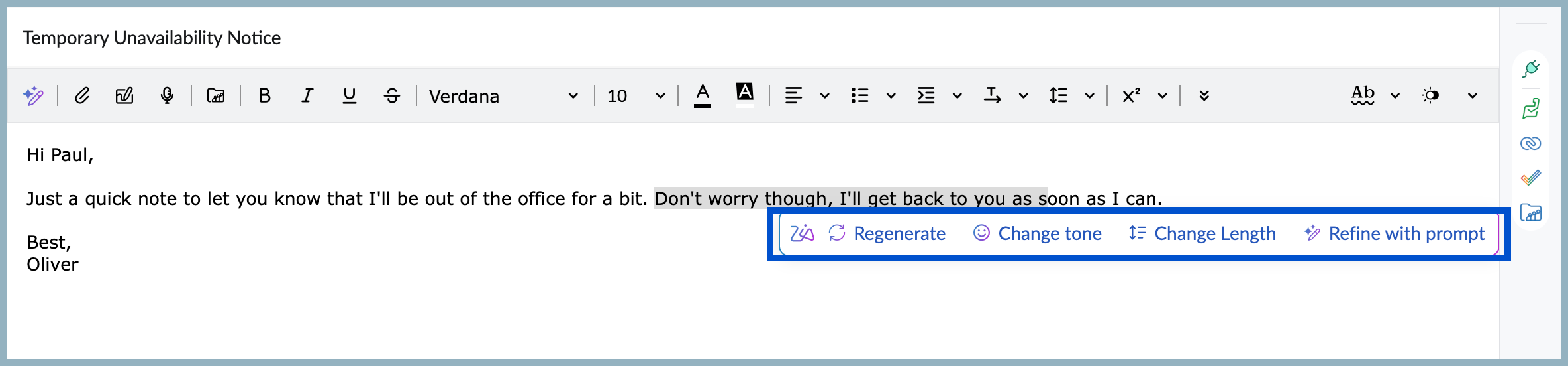
The Zoho Mail AI rewrite and Zoho Mail AI tone feature — after drafting an email (or generating one with AI Write), Zoho Mail Zia AI tone and length adjustment 2026 refines it. Adjust tone to be more formal, friendly, or professional; adjust length to be shorter or more detailed. The Zoho Mail Zia AI content regeneration and editing function lets you regenerate the draft entirely if the first version isn’t right, or make targeted adjustments to specific sections. The Zoho Mail AI suggestions surface as you refine, giving alternative phrasings for individual sentences.
Feature 4: Slash commands explained
The Zoho Mail slash commands feature — the Zoho Mail slash commands explained 2026 tutorial: typing the forward-slash character “/” in the email composer opens a menu of Zoho Mail AI commands you can invoke inline without leaving the writing area. The Zoho Mail AI shortcuts triggered this way can generate content, adjust text, summarize the thread you’re replying to, or — in supported configurations — pull in data via integrations. The Zoho Mail slash commands for data integration 2026 capability mirrors the interaction pattern of modern document editors, keeping your writing flow uninterrupted. Instead of switching to a separate AI panel, you invoke AI assistance at the exact point in your email where you need it.
Feature 5: Smart compose and grammar
The Zoho Mail AI autocomplete and Zia AI smart compose feature — the Zia AI smart compose features Zoho Mail 2026 suggest sentence completions as you type, letting you accept a suggestion with a keystroke to write faster. The Zoho Mail Zia AI autocomplete sentences while typing capability learns from common phrasing patterns. The Zoho Mail AI grammar function runs the Zoho Mail Zia AI grammar and readability check in the background, flagging errors and suggesting clearer phrasing before you send. Together, the Zia AI email assistant and Zoho Mail AI assistant reduce both writing time and errors.
Feature 6: Inbox summarization
The Zia AI inbox cleanup suggestions Zoho Mail 2026 feature — beyond summarizing individual threads, Zia provides overview summaries of inbox activity, helping you triage what needs attention first. The Zoho Mail AI workflow for inbox management surfaces the emails that matter, giving you a high-level view before you dive into individual messages. This supports the broader Zoho Mail AI productivity goal: less time deciding what to read, more time on what matters. Working across Zia AI email threads, the summarization applies whether you are catching up after time away or managing a high-volume shared inbox.
Feature 7-8: BYOK and model switching
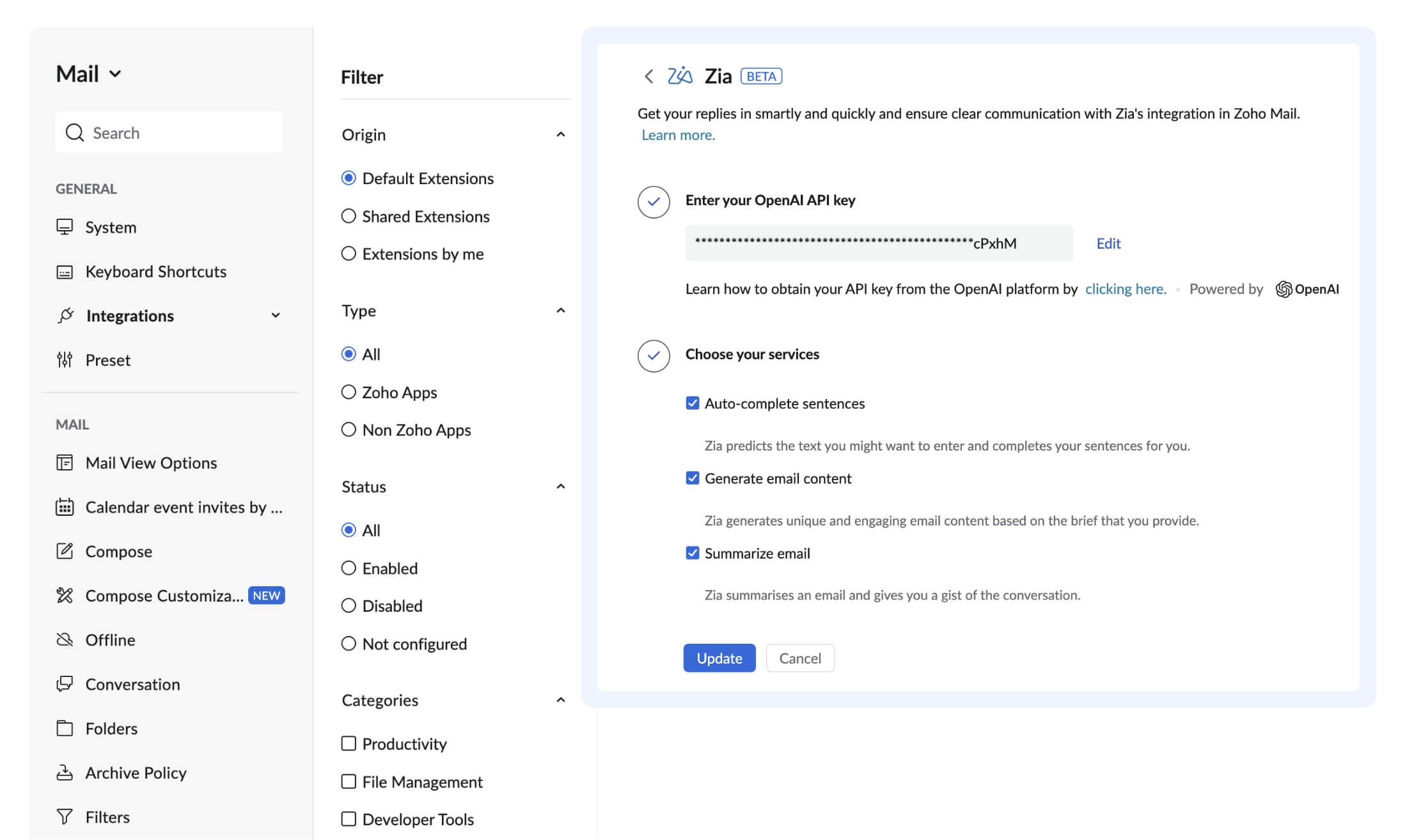
The Zoho Mail AI BYOK and Zoho Mail AI models feature — the Zoho Mail Zia AI BYOK bring your own key setup lets organizations connect their own AI provider account. The Zoho Mail Zia AI switch AI models OpenAI Gemini capability means you are not locked to a single model: choose the AI backend that fits your quality, cost, and data-handling requirements. For organizations with specific data governance requirements, BYOK provides control over which model processes email content and under whose account terms. This flexibility, combined with the Zoho Mail Zia AI powered writing assistant explained features above, means the AI layer adapts to the organization rather than the reverse.
Productivity tips and use cases
The Zoho Mail Zia AI productivity tips and tricks 2026 and Zoho Mail Zia AI features across devices 2026:
For individuals
- Summarize before replying to long threads
- Draft with AI Write, then adjust tone
- Use slash commands to stay in flow
- Accept smart-compose suggestions to type faster
For teams
- Thread summaries for shared mailbox handoffs
- Consistent tone via rewrite across the team
- BYOK for data governance compliance
- The Zia AI email workflow automation Zoho Mail 2026 for routine responses
The complete picture — the Zoho Mail Zia AI complete tutorial summarize write commands — is that Zia turns Zoho Mail from a passive inbox into an active writing and reading assistant, available on both the web interface and mobile apps so the same capabilities travel with you across devices.
Codroid Labs — Certified Zoho Mail Partner — Zia AI Setup and Training
Zoho Mail Zia AI, Zia AI features 2026, Zoho Mail summarize emails, Zoho Mail AI write, Zoho Mail slash commands, Zia AI email assistant, Zoho Mail AI summarize, Zoho Mail AI generate, Zoho Mail AI tone, Zoho Mail AI rewrite, Zia AI mail composer, Zoho Mail AI suggestions, Zoho Mail AI grammar, Zoho Mail AI autocomplete, Zia AI inbox summary, Zoho Mail AI shortcuts, Zoho Mail AI commands, Zia AI email drafting, Zoho Mail AI workflow, Zoho Mail AI productivity, Zia AI email threads, Zoho Mail AI BYOK, Zoho Mail AI models, Zia AI smart compose, Zoho Mail AI assistant — Codroid Labs (GSTIN 07AAWFC0815B1ZP) is a certified Zoho Mail partner. We set up Zoho Mail with Zia AI, configure BYOK model connections, and train teams on the Zoho Mail Zia AI features 2026 complete guide workflows including how to use Zia AI summarize emails in Zoho Mail 2026. Contact: +91 78384 02682, team@codroiditlabs.com.
Related Guides from Codroid Labs
Frequently asked questions
What can Zoho Mail Zia AI do?
Full detail in the FAQ Schema above. The 8 features: summarize threads, AI write, rewrite with tone/length adjustment, slash commands, smart compose autocomplete, grammar and readability checks, inbox summarization, and BYOK model switching.
How do slash commands work in Zoho Mail?
Full detail in the FAQ Schema above. Type “/” in the composer to open a menu of AI actions you can invoke inline — generate content, adjust text, summarize the thread, or pull data via integrations — without leaving the writing area.
Set Up Zoho Mail with Zia AI for Your Team
Zia AI configuration, BYOK model setup, team training on summarize, write, and slash commands — certified Zoho Mail partner with GSTIN invoice for 18% ITC.
Start Zoho Mail via Codroid Labs
Book Free Zia AI Setup Call – +91 78384 02682