


Connect AI models with Zoho — in 2026, the question is no longer whether AI will transform business operations but how quickly your business can implement it. Zoho’s MCP (Model Context Protocol) framework, Zia AI, Zoho Creator AI Modeler, and Zoho Flow’s AI connectors give Indian businesses a direct path to connecting large language models — ChatGPT, Claude, Gemini — with operational CRM, accounting, HR, and support data. The result: creating an invoice becomes a sentence typed to an AI, not a 6-step navigation sequence. Analyzing which leads have gone cold requires one prompt, not a 20-minute report-building session.
This guide covers all seven methods to connect AI models with Zoho, from Zoho MCP setup (step-by-step) to Zia AI configuration, Zoho Flow AI triggers, and Zoho Creator AI Modeler for no-code machine learning integration. All methods include verified 2026 technical details — not generic descriptions — because This is the integrate AI model with Zoho step by step guide and Zoho AI integration tutorial that actually works requires specifics: exact URL formats, permission configurations, and tested prompt patterns.
AI Models Compatible with Zoho MCP — 2026
ChatGPT (OpenAI)
GPT-4o and later
GPT-4o and later
Claude (Anthropic)
Claude 3.5+ via MCP
Claude 3.5+ via MCP
Gemini (Google)
Gemini 2.0+
Gemini 2.0+
Cursor
AI code editor
AI code editor
VS Code / GitHub Copilot
Developer workflows
Developer workflows
n8n
Open-source AI orchestration
Open-source AI orchestration
Method 1 — Zoho MCP: The Core Framework to Connect AI Models with Zoho
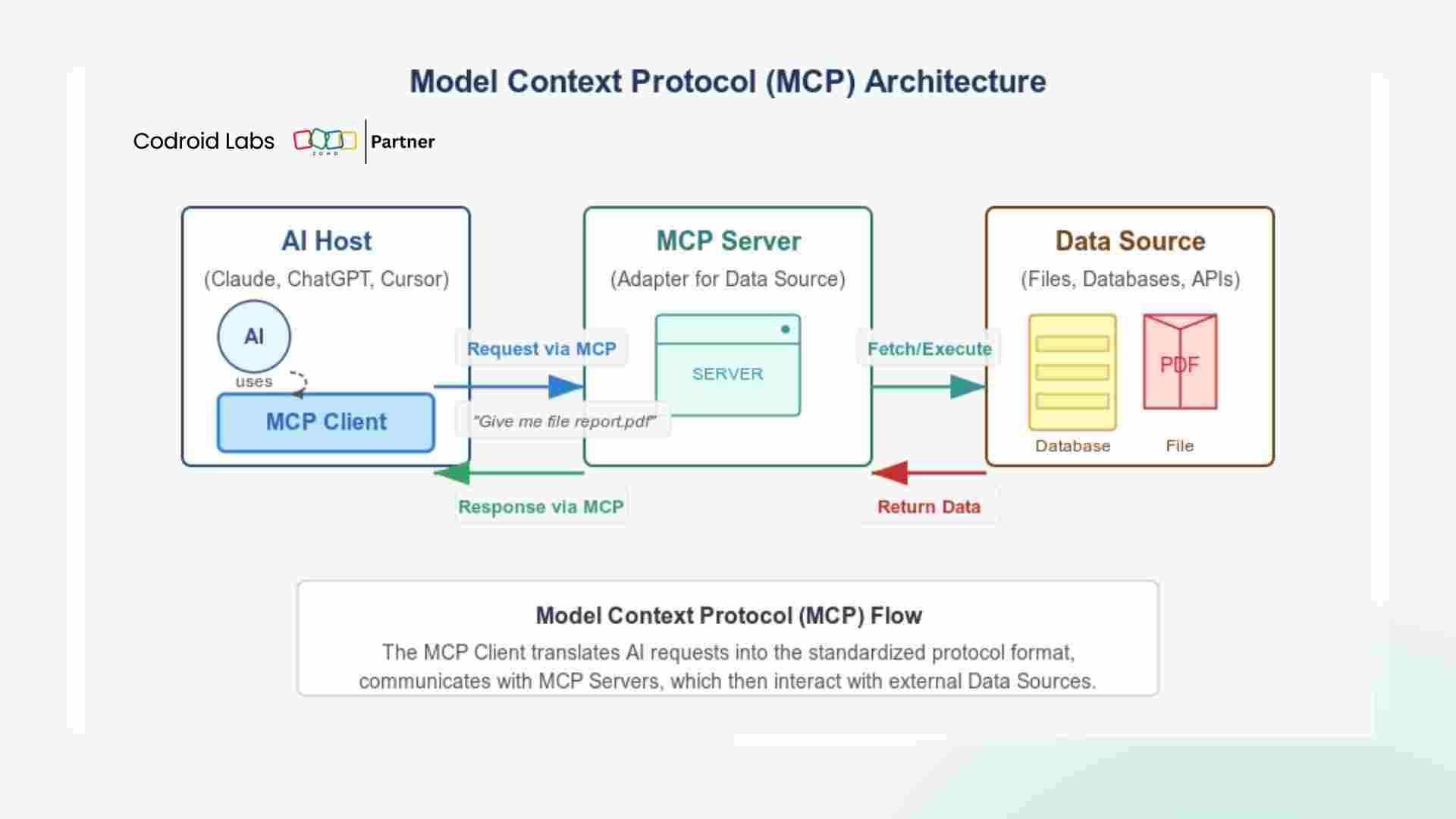
Zoho AI integration, connect AI with Zoho, and Zoho model integration — Zoho MCP (Model Context Protocol) is the official integration layer that enables any MCP-compatible AI client to interact with Zoho applications securely. Understanding the MCP architecture is essential before any configuration:
Zoho AI platform security — the MCP architecture ensures the AI model never has direct database access. Every request passes through Zoho’s API governance layer, which enforces the configured permissions. The AI connector Zoho URL format is: https://[server-name]-[orgid].zohomcp.com/mcp/[api-key]/message — treat this URL with the same security as a database password, as it provides programmatic access to your Zoho account within the configured tool permissions.
Method 2 — Connect ChatGPT with Zoho CRM (Step-by-Step Tutorial)
Connect ChatGPT with Zoho CRM, Zoho GPT integration, and how to connect AI model with Zoho CRM — the most widely requested integration. Follow these verified 5 steps:
1
Create Zoho MCP Server — go to the Zoho Developer Console, select MCP, and create a new server. Choose the Zoho products this AI session should access (CRM, Books, Desk, etc.). Name it something descriptive: “ChatGPT-CRM-Readonly” or “ChatGPT-CRM-Admin” to track permission levels.
2
Configure Minimum Required Tools — Zoho CRM AI model setup best practice: enable only what the AI workflow needs. For a sales analytics use case: enable Get Lead, List Deals, Generate Report, Get Contact. Do NOT enable Create Deal or Delete Record unless the workflow requires modification rights.
3
Generate and Secure MCP URL — Zoho generates your MCP Server URL. Save it in a secure location (Zoho Vault recommended). Never share it in public repositories or Slack channels.
4
Connect in ChatGPT — ChatGPT Settings → Connectors → Add Connector → Select MCP → Paste your Zoho MCP URL → Complete OAuth authorization (you will be redirected to Zoho login to authorize the connection). Zoho CRM AI access is active once authorization completes.
5
Test with Verified Prompt Patterns — start with read-only queries to validate the connection before testing write operations:
“Show me all CRM leads created in the last 7 days from IndiaMART.”
“Which deals in my pipeline have had no activity for more than 10 days?”
“Generate a summary of this month’s revenue from closed deals.”
“Which deals in my pipeline have had no activity for more than 10 days?”
“Generate a summary of this month’s revenue from closed deals.”
Method 3 — Connect Claude with Zoho CRM
Zoho Claude integration and connect Claude with Zoho CRM — Claude (Anthropic) supports the Model Context Protocol natively, making it one of the strongest choices for Zoho AI integration. Claude excels at complex analytical tasks: understanding ambiguous sales pipeline questions, generating nuanced customer summaries, and writing CRM notes with structured business context.
Best AI model for Zoho integration comparison — Claude vs ChatGPT for Zoho:
Claude Strengths for Zoho
Complex multi-condition pipeline queries. Writing structured customer notes and summaries. Analyzing deal patterns and generating strategic insights. Strong at following strict output formats for CRM fields.
Complex multi-condition pipeline queries. Writing structured customer notes and summaries. Analyzing deal patterns and generating strategic insights. Strong at following strict output formats for CRM fields.
ChatGPT Strengths for Zoho
Fast execution of routine tasks (create invoice, update field). Wide integration ecosystem. Best for action-heavy workflows requiring multiple sequential CRM operations. Strong plugin/connector ecosystem.
Fast execution of routine tasks (create invoice, update field). Wide integration ecosystem. Best for action-heavy workflows requiring multiple sequential CRM operations. Strong plugin/connector ecosystem.
Connect AI chatbot to Zoho CRM using Claude: the Claude MCP configuration follows the same Zoho MCP Server URL process as ChatGPT (Steps 1-3 are identical). In Claude Desktop or API configuration, add the Zoho MCP Server as a connected tool source. Claude then has access to all enabled Zoho CRM tools within the configured permissions. Zoho CRM and AI model integration guide: for Indian B2B businesses, Claude’s ability to process Hindi-English Hinglish input makes it particularly effective for sales teams that think and communicate bilingually.
Method 4 — Zia AI: Zoho’s Built-In AI Assistant
Zoho AI assistant setup guide begins with Zia: Zoho AI assistant, Zoho chatbot AI, Zoho CRM chatbot, and Zoho predictive AI — Zia is Zoho’s native AI engine, built directly into the Zoho CRM Enterprise plan ($40/user/month) and the wider Zoho ecosystem. Unlike external AI model integration via MCP, Zia requires zero configuration — it is active as soon as the Enterprise plan is enabled.
Lead Scoring
Zia analyzes lead behavior (email opens, website visits, call history) and assigns a score 1-100. High-scoring leads are automatically surfaced to sales reps. Zoho lead AI scoring updates in real time.
Zia analyzes lead behavior (email opens, website visits, call history) and assigns a score 1-100. High-scoring leads are automatically surfaced to sales reps. Zoho lead AI scoring updates in real time.
Deal Prediction
Zia predicts the probability of each deal closing based on historical patterns. Deals predicted to be at risk are flagged before they go cold. Zoho predictive AI for revenue forecasting.
Zia predicts the probability of each deal closing based on historical patterns. Deals predicted to be at risk are flagged before they go cold. Zoho predictive AI for revenue forecasting.
Anomaly Detection
Zoho smart automation — Zia detects unusual patterns: sudden drop in website leads, unusual deal loss rate for one sales rep, or unexplained revenue dip. Alerts management proactively.
Zoho smart automation — Zia detects unusual patterns: sudden drop in website leads, unusual deal loss rate for one sales rep, or unexplained revenue dip. Alerts management proactively.
Conversational Analytics
Ask Zia questions in the CRM search bar: “Which salesperson converted the most leads last quarter?” Zia queries the database and responds in natural language.
Ask Zia questions in the CRM search bar: “Which salesperson converted the most leads last quarter?” Zia queries the database and responds in natural language.
Best Time to Contact
Zia analyzes when each lead historically responds to calls and emails, and recommends the optimal contact time for each individual lead.
Zia analyzes when each lead historically responds to calls and emails, and recommends the optimal contact time for each individual lead.
Automated Summaries
Zoho AI model summarization: Zia summarizes long email threads, call recordings, and customer history into concise notes before a sales call.
Zoho AI model summarization: Zia summarizes long email threads, call recordings, and customer history into concise notes before a sales call.
Method 5 — Zoho Creator AI Modeler: No-Code Machine Learning
Zoho no-code AI, Zoho machine learning, and Zoho custom AI — Zoho Creator AI Modeler allows businesses to train custom AI models on their own data without writing machine learning code. This is the most powerful method for businesses with unique data patterns that generic AI models do not understand.
Zoho Creator AI Modeler capabilities — business applications:
OCR (Optical Character Recognition): Extract data from scanned invoices, business cards, and documents automatically into CRM fields
Sentiment Analysis: Classify customer support tickets and email inquiries as positive/negative/neutral for priority routing
Predictive Categorization: Train a model on your historical data to predict: which leads convert, which customers churn, which products sell best seasonally
Context-based Automation: Trigger different workflows based on document content, not just field values
OCR (Optical Character Recognition): Extract data from scanned invoices, business cards, and documents automatically into CRM fields
Sentiment Analysis: Classify customer support tickets and email inquiries as positive/negative/neutral for priority routing
Predictive Categorization: Train a model on your historical data to predict: which leads convert, which customers churn, which products sell best seasonally
Context-based Automation: Trigger different workflows based on document content, not just field values
No code AI integration with Zoho via Creator AI Modeler: upload training data (CSV, spreadsheet, or connected Zoho data), select the prediction type (classification, regression, or extraction), train the model with one click, and deploy it as an automation trigger in Zoho Creator workflows. Zoho CRM machine learning integration: trained models from Creator can be called from Zoho CRM via Zoho Flow to enrich lead records with AI-predicted attributes at the moment of creation.
Method 6 — Zoho Flow AI Automation: 1,000+ App Connectors
Zoho workflow AI, Zoho automation AI, and Zoho workflow automation with AI — Zoho Flow provides no-code AI workflow automation connecting Zoho applications to 1,000+ third-party apps. For AI integration, Zoho Flow’s built-in ChatGPT and OpenAI actions allow businesses to add AI processing as a step in any automation:
Zoho Flow AI workflow example — automated lead qualification:
New lead created in Zoho CRM (Trigger)
→ Zoho Flow sends lead details to OpenAI GPT-4o with prompt: “Score this lead 1-10 for fit based on: [industry, company size, query type]. Return JSON: score, reasoning, recommended_action”
→ AI response parsed by Zoho Flow
→ If score > 7: update CRM field “AI Score = Hot”, assign to Senior AE, create urgent call task
→ If score < 4: move to long-nurture campaign in Zoho Campaigns
→ All actions completed within 30 seconds of lead creation — zero human input required
New lead created in Zoho CRM (Trigger)
→ Zoho Flow sends lead details to OpenAI GPT-4o with prompt: “Score this lead 1-10 for fit based on: [industry, company size, query type]. Return JSON: score, reasoning, recommended_action”
→ AI response parsed by Zoho Flow
→ If score > 7: update CRM field “AI Score = Hot”, assign to Senior AE, create urgent call task
→ If score < 4: move to long-nurture campaign in Zoho Campaigns
→ All actions completed within 30 seconds of lead creation — zero human input required
Zoho AI for customer support via Zoho Flow — when a Zoho Desk ticket arrives: Flow sends the ticket content to Claude via API → Claude classifies the issue category and urgency → Flow updates the ticket priority and routes it to the correct support queue → Claude drafts a suggested reply that the agent reviews before sending. Zoho CRM AI use cases via Flow: lead enrichment, automated proposal drafting, competitive intelligence summarization, and post-call note generation from call recording transcripts.
Method 7 — Zoho API and Webhook AI Integration
Zoho API AI, Zoho data AI, and connect external AI model to Zoho — for developers and technically advanced businesses, the Zoho REST API + webhooks provides maximum flexibility to integrate any AI model or custom ML pipeline with Zoho data:
// Example: Send Zoho CRM lead data to custom AI model via webhook
// Zoho CRM Workflow Rule → Webhook → Your AI endpoint
POST https://your-ai-endpoint.com/classify-lead
Headers: Authorization: Bearer [your-token]
Body: {
“lead_name”: “${Lead Name}”,
“company”: “${Company}”,
“lead_source”: “${Lead Source}”,
“annual_revenue”: “${Annual Revenue}”,
“industry”: “${Industry}”
}
// AI endpoint processes and calls Zoho CRM API to update lead score field
// Zoho CRM Workflow Rule → Webhook → Your AI endpoint
POST https://your-ai-endpoint.com/classify-lead
Headers: Authorization: Bearer [your-token]
Body: {
“lead_name”: “${Lead Name}”,
“company”: “${Company}”,
“lead_source”: “${Lead Source}”,
“annual_revenue”: “${Annual Revenue}”,
“industry”: “${Industry}”
}
// AI endpoint processes and calls Zoho CRM API to update lead score field
Zoho RPA AI and Zoho custom AI automation tutorial — for businesses running Zoho Creator apps, the Deluge scripting language can make HTTP calls to any AI API endpoint. This means a custom AI model hosted on your own infrastructure (or a private model via Azure OpenAI or AWS Bedrock) can be called from within Zoho workflows — keeping sensitive business data within your chosen security perimeter rather than routing through public AI APIs. Zoho predictive analytics with AI: historical deal data exported from Zoho Analytics to a Python ML model returns predictions that are written back to CRM via API.
AI + Zoho Use Cases for Indian Businesses
Zoho AI integration for business automation and best way to connect AI to Zoho CRM — the optimal approach for most Indian SMBs: start with Zia AI (zero configuration, immediate value on Enterprise plan), layer Zoho Flow + OpenAI actions for lead qualification and support triage, then advance to MCP-based ChatGPT or Claude integration as team AI literacy grows. AI model integration for Zoho users: Codroid Labs implements the complete AI + Zoho stack for Indian businesses — including Zoho MCP setup, Zia configuration, Flow AI workflows, and Creator AI Modeler training. GSTIN invoice. Hindi + English support.
More Guides from Codroid Labs
Frequently Asked Questions — Connect AI Models with Zoho
How to automate Zoho with AI for a small Indian business?
How to automate Zoho with AI for small businesses: the lowest-cost entry point is Zia AI (included with Zoho CRM Enterprise at $40/user/month — already in use if you have the Enterprise plan). Zia provides lead scoring, deal prediction, and anomaly detection with zero additional cost or configuration. The next step is Zoho Flow ($10/org/month on basic plans) with OpenAI action connectors — this allows you to add AI processing (lead qualification, draft email generation) as steps in automated workflows without writing code. Zoho AI integration for business automation at this level requires no technical expertise and delivers visible productivity improvement within the first week of activation.
Is connecting AI models with Zoho secure?
Zoho AI tools security: Zoho MCP uses OAuth 2.0 authentication — your Zoho username and password are never shared with the AI model. The AI communicates only through the configured API tools within the MCP server’s permission boundary. Every action is logged in Zoho’s activity trail with the AI model’s identity (Zuid), action type, and execution ID for audit purposes. Zoho data AI privacy: Zoho states that customer data processed through Zoho MCP is not used to train external AI models and is not shared for advertising purposes. For sensitive data categories, configure the AI tools with read-only permissions and exclude sensitive modules (HR salary data, financial account numbers) from the MCP server’s tool list entirely.
What are the best AI prompt patterns for Zoho CRM?
How to use AI with Zoho CRM effectively — prompt patterns that work reliably: (1) Specific prompts outperform vague ones: “Show deals worth more than Rs.5 lakh in the Proposal Sent stage with no activity in the last 5 days” works; “Show me my pipeline” is too vague. (2) Include organization context: “In Org [Name], create invoice for [Client] for ₹[Amount] with 18% GST” avoids multi-tenant ambiguity. (3) For write operations, confirm before executing: “Before creating this record, confirm: [details].” (4) Use structured output requests for CRM data: “Return as a table with columns: Deal Name, Value, Stage, Days Inactive, Owner.” Zoho CRM AI use cases: pipeline reviews, lead follow-up drafts, competitive analysis summaries, and weekly sales performance reports are the four highest-ROI AI automation applications for Zoho CRM users.
Implement AI + Zoho for Your Business — Codroid Labs Sets It Up
Zoho MCP setup, ChatGPT/Claude integration, Zia AI configuration, Flow AI workflows, Creator AI Modeler training. Certified Zoho partner. GSTIN invoice. Hindi + English. PAN India.
Start Zoho AI via Codroid Labs
Book Free AI Integration Consultation