


Every Zoho implementation guide you find online is written for generic global businesses. None of them tell you how to handle Tally migration, configure GST on Zoho Books, sync IndiaMart leads in real time, or structure a Zoho One rollout for an Indian SME with 10 to 200 employees.
This guide is different. Codroid Labs is a certified Zoho partner in India with 150+ documented implementations across Delhi, Mumbai, Bengaluru, Hyderabad, Chennai, Surat, and Pune. This Zoho implementation guide is written from real project experience — not Zoho’s product documentation, and not a generic checklist republished from a US consulting blog.
The 7 phases in this guide are the exact sequence Codroid Labs follows on every Indian implementation. Follow them in order and you will have a working, configured, and trained Zoho deployment in 6-12 weeks — with verified 2026 INR pricing at every stage.
What Makes This Zoho Implementation Guide Different
Most Zoho implementation guides skip four things Indian businesses need most: verified 2026 INR pricing, Tally migration steps, GST configuration in Zoho Books, and IndiaMart/WhatsApp integration. All four are covered in full detail in this guide.

Why Most Zoho Implementations Fail in India — And How This Guide Prevents It
Following a structured Zoho implementation guide is not optional — it is the difference between a productive system your team uses daily and an expensive subscription that sits idle while your team continues using Excel.
In our experience with 150+ Indian deployments, implementations fail for three consistent reasons:
- Big-bang rollout with no phasing. Trying to configure CRM, Books, People, Inventory, and Analytics simultaneously overwhelms every team and guarantees partial adoption. A phased approach — highest-value apps first — delivers ROI within weeks, not months.
- Dirty data migration. Importing uncleaned data from Tally or Excel creates a polluted CRM from day one. Deduplicated, validated data is the foundation of every successful implementation.
- Generic configuration not built for India. A CRM configured without IndiaMart integration, GST tax codes, WhatsApp workflow, or Indian fiscal year settings is not built for Indian business reality. It forces workarounds from day one.
This Zoho implementation guide addresses all three failure points — with phase-by-phase sequencing, data migration best practices, and India-specific configuration steps built in from the start.
Phase 1 — Business Process Analysis and Product Selection
Every successful Zoho implementation guide begins before any software is purchased. This phase maps your business processes and selects the right Zoho products — preventing both over-investment and under-deployment.
What to Map in the Business Analysis Phase
- Lead sources: How do enquiries arrive? IndiaMART, JustDial, website, WhatsApp, referral? Each source needs a corresponding integration in the implementation plan.
- Sales pipeline stages: What steps does a deal go through from enquiry to closed-won? Map these exactly — they become your Zoho CRM pipeline configuration.
- Finance workflow: Are you on TallyPrime, Excel, or paper? Is GST e-invoicing required (turnover above Rs.5 crore)? Multi-GSTIN for multiple branches?
- Team structure: How many active users will need licences? This determines whether Zoho One All-Employee (Rs.1,250/employee) or Flexible User (Rs.3,500/user) is more cost-effective.
- Integration requirements: IndiaMart, TradeIndia, Razorpay, Shiprocket, Tally, SAP, or existing tools that must connect to Zoho.
Zoho Product Selection Framework for Indian Businesses
| Business Need | Zoho Product | 2026 India Price | Start Here? |
|---|---|---|---|
| Sales pipeline and lead management | Zoho CRM | Rs.800–Rs.2,600/user/mo | Yes — always first |
| GST invoicing and accounting | Zoho Books | Rs.749–Rs.4,999/org/mo | Yes — simultaneously |
| HR, payroll, leave management | Zoho People | Rs.48–Rs.192/user/mo | Phase 2 |
| Business email with custom domain | Zoho Workplace | Rs.99–Rs.399/user/mo | Phase 2 |
| Full suite (45+ apps) | Zoho One | Rs.1,250/emp/mo (All-Employee) | If 3+ departments |
| Customer support and ticketing | Zoho Desk | Free/Rs.420- Rs. 2400/user/mo | Phase 3 |
Phase 2 — Account Creation and Organisation Setup
This phase of the Zoho implementation guide establishes the foundation that all subsequent configuration depends on. Errors made here — wrong fiscal year, missing GSTIN, incorrect time zone — cascade into every later phase and require rework.
Critical Organisation Settings for Indian Businesses
- Fiscal Year: Set to April–March. This is the Indian financial year and affects all Zoho Books reports, tax filing periods, and analytics dashboards.
- Base Currency: Set to INR. If you have export clients, add foreign currency accounts separately — do not change the base currency later as it cannot be modified post-setup.
- Time Zone: Set to IST (UTC+5:30). Incorrect time zones break workflow automation triggers and lead timestamp records.
- GSTIN: Enter your 15-digit GSTIN at the organisation level in Zoho Books. This auto-populates on all invoices and e-invoice IRN requests.
- User roles and profiles: Define CRM access levels — Admin, Sales Manager, Sales Executive, Finance — before inviting team members. Correcting permissions after users are active is significantly harder.
Phase 3 — Zoho CRM Configuration for India
CRM configuration is the most business-critical phase of any Zoho implementation guide for Indian B2B companies. A generic CRM setup produces a generic result — low adoption, continued Excel use, and wasted licence cost.
Module Configuration Essentials
Leads module: Add custom fields for Lead Source (with IndiaMART, TradeIndia, WhatsApp, JustDial, Referral, Website as picklist options), Product Interest, Enquiry ID, and City. These fields feed your source attribution reports and determine assignment rule routing.
Pipeline stages: Replace Zoho’s default stages with your actual sales process. A manufacturing company’s pipeline looks nothing like a service company’s. Typical Indian B2B stages: New Enquiry → Qualification → Quotation Sent → Negotiation → PO Received → Order Confirmed → Lost.
Blueprint process flows: For businesses with compliance requirements, Blueprint enforces stage-gate conditions — a deal cannot move to Quotation Sent without a phone number, and it cannot move to Order Confirmed without an attached PO. This eliminates incomplete records.
Workflow automations: Configure at minimum: automatic lead assignment on record creation (by source or product), follow-up task creation on new lead (due within 15 minutes), and deal stagnation alert when a deal sits in the same stage for more than 3 days.
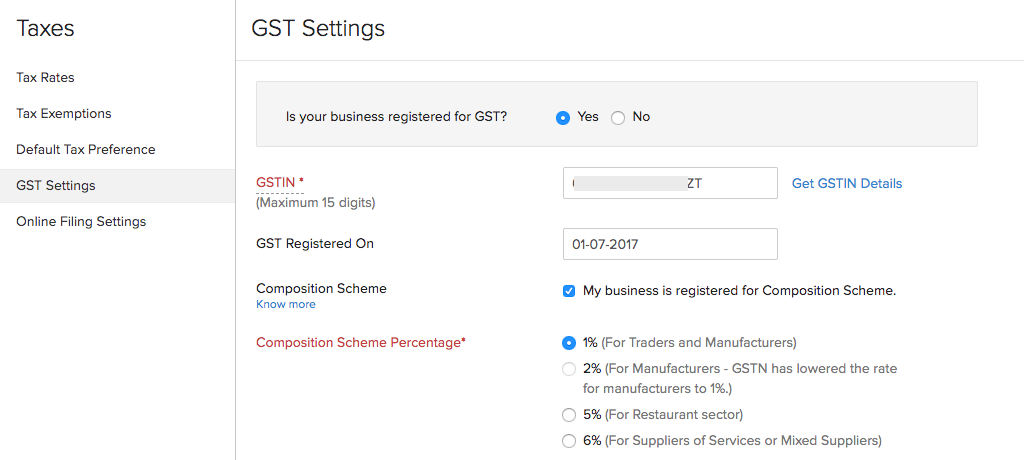
Phase 4 — Zoho Books GST and Finance Setup (India-Specific)
No Zoho implementation guide written for Indian businesses can skip this phase. Zoho Books is the most complete GST accounting platform in India — but only if configured correctly from day one.
GST Configuration Checklist for Zoho Books
Required for Every Indian Zoho Books Implementation:
- Enable GST and enter 15-digit GSTIN in Settings → Taxes → GST Settings
- Set GST filing frequency (monthly or quarterly)
- Configure HSN/SAC codes for every product and service
- Enable e-invoicing IRP integration if turnover exceeds Rs.5 crore
- Configure e-way bill settings for goods movement above Rs.50,000
- Set up TDS rates for applicable vendor categories
- Add all bank accounts with IFSC codes for bank feeds
- Configure GSTR-1 and GSTR-3B report templates
- Enable RCM (Reverse Charge Mechanism) if purchasing from unregistered dealers
- For multi-branch: add each branch’s GSTIN under Locations
Zoho is a registered GST Suvidha Provider (GSP) — which means you can file GSTR-1 and GSTR-3B directly from within Zoho Books without logging into the GST portal separately. This saves 2-3 hours per filing period for businesses with high transaction volumes.
Phase 5 — Data Migration: Tally, Excel, and Legacy CRM
Data migration is the most technical phase of this Zoho implementation guide and the one most likely to be rushed. Dirty data imported into Zoho creates problems that compound over months — duplicate contacts, missing invoices, wrong opening balances, and unreconciled accounts.
Tally to Zoho Books Migration — What Gets Migrated
| Data Type | Migratable? | Method | Notes |
|---|---|---|---|
| Chart of Accounts | Yes | Excel import | Map to Zoho account types |
| Customer and Vendor Masters | Yes | CSV import | Include GSTIN for all parties |
| Outstanding Invoices | Yes | CSV import | Reconcile with Tally AR report |
| Opening Stock Balances | Yes | CSV import | Match item codes exactly |
| Historical Transactions | Partial | Opening balance entry | Use cutover date approach |
| Bank Statements | Yes | OFX/CSV bank feeds | Auto-reconciliation enabled |
The golden rule of data migration in this Zoho implementation guide: always do a test migration first with 50-100 records before importing the full dataset. Validate every mandatory field, check for duplicates, and reconcile totals against your Tally trial balance before go-live.
Phase 6 — Integrations Setup (IndiaMart, WhatsApp, Razorpay)
Integration setup is where this Zoho implementation guide diverges most sharply from generic global guides. Indian businesses run on a specific digital ecosystem — and your Zoho implementation must connect to it.
Priority Integrations for Indian B2B Businesses
IndiaMART Push API
Official Zoho Marketplace plugin. Delivers leads in real time (under 10 seconds). Requires Zoho CRM Enterprise. Eliminates 4-6 hour response delays.
WhatsApp LeadChain
Connects WhatsApp Lead Ads (Meta) to Zoho CRM via Zoho LeadChain. Field mapping, assignment rules, and duplicate detection included.
Razorpay / PayU
Connects payment gateway to Zoho Books. Automatically records received payments against invoices. Reduces reconciliation time from hours to minutes.
Zoho Mail
Sync business email with Zoho CRM for centralised communication tracking. Every email exchange with a Lead or Contact is visible inside the CRM record.
For the complete IndiaMART and WhatsApp integration setup process, read our detailed guide: IndiaMART Zoho CRM Integration — 5-Step Setup Guide 2026.
Phase 7 — Training, Testing, and Go-Live
The final phase of this Zoho implementation guide is where implementations most often fail despite perfect configuration. Low user adoption — teams reverting to WhatsApp and Excel because they were never properly trained — is the leading cause of implementation failure in India.
Go-Live Checklist — Complete Before Switching Teams Live
- All custom fields and modules configured and reviewed by business owner
- Pipeline stages signed off by sales team lead
- Test IndiaMART lead received and processed through full workflow
- WhatsApp LeadChain tested with dummy Meta ad submission
- GST invoice generated and e-invoice IRN confirmed (if applicable)
- Tally migration validated against trial balance with zero variance
- All workflow automations tested with test records
- Role-specific training completed for admin, sales, and finance users
- Mobile app installed and configured for all field sales users
- Legacy system access archived (do not delete — keep for reference)
- Support escalation contact confirmed with implementation partner
Training sessions should be role-specific and conducted in the team’s preferred language. Codroid Labs conducts all training in Hindi or English based on the client’s team composition. A single 3-hour session covering every feature is far less effective than four 45-minute role-specific sessions.
Zoho Implementation Cost in India — 2026 Verified INR Pricing
Every Zoho implementation guide should give you the actual cost — not vague ranges that force you into a discovery call before you see a number. Here is the verified 2026 pricing for both licence costs and professional service fees in India.
Zoho Licence Costs — India 2026 (Annual Billing, Excluding 18% GST)
| Product | Plan | India Price (INR) |
|---|---|---|
| Zoho CRM | Standard | Rs.800/user/month |
| Professional | Rs.1,400/user/month | |
| Enterprise | Rs.2,400/user/month | |
| Ultimate | Rs.2,600/user/month | |
| Zoho Books | Standard | Rs.749/org/month |
| Professional | Rs.1,499/org/month | |
| Elite | Rs.4,999/org/month | |
| Zoho One | All-Employee | Rs.1,250/employee/month |
| Flexible User | Rs.3,500/user/month |
Professional Implementation Service Fees — Codroid Labs 2026
| Implementation Scope | Duration | Estimated INR Range |
|---|---|---|
| Zoho CRM only (standard setup) | 2-3 weeks | Rs.50,000–Rs.1,00,000 |
| Zoho CRM + Books (with GST) | 4-6 weeks | Rs.1,00,000–Rs.2,00,000 |
| Zoho CRM + Books + Tally migration | 6-8 weeks | Rs.1,50,000–Rs.2,50,000 |
| Zoho One (full suite, 5-10 apps) | 8-12 weeks | Rs.2,00,000–Rs.4,00,000+ |
As a certified Zoho partner, all Codroid Labs invoices include GSTIN (07AAWFC0815B1ZP), SAC code 998315, and HSN/SAC breakdown — making the full implementation cost eligible for 18% input tax credit recovery. On a Rs.2 lakh implementation, that is Rs.36,000 recovered through ITC.
Related Guides from Codroid Labs
Get a Free Zoho Implementation Plan for Your Business
Codroid Labs delivers a written implementation roadmap, INR cost breakdown, and product recommendation in your free 60-minute consultation — before you purchase any Zoho licence.
Frequently Asked Questions — Zoho Implementation Guide
How long does Zoho implementation take?
A basic Zoho CRM implementation takes 2-4 weeks. A full Zoho One implementation covering CRM, Books, People, and Analytics typically takes 6-12 weeks. Indian businesses with Tally migration should add 1-2 weeks for data extraction and validation.
What is the cost of Zoho implementation in India?
Zoho licence fees start at Rs.800/user/month for CRM Standard. Professional implementation services from a certified Indian partner range from Rs.50,000 for basic CRM to Rs.4,00,000+ for a full Zoho One rollout with Tally migration and multiple integrations.
Can Zoho Books handle GST compliance in India?
Yes. Zoho Books is a registered GST Suvidha Provider. It supports GSTR-1/3B filing, e-invoicing with IRN, e-way bills, TDS/TCS, multi-GSTIN for multiple branches, and GSTR-2B reconciliation — all from within the platform without switching to the GST portal.
Is Tally data migration to Zoho possible?
Yes. Chart of accounts, customer/vendor masters, outstanding invoices, and opening stock balances migrate from TallyPrime to Zoho Books. A certified partner handles extraction, field mapping, import, and five-way reconciliation to confirm zero data loss.
Should I start with Zoho CRM or Zoho One?
Start with Zoho CRM if your primary need is sales pipeline management. Start with Zoho One if you need 3 or more departments covered — the All-Employee plan at Rs.1,250/employee/month is often cheaper than buying CRM + Books + People separately once your team exceeds 5 active users.
What is the biggest risk in a Zoho implementation?
Low user adoption. Teams that are not trained before go-live revert to Excel and WhatsApp within weeks, rendering the implementation effectively idle. Role-specific training conducted in the team’s preferred language (Hindi or English) before go-live is the single highest-ROI activity in any Zoho implementation guide.
What Indian Businesses Say After Codroid Labs Implementation
“The Codroid Labs Zoho implementation guide for our business covered every detail — CRM pipeline, Books GST setup, and Tally migration. Within 6 weeks we had 12 users fully live. Zero data loss on migration. The ROI was visible in the first month.”
“We had tried to self-implement Zoho CRM twice and failed. Codroid Labs completed the full implementation in 4 weeks, including IndiaMart integration and training in Hindi for our field sales team. Adoption was 100% in 2 weeks.”
Codroid Labs — Certified Zoho Creator Partner India
Zoho Implementation Guide: 7 Proven Steps to a Successful Business Rollout in 2026
Whether you want to build a custom order management app in 5 steps without code yourself or have Codroid Labs handle it end-to-end — Codroid Labs builds custom Zoho Creator order management apps for Indian manufacturers, distributors, IT companies, and FMCG businesses — with India GST auto-calculation, WhatsApp DLT notifications, inventory tracking, e-invoice IRP, and live dashboards. Fixed INR price. 90-day warranty.
GSTIN: 07AAWFC0815B1ZP | team@codroiditlabs.com | +91 78384 02682