


B2B Lead Playbook · Updated 21 October 2026
IndiaMART Zoho CRM WhatsApp SLA: Duplicate Leads, a 10-Minute First Reply and JustDial Follow-Up
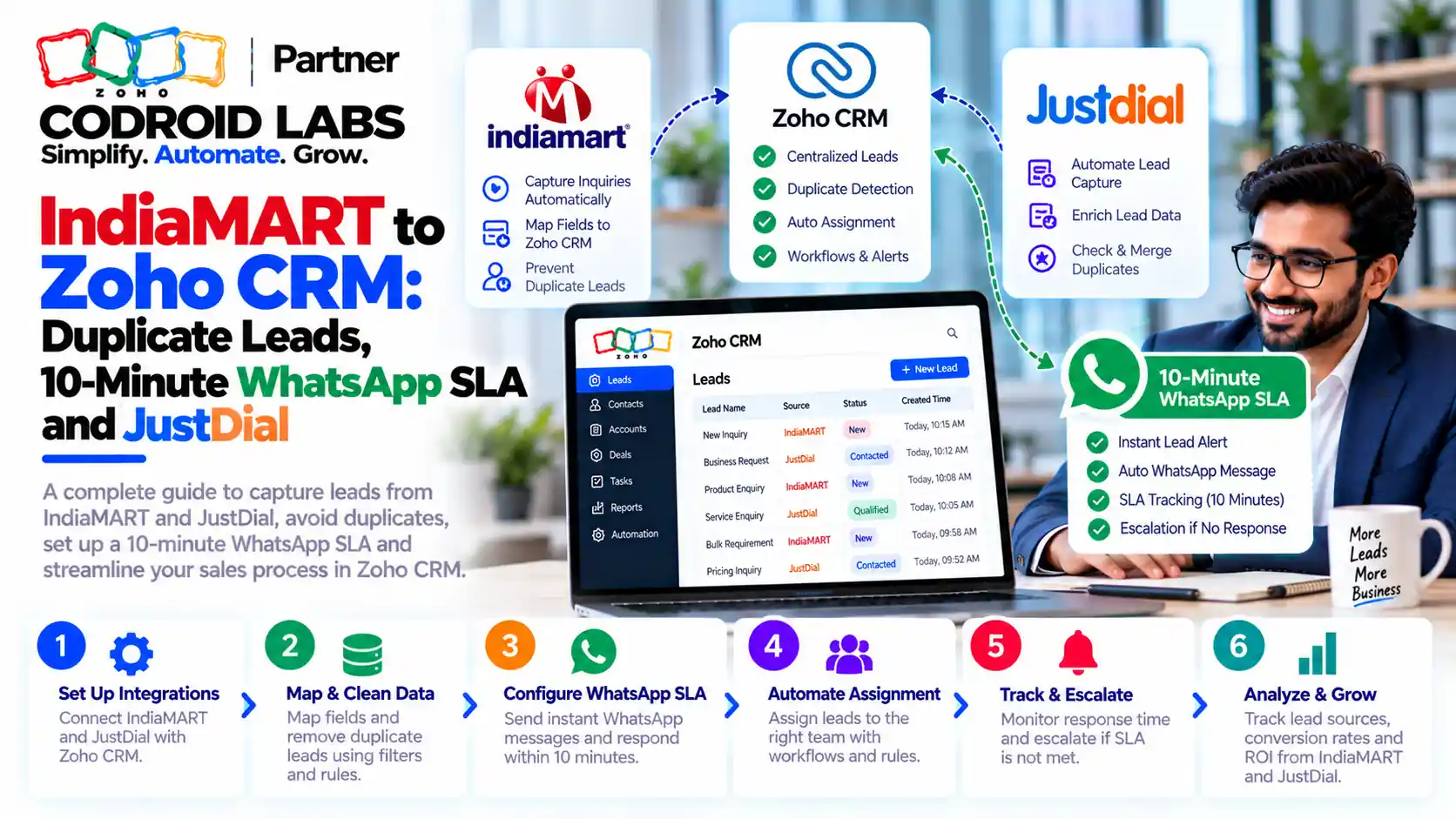
An IndiaMART Zoho CRM WhatsApp SLA means every enquiry lands in Zoho CRM in real time, is checked for duplicates, gets an owner instantly and receives a WhatsApp reply within 10 minutes, with escalation if it does not. This playbook is for manufacturers, traders and sales teams that live on IndiaMART and JustDial enquiries. It covers the capture flow, duplicate rules, assignment, the 10-minute SLA, escalation, JustDial follow-up, repeat orders from WhatsApp and the reports that keep it honest.
Updated: 21 October 2026
Sources: Zoho CRM help and feature list; IndiaMART's help on its Zoho CRM extension
By: Codroid Labs, a Zoho Partner and Zoho AI Enabled Partner
Sources: Zoho CRM help and feature list; IndiaMART's help on its Zoho CRM extension
By: Codroid Labs, a Zoho Partner and Zoho AI Enabled Partner
Short answer
Install IndiaMART's official Push API extension so leads reach Zoho CRM in real time. Make Mobile a unique field with Do Not Allow Duplicates and keep IndiaMART's Query ID on every lead. Route leads with assignment rules. Connect WhatsApp Business through Zoho CRM's own Business Messaging channel, send an approved acknowledgement template instantly, give the owner a 10-minute task and add a scheduled workflow action that alerts the manager at 10 minutes. Apply the same rules to JustDial leads.
Why an IndiaMART Zoho CRM WhatsApp SLA Matters
In short: Enquiries lose value fast; the fix is real-time capture, one record per buyer, an owner within seconds and a reply within minutes.
A familiar pattern at B2B manufacturers and traders: Enquiries sit in the IndiaMART inbox for hours before anyone opens them, often half a working day. The same buyer appears three times: once from IndiaMART, once from JustDial and once from a WhatsApp message. Repeat orders stay on personal phones.
An indiamart zoho crm whatsapp sla turns “reply when free” into a measured promise: every new enquiry gets a first WhatsApp reply within 10 minutes during working hours.
Lead Capture Flow for IndiaMART, JustDial and WhatsApp
In short: IndiaMART, JustDial and WhatsApp leads should all land in the Leads module with a clear Lead Source, pass a duplicate check and get assigned automatically.
| Source | How it reaches Zoho CRM | Lead Source value | First check |
|---|---|---|---|
| IndiaMART direct enquiry, BuyLead or call | IndiaMART's Push API extension, in real time | IndiaMART Push API (set by the extension) | Duplicate check on Mobile and Query ID |
| IndiaMART older leads | Pull API inside the same extension, on demand | IndiaMART Pull API | Same duplicate check |
| JustDial | Your chosen JustDial route into CRM | JustDial | Same duplicate check |
| WhatsApp from a new number | Zoho CRM Business Messaging creates a record in the module you choose | Same duplicate check |
IndiaMART Push API vs Pull API in Zoho CRM
In short: Use IndiaMART's Push API extension for real-time leads; the older Pull plugin fetches every 2 hours and is being phased out.
| Point | Push API extension | Pull API plugin |
|---|---|---|
| Speed | Real time, as soon as the lead is generated | Scheduled fetch every 2 hours; cannot be shortened |
| Status | IndiaMART's recommended route | Being phased out by IndiaMART |
| Old leads | Fetch up to 365 days back, 7 days per request | Fetch old leads supported |
| Multiple IndiaMART accounts | Yes; paste the same listener URL into each account | Not covered here |
Source: IndiaMART's help article on its Zoho CRM extension, updated December 2025. You install the extension from Zoho Marketplace inside Zoho CRM, copy the webhook listener URL it generates and paste it into the Push API page of your IndiaMART Lead Manager. India data centre accounts use a zohoapis.in address.
IndiaMART Push API Zoho Enterprise requirement: what we found. We checked on 21 October 2026. IndiaMART's help article for the extension does not state a Zoho CRM edition requirement, and we found no official Zoho or IndiaMART page that confirms an Enterprise-only rule for it. Zoho's feature list shows custom functions as workflow actions only from Enterprise, while extensions can use functions in Standard and Professional. Before you buy or upgrade, check the edition note on the extension's listing in Zoho Marketplace and confirm with IndiaMART which leads your seller plan delivers through the API.
IndiaMART to Zoho CRM Field Mapping
In short: The official extension maps 20 IndiaMART fields to Zoho CRM, including a unique Query ID, lead type, buyer mobile and product.
| IndiaMART field | Zoho CRM field | Meaning |
|---|---|---|
| UNIQUE_QUERY_ID | Query_Id | Unique ID for each lead |
| QUERY_TYPE | Lead_Push_Type | W: direct, B: consumed BuyLead, P: call (PNS) |
| QUERY_TIME | Lead_Push_Time | Time the enquiry was created |
| SENDER_NAME | Last_Name | Buyer name |
| SENDER_MOBILE | Mobile | Buyer mobile |
| SENDER_EMAIL | Buyer email | |
| SENDER_COMPANY | Company | Buyer company |
| QUERY_PRODUCT_NAME | Product_Name | Product asked about |
| QUERY_MESSAGE | Description | Requirement text |
| QUERY_MCAT_NAME | Mcat_Name | Product category |
| RECEIVER_CATALOG | Catalog_URL | Which of your IndiaMART accounts received it |
IndiaMART Zoho CRM Duplicate Leads: Prevent, Then Merge
In short: Mark Mobile as a unique field with Do Not Allow Duplicates, use Query ID as a second key, and clean older duplicates with Find & Merge.
| Tool | What it does | Edition (Zoho feature list) |
|---|---|---|
| Unique fields with Do Not Allow Duplicates | Blocks a second lead with the same value, such as Mobile | Standard and above, 2 fields per module |
| Find & Merge Duplicates | Finds duplicates of one record and merges them | All editions |
| Deduplicate tool | Scans a module on up to three fields | Professional and above |
Zoho's duplicate management help notes you can merge up to three records at a time and merged records are deleted permanently, so pick the master record carefully. Set unique fields on Mobile and, if you use it, Query_Id. That way the same IndiaMART enquiry cannot create two leads, and a buyer who also writes on WhatsApp or calls via JustDial is caught by the mobile number. A strict check on indiamart zoho crm duplicate leads is the first half of any indiamart zoho crm whatsapp sla; you cannot measure response time on records that should not exist.
Assignment Rules for Your IndiaMART Zoho CRM WhatsApp SLA
In short: Assignment rules route each new lead by product, region or round robin the moment it is created.
Assignment rules give each new lead an owner the moment it is created. Standard allows 10 rules per module, Professional 20 and Enterprise 50, per Zoho's feature list checked 21 October 2026.
| Rule | Criteria | Owner |
|---|---|---|
| By product | Product_Name or Mcat_Name contains a product line | Product specialist |
| By region | State or City in a territory | Regional rep |
| By lead type | Lead_Push_Type is B (BuyLead) | Rep who bought the BuyLead |
| Fallback | Everything else | Round robin across inside sales |
The 10-Minute IndiaMART Zoho CRM WhatsApp SLA
In short: Send an approved WhatsApp acknowledgement instantly, give the owner a 10-minute task, and escalate with a scheduled workflow action if nobody responds.
Connect WhatsApp through Zoho CRM's own WhatsApp Business integration (Setup, Channels, Business Messaging). Prerequisites include a verified business, a WhatsApp Business account and an unused registered number. The integration is available in the free trial and all paid editions, and the feature list notes that sending WhatsApp messages uses credits. Messages you start must use approved templates.
| Minute | What happens | Zoho CRM feature |
|---|---|---|
| 0 | Lead created, duplicate check passes, owner assigned | Push API extension, unique fields, assignment rules |
| 0 | Buyer gets a WhatsApp acknowledgement template with the owner's name | Workflow rule with a WhatsApp notification action |
| 0 | Owner gets a notification and a task due in 10 minutes | Workflow rule: email notification and task |
| 0 to 10 | Owner replies on WhatsApp from the lead record and sets Lead Status to Contacted | Business Messaging in the record |
| 10 | Manager alert if the lead is still uncontacted | Workflow scheduled action set in minutes |
| 30 | Reassign or second escalation if still uncontacted | Second scheduled action or manual reassignment |
Zoho's workflow rules help confirms scheduled actions can be set in minutes, hours or days, with up to five scheduled actions per condition from Standard upward. On Enterprise and above, a function can check the lead status before sending the 10-minute alert, so only genuinely late leads trigger it. On Standard or Professional, send the alert to the manager and back it with a saved view of “Lead Status is Not Contacted and created more than 10 minutes ago”. Professional and above can also use Zia Scores to rank which leads to call first.
Out-of-hours leads get the acknowledgement immediately and a human reply within 10 minutes of the next shift. Write the indiamart zoho crm whatsapp sla on one page and share it with every rep.
JustDial Zoho CRM Follow-Up
In short: Treat JustDial leads exactly like IndiaMART leads: same Lead Source discipline, duplicate check, owner and follow-up rules.
Apply the same capture, duplicate and assignment rules to JustDial, then add a short cadence:
| Day | Follow-up | Channel |
|---|---|---|
| 0 | Acknowledgement and call within the SLA | WhatsApp and call |
| 1 | Second attempt with a catalogue or price list | |
| 3 | Call and log the outcome | Call |
| 7 | Final check-in, then mark as Nurture or Lost | WhatsApp or email |
Zoho CRM Cadences support email, task, call and WhatsApp follow-ups from Standard upward. For how JustDial leads reach Zoho CRM in the first place, see our JustDial Zoho CRM integration guide. This page focuses on the justdial zoho crm follow up rules that sit on top.
Capturing Repeat Orders From WhatsApp Into Zoho CRM
In short: When a known buyer messages on WhatsApp, the chat links to their record; turn repeat requests into new Deals so they appear in reports.
- Move every rep to the shared Business Messaging number in Zoho CRM so customer chats are not lost on personal phones.
- When a known buyer writes, the chat attaches to their existing record. The rep creates a new Deal with Type “Repeat order” from that record.
- Use a short pipeline: Enquiry, Quote sent, Confirmed, Dispatched.
Reports That Keep the IndiaMART Zoho CRM WhatsApp SLA Honest
In short: Track leads by source, uncontacted leads older than 10 minutes, duplicates merged and conversion by source every week.
| Report or view | What it shows | Review |
|---|---|---|
| Leads by source this week | IndiaMART Push, IndiaMART Pull, JustDial, WhatsApp | Weekly |
| Uncontacted over 10 minutes | Leads breaching the SLA right now | Several times a day |
| First contact by owner | Leads contacted within the SLA per rep | Weekly |
| Conversion by source and lead type | Direct vs BuyLead vs JustDial vs WhatsApp | Monthly |
To measure response time, add a “First Contacted At” field filled by a field update when Lead Status becomes Contacted, and report the gap from the created time for each indiamart zoho crm whatsapp sla review.
Zoho CRM Editions and INR Prices for This Setup
From Zoho's pricing page and feature list, checked 21 October 2026. Per user a month, GST 18% extra.
| Edition | Annual / monthly | Relevant limits |
|---|---|---|
| Standard | ₹800 / ₹1,300 | 2 unique fields, 10 assignment rules, scheduled actions, cadences, WhatsApp |
| Professional | ₹1,400 / ₹2,100 | Adds Deduplicate tool, 20 assignment rules, Blueprint, Zia Scores |
| Enterprise | ₹2,400 / ₹3,000 | Adds functions as workflow actions for smarter SLA checks, 50 assignment rules |
WhatsApp messages use credits on top of licences. See our Zoho CRM pricing India guide for full plan details.
Set Up an IndiaMART Zoho CRM WhatsApp SLA in 8 Steps
- Write the SLA: Define working hours, the 10-minute first reply and the escalation ladder.
- Install the Push API extension: Install IndiaMART's extension in Zoho CRM, paste the listener URL into IndiaMART and fetch recent old leads.
- Set duplicate rules: Make Mobile and Query_Id unique with Do Not Allow Duplicates and merge existing duplicates.
- Create assignment rules: Route by product, region and lead type with a round robin fallback.
- Connect WhatsApp: Integrate WhatsApp Business through Business Messaging and get templates approved.
- Build the SLA workflow: Add the instant acknowledgement, owner task and 10-minute scheduled alert.
- Add JustDial and repeat-order rules: Apply the same rules to JustDial leads, add a cadence and a repeat-order pipeline.
- Review weekly: Check the uncontacted view, source report and duplicates merged.
Help Setting Up Your Lead SLA
Codroid Labs is a Zoho Partner and a Zoho AI Enabled Partner, recognised by Zoho after completing the AI Accelerator Series 2026. We set up IndiaMART and JustDial lead capture, duplicate rules, assignment, WhatsApp through Zoho CRM, SLA workflows and reports for B2B sales teams. Call +91 7838402682 or email team@codroiditlabs.com.
Book a free SLA setup callStart a Zoho CRM trial
Quick Answers
Which field stops duplicates best?
Mobile as a unique field, plus IndiaMART's Query ID.
Can Zoho CRM send WhatsApp messages?
Yes, via Business Messaging; sending uses credits.
Can workflows wait 10 minutes?
Yes, scheduled actions can be set in minutes.
Does Push API need Enterprise?
Not stated on IndiaMART's help page; check the extension listing.
IndiaMART Zoho CRM WhatsApp SLA FAQs
What is an indiamart zoho crm whatsapp sla?
A written promise, enforced by Zoho CRM automation, that every IndiaMART enquiry is captured in real time, assigned instantly and gets a first WhatsApp reply within a set time, such as 10 minutes, with escalation if missed.
How do I connect IndiaMART to Zoho CRM in real time?
Install IndiaMART's official Push API extension from Zoho Marketplace inside Zoho CRM, then paste the webhook listener URL it generates into the Push API page in IndiaMART's Lead Manager.
Does the IndiaMART Push API need Zoho CRM Enterprise?
IndiaMART's help article does not state an edition requirement, and we could not confirm an Enterprise-only rule on official pages as of 21 October 2026. Check the extension listing before upgrading.
How do I stop indiamart zoho crm duplicate leads?
Mark Mobile, and optionally Query_Id, as unique fields with Do Not Allow Duplicates, then merge older duplicates with Find & Merge or the Deduplicate tool on Professional and above.
Can Zoho CRM escalate a lead after 10 minutes?
Yes. Add a workflow scheduled action set to 10 minutes that alerts the manager. On Enterprise, a function can first check whether the lead is still uncontacted.
How should JustDial leads be followed up?
Use the same duplicate and assignment rules, then a short cadence of WhatsApp messages and calls over about a week before marking the lead as Nurture or Lost.
Reply to every enquiry in 10 minutes
Bring your lead sources and team. Leave with duplicate rules, assignment logic and an SLA workflow plan.
Zoho references (checked 21 October 2026)